
The complete Google Ads guide for 2026

You're looking for a complete Google Ads guide, and you'll find plenty of them. Most will walk you through fifteen campaign types before they've told you how the auction works. That's the opposite of the order you actually learn it in.
This guide follows the real order: understand the mechanism, open an account, pick keywords, launch, measure, fix. Each section points to the article that covers it in depth, because a 5,000-word tutorial can't dig into everything without becoming unreadable.
A word on vocabulary before we start, because it comes up all the time. AdWords and Google Ads are the same thing: Google renamed its ad platform in 2018. And when an agency talks to you about paid search or PPC, nine times out of ten it's still talking about Google Ads. The three terms are interchangeable: it's the same product.
How Google Ads works
Everything starts with a misunderstanding that needs clearing up right away: you're not buying a position, you're taking part in an auction. And the highest bidder doesn't always win.
Every time someone types a search, Google runs an auction in a few milliseconds among all the advertisers targeting that term. The ranking depends on six factors, and only three of them can be managed from your account.
- your maximum bid, the amount you're willing to pay for a click;
- the estimated quality of your ad, meaning its relevance to the search, its expected clickthrough rate and the experience on your landing page;
- the context of the search: the device, the time, the location, the person's history.
The other three are out of your hands: the minimum thresholds Google sets before an ad can show, the competitiveness of the auction at the moment of the search, and the expected impact of your ad formats. Remembering the first three is plenty to run an account.
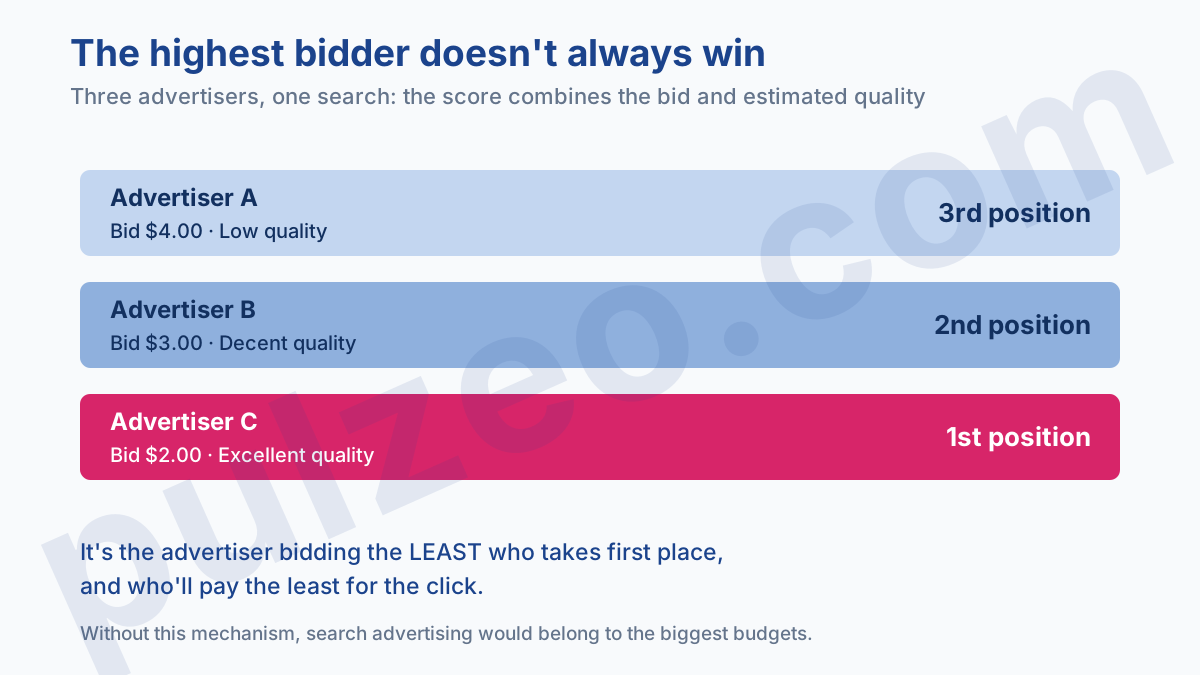
The consequence is counterintuitive, and it's the one to remember. An ad judged relevant can rank above an ad with a higher bid, and pay less for its click. Quality directly affects what you pay.
A close estimate of that quality shows up in your account as Quality Score, rated from 1 to 10. Watch out for a common misunderstanding: Google states that this number isn't used in the auction. It's a diagnostic indicator, calculated separately, while the quality actually used is recalculated with every search.
It's easy to misread, and many advertisers use it the wrong way. I explained why in the article on what Quality Score really measures.
Another point tutorials skip: you rarely pay your maximum bid. You pay the minimum needed to beat the competitor right behind you. One caveat is worth knowing: bid adjustments can occasionally push you past that ceiling. A high bid still isn't very dangerous in itself, as long as your cost per acquisition stays on target.
Let's take an example, because the mechanism stays abstract until you put numbers on it. Three advertisers target the same search. The first bids $4 with mediocre quality, the second $3 with good quality, the third $2 with excellent quality.
In a classic auction, the order would be 4, 3, 2. Here, the combined score flips the ranking: the third takes the top spot and pays $1.80 per click, the second follows, and the one bidding $4 ends up last. The lowest bidder wins, and pays less.
That's the only reason a small advertiser can coexist with a big one on the same keywords. Without this mechanism, search advertising would simply go to the highest bidder, and the market would belong to the biggest budgets.
What's behind that "estimated quality" is simple to state and slow to achieve: does your ad answer what the person asked, and does your page keep the ad's promise? Everything else you do on an account comes down to improving those two answers.
How to open and structure your account
Opening it takes ten minutes, and the structure will stay with you for years. Don't rush the second part.
Google will ask for your currency and time zone when you create the account. Both settings are permanent. An account opened in euros stays in euros, and you'll live with currency conversions in every report. The step-by-step process, billing pitfalls included, is in the guide on how to create a Google Ads account.
The hierarchy to keep in mind
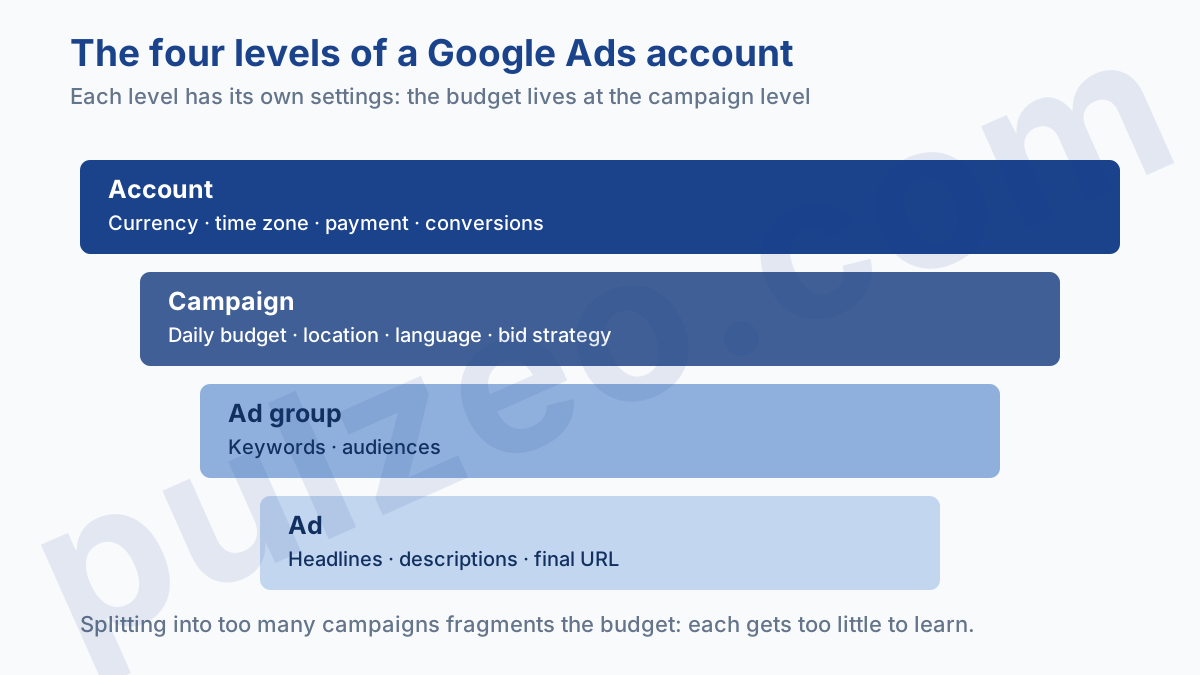
A Google Ads account has four nested levels, and each one has its own settings.
- the account holds the currency, the time zone, the payment methods and the conversions;
- the campaign holds the daily budget, the location, the language and the bid strategy;
- the ad group holds the keywords and the audiences;
- the ad holds the headlines, the descriptions and the final URL.
Above all, remember that the budget lives at the campaign level. That's why splitting your account into too many campaigns fragments the budget and starves each one of them.
It's the most common structural mistake on the accounts I take over. You create one campaign per product, per city, per variant, and you end up with fifteen campaigns at $5 a day, none of which has enough data to learn. I devoted a whole article to it: structuring your account without fragmenting it.
If you manage several accounts, for clients or for several brands, the MCC, which Google renamed the manager account, brings them together under a single login. How it works and where it falls short are covered in the article on the Google Ads MCC.
How to choose your keywords
This is where half your results are decided, and where you lose the most money without noticing.
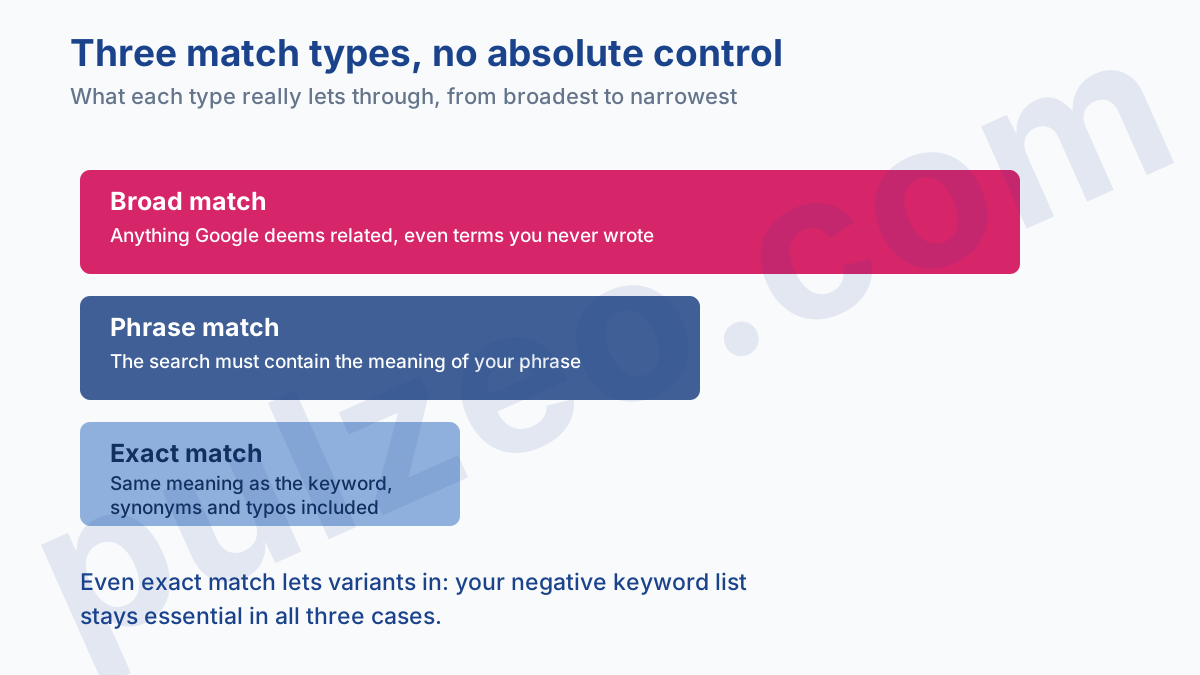
A keyword works like an instruction whose reach Google interprets according to the match type you choose, and that reach is broader than most advertisers imagine.
- broad match triggers your ad on anything Google deems related, including terms you never wrote;
- phrase match requires the meaning of your phrase to be included in the search;
- exact match requires the search to have the same meaning as your keyword, which still allows synonyms and typos.
None of the three gives you absolute control. Even exact match lets variants through, which I cover in what keyword match types really decide.
To find your keywords, the Keyword Planner built into Google Ads is still the place to start. It gives volumes, but it rounds and groups them in a way that misleads if you take them at face value: how to read Keyword Planner volumes explains what the numbers hide.
And above all, don't launch anything without a list of negative keywords. An account without negatives pays for clicks on "free", "jobs", "reviews", "definition", all searches from people who aren't there to buy. How exclusion works, and its main trap, are in the article on negative keywords.
That list isn't written once and for all. It grows every week with what people actually typed. It's the kind of sorting Pulzeo does for you, surfacing the terms that eat budget without ever converting.
How to create your first campaign
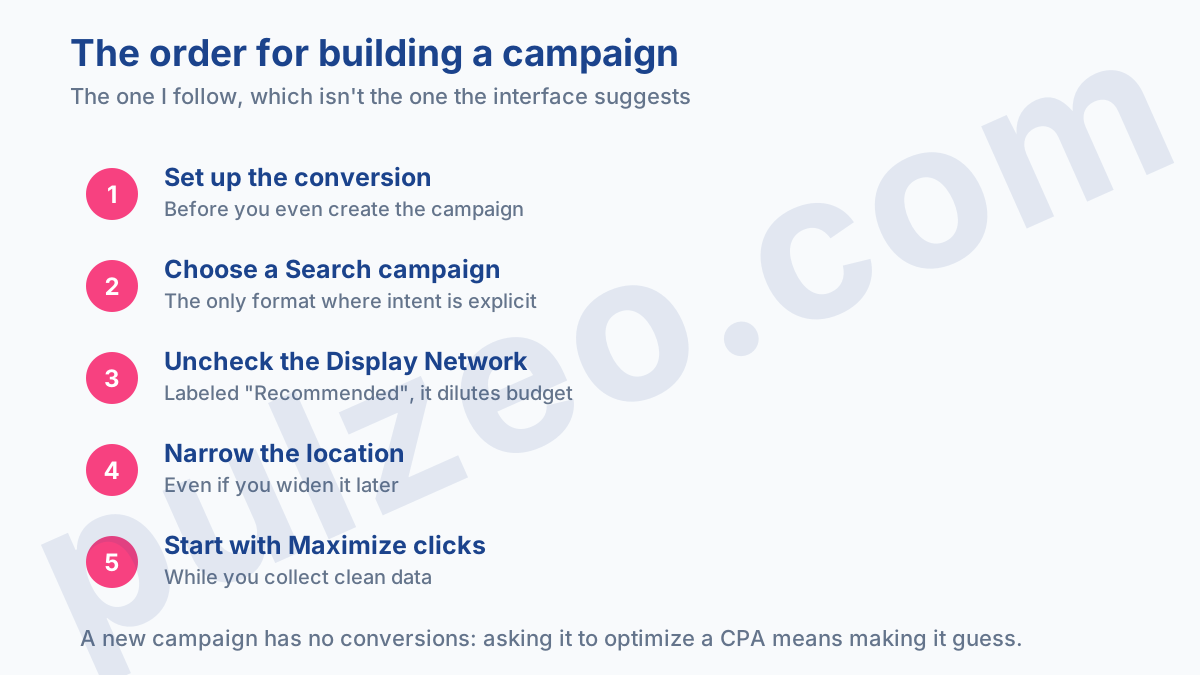
You have an account, keywords, a list of negatives. Here's the order I build a campaign in, and it isn't the one the interface suggests.
- define the conversion first, before you even create the campaign, or you'll be measuring clicks for two weeks;
- choose the Search campaign type for a first campaign, since it's the only format where intent is explicit;
- uncheck "Include Google search partners," which is checked by default and shows your ads outside Google;
- uncheck the Display Network just below it, even though it's labeled "Recommended";
- set a narrow location, even if it means widening it later;
- start with Maximize clicks while you collect clean data.
Those two boxes are the first budget leak in a new campaign, and they're the two to check before you confirm. Search partners show your ads on third-party sites, the Display Network on banners shown to people who weren't searching for anything.
In both cases, a Search campaign's money gets spent without any search intent behind the click, and search intent is precisely what you came to buy. Uncheck them every time you create a campaign, however reassuring the wording next to them.
The bid strategy deserves a word too, because the terms are confusing. Maximize clicks is an automated bid strategy, but it doesn't need conversions to work. Smart Bidding, the strategies that target a cost per acquisition or a ROAS, is what needs conversions to learn.
A new account has none. Asking it to optimize a cost per acquisition it can't predict yet amounts to asking it to guess.
The rest of the process, screen by screen, is in the article creating a Google Ads campaign: where to start.
What you can ignore at first
During setup, Google will offer you a dozen options that are of no use on a first campaign: observation audiences, device bid adjustments, ad rotation, ad schedule. Leave everything at the defaults.
You'll come back to them once you have data to interpret. Setting an option before you've measured anything is optimizing at random.
How to set your budget
Here's the question that comes up most, and the answer that disappoints most: you don't choose your budget, you calculate it.
The logic fits in one sentence. Smart Bidding needs about thirty conversions a month to work properly, and you need as many to judge your results without fooling yourself. Your minimum budget is therefore thirty times your estimated cost per acquisition.
In an industry where a click costs $3 and your page converts at 5%, a conversion costs $60. Thirty conversions require $1,800 a month. That's a floor, not a recommendation, and it explains why some businesses can't get started at $300.
A budget that's too small doesn't produce small results, it produces meaningless ones. It's the difference between earning little and learning nothing.
The full reasoning, with the cases where you can go lower, is in the article on the minimum Google Ads budget. And if you're wondering what Google Ads costs in general, the answer depends so much on the industry that I devoted a whole article to what Google Ads really costs.
One useful detail about the daily budget: Google can spend up to twice your budget on any given day, as long as it doesn't go over your average monthly budget. Don't panic over a one-off overspend; look at the month's total.
What your budget really pays for
We always think in terms of ad budget, as if it were the total cost. There are actually three cost items, and on small accounts the first one is rarely the biggest.
First, the media budget, the one Google collects. It's the only one the interface shows, and the one everyone thinks of.
Then the management time. A properly monitored account takes two to four hours a week: reading search terms, making adjustments, checking the tracking. Value those hours at the real cost of the person who spends them, and the math often looks very different. On an account with a $1,000 media budget, four hours a week from someone billed at $60 an hour add up to almost as much as the advertising itself.
Finally, the wasted budget, the one nobody counts because it's invisible in reports. That's the clicks on irrelevant searches, the campaigns running on out-of-stock products, the ads sending people to a deleted page. On the accounts I audit, this item commonly represents 15 to 30% of the media budget, and you can win it back in an afternoon of cleanup.
You still have to spot it. That's exactly what Pulzeo's alerts flag during the month, rather than when the bill arrives.
This third item is the only one of the three you can act on right away. You won't negotiate the cost per click in your industry, you won't halve the time it takes to monitor an account, but you can cut a useless search this afternoon.
Budget by the month, not by the test
One last point on how to commit the budget, because it often decides the outcome. Many advertisers plan a test budget, spent over three weeks, after which they'll decide whether to continue or stop.
It's the worst way to go about it. Three weeks of delivery on a tight budget produce neither enough conversions to draw conclusions nor enough stability for the algorithm to learn. So you stop on a gut feeling, almost always a bad one, and you write off Google Ads as a channel that doesn't work.
Instead, commit a monthly amount you can sustain three months in a row, even if it's smaller than the test budget you had in mind. Consistency beats intensity, on this channel as everywhere else.
How to write your ads
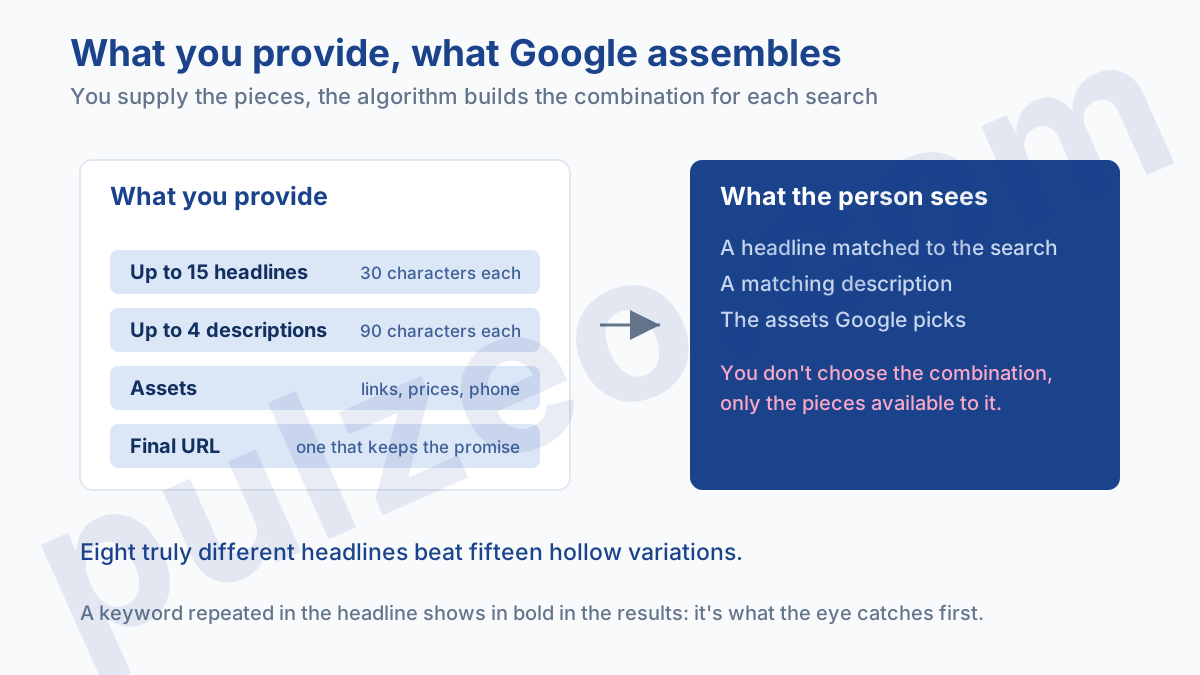
The standard format on the Search Network is the responsive search ad. You provide headlines and descriptions, and Google assembles the combinations it judges most effective.
The interface asks you for fifteen headlines and four descriptions. It's not required, and filling all fifteen boxes with hollow variations produces worse results than eight genuinely different headlines. I measured this in do you really need fifteen headlines.
Three things matter in a headline, in this order. First, repeating the keyword from the search, because Google shows it in bold in the results and the eye latches onto it. Next, a concrete differentiator: a price, a lead time, a guarantee, something a competitor can't copy the next day. Finally, a clear call to action: what the person will be able to do when they land on the page.
The rest is window dressing. Superlatives, exclamation points and vague promises take up characters without adding anything, and the tests I've run on real accounts have never shown them to work.
Then there are ad extensions, which Google now calls assets: the extra lines that show your links, your prices or your phone number. They make your ad bigger without costing more per click, but Google decides which ones to show: how it picks your extensions.
How to measure what it brings in
An account that doesn't track its conversions is basically paying Google a monthly subscription. And it's the most widespread problem on the accounts I audit.
Conversion tracking relies on a tag placed on your site, which tells Google when someone completes the action you care about. Using Google Tag Manager has become the norm, and what to set up before the conversion tag helps you avoid the most common mistakes.
Six settings silently skew the numbers, and I see them misconfigured everywhere: the attribution model, the conversion window, the counting method, the value, inclusion in "Conversions", and duplicates across several sources. They're covered in detail in the six settings that skew everything.
Nobody reviews those six settings by hand every month, and that's why they drift. Pulzeo's conversion audit checks them automatically and tells you which one is skewing your numbers, which saves you from running on broken tracking for three months.
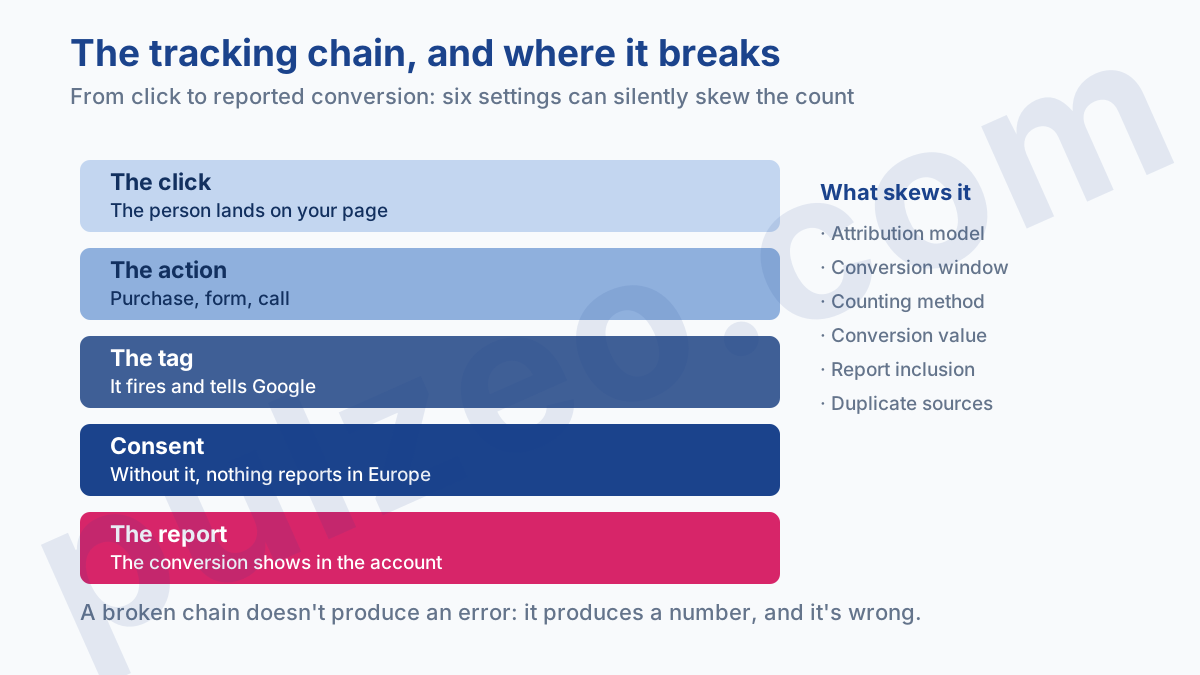
Since 2024, consent mode has been part of that chain for anyone advertising to users in the European Economic Area. Without it, some of your conversions vanish from reports because consent wasn't passed along: is consent mode mandatory covers the real obligation and its consequences.
Once tracking is in place, two metrics are enough to steer by. Cost per acquisition if all your conversions are worth the same, ROAS if they have different values. The second is more misleading than it looks: why a ROAS of 4 can lose you money.
How often to optimize
This is where most accounts go downhill, not from lack of work but from too much of it. Google lists four triggers for the learning period: creating or reactivating a bid strategy, changing one of its settings, adding or removing campaigns, ad groups or keywords, and sometimes changing the target at the ad group level. An account reshuffled every day never stabilizes.
One point that often surprises people: changing a target CPA or target ROAS at the campaign level doesn't restart learning. Google says so in black and white: the strategy reacts immediately to the new number. A big jump therefore shifts delivery in one go, which makes the month impossible to compare with the previous one, but the counter doesn't go back to zero.
Maintenance moves, on the other hand, don't restart anything. Excluding a search term or adding an ad doesn't reset the counter, and that's exactly what makes the rhythm below sustainable.
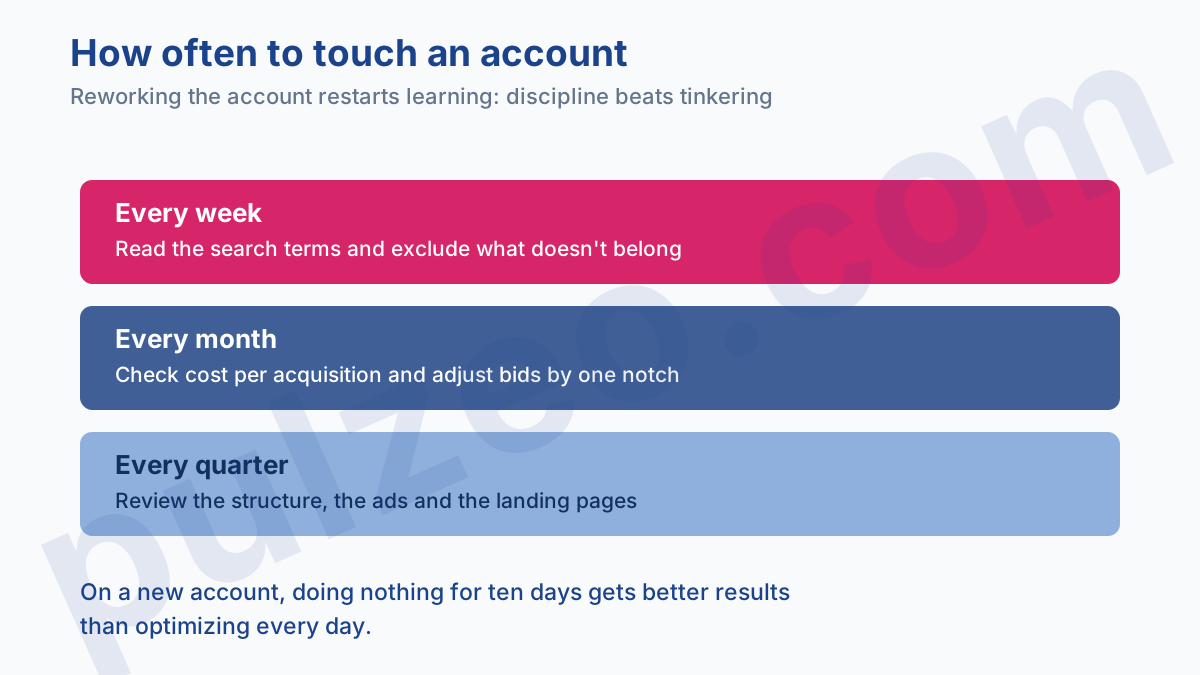
Here's the rhythm I keep on the accounts I manage, broken down move by move and minute by minute in the weekly routine for an account.
- every week, read the search terms report and exclude whatever doesn't belong there;
- every month, check that cost per acquisition is on target and adjust bids by one notch, no more;
- every quarter, review the structure, the ads and the landing pages.
The search terms report is the most profitable tool on the list, and the most neglected. It shows what people actually typed, as opposed to what you targeted. Be careful, though, because Google hides some of it: the hidden searches in the report.
When a metric drops off, resist the urge to change everything at once. A rising cost per acquisition almost always has an identifiable cause, and how to find it takes method more than quick reflexes.
Once a quarter, a full audit wipes the slate clean. The Google Ads audit checklist lists what to check, in order.
That monitoring work is exactly what Pulzeo automates: it reads your accounts continuously, spots the anomalies that deserve your attention and ranks them by impact, so you only open the interface when there's really something to decide.
How long does Google Ads take to work?
It's the question everyone asks, and the honest answer comes in three time frames you shouldn't confuse.
The first clicks arrive within the hour. An approved campaign starts serving almost immediately, and that speed is paid search's main advantage over SEO. You'll know on day one whether your ad interests anyone.
The first conversions arrive within a few days, but don't read anything into them. Three conversions tell you nothing about your cost per acquisition or the quality of your targeting. Chance produces streaks, and a good first week followed by a bad second one is the most common scenario.
The real verdict comes between six and eight weeks, and it takes two things. You must have built up about thirty conversions, and let bidding settle after the learning period. That period lasts a few conversion cycles, which ranges from a few days in ecommerce to several weeks in B2B: exactly how long learning lasts.
The classic mistake is to judge after three weeks, find the result disappointing, change everything, and start another three weeks of learning. I've seen accounts run for a year without ever escaping that loop, and without ever knowing whether their campaign worked.
The most expensive Google Ads mistakes
There are many, but four show up on nearly every account I audit, and they cost more than all the others combined.
The first is running ads without measuring. An account without conversion tracking spends blind, and the worst part is that it looks like it's working: clicks go up, the budget gets spent, the reports are full of charts. Except none of that tells you whether a sale happened.
The second is letting a Search campaign run somewhere other than Google Search. Two boxes decide it, and you have to uncheck both: "Include Google search partners," which puts your ads on third-party sites, and the Display Network, which puts them in banners.
A useful detail, so you know which one to watch. Search partners are checked by default, and that's the leak almost nobody sees. The Display Network, on the other hand, hasn't been checked automatically since June 2025, but Google still pushes it with a "Recommended" label, and older campaigns have often kept it.
The third is managing by cost per click. A falling CPC feels good and proves nothing. You can cut your CPC in half by buying traffic with no intent, and watch your cost per acquisition double at the same time.
The fourth is more insidious: changing course too often. Switching bid strategies, or adding and removing campaigns and keywords, restarts learning every time. An account reshuffled every morning never produces a stable run, so it never produces a reliable conclusion.
On a new account, doing nothing for ten days gets better results than optimizing every day. It's the hardest advice to follow in this whole guide.
The landing page, half the battle
There's a lot of talk about bids and keywords, and very little about where people land. Yet that's where half your cost per acquisition is decided.
It's simple math. If your page converts at 2% and you take it to 4%, your cost per acquisition is cut in half, without touching a single bid. No setting in Google Ads produces an effect that big.
Three flaws keep coming back on the pages campaigns send their traffic to. The first is sending people to the homepage rather than to the advertised product's page, which forces them to go looking for what they were just promised. The second is the broken promise, when the ad talks about a price or a lead time that appears nowhere on the page.
The third is the form that's too long, asking for eight fields where three would be enough to qualify the lead. Each of them can be fixed in an afternoon, and each does more for the final result than the week of bid tweaks people often prefer.
This last point comes with a caveat from experience. A short form increases the volume of leads and lowers their quality; a long form does the opposite. There's no universally right setting, only the one that matches your capacity to handle them.
Page quality also matters to Google itself, since it's part of the score that decides your ranking. A slow or off-topic page makes you pay more per click, on top of converting worse. It's the only place in the whole setup where one piece of work improves two things at once.
Beyond the Search Network
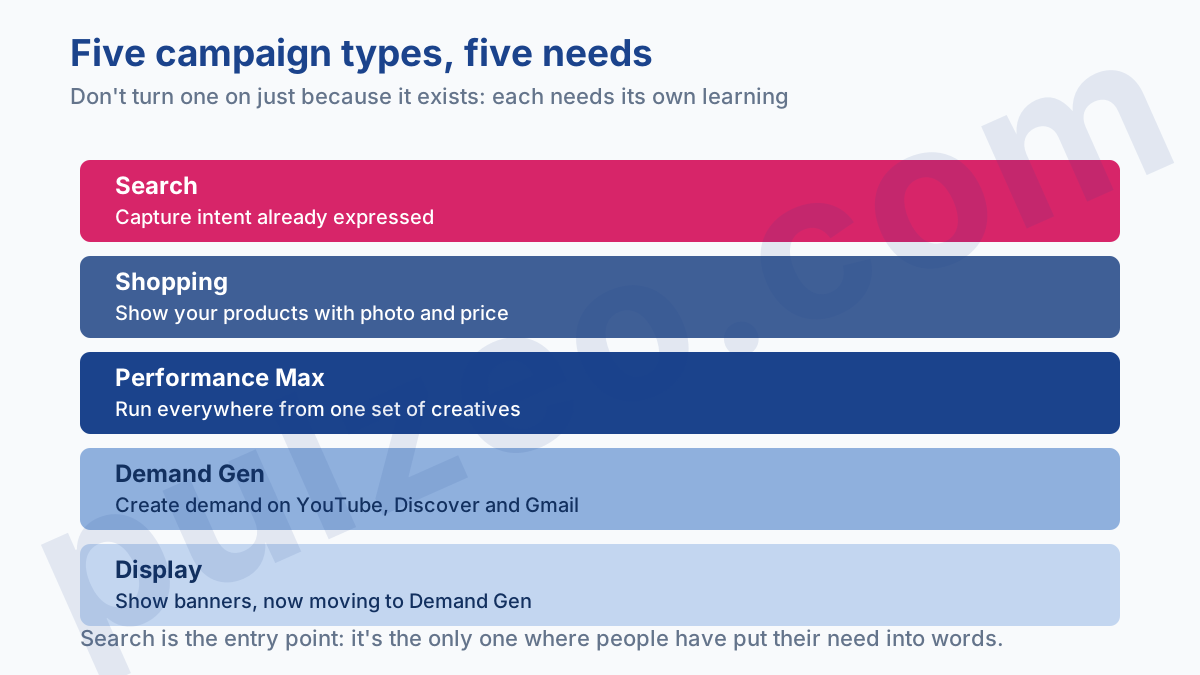
Search is the entry point, not the end of the road. Four other campaign types cover most needs, and each one fits a different situation.
- Shopping shows your products with a photo and price, and requires a feed in Merchant Center;
- Performance Max runs across all networks from a single set of creatives;
- Demand Gen creates demand on YouTube, Discover and Gmail, among people who weren't looking for you;
- Display shows banners on partner sites, and is gradually moving to Demand Gen.
There are two more specialized types, which you'll only come across if your business calls for them: Video campaigns, which run on YouTube, and App campaigns, which get people to install a mobile app.
Don't turn them on just because they exist. Each one has its own learning period, and a poorly set up Shopping campaign costs more than an average Search campaign.
For ecommerce, Shopping quickly becomes the biggest line item. It starts with understanding Merchant Center, then optimizing the campaign itself. And when the account gets suspended, which happens more often than you'd think, here's how to get it reinstated.
Performance Max deserves a separate mention because it's sold as an automatic solution. It isn't, and the control it really allows is detailed in getting out of the black box. As for Demand Gen, it has to be judged on different metrics than Search, or you risk cutting it too early: what it's really for.
Who sees your ads, beyond keywords
On the Search Network, the keyword decides almost everything. As soon as you step outside Search, audiences take over, and the reasoning changes completely.
An audience describes people rather than a search. Google offers several types, from coldest to warmest: long-term interests (affinity), demographics, life events, the custom segments you build, people already in the market (in-market), and finally your own visitors.
Your own visitors are worth all the others combined. Someone who has already seen your site knows you, and reaching them again costs a fraction of what a first encounter costs. The details of these audience types and their temperature are in the article on which audience to choose.
Remarketing, meaning showing ads again to your visitors, requires a minimum volume to kick in. That threshold has dropped a lot, and many advertisers still don't know it: how much traffic you need before remarketing becomes possible.
A word of warning about optimized targeting, turned on by default in several formats. It lets Google serve beyond the audiences you chose when it thinks it can find conversions there. It's sometimes effective, and always worth knowing about: your segments can be expanded, or even bypassed, without you asking for anything.
What automation has changed, and what it hasn't
In 2026, a good share of the traditional levers has vanished from the interface. Manual bidding is receding, ads assemble themselves, audiences expand on their own. You often read that the job is disappearing along with them.
Automation really does some things better than a human, and you have to admit it. It adjusts thousands of bids a day based on signals no spreadsheet can handle: the device, the time, the history, the estimated likelihood of a purchase. Nobody does that by hand, and nobody should try.
What it doesn't do comes down to three points, and they're exactly the three places where an account goes astray. It doesn't decide your goals: it optimizes the one you give it, even when it's the wrong one. It doesn't know your margins, so it can't tell that an $80 conversion loses you money on a product that earns you $60.
And it doesn't judge the quality of leads. A form filled out by someone just browsing counts exactly as much as a signed quote, as long as you haven't taught it to tell them apart. That's also the most profitable change you can make on a mature account: assigning different values to conversions based on what they really bring in.
That's why an automated account demands more judgment, not less. The work has shifted from settings to definitions: what do you measure, at what value, and at what threshold do you stop?
AI Max, the latest layer of automation on Search, illustrates that shift well. It broadens search term matching, rewrites ads and chooses landing pages. Three expansions, so three places where budget can leak without supervision: what AI Max really changes.
Should you learn it, delegate it, or use a tool?
The question always comes up, and the answer depends on a single number: your monthly ad budget.
Below $2,000, an agency's fees take such a share of the budget that they eat the performance they're supposed to create. Learn it yourself, spending a few hours a week on it. Paid courses teach you nothing a real account won't teach you better, as I explain in should you pay for Google Ads training.
Above $5,000 a month, managing the account becomes a part-time job and delegating makes sense. The question is who to hand it to: when a Google Ads agency is worth it and what a consultant costs give you price benchmarks.
Most advertisers sit in between, and it's the most uncomfortable zone: too much budget to run by feel, not enough to pay someone. That's exactly where a monitoring tool like Pulzeo makes sense: it does the daily reading, you keep the decisions, and the cost bears no relation to agency fees.
One last pointer on agencies: the Google Partner badge doesn't measure the quality of the work. It requires three things: $10,000 in spend over ninety days, certifications within the team, and an optimization score of at least 70%. That last one mostly measures how closely the agency follows Google's recommendations. What the badge really guarantees keeps you from reading too much into it.
What Google Ads won't fix
An honest guide also has to say when the tool is useless, because half the failures I see come from there rather than from a bad setting.
Google Ads captures existing demand, and not all of it: in France, Google handles 88.85% of searches, with the rest going through the network Microsoft sells. On the Search Network, it puts you in front of someone who has already typed their question.
If nobody searches for what you sell, no campaign will create that search, and Keyword Planner tells you so in thirty seconds: zero volume stays zero, whatever the budget.
It won't fix an unconvincing offer, either. A campaign that sends a thousand visitors to a page that converts none of them has done its job: it has proven the problem lies elsewhere. It's unpleasant to hear, and it's often the best lesson of a first month.
Nor will it make up for an uncompetitive price, an unacceptable delivery time or a lack of customer reviews. Those three things are decided before the ad, and advertising simply makes them more visible.
Finally, it doesn't replace SEO, it goes alongside it. Paid search buys speed, SEO builds an asset. The first stops the day you cut the budget, the second keeps working. The full comparison, with the cases where one clearly wins over the other, is in SEO or paid search.
One last thing, and it may be the most important for anyone starting out. Google Ads is an auction market: your cost depends on what your competitors are willing to pay. In some industries, they pay more than they earn, by mistake or as a land-grab strategy. You're under no obligation to follow them, and knowing when to give up on a keyword that's too expensive is part of the job.
Google Ads terms you need to know
PPC jargon puts people off more than it helps them. Here are the terms you'll run into every day, boiled down to what they mean.
- CPC, cost per click, what you pay each time someone clicks;
- CPA, cost per acquisition, what a complete conversion costs you;
- ROAS, return on ad spend, the revenue generated for every dollar spent;
- CTR, clickthrough rate, the share of people who click after seeing the ad;
- Quality Score, the 1 to 10 rating that sums up your ad's estimated relevance.
Two of these metrics are enough to steer by, and they're rarely the ones you look at first. CPC and CTR describe the traffic, CPA and ROAS describe the result. An account is judged on the latter.
If you run into a word you don't know along the way, the full glossary of paid search terms, with detailed definitions, is in the Google Ads glossary.
Where to start this week
If you're starting from scratch, here's the order that avoids costly mistakes. It fits in five steps and takes about ten days, not a quarter.
- day 1, create the account and set up conversion tracking, before any campaign;
- day 2, list thirty keywords and as many negatives;
- day 3, build a single Search campaign, with a narrow location and a calculated budget;
- days 4 to 10, touch nothing, let the campaign produce data;
- day 11, open the search terms report and do your first round of cleanup.
It's days 4 to 10 that trip everyone up. Watching a new campaign without touching it takes a discipline nobody has naturally, and yet it's what separates an account that learns from an account you reset every morning.
The rest you learn by doing. A real account, even a small one, will teach you more in a month than any tutorial, this one included.
Common questions
How long does it take to master Google Ads?
Expect about ten days to launch a clean first campaign, and two to three months to know how to read what it produces. The technical side is quick to learn; it's interpreting the numbers that takes time. You need to have seen a cost per acquisition climb for no apparent reason, gone looking for why, and found it. No tutorial replaces those three months.
What's the minimum budget to start with Google Ads?
Think in expected conversions, not in a round number. You need about thirty conversions a month for Smart Bidding to learn and for you to judge your results. Multiply thirty by your estimated cost per acquisition: that's your floor. In an industry at $3 a click with a 5% conversion rate, that comes to about $1,800 a month.
Google Ads or SEO: which should you start with?
Google Ads, if you need to find out quickly whether anyone wants your offer. A campaign delivers its verdict in six to eight weeks, while SEO takes six months. The two complement each other, and Google Ads is often used to validate the keywords you'll then work on organically.
Should you hand Google Ads over to an agency?
It depends on your ad budget, not on your technical skills. Below $2,000 a month, an agency's fees eat up too much of the budget for better management to make up for it. Above $5,000, running the account becomes a real job and delegating makes sense. Most advertisers sit in between, and that's where a tool like Pulzeo comes in: it reads your accounts every day and tells you what to fix, for a fraction of the cost of an agency, without taking the decision away from you.
