
How to set up a Google Ads campaign

You want to set up a Google Ads campaign, and every guide you find runs through the same list: objective, type, budget, bidding, ads. Each step gets the same weight, as if getting one wrong cost as much as getting any other wrong.
That's false, and it's what costs beginners the most. In this flow, nearly every setting can be fixed in two clicks once the campaign is live. Only one locks for good, and two others can be fixed, but at a price nobody tells you about up front.
So here's where to start: what to set up before you even open the form, the order in which Google asks for things, and the spots where you need to slow down.
Create your Google Ads account before the first campaign
First thing to know: the sign-up flow ties the account and the campaign together, and it pushes you to build a campaign before you've even understood the interface. Nothing forces you to: you can skip its recommendations and create the account without a campaign, which is what Google itself advises.
The account itself is free. No subscription, no sign-up fee: you pay per click, and only when someone clicks. Google will, however, ask you for a payment method before it runs anything.
Smart Mode, the default option
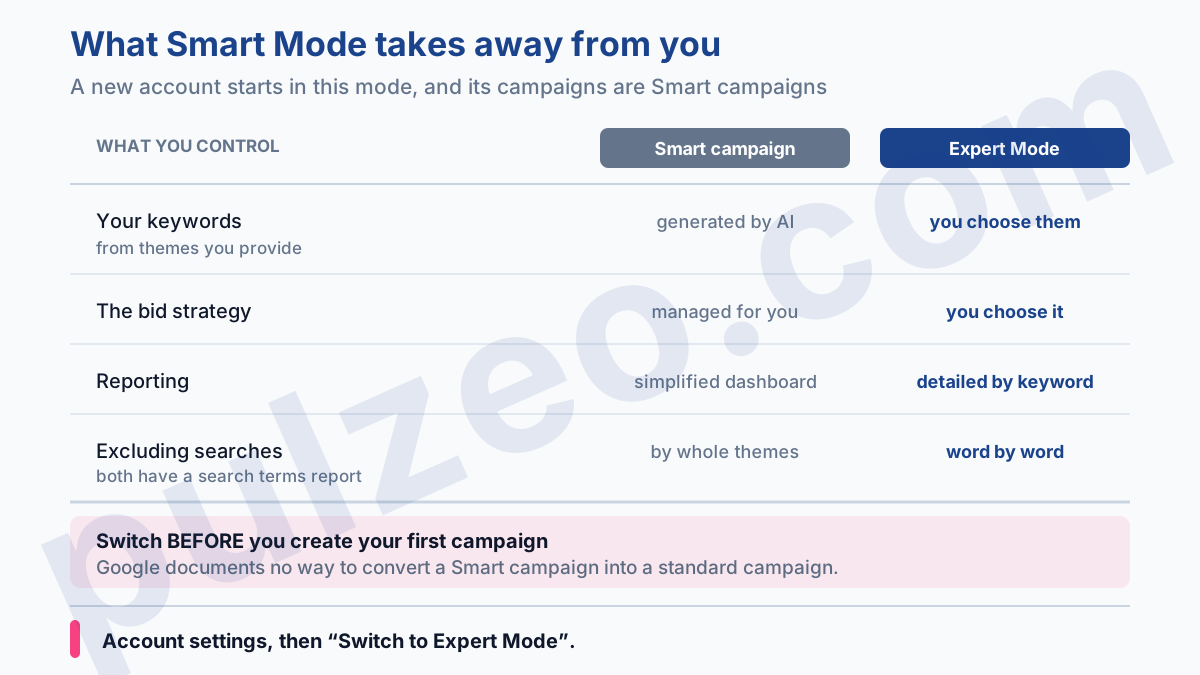
Here's the trap, and it's a silent one. A new account starts in a stripped-down version of Google Ads called Smart Mode, where the campaigns you create are Smart campaigns. It's built for business owners who want an ad up in five minutes, and for that, it holds up.
Except this mode takes away the essentials. Google describes it itself: a Smart campaign "manages bidding for you", "Google AI generates keywords based on your keyword themes", and you get a "simplified, easy-to-use dashboard" instead of detailed reports by campaign, ad group and keyword.
You do still get a search terms report, and you can weed out whatever is off-topic there. But exclusion works by whole themes (Google calls them negative keyword themes), never word by word, which is a far blunter instrument than the negative keywords of a standard campaign.
Translation: you don't define what you're buying, you correct it in broad strokes, and you read the results on a pared-down dashboard. For someone who wants to learn to run their own campaigns, it's a dead end.
Switching to Expert Mode
The switch sits in the account settings menu, under the label "Switch to Expert Mode". Do it before you create your first campaign, not after.
Why before? Because Google documents no way to convert a Smart campaign into a standard one: whatever was created in Smart Mode has to be rebuilt; it can't be converted. You then start over on a brand-new campaign, without the old one's history, with a learning period to go through again.
The setup steps in the order Google asks for them
Once you're in Expert Mode, the form always unfolds the same way. The order matters, because it doesn't match the one in the guides you've read.
You first choose an objective, then the campaign type, then you name the campaign. Next come the bid strategy, location and language targeting, audience segments, then your ad assets. Only after that do you build your ad groups and keywords and write your ads, and the budget comes last.
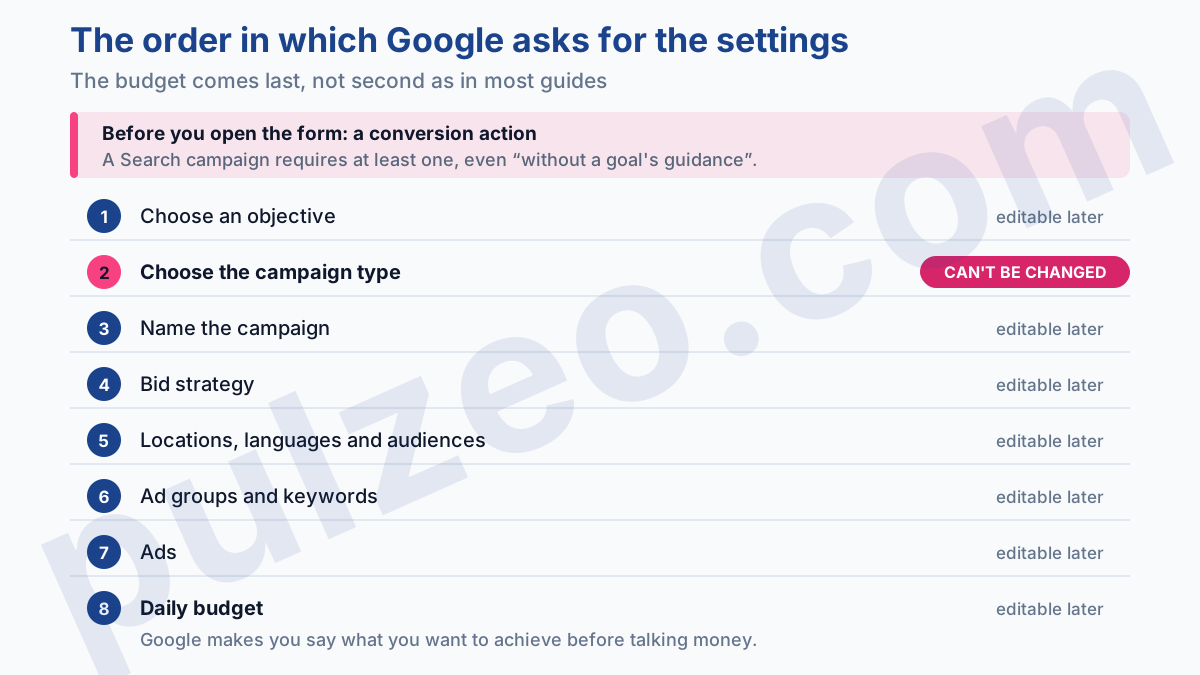
The order is more than a curiosity. Most guides bring up the budget in the very first steps, which pushes you to start from a fixed amount: "I've got $500, what do I do with it?" Google, on the other hand, first makes you say what you want to achieve and who you want to talk to. The amount comes after, once the campaign has taken shape.
For objectives, the list for a Search campaign comes down to four entries:
- Sales;
- Leads;
- Website traffic;
- Create a campaign without a goal's guidance.
The last one is often the most honest choice when you're starting out: it keeps the interface from pre-filling settings for you on the strength of an objective picked at random from a list you're seeing for the first time.
Why the campaign type can't be changed
Here's the first of the two choices that commit you. Google's documentation leaves no ambiguity on this point.
You cannot change your campaign to a new campaign type once it's been created.
In practice, if you launch a Search campaign when you wanted Shopping, there's no button to set it right: you create a second campaign of the right type, which starts from your product feed. When the mistake involves two compatible campaigns, Google Ads Editor at least saves you from retyping everything by copying your ad groups over.
The same rigidity applies to the marketing objective of a Performance Max or Demand Gen campaign: it's frozen at creation. On a standard Search campaign, by contrast, the objective stays much more flexible.
For a first campaign, the choice is actually simple. Other formats also give you access to the queries and to negative keywords, Shopping and Performance Max alike, but Search remains the only campaign type where you pick your keywords one by one, with their match types. That's the ground you learn on, and the other formats can come later.
The conversion goal a Search campaign requires
The second point to watch is the most counterintuitive, and none of the guides I've read explain it. Even if you choose "Create a campaign without a goal's guidance", Google still won't let you through empty-handed.
At least one conversion goal is required to create a Search campaign.
In other words, conversion tracking is an entry requirement, not a step you'll get to "later, once it's running". And if you rush it to unlock the form, by selecting an action that measures nothing real, you start out on a hollow signal.
Let's be clear about what you can fix and what you can't. The setting itself is easy to change after the fact: in the campaign settings, the Goals menu lets you change the conversion goals the campaign uses, including in bulk across several campaigns.
What doesn't come back is the time. The bidding algorithm learns from those conversions, and if it learns from an action that means nothing, it diligently optimizes toward thin air for weeks, without a single warning light blinking.
You'll fix the setting in three clicks. The history built on a hollow signal, though, is lost. I've detailed the settings that skew everything in the guide on badly configured conversions, and it's better read before you create the campaign than after.
Pulzeo also reviews these settings on its own and flags inactive actions, the ones excluded from the column that drives bidding, and the duplicates that inflate your numbers.
The right move fits in one sentence: first set up a conversion action that matches something you sell or that people ask you for, a submitted form, a phone call or a completed order, and only then open the campaign creation form.
What can you change after launching a campaign?
Almost everything, and that's the good news in this article. Once the campaign is live, you're still free to change the settings you use to run it day to day.
- the daily budget, up or down;
- the bid strategy, including a switch from manual to automated;
- locations, languages and ad schedule;
- keywords, their match types, and the terms to exclude;
- ads, their headlines and their descriptions.
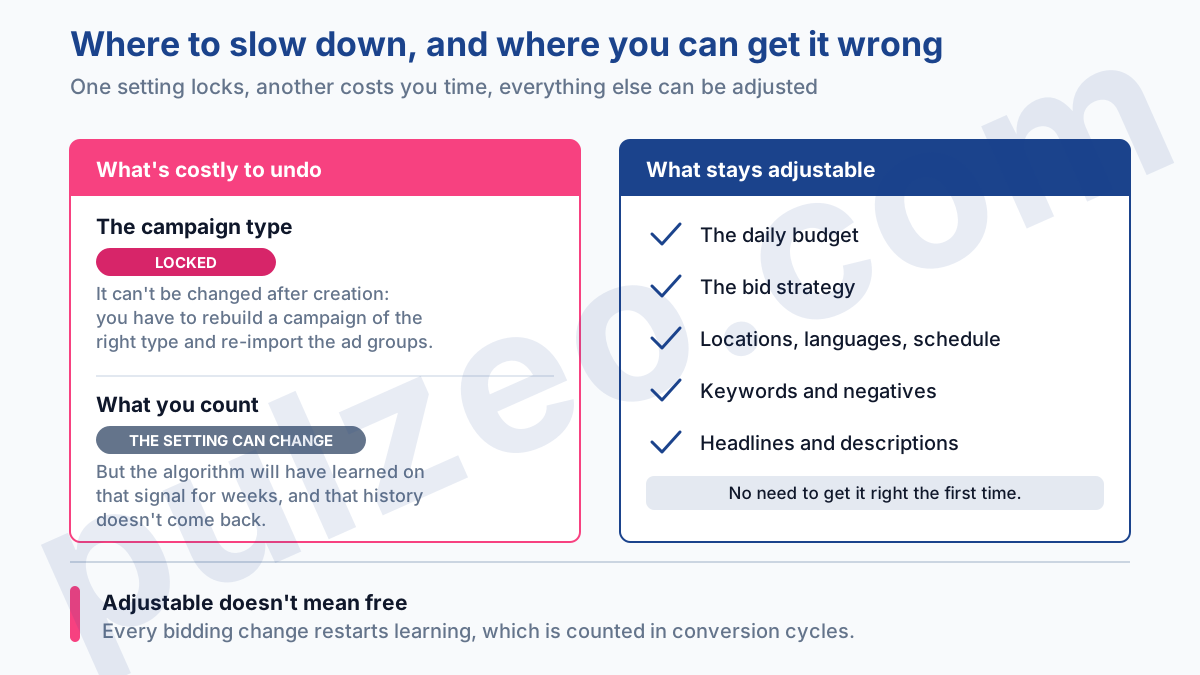
That list changes how you approach the form. You don't have to find the perfect budget or bidding setting on the first try: you'll have all the time you need to adjust them while watching the numbers. Focus your attention on the two points above, the campaign type and what you count as a conversion, and don't worry about getting the rest exactly right.
One caveat from the field, though. Being able to change something doesn't mean changing it every day: every bid strategy change restarts the algorithm's learning, and that delay is counted in conversion cycles, not in hours.
How much should you budget for a first campaign?
Enough to get an answer, which is very different from enough to run. Google sets no minimum: you can launch at one dollar a day, nobody will stop you, and that's exactly the trap.
The right benchmark starts with your cost per acquisition. Plan on roughly thirty times that cost per month, because that's the conversion volume at which the swings start to mean something. A $25 cost per acquisition therefore calls for around $750 a month. The full reasoning, including accounts that will never reach that threshold, is in the article on the minimum budget.
If you don't know that cost yet, estimate it: your cost per click divided by your conversion rate. A $1 click and a 2% conversion rate give a cost per acquisition around $50, so a floor of $1,500 a month, worked out before you've spent your first dollar.
Common mistakes in the first weeks
Three come up on almost every account I take over, and they happen after launch, not during setup.
The first is tweaking the settings every morning. A new campaign produces unstable numbers: three more conversions, and the cost per acquisition seems to collapse. You make a fix, restart the learning, and do it all over again. Schedule one session a week, and let it run in between.
The second is never opening the search terms report. Yet that's where you see what you're really buying, as opposed to what you think you bought, and off-topic queries can be cut in a few minutes. Zeo, the assistant built into Pulzeo, surfaces the queries that spend without converting for you, with the exclusion ready to apply.
The third is judging too early. A first campaign can't be read after five days, and a high cost per acquisition in the first weeks is nothing unusual: the algorithm is paying to learn.
That's the whole challenge when you start out alone, by the way. You'll figure out the settings within a few weeks; what's missing is someone to tell you whether what you're seeing is normal. That's what Zeo does: it reads your real data, explains in plain language what's moving and why, and suggests the next action, instead of leaving you to interpret a ten-day curve on your own.
Creating a campaign takes half an hour. What counts is that the type and the tracking are right on the day you click Publish.
Common questions
Can you change a Google Ads campaign type after it's created?
No. Google puts it in black and white: once the campaign is created, its type can't be changed. If you got it wrong, you have to create a new campaign of the right type, re-importing your ad groups into it with Google Ads Editor if need be. It's the only setting in the creation flow that truly locks you in; everything else can be corrected along the way.
Is it free to sign up for Google Ads?
Yes, opening an account costs nothing and there's no subscription. You're billed per click, only when someone clicks your ad, and nothing is charged until the campaign is running. The account does, however, ask for a payment method before you can launch anything.
What budget do you need for a first Google Ads campaign?
The right amount is worked out from your cost per acquisition, not from a range you read online. Plan on roughly thirty times that cost per month for the results to mean anything. A $25 cost per acquisition therefore calls for around $750 a month. Below that, the campaign runs and converts, but you won't have enough to judge whether it works.
Can a Smart campaign become a standard campaign?
Google documents no way to switch a Smart campaign over to a standard campaign. In practice, you rebuild the campaign in Expert Mode instead of converting it. That's why the choice of mode, at the very start, deserves thirty seconds of thought: it's costlier to undo than it looks.
