
A dashboard that gets straight to the point
A real-time view of the account you selected: spend, conversions and trends. No more digging through tabs to find a number.
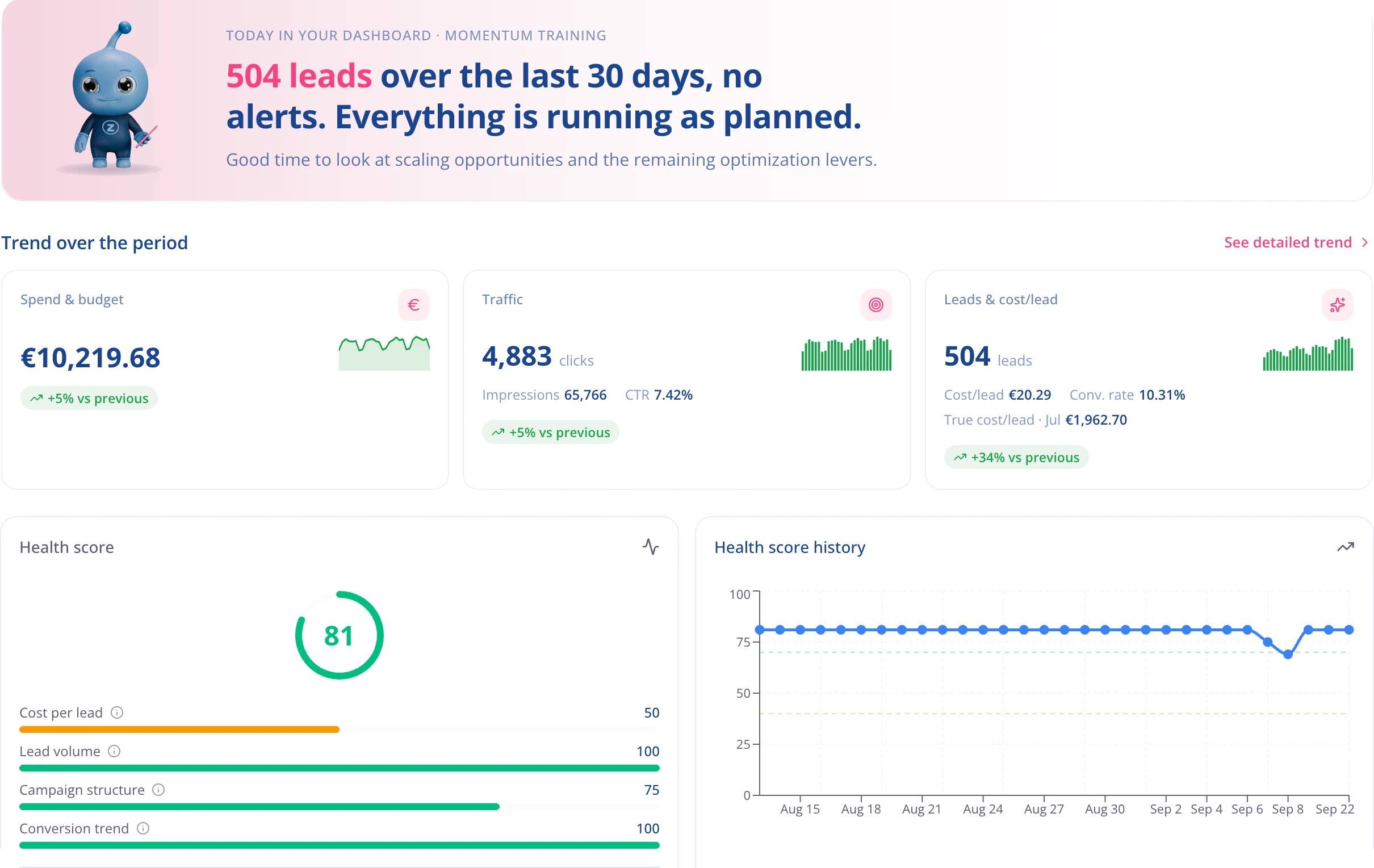
The whole account at a glance
Spend, conversions, cost per conversion, ROAS, and the change from the previous period: the numbers that matter come to you. One page instead of ten Google Ads tabs.
- Every number compared with the previous period, automatically.
- Pick the date range once and it follows you from screen to screen.
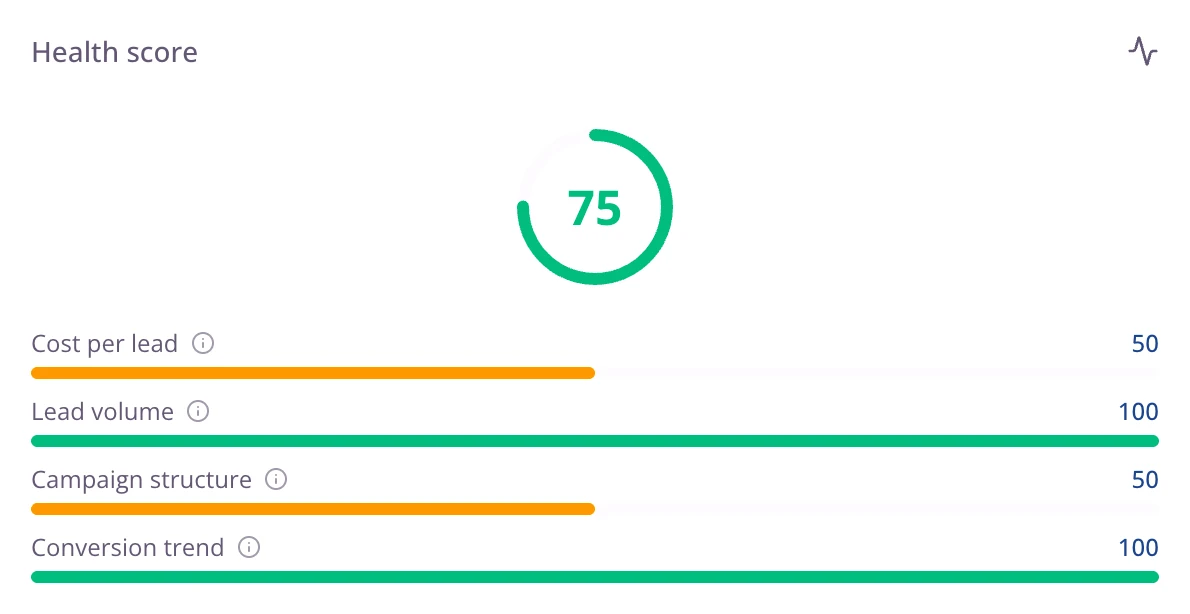
The health score shows where your account stands
Every account gets a score out of 100, built on four pillars:
- Profitability
- Volume
- Campaign structure
- Goal attainment
At a glance, you see where to focus your effort to bring the score back up.
What the dashboard gives you
The right metric for your business
An online store sees ROAS and revenue, a lead generation account sees cost per lead. No one-size-fits-all scorecard.
The change from the previous period
Every number is compared with the matching period. You know right away whether it’s a normal week or something changed.
From account to ad
Go from the overview down to a campaign, an ad group, a single ad, without switching tools or losing the thread.
Alerts already sorted
The alerts that need you are on the dashboard, in order of severity. Nothing to hunt for.
Set the date range once
You choose the period in one menu and it follows you everywhere in Pulzeo. No filters to reset on every page.
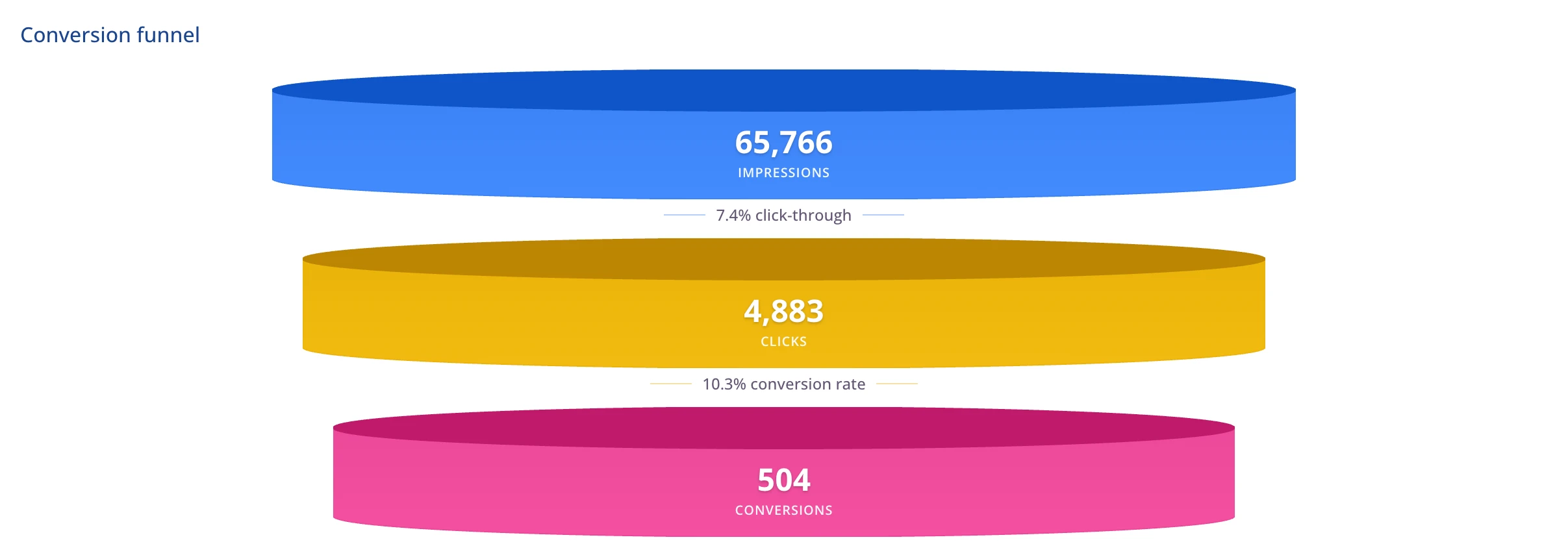
The funnel, end to end
Impressions, clicks, conversions, with the rate from each step to the next. The leaky step stands out.
14-day free trial
Check your account
Connect your Google Ads account and get advice right away. No credit card required. Cancel anytime.

Every business has its own numbers
You set the account type and the metrics adjust. An online store is judged on ROAS, lead generation on cost per lead, a brand campaign on reach. The dashboard adapts, and so does Zeo.
- Ecommerce, lead generation, appointment booking, brand awareness.
- Analyses and advice line up with your goals.
From the whole account down to one keyword
The overview tells you how the account is doing. From there you open a campaign, compare two or more of them, and drill down to the keywords or the ads.
- Campaign comparison built in.
- Campaign details keep the date range you selected.
What needs your attention gets flagged
The account’s alerts sit on the dashboard, sorted by severity, with the likely cause and the campaign involved. You see the one that needs you before you go looking, and you know where to start: a campaign burning budget without selling comes before one left paused.
- Three levels: critical, worth watching, informational.
- Every alert names the campaign and the number that triggered it.
- One click runs an analysis of that campaign.
From impression to conversion, without doing the math
How many people saw your ads, how many clicked, how many converted. The rate between each level of your funnel is where you spot what to fix.
Questions about the Pulzeo dashboard
Does the dashboard show all my accounts at once?
No, it shows the selected account, in detail. For a consolidated view across several accounts, use the portfolio view, available starting with the Business plan.
Where do the numbers come from?
Straight from your Google Ads account. Pulzeo reshapes that data so you can see what to do about your profitability.
How often are they updated?
Automatically once a day, using the previous day’s finalized data. You can also run a manual sync whenever you need one. Today’s numbers keep changing, because conversions take time to be attributed.
How is the health score calculated?
It’s based on four pillars, weighted by the type of business you selected: profitability, volume, campaign structure and goal attainment. The four sub-scores are shown, so the headline number is never a black box.
Can I change the period shown?
Yes, and the choice follows you from screen to screen: switch to 90 days and campaigns, analyses and comparisons line up without you having to set it again everywhere.

Your Google Ads copilot is ready.
Zeo will analyze your accounts, quickly spot the optimizations that matter and prepare your client reports.
- 14-day free trial
- No credit card required
- Cancel in one click
