
For agencies
More client accounts, not more hours
Monitoring, alerts and reports are handled across every client account. Your account managers spend their time on judgment calls, not formatting.

Handle every client account in less time
Opening twelve accounts one by one to find out that nine were fine is half a billable day gone every week. Each account arrives with its status and its pending actions: you only open the ones waiting on you.
Your juniors move forward without tying up a senior
A junior account manager getting up to speed is paid for in senior hours, and those are the most expensive in the agency. Every recommendation explains the reasoning, not only the move: the junior understands what they’re applying, and the question never gets escalated.
Handle more accounts without hiring
Up to thirty accounts
The Agency plan takes you to thirty client accounts. And the price never tracks your clients’ ad spend, unlike most tools on the market.
White-label reports
The deliverable goes out under your name. A client who receives a document stamped with a tool’s branding always ends up wondering whether they could subscribe to it themselves.
Every account has its manager
On the Agency plan you invite your team and choose what each person sees and can change, account by account.
What happens on the accounts you no longer open
Each account’s status and pending actions stay visible without having to ask a manager for an update.
The copilot for your juniors
Zeo explains the why behind every recommendation. Your juniors build their skills on the accounts instead of pulling in a senior with every question.
Read-only client access
On the Agency plan you give a client a view of their own account. They see only the numbers, can change nothing, and stop asking you where things stand.
14-day free trial
Sign more clients
Connect your client accounts and let Zeo handle the monitoring, the alerts and the reports. No credit card required. Cancel anytime.

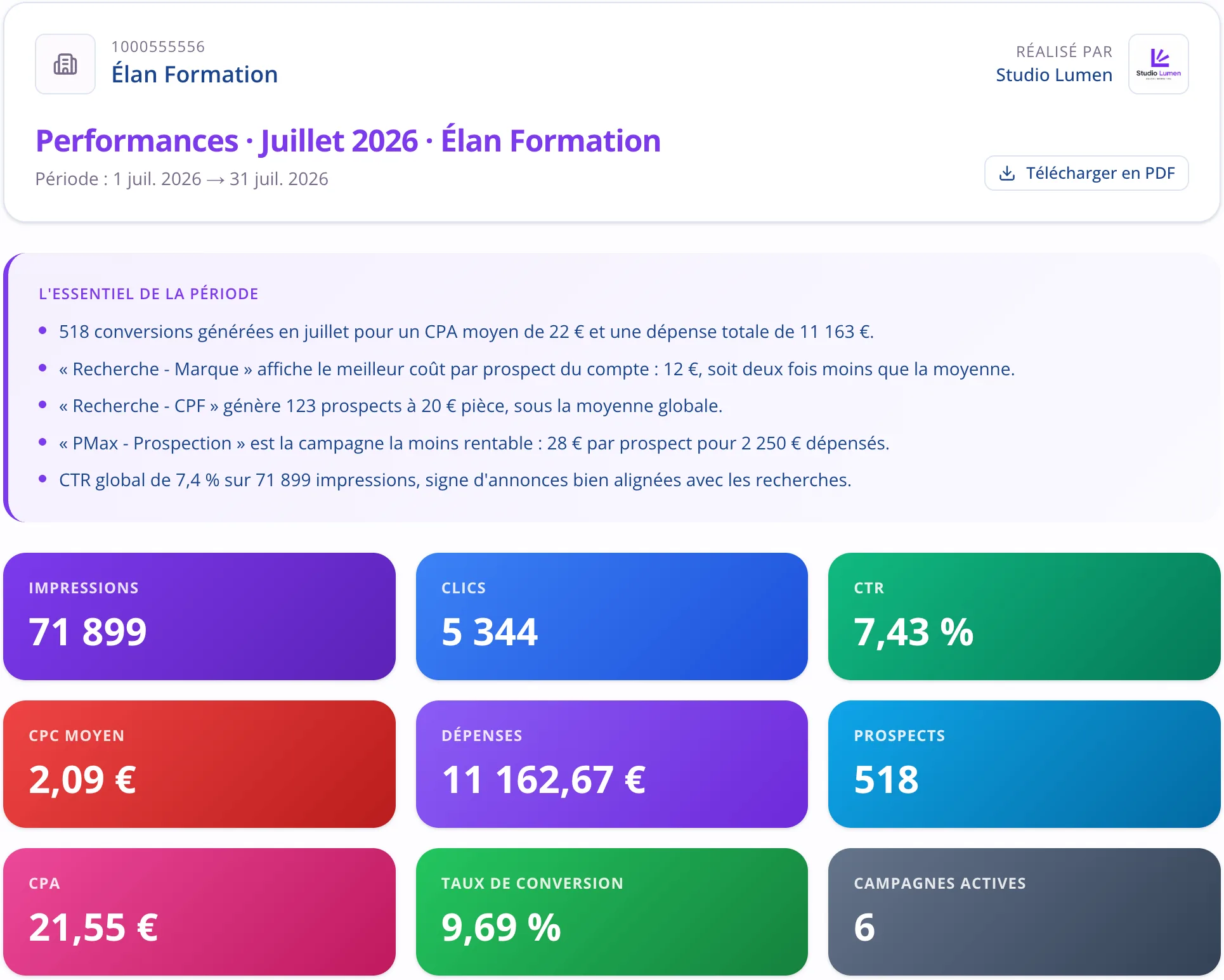
Month-end stops holding up the agency
The report carries your brand, and the commentary is written from the real data in the vocabulary of each client’s business. You add your own notes and schedule delivery for the date you choose. That’s a lot of hours saved every month.
The client nobody is looking after
It’s almost never the big client who walks. It’s the small one nobody mentions in meetings anymore. Their status is visible without you having to ask for it. With Pulzeo that’s over: the alert goes out before the client notices.
- Keep your clients longer, without holding your breath.
- Critical alerts flagged the same day, across the whole book.
When a client asks what you’ve been doing
The question rarely comes at a good time, and often after an average month. You have the written diagnosis, the dated history of the changes and the result of each one. The whole conversation changes: you’re not defending your work, you’re showing it.
- Every action keeps its date, its author and its note.
- The before and after results stay side by side.
A price that doesn’t punish you when your clients grow
Plenty of tools tie their price to the ad spend you manage: a client who doubles their budget doubles your cost, without your work changing. Here the price depends on the number of accounts, and it stops climbing at the Agency plan.
- The same price up to thirty accounts, no matter how much spend you manage.
- Two months free on the annual plan.
Monday morning
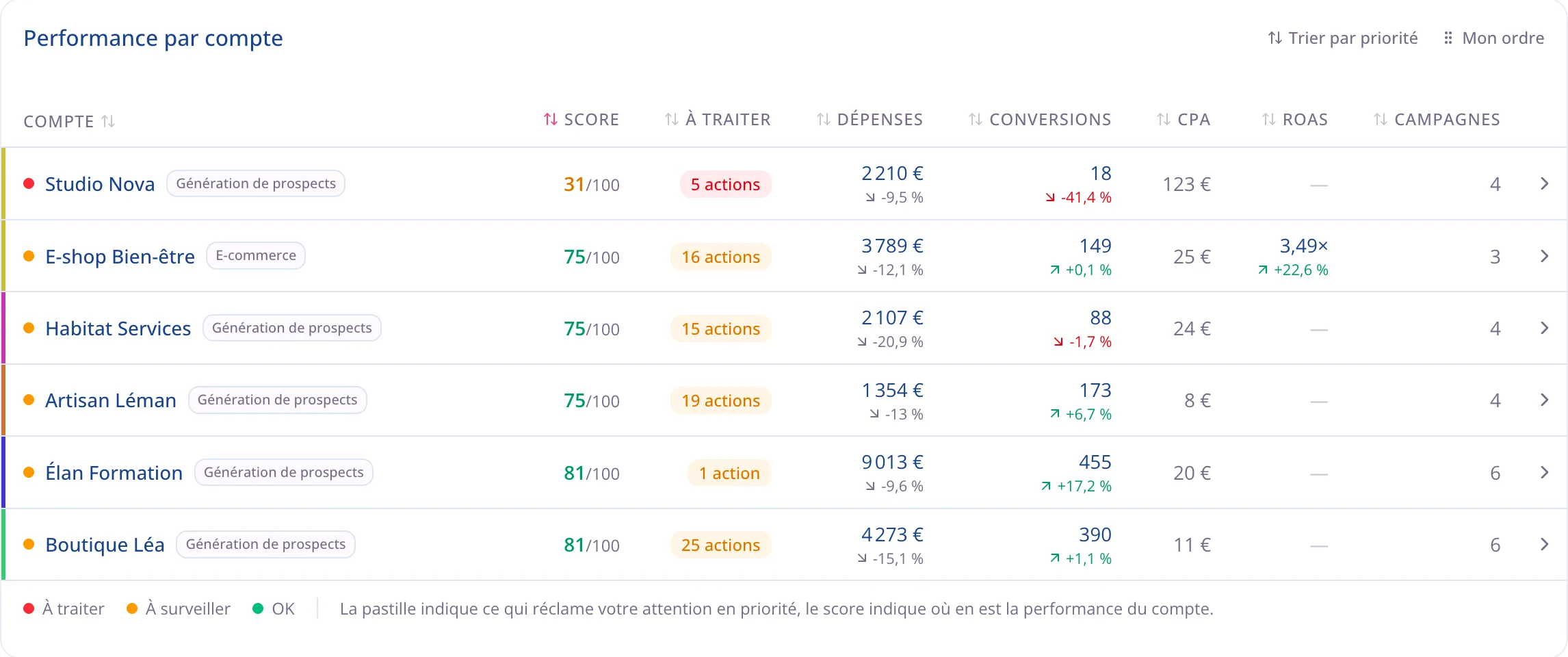
Which account to open first
The question isn’t how the accounts are doing, it’s which one to handle first. Every row carries its score, the number of pending actions and its figures for the month, and the list sorts itself by priority.
The features that will help your agency
What your account managers will use day to day.
The portfolio view
All your client accounts on one screen, with the consolidated total and the account that needs attention at the top.
Learn moreWhite-label reports
Your logo, your written commentary, your delivery schedule. The deliverable that leaves the agency.
Learn moreThe action plan
Where to start on each account, with the reasoning that lets a junior apply it alone.
Learn moreAlerts
What tells you before the client does, on the accounts nobody opened this week.
Learn more
Questions from agencies
How many client accounts can I handle?
Ten on the Business plan, up to thirty on the Agency plan. The price never depends on your clients’ ad spend.
Are my reports really white-label?
Yes, starting with the Business plan: your logo, your colors and your trade name replace ours. Nothing tells the client a tool was involved.
Can I give my clients access?
Yes, on the Agency plan: read-only access limited to their own account. They don’t see the alerts, the notifications or the history. They see their figures and their reports, and can’t change anything.
How do roles work inside the team?
Working together is built into the Agency plan: you invite your colleagues and give each a role that sets what they see, which accounts they can access and what they can change.
Do I need a manager account (MCC)?
No, but if you have one, the accounts it manages are listed for you automatically when you connect. Otherwise you connect the accounts one by one.
How long does it take to connect a whole book of clients?
One Google connection, then you check the accounts to track. The history loads and can take from a few seconds to a few minutes depending on the size of your accounts.

Your Google Ads copilot is ready.
Zeo will analyze your accounts, quickly spot the optimizations that matter and prepare your client reports.
- 14-day free trial
- No credit card required
- Cancel in one click
