
How to check Google Ads conversion tracking

When I take over an account, I always start in the same place, and it's no accident: Google Ads conversion tracking. Get your Google Ads conversions wrong, and you're steering the whole account off course. Smart Bidding optimizes on them, your reports depend on them, and so do your budget decisions.
If they're wrong, you're flying blind, with the comfortable illusion of having data. And believe me, it's far more common than people think: most of the accounts I take over have at least one conversion setting that's off somewhere.
The worst part is that nothing flashes red. An account can run for months on skewed conversions without a single alert going off. It's a silent lie: the numbers look clean, even rather flattering, and that's exactly the trap. Here's the checklist to go through, point by point, starting with what has the most impact.
If you're just starting out, be aware that this catches up with you even sooner than you'd think: on the Search Network, Google requires a conversion goal before you even create your first campaign.
The conversions that drive Smart Bidding
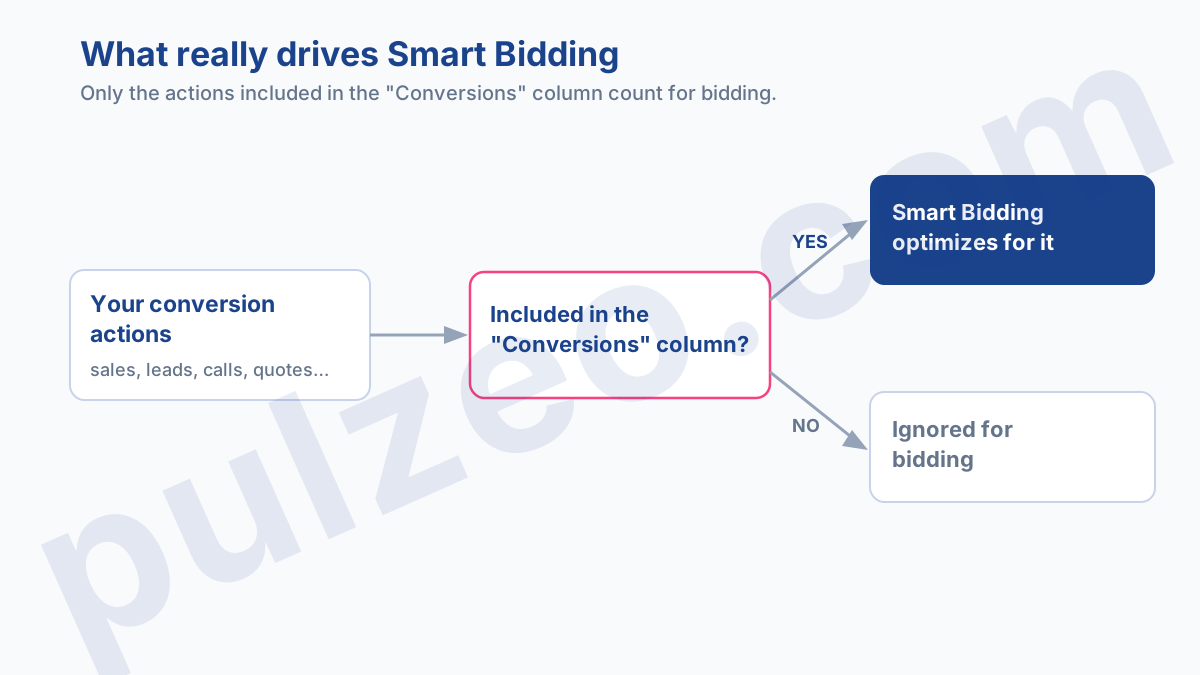
Before the checklist, one distinction that explains half the mistakes. Google shows two totals: "All conversions", which counts every tracked action, and "Conversions", which only counts the actions you've chosen to include in it. And Smart Bidding bids on that second column alone.
In other words, an action can be perfectly tracked, show up in your reports, and still have no influence at all on your bids, simply because it's excluded from the "Conversions" column. It's the kind of invisible detail that keeps an account optimizing toward the wrong goal for months.
1. Are your primary conversions active?
It sounds obvious, but a conversion action may have been removed (status "Removed"), be flagged as "Misconfigured", or record zero conversions for weeks because its tag is broken. A primary conversion that stops reporting means an account optimizing into thin air.
The most frequent case, and I've watched it repeat dozens of times: a site redesign that moves or deletes the tag, without anyone warning the Google Ads team.
The site gets rebuilt over a weekend, and by Monday the account is bidding on a dead signal. Conversions drop to zero, Smart Bidding loses its signal, performance slowly degrades, and it often takes weeks before anyone connects the dots.
What to check: every primary action shows an "Active" status and is recording recent conversions. An action that has been active for over a month with zero conversions deserves an immediate tag test.
2. Are they included in the "Conversions" column?
This is the most underrated point, the one in the diagram above.
A real conversion left out
An action can be tracked but excluded from the "Conversions" column (set as secondary rather than primary): in that case, the algorithm doesn't use it to bid. It's often a box unchecked by mistake, or a default left as is when the action was created.
The mirror mistake: a micro-conversion included
The mirror mistake happens too, and it's sneakier: a worthless micro-conversion included in the column by mistake.
A newsletter sign-up counting as a primary conversion, for example, and there's Smart Bidding optimizing to bring in free email addresses instead of sales. The account looks like a top performer, with a ridiculously low cost per conversion, except that revenue doesn't follow.
In practice, make sure the conversions that really count, purchases and qualified leads, are included in "Conversions", and that secondary micro-conversions, a page view or a click on a phone number, stay excluded so they don't pollute the bidding signal.
3. Is the count setting right for your business?
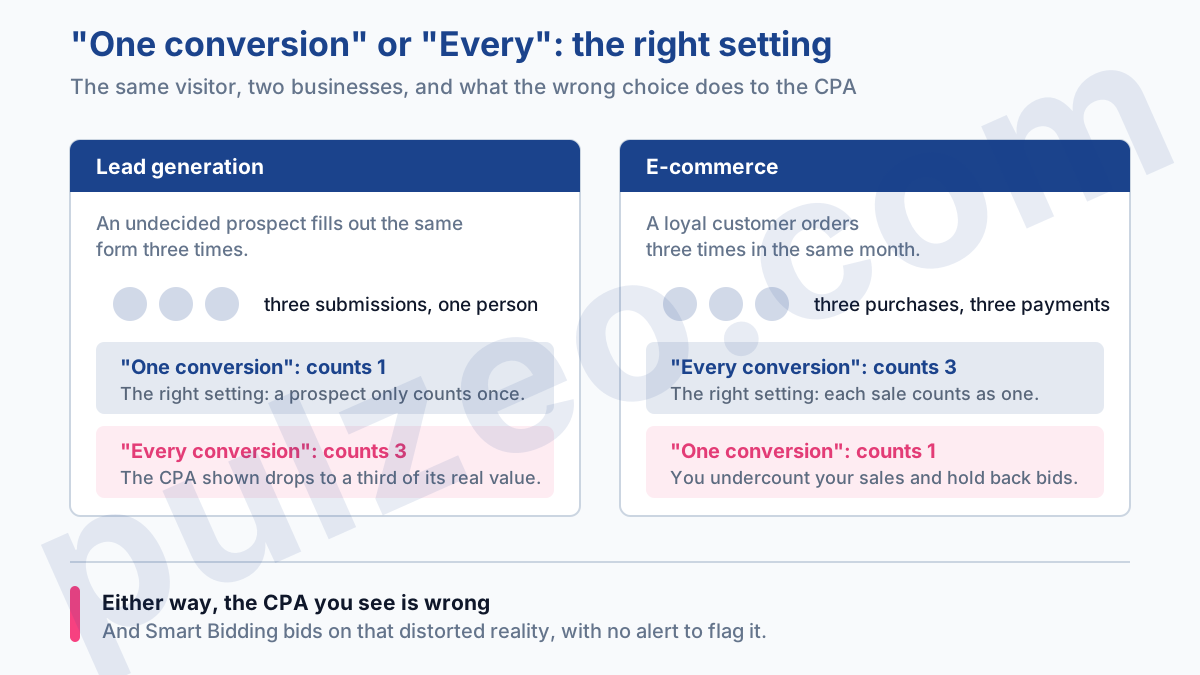
Google offers two modes, and the right choice depends entirely on your business:
- E-commerce → "Every conversion": the same customer can buy several times, and every purchase should count.
- Lead generation → "One conversion": you want to count a prospect once, however many times they fill out the form.
A lead generation account set to "Every conversion" artificially inflates its conversions, because the same undecided prospect who submits the form three times counts as three. An online store set to "One conversion" undercounts its sales. Either way, the CPA you see is wrong, and Smart Bidding is bidding on a distorted reality.
The first case is the most common, for a simple reason: "Every conversion" is the default setting for website actions. So a contact form created without a second thought is misconfigured from day one.
In lead generation, accurate counting isn't enough: it correctly counts forms, not customers. To trace the sale back to the original click, see how to run effective lead generation with Google Ads.
4. Is your attribution model consistent?
The data-driven model is now the standard Google recommends: it splits credit across all the touchpoints according to their real impact, rather than handing everything to the last click. If some of your actions are still on a "Last click" model and others on data-driven, your attribution is inconsistent from one conversion to the next.
In practice, last click under-credits everything that sets up the sale upstream, your prospecting campaigns in particular, which then look less profitable than they really are. You end up cutting those campaigns, and the sales they were quietly feeding disappear a few weeks later, without anyone making the connection.
These days Google puts new actions on data-driven by default, so the real risk is no longer the initial choice: it's legacy actions, the old ones left on an outdated model that nobody ever brought back in line.
The rule: standardize the model across all your actions as soon as volume allows. Mixed attribution makes your comparisons between campaigns unreliable, because you're comparing figures that don't count the same way.
5. Have you set your conversion windows?
The click-through conversion window determines how long after a click a conversion is still credited to the campaign. If you haven't set it deliberately, you're using a default that may not fit your sales cycle.
A telling example. On a $5,000 service that a client takes three weeks to sign off on, a window set to 7 days will credit almost none of those sales to the campaign that actually triggered them.
Your Search campaigns will look half as effective as they really are, and you'll cut budget that was working very well, on the strength of a figure skewed by a simple window setting.
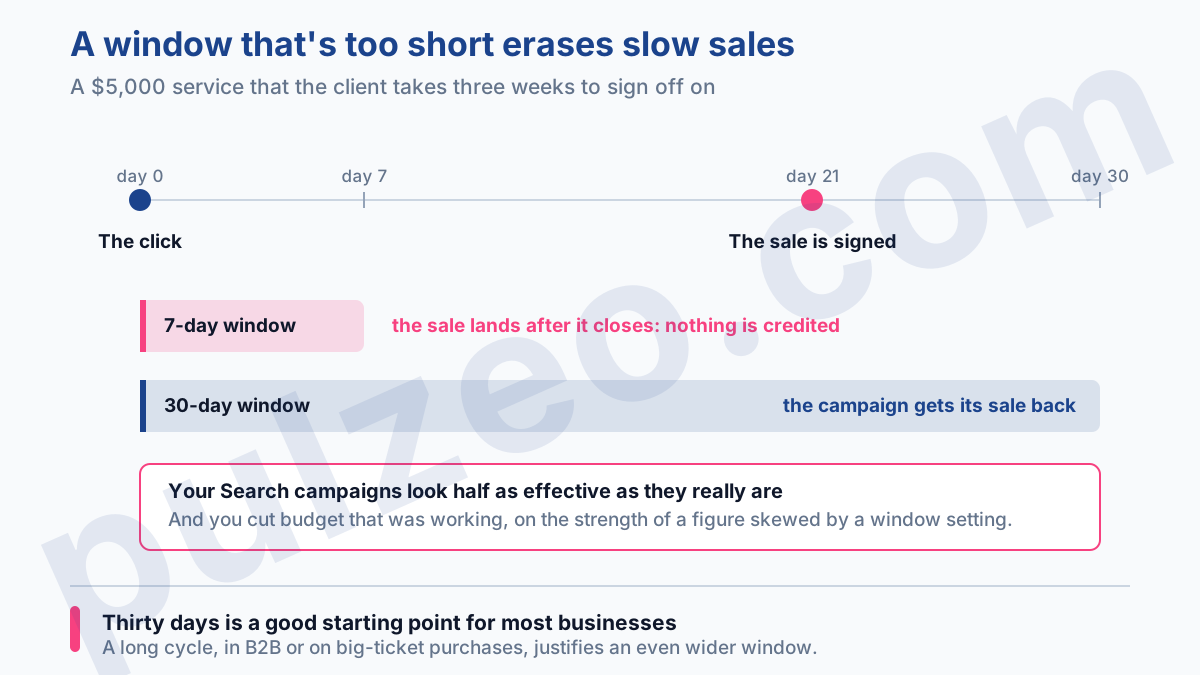
In practice, 30 days is a good starting point for most businesses. A long sales cycle, in B2B or on big-ticket purchases where the customer mulls it over for several weeks, justifies a wider window, otherwise you wrongly credit those sales to something other than Google Ads.
6. Do you have duplicate conversion actions?
Two conversion actions measuring the same thing, for example two "purchase" tags installed at different times and never cleaned up, double-count your conversions. Smart Bidding then optimizes on inflated figures, and your CPA looks twice as good as it really is.
To flush them out, segment your conversions by conversion action in your reports rather than looking at the total. Two lines that rise and fall in exact parallel, day after day, are almost always measuring the same event counted twice.
The sign of a duplicate: two active actions with the same name, or clearly measuring the same event. Keep the one with the most history, and set the other as secondary so it stops counting.
Recovering the conversions that cookies lose
The previous six points fix skewed conversions. There's one final setting that recovers conversions instead: enhanced conversions. The principle is simple. When a visitor converts, your site sends Google a hashed, anonymized version of their contact details, email or phone number, which Google matches against users signed in to their Google account.
In practice, conversions that cookie blocking would have wiped out get counted again. On accounts where browsers block a lot of them, the difference is far from trivial, and it costs your campaigns nothing.
Careful, though: they don't make up for refused consent, because Google requires consent to advertising data before it uses them. That particular gap is filled by consent mode modeling.
A more complete signal also means Smart Bidding works from a reality with fewer holes in it. You set it up once, at the tracking level, often through Google Tag Manager, and then check it like the rest of your setup.
Once the counting is reliable, you still need to know what to do with it. The article on improving your conversion rate without losing sales explains why a rising rate isn't always good news.
Where do you start if everything needs fixing?
Faced with a neglected account, it's easy to drown. Yet the order of priority is simple, and it follows the impact on bidding. First check that your key conversions are active and actually recording data: that part is vital.
Then check that they're included in the "Conversions" column, because that's what drives Smart Bidding. Counting and duplicates come right after, since they skew the CPA directly. Finally, attribution and windows refine how you read the numbers, but on their own they won't throw the account off course.
In fact, this is only the first layer of a bigger job. A full Google Ads audit always starts with conversions before judging the structure, keywords or bids, because everything else rests on them.
And if you're in e-commerce, optimizing your Shopping campaigns also starts with reliable conversions. Once your conversions are finally clean, if your CPA keeps trending up, at least you'll know the problem is real and not just a measurement artifact.
How to check all this without spending the day on it
Running this checklist by hand, on every account, takes time and is easy to forget.
The Pulzeo Conversions page runs this diagnosis automatically: it detects inactive actions, exclusions from the "Conversions" column, unsuitable count settings, inconsistent attribution models and duplicates, then ranks the problems by severity, from critical to informational, so you deal first with what has the most impact.
What would take a morning to review by hand then takes a single glance, across all your accounts at once.
Reliable conversions are the foundation of everything else. Until they're clean, optimizing the rest is like decorating a house with no foundations.
Common questions
What's the difference between "Conversions" and "All conversions"?
"All conversions" counts every action tracked in the account. "Conversions" only counts the actions you've chosen to include in that column, and it's the only one Smart Bidding uses to bid. An action that's tracked but excluded from the "Conversions" column therefore has no influence on your bids.
Why did my Google Ads conversions drop to zero?
Almost always because of a broken tag: a site redesign, a dataLayer change or a consent banner blocking the tag. A healthy account doesn't lose 100% of a conversion action overnight for a business reason. Test the tag first.
Which attribution model should you choose in Google Ads?
The data-driven model is now the standard Google recommends: it splits credit between touchpoints according to their real impact. What matters most is using the same model everywhere, so your comparisons between campaigns stay consistent.
Should you count "One conversion" or "Every conversion"?
In lead generation, choose "One conversion": a prospect should only count once, even if they fill out two forms. In e-commerce, choose "Every conversion": the same customer can buy several times and every sale counts. Careful: "Every conversion" is the default setting for website actions, so a contact form created without a second thought is misconfigured from the start.
