
How to optimize Google Shopping campaigns

A Google Shopping campaign stalls, and the same scene plays out every time: you type "how to optimize Google Shopping campaigns" into Google, land on ten guides that each list fifteen best practices, apply everything at once, and three weeks later you still don't know what worked. The problem isn't a shortage of advice. It's the lack of a method.
Optimizing Google Shopping ads isn't about checking items off a list. It starts with knowing where the campaign is stuck, then fixing things in the right order. Because the three places where everything happens, the product feed, the structure, and bidding, aren't interchangeable: they stack on top of each other.
Here's how to diagnose them, in the order that has the most impact, with concrete thresholds so you know when a setting is really off.
The three levels of a Shopping campaign
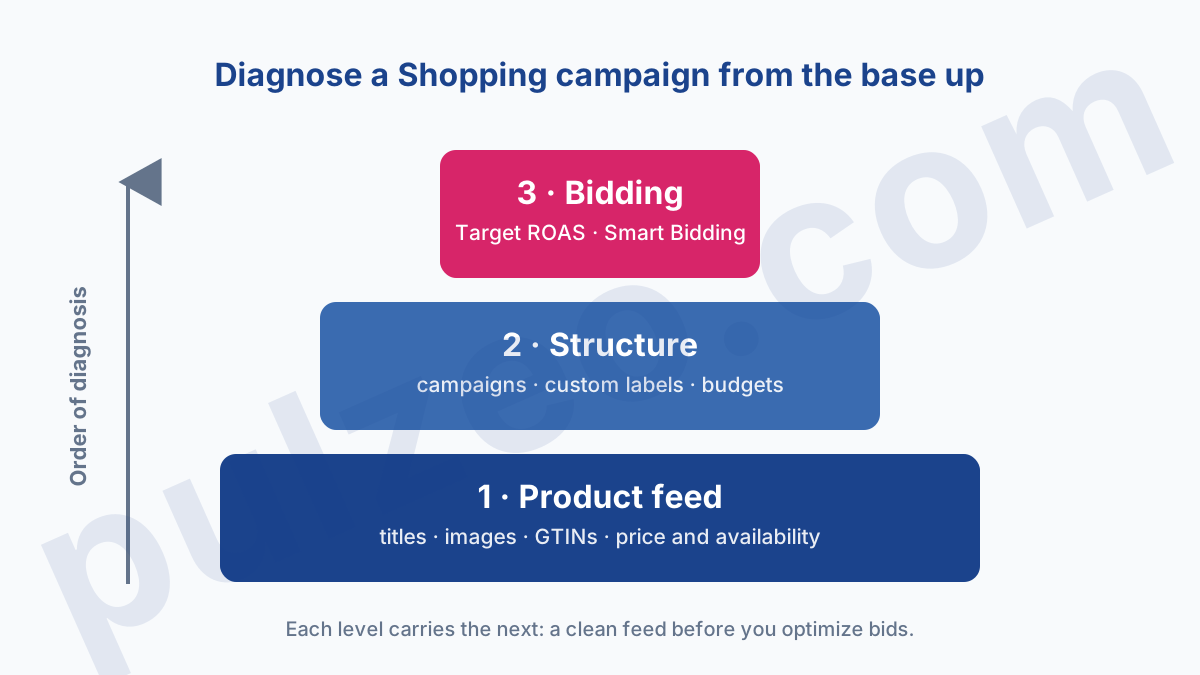
Before you touch a single setting, here's a picture to keep in mind. A Shopping campaign rests on three levels, and they sit in a specific order.
The base is the product feed: the data Merchant Center sends to Google (titles, images, prices, identifiers). That's what decides which searches your products are eligible for.
Above it sits the structure: how you group your products into campaigns so you don't bid the same on a pair of socks and on your flagship product. At the very top is bidding: how much you're willing to pay, by hand or through Smart Bidding.
The order isn't arbitrary. Each level carries the one above it. A clean feed makes the structure useful, and a sound structure makes your bids something you can actually steer. Attacking the problem from the top, fiddling with the target ROAS on a feed full of holes, is repainting the front of a house whose foundations are shifting.
Fixing your Shopping product feed
If I could look at only one thing on a Shopping campaign that's struggling, it would be the feed. It's the least visible part and the most decisive: Google builds your ads from that data, not from copy you write. A mediocre feed caps everything else, whatever you do above it.
The product title, your number one lever
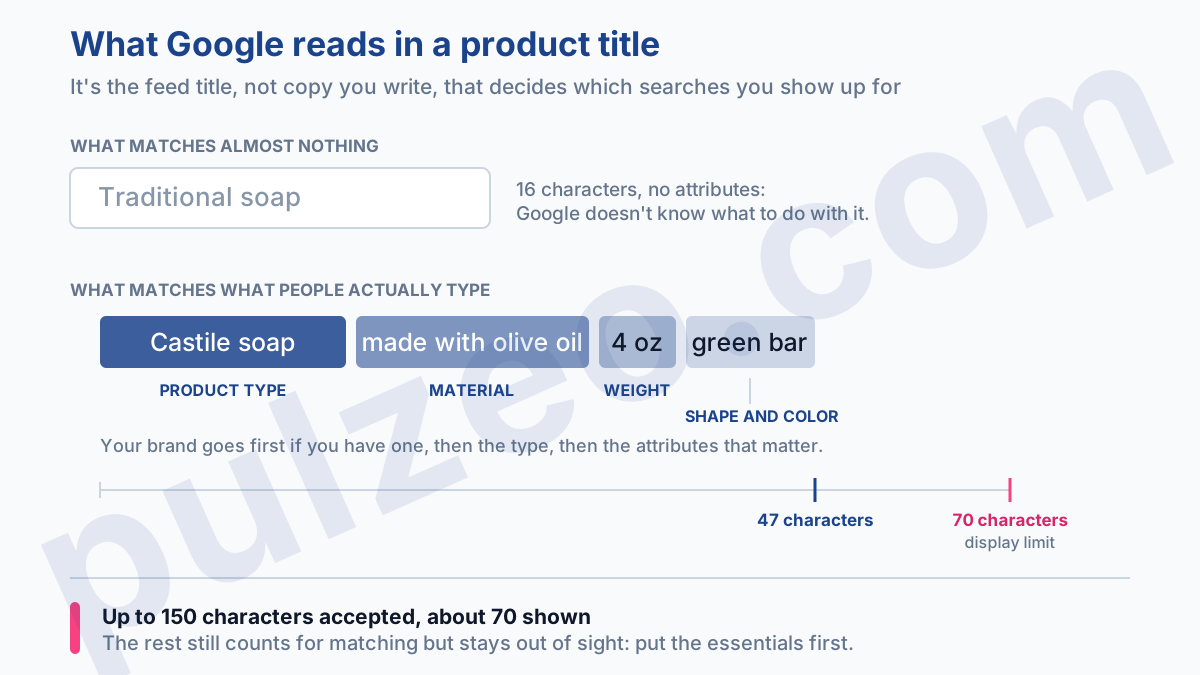
The title is, by far, the part of the feed that carries the most weight. It's what Google reads to decide which searches you show up for. "Traditional soap" matches almost nothing. "Castile soap made with olive oil 4 oz green bar" matches everything a shopper actually types.
The structure that works is always the same: brand, product type, then the attributes that matter (material, color, size, weight). You get up to 150 characters, but only the first 70 or so are displayed: put the essentials up front.
And to know what to add, one simple habit: read your search terms report. The words people type to find you are exactly the ones to move up in the title.
GTINs, images, attributes: the invisible foundations
The rest of the feed won't win you searches, but it will cost you some if it's missing. Three things not to overlook:
- the GTIN (the product's barcode number): without it, Google struggles to identify your item and you lose placements; with it, Google ties you to the product listings that already exist.
- the image: sharp, the product alone on a white background, with no watermark or promotional text slapped on top, a very common reason for disapproval.
- the Google product category and attributes (condition, gender, age group), filled in as completely as possible: they sharpen the targeting.
One last point people forget all the time: the price and availability in the feed have to match the product page exactly. One mismatch, and the item gets disapproved without a word of warning.
When products "disappear" from Shopping, the answer is almost always in the "Needs attention" tab in Merchant Center, which lists every disapproval and its cause. If the mechanics still escape you, I've explained how Merchant Center works and why it rejects products.
Should you segment your Shopping campaigns?
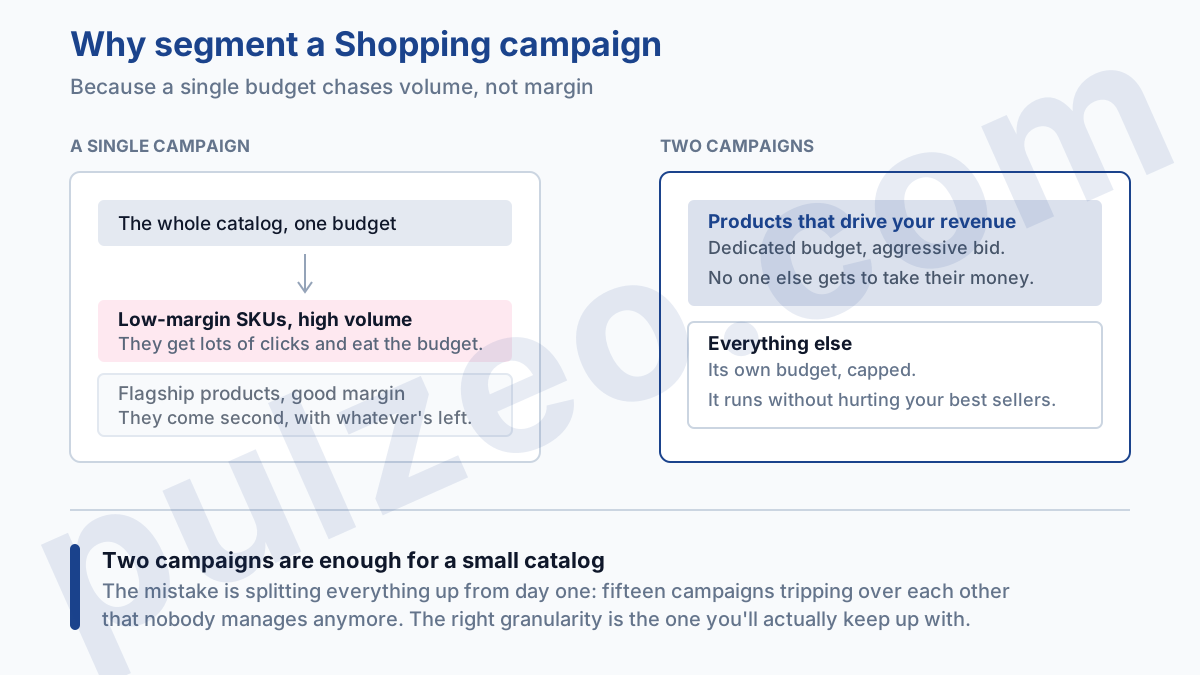
Yes, but less than people will tell you. By default, a single Shopping campaign treats your catalog as one block, and the budget goes where the volume is, not where the margin is. Segmenting simply means you stop bidding the same on things that aren't worth the same to you.
In practice, your high-margin flagship products deserve their own campaign, with a dedicated budget and an aggressive bid. Your low-margin or slow-moving SKUs don't belong in the same bucket: otherwise they eat into the first group's budget.
Custom labels are made for exactly that: tagging your products by margin, seasonality, or stock level so you can manage each group on its own.
This doesn't have to turn into a Rube Goldberg machine. On a small catalog, two campaigns are often enough: one for the products that drive your revenue, one for everything else. The mistake is wanting to slice everything up from the start, with fifteen campaigns tripping over each other that nobody manages anymore. The right granularity is the one you can actually keep up with.
What target ROAS should you set, and when?
The right target ROAS isn't a magic number, it's your margin. How to calculate the threshold, and why a ROAS of 4 can be a loss, are covered separately. And the right time to set it up is when you have enough conversions for Smart Bidding to learn.
Two conditions, in this order. And if you shift some or all of your Shopping into a Performance Max campaign, here's how to manage it without flying blind.
First, the data.
Smart Bidding needs conversions to adjust its bids, and those conversions still have to be reliable, which is far from a given (I cover it in detail in the guide on badly configured conversions). Below fifteen or so conversions a month on a campaign, the algorithm is working blind: you're better off staying on Manual CPC while you build up history.
Switch it to Target ROAS too early, and you strangle it.
Second, the level. A 400% ROAS is excellent on a high-margin product, whose break-even point is low, and nowhere near enough on a low-margin product, which could easily demand double that. Work out your break-even point (roughly, 1 divided by your margin gives the minimum ROAS to avoid losing money) and aim above it.
Above all, don't abruptly raise your target ROAS to "improve profitability": you're not cutting your costs, you're cutting delivery. Volume collapses, and you end up with a flattering ROAS on three sales a week. It's the same trap as a target CPA squeezed too hard, a pitfall I break down in the article on a CPA that shoots up.
The mistakes that drag down a Shopping campaign
Bad habits sink a campaign as surely as good settings keep it afloat. These are the ones I run into most often when I take over accounts.
Setting up the feed and forgetting it. A feed isn't a file you drop off once and for all. Prices move, stock turns over, products sell out. A feed that never gets refreshed ends up full of disapproved products nobody notices.
Ignoring search terms. In Shopping, you don't pick your keywords, but you can exclude the ones you don't want. Without negative keywords, you pay for "manual," "used," "free," "repair," everything that will never convert. Going through the search terms report once a month and cutting the irrelevant queries is the fastest win on this whole list.
Judging too fast. A three-day ROAS means nothing, especially at low volume. Look at the trend over two to four weeks, never at yesterday alone. And before cutting a product because it "doesn't convert," check that it doesn't simply have a feed problem. Cut first and diagnose later, and you're guaranteed to kill what was working.
Where should you start if everything needs work?
With a neglected campaign, it's easy to get overwhelmed. Yet the order of priorities follows directly from the three levels, and it tracks impact.
Always start with the feed, and within the feed, with the titles: that's where the most impressions are won or lost, and it costs nothing but time. Then check that no important product is disapproved, in the "Needs attention" tab.
Structure comes next: isolate your flagship products so they stop sharing their budget with everything else. Bidding follows, once the base is healthy and you have enough data to steer with. Attribution, device bid adjustments, free listings: those are refinements, and they come last, never before the foundations.
This order isn't just a convenience. It prevents the most common mistake: spending hours on the bids of a campaign whose real problem was a half-disapproved feed.
Diagnosing without spending all day on it
Running this diagnosis by hand, product by product, on a catalog of several hundred SKUs, takes time and is easy to put off. You end up checking the overall ROAS once a month, and the day it drops, you still don't know whether the problem is at the bottom, in the middle, or at the top.
That's exactly what Pulzeo for e-commerce businesses takes off your plate. Zeo, the built-in assistant, watches your accounts continuously and alerts you when a campaign starts to slip, pointing to the likely cause, instead of shoving one more red number under your nose.
You no longer discover the problem at the end of the month: you know right away whether to look at the feed, the structure, or bidding.
You don't optimize a Shopping campaign by checking boxes. You diagnose it, level by level, always starting from the bottom.
Common questions
How long before a Google Shopping campaign is profitable?
Give it two to four weeks before you judge, the time it takes Smart Bidding to get through its learning period and build up enough conversions. Before that, the numbers are too unstable to decide anything. The one exception: a broken feed or missing conversion tracking gets fixed right away, no waiting.
Should you choose Performance Max or Standard Shopping?
Performance Max serves more widely (Shopping, Display, YouTube) and steers itself, at the cost of control: its reports now show channels and search terms, but it decides the split itself. Standard Shopping keeps control and clarity. In practice, stay on Standard Shopping as long as you want to understand and fine-tune, and test Performance Max once your foundations are clean (a reliable feed and conversion tracking).
What target ROAS should you aim for on Google Shopping?
There's no universal good ROAS: it depends on your margin. A 400% ROAS ($4 in sales for every $1 spent) is excellent on high-margin products and not enough on low-margin ones, which need a much higher ROAS to be profitable. Work out your break-even point (roughly, 1 divided by your margin) and aim above it. Always compare against your margin, never against a number you found online.
Why aren't my products showing on Google Shopping?
Almost always a feed problem: a product disapproved in Merchant Center (a missing attribute, an invalid GTIN, a price or availability that doesn't match the page). Look at the "Needs attention" tab in Merchant Center first: it lists every disapproved product and the exact reason it was rejected.
