
How to set up a Google Shopping campaign in 2026

Setting up a Google Shopping campaign in 2026 starts with a decision the interface never lays out clearly: Standard Shopping or Performance Max. The rest of the path is mechanical. This fork isn't, and it decides what you'll be able to steer for the months that follow.
A word about what you'll read elsewhere. Quite a few guides still floating around tell you to switch to "Smart Shopping" once your data has stabilized. That campaign type no longer exists: Google migrated it to Performance Max between July and September 2022, and nobody can create one anymore. So here's the real path.
What you need before you create the campaign
Three prerequisites, in this order, and there's no getting around any of them.
- a Merchant Center account with an approved product feed, which supplies the titles, images, prices, and availability of your ads;
- your website verified and claimed in Merchant Center;
- the Merchant Center account linked to your Google Ads account.
Without these three, the campaign creation screen will let you move forward, then stop you dead when it asks for the Merchant Center account. The details of importing the feed, product disapprovals, and lead times are in the guide on how Merchant Center works.
A note on the order. Many merchants create the campaign first and fix the feed afterward, telling themselves they'll save time. They lose time: a campaign that starts on a half-disapproved feed learns on a truncated catalog, and you'll have to redo everything when the missing products come back.
Standard Shopping vs Performance Max: which should you create?
That's the real question, and the answer depends on what you already know about your catalog.
If you don't know yet which products sell through advertising, create a Standard Shopping campaign. If you do, and you want to cover all of Google's surfaces with a single set of creatives, Performance Max makes sense.
What Standard Shopping lets you control
A Standard Shopping campaign gives you three things, and a new account needs all three.
First, search term detail. You see what people actually typed before clicking on your product, query by query. On a fashion catalog, that's what shows you that "wedding dress rental" is costing you clicks when you only sell new dresses.
Worth pointing out, because plenty of guides still miss it: neither that detail nor exclusions are reserved for Standard Shopping anymore. Performance Max accepts negative keywords at the campaign level, and their cap went up to 10,000 in March 2025. Since 2025, its search terms report has also had the same granularity as in Standard Shopping.
Next, product groups. You decide which products go into the campaign and which stay out, by brand, by category, by custom label. So you can push your twenty best sellers and leave the rest of the catalog aside while you learn.
Finally, clarity. A Standard campaign tells you which product generated which click and which sale, with no aggregation.
What Performance Max takes away
Performance Max serves across Google's six channels from a single set of creatives: Search, Maps, YouTube, Discover, Gmail, and the Display Network. Your products don't form a seventh channel there, they travel inside those six as ads using product data. That's its strength, and it's also what makes steering it indirect.
You don't choose how the budget splits across those surfaces. What you can really control is broader than people say, but you have to know where to look: getting Performance Max out of its black box covers the question in full.
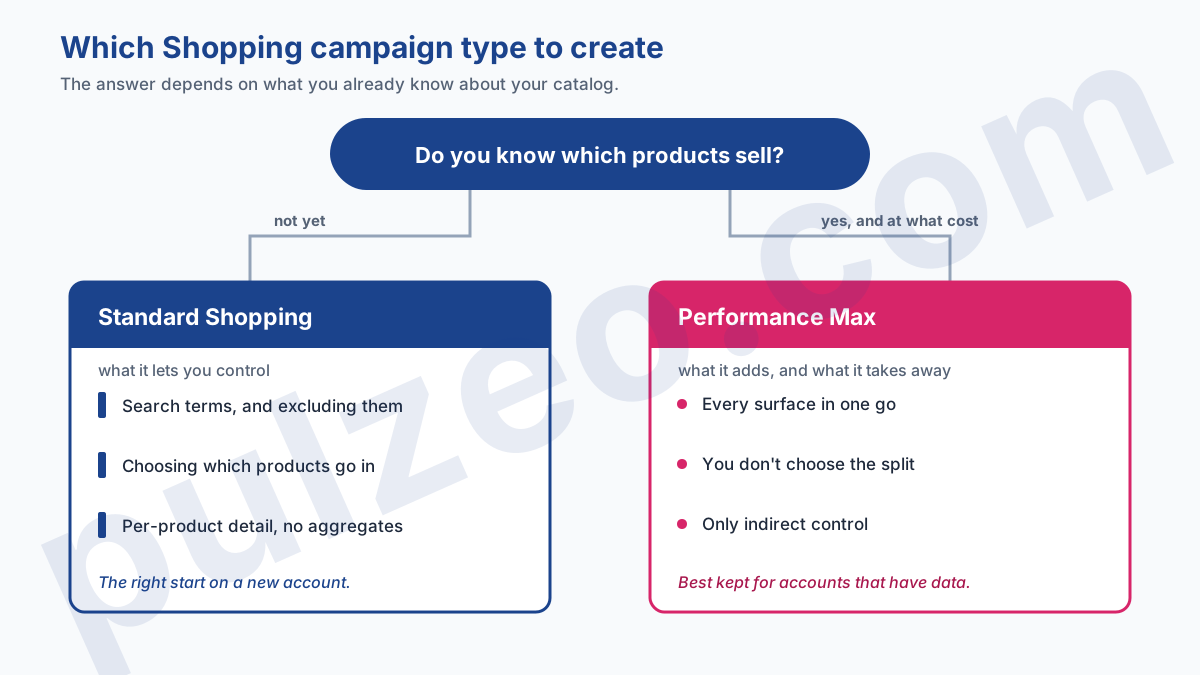
My take, for what it's worth: on a new account, starting with Performance Max means asking an algorithm to optimize a catalog nobody has sorted yet. It will, with the data it has, which is to say none.
Setting up the campaign, screen by screen
The real path differs from what the documentation describes, because Google slips a suggestion in at every step.
- choose the "Sales" objective, or "Create a campaign without a goal's guidance" if you'd rather see every setting;
- select the Shopping campaign type;
- pick the Merchant Center account, which can't be changed afterward;
- Google then suggests switching to Performance Max: decline, and continue with Standard Shopping;
- choose the feed label that selects your products, which replaced country of sale in August 2024;
- set the daily budget, keeping in mind that it will be split across all your products;
- set the bid strategy to "Maximize clicks" to start;
- name the ad group, then create a product group that contains only the items you want to push.
That last point is the one everybody skips. By default, the campaign includes all your products, and that's rarely what you want in the first month.
On bid strategy, the Search logic applies, with a different threshold. In Standard Shopping, the only bid strategy with a numeric target is Target ROAS, and Google requires at least fifteen conversions over the last thirty days, per Merchant Center account, before you can use it. A new account has none.
How much budget to start with, and why the catalog decides
Here's the threshold guides never give, because it isn't expressed in dollars.
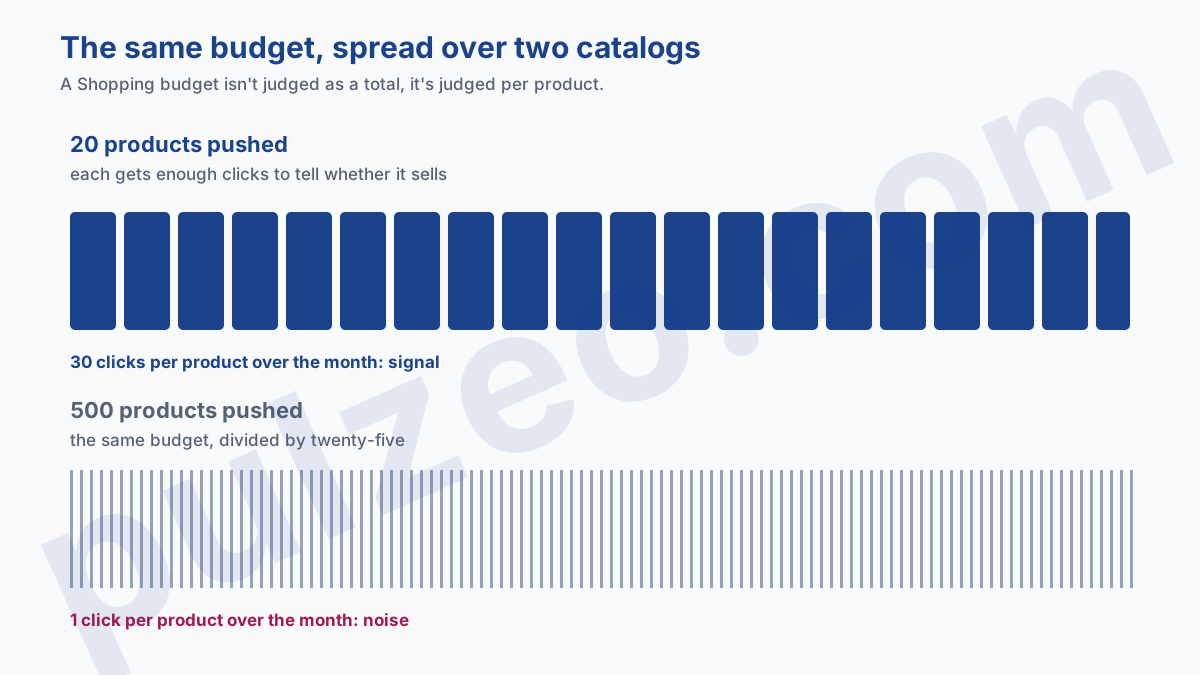
A Shopping budget isn't judged as a total, it's judged per product. $300 a month on a catalog of fifty items works out to $6 per product per month: at $2 a click, each product gets three clicks a month, and you learn absolutely nothing.
The math runs the opposite way from most people's instinct. Start from the number of clicks you need per product to judge it, say thirty over the month, multiply by your cost per click, then by the number of products you're pushing. That's your minimum budget, and above all it tells you how many products you can afford to push.
A catalog too wide for its budget doesn't produce small results: it produces meaningless ones, on every single product.
That's why a merchant on a small budget is better off starting with twenty products than with a thousand. Sorting by margin comes afterward, once you know what sells: optimizing a Shopping campaign picks up that work in detail.
How long before you can judge a Shopping campaign?
Three timelines you shouldn't confuse, and the first one often catches people off guard.
Feed approval takes anywhere from a few hours to five business days, sometimes longer on a first import. Until a product is approved, it doesn't serve, so a campaign can run on empty while its budget sits there untouched.
The first clicks then arrive within the day. The first sales, on the other hand, mean nothing: three conversions tell you neither your cost per acquisition nor which products work, and luck runs in streaks.
The verdict comes somewhere between three and six weeks, provided you've built up thirty or so conversions. With a high average order value and few sales, that can take a whole quarter, and you have to accept it before you start rather than pulling the plug in week three.
One last variable, which I haven't seen covered in any of the setup guides I've read: seasonality. Launching a Shopping campaign three weeks before back-to-school or Black Friday means teaching the algorithm a buying behavior that's about to disappear. The numbers will look flattering, then collapse without you changing a thing.
If you have the choice, start during an ordinary stretch of your year. Otherwise, know that you'll have to judge the campaign again once the rush is over, and draw no conclusions from your first weeks.
That's exactly the kind of monitoring Pulzeo runs continuously on an ecommerce account, flagging the products that spend without selling before the month is out.
The mistakes of the first few weeks
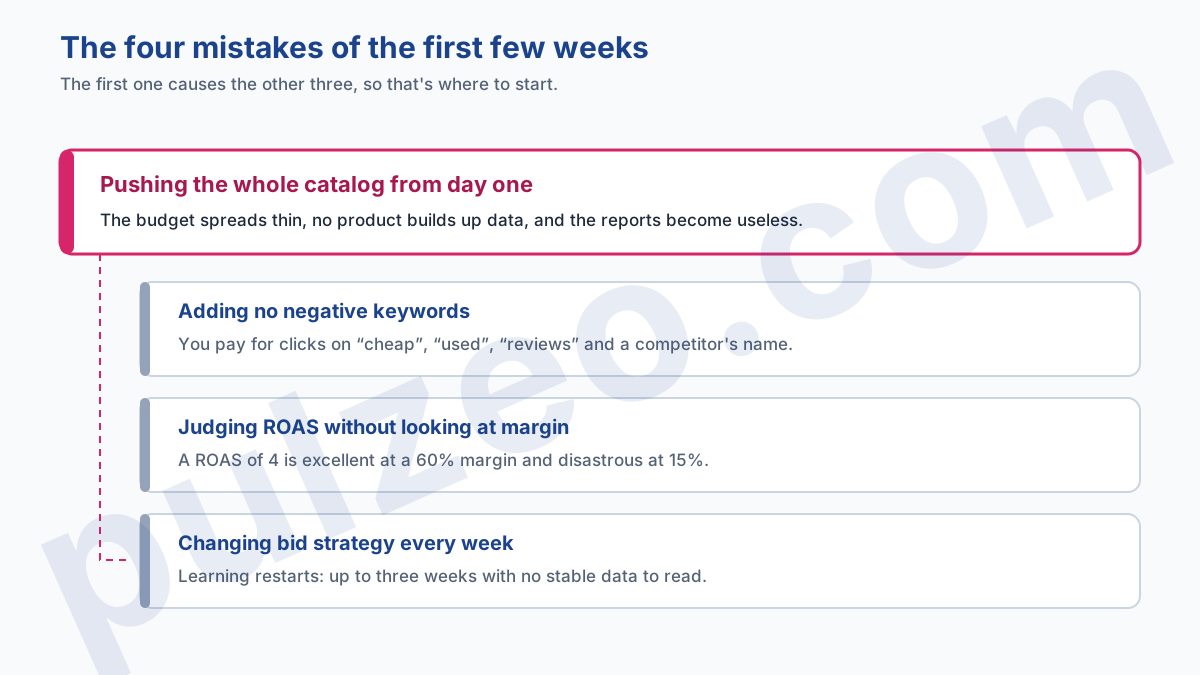
Four of them show up in nearly every account I take over.
- pushing the whole catalog from day one, the root mistake: the budget spreads thin, no product builds up data, and the reports become useless;
- adding no negative keywords, and paying for clicks on "cheap", "used", "reviews", or a competitor's name;
- judging by return on ad spend without looking at margin, when a ROAS of 4 is excellent at a 60% margin and disastrous at 15%;
- changing bid strategy every week, which restarts the learning period every time.
The first one produces the other three, and it's where you have to start. On negatives, the mechanics are the same as in Search, and the broad match negative trap applies here too. On margin, the full calculation is in the article on what ROAS really measures.
Where to start this week
If your feed is already approved, a Standard Shopping campaign takes half an hour to build. Take your twenty best sellers, a budget that leaves each of them a few clicks a day, the Maximize clicks strategy, and a location you actually ship to.
Then don't touch anything for ten days. It's the hardest instruction in this article, and it's the one that separates a campaign you learn something from and a campaign you reset every morning.
Common questions
Should you create a Standard Shopping or a Performance Max campaign?
Start with a Standard Shopping campaign if you're starting from scratch. It shows you, query by query, what triggers your ads, and its whole budget stays on your Shopping ads, whereas Performance Max splits it across its six channels on its own. Both now accept negative keywords and show search terms with the same granularity. Move to Performance Max once you already know which products sell, and at what cost.
What's the minimum budget for a Google Shopping campaign?
Think per product, not in total. A budget gets divided by the number of products you push, so $300 across fifty items gives none of them enough clicks to draw any conclusions. Push your twenty best sellers first, with a budget that leaves each of them a few clicks a day.
How long until a Shopping campaign shows results?
Allow up to five business days for your feed to be approved, then three to six weeks of live ads before the numbers mean anything. The real verdict takes thirty or so conversions, which depends entirely on your average order value and your daily budget.
Can you run Shopping ads without Merchant Center?
No. Shopping ads are built from the product feed hosted in Merchant Center: it's what supplies the title, image, price, and availability. Without a linked Merchant Center account and an approved feed, no Shopping campaign can serve.
