
What is Google Merchant Center and how does it work?

You opened an account, uploaded your catalog, and since then nothing has budged. That's the moment most people look up how Google Merchant Center works, and the answer fits in one sentence: it's where Google stores and checks your products, but it doesn't serve a single ad. Serving the ads is Google Ads' job.
That split explains almost every roadblock I come across. A perfectly uploaded catalog can stay invisible for weeks because the link with Google Ads was never accepted, or because forty products are disapproved and nobody has opened the tab that says so.
Here's how the chain really fits together, and above all where it breaks. The guides all stop once the account is created, which is precisely where the trouble begins.
What's the difference between Merchant Center and Google Ads?
Three building blocks, three distinct roles, and confusing the first two costs a lot of time.
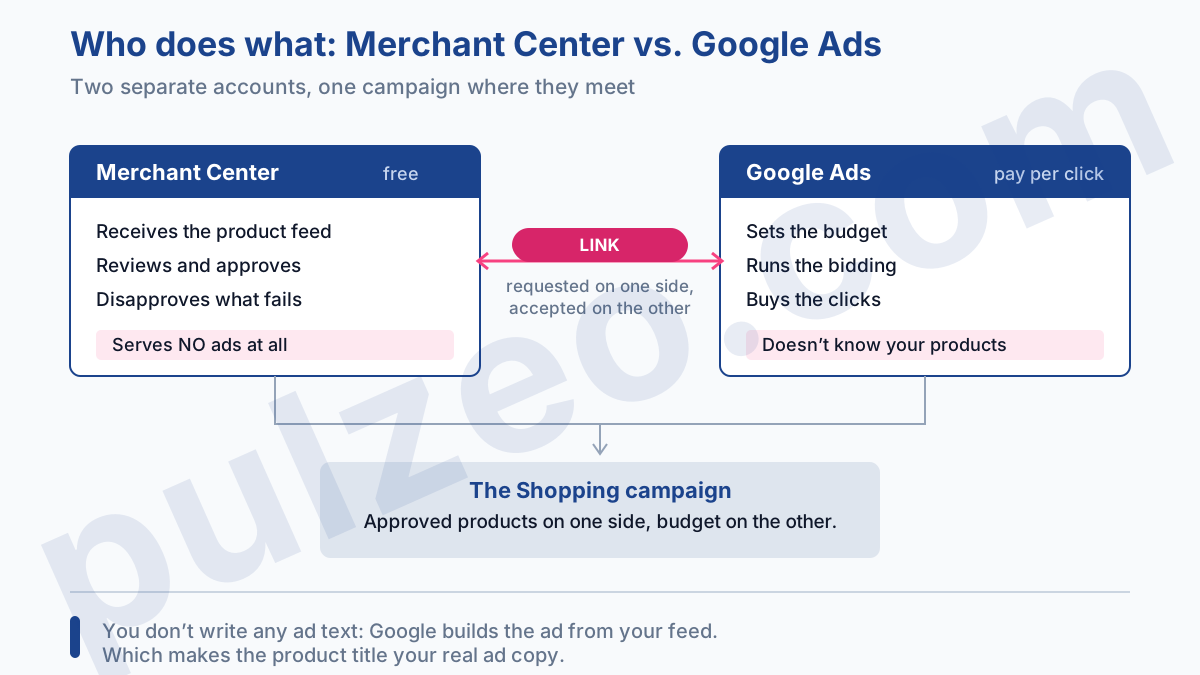
Merchant Center receives your catalog as a feed: a file, or a direct connection to your store, describing each product with its title, price, availability and image. Google reviews it, approves what complies and disapproves the rest. The account is free.
Google Ads, on the other hand, buys the clicks. That's where you set a budget, a bid strategy, targeting. It doesn't know your products: it pulls them from Merchant Center once the two accounts are linked.
The Shopping campaign is the meeting point. It takes the approved products from one side and the budget from the other, and builds the ads on its own. You don't write a word of ad copy: Google builds the listing from your feed, which makes the product title your real ad copy, as I explain in the article on Shopping campaigns.
One important caveat that most guides gloss over. Saying Merchant Center serves nothing is true for advertising: it buys no clicks and runs no bidding. But an approved catalog can show up without you paying a cent, through free listings for products.
Google describes them as turned on by default in most cases, and they make your products visible in Search, the Shopping tab, Google Images or Maps. The volume is modest next to a paid campaign, but it's free and already in place. For a small store that's hesitant to invest, the logical order is to polish the feed first and see what it brings, before spending a single dollar.
How to upload your products to Merchant Center
This is the basic mechanism, and the choice you make here shapes everything else. Google calls it a data source, and it offers six ways to feed one:
- adding products automatically from your online store, where Google reads the markup on your pages and updates as it spots changes;
- connecting an ecommerce platform such as Shopify, where the data flows in by itself;
- adding products from a file, uploaded once or hosted at a URL that Google comes back to fetch;
- a Google Sheets template, handy for a small catalog you maintain by hand;
- adding products one by one in the product editor, workable under a few dozen SKUs, but only on accounts that already have products;
- the Merchant API, for large catalogs and special cases.
The real question isn't which one to pick, it's how fast each one refreshes. A hosted file gets fetched by Google every 24 hours. A spreadsheet syncs on the same schedule. A connected ecommerce platform can take 24 to 48 hours before a change shows up.
Remember that number, because it explains half the disapprovals I talk about further down. You launch a sale at noon, your store shows the new price instantly, and Merchant Center goes on believing the old one for twenty-four hours. Google compares, finds a gap, disapproves the product.
On a store where things change often (prices, stock, weekend promotions), that lag isn't a configuration detail. It's the first thing to weigh, ahead of ease of setup. A 48-hour sale driven by a daily feed spends a good chunk of its run out of step with Google.
How do you link Merchant Center to Google Ads?
The link is requested on one side and accepted on the other. That's the only subtlety, and it's the one that stalls the most accounts, seemingly for no reason.
Who has to accept the link request
You can send the request from either account. From Merchant Center, by going to Settings, then Access and services, where you add Google Ads as a service. From Google Ads, through Data manager in the Tools menu, where Merchant Center appears in the list.
Either way, the request waits for approval on the other side. If you're an admin on both accounts, Google approves it automatically and you don't see a thing. Otherwise, someone has to go in and click Accept (Approve, on the Google Ads side), and that's exactly where things jam: nobody knows, the request sits there, and everyone looks for the problem in the feed.
The classic case is the store owner who set up their Merchant Center account themselves and handed Google Ads to an agency. Each one is waiting for the other. A three-minute phone call settles what people spent two weeks hunting for.
What the link unlocks
Once the two accounts are linked, Google Ads sees your catalog and you can create a Shopping campaign. It's also what brings product-level performance back into Google Ads: which item got clicked, what it cost, what it brought in.
From that point on, monitoring becomes a real issue, because in Shopping you don't choose your keywords. Pulzeo surfaces the actual searches that triggered your ads and flags the ones that spend without selling.
Why are my products disapproved in Merchant Center?
Because on the first upload, Google reviews two things, not one: your products, and your website. The catalog can be flawless and the account still get blocked because of the store itself: no business contact details, a return policy nowhere to be found, unclear payment options.
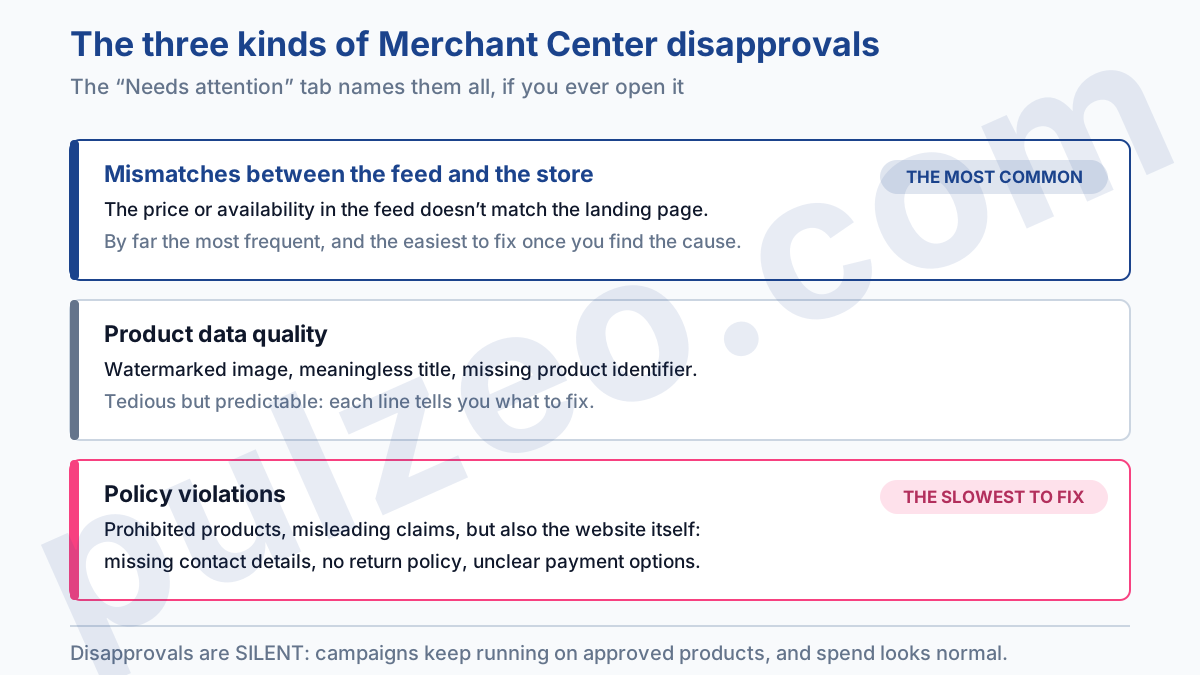
On the product side, disapproval reasons fall into three categories. Data quality first: an image with a watermark, a meaningless title, a missing product identifier. Then content policies, which cover prohibited products and misleading claims. And finally mismatches between the feed and the store, which I come back to below because they're by far the most frequent.
The trap isn't the disapproval itself, it's that it happens in silence. Your campaigns keep running on the approved products, spend looks normal, and you don't see that a third of your catalog never shows. I've taken over accounts where two hundred products had been disapproved for months, and nobody had batted an eye.
The tab that lists these disapprovals is called Needs attention, under Products, and it deserves a weekly visit, just like the Search terms report. Each line shows its reason and the number of products affected, which is enough to sort out what deserves an immediate fix.
Product disapproved for inaccurate price: what to check
It's the most widespread disapproval reason, and the one that seems the most absurd until you get the logic. Google compares the price in your feed with the one shown on the landing page. If the two don't match, the product gets disapproved.
Sounds simple, until you check and find your price is the right one. The real causes lie elsewhere, and Google's documentation on price mismatches lists about a dozen. The ones I run into most often:
- a feed that has fallen out of sync, because it only updates once a day and you launched a sale at noon;
- several prices visible on the same page, the crossed-out one and the discounted one, without Google knowing which one counts;
- structured data that contradicts what's displayed, often a leftover from an old plugin;
- a price that changes with the visitor, by location or by cookie, so it differs from the one Google's crawler sees.
Availability follows exactly the same rule. A product listed as in stock in the feed but shown as out of stock on the page gets disapproved, and the other way around too.
The quick check that settles half the cases: open the landing page in a private window, logged out of everything, and compare it line by line with what your feed says. What Google sees looks much more like that than like your admin screen.
How long does Merchant Center take to approve products?
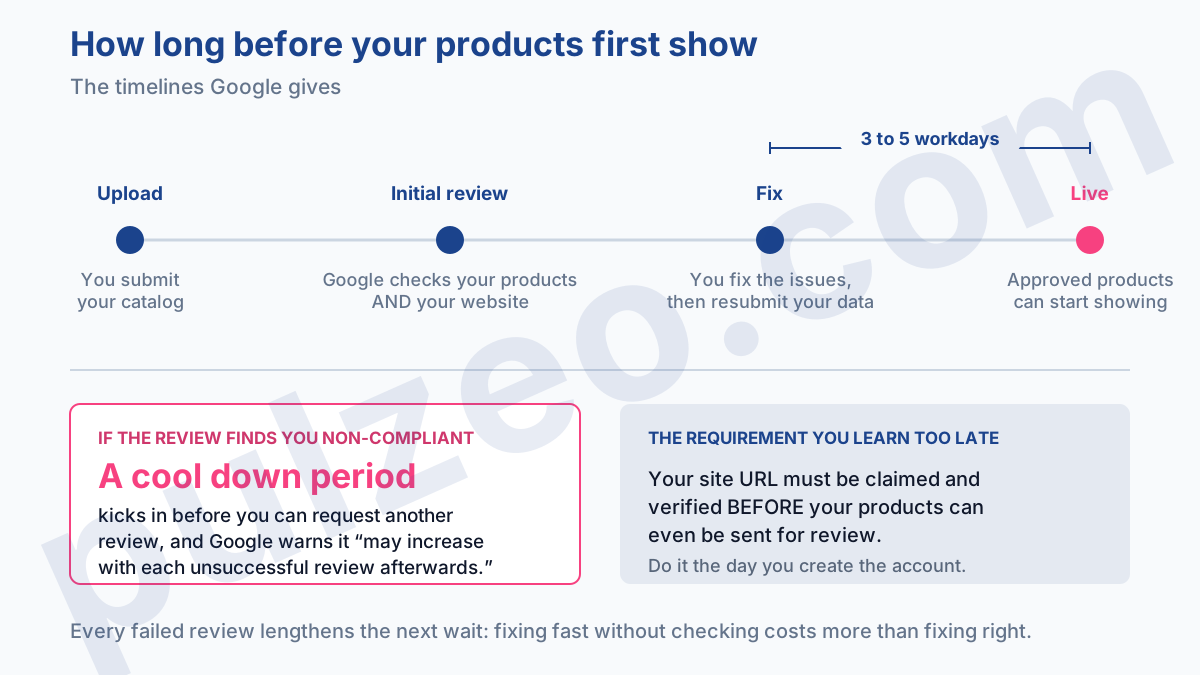
Longer than you'd think, and that's the real cost of this stage. After you update your products, Google says it can take three to five business days to review them, and up to seven business days for other kinds of reviews.
The trap snaps shut when a review fails. Once you've disagreed with the decision and tried to fix it, Google sets a cool down period before you can request another one, and warns that it "may increase with each unsuccessful review afterwards."
Every failed review lengthens the wait for the next one. So fixing fast and requesting a review without checking costs more than fixing slowly and properly.
Another requirement people discover at the worst possible moment: Google states in black and white that "your account must have a URL that is claimed and verified" before your products can be reviewed. You verify it with a tag on your site, a file upload, or your analytics tool. Do it the day you create the account, not the day you get stuck.
What to do once your Merchant Center feed is approved
Past this stage, Merchant Center needs little attention, and the action moves entirely over to Google Ads, where you now have to create the Shopping campaign itself. That's where you decide the campaign structure, how to separate your good-margin products from the rest of the catalog, and the return on ad spend you require.
The break-even point to aim for is a topic in its own right, which I covered in the article on calculating ROAS.
A word on reports, because they've changed: since August 24, 2026, Merchant Center has changed its definitions and recalculated your historical data back to July 1. Your "Organic" numbers go down, your ad metrics go up, and your sales haven't moved.
What's left is the part that wears you down: reopening the Needs attention tab, going back over the search terms, checking that margin hasn't slipped while revenue was climbing. It's doable, it just means thinking about it every week for months, and that's exactly what nobody keeps up.
Pulzeo watches these accounts continuously and warns you when a campaign spends without selling, with a store's numbers rather than a generic dashboard's.
Merchant Center remains a quality checkpoint: it tells you whether your products are allowed out, and stops there. Mistaking it for a management tool means spending weeks polishing a flawless catalog that feeds a badly tuned campaign.
Common questions
Is Google Merchant Center free?
Yes, opening and using a Merchant Center account costs nothing. You upload your catalog there, and Google reviews and stores it without charging you anything. What you pay for is the advertising: as soon as your products go into a Shopping campaign, Google Ads bills the clicks, not Merchant Center.
Do you need a Google Ads account to use Merchant Center?
Not to open the account or to upload your products. But Merchant Center doesn't serve any ads on its own: you have to link it to a Google Ads account to run a paid Shopping campaign. Without that link, your catalog stays approved and can still appear in free listings, but no paid campaign can advertise it.
What happens if a Merchant Center review fails?
Once you've disagreed with the decision and tried to fix the issue, a cool down period applies before you can request a new review, and it may increase with each unsuccessful review afterwards. So fix the cause of the disapproval before asking for another check instead of retrying blind, or you'll lengthen the wait with every attempt. As a rule of thumb, allow three to five business days after you update your products.
What should you do when a product is disapproved for an inaccurate price?
Compare the price in your feed with the one displayed on the landing page, under real conditions. The classic causes are a feed that's no longer in sync with the store, several prices visible on the same page, structured data that contradicts the display, or a price that changes depending on the visitor. Fix the attribute, resubmit your data, then wait for the review.
