
What is a good ROAS for Google Ads?

Google Ads ROAS is the revenue each dollar of advertising brings back: revenue divided by spend. An account showing a ROAS of 4 means a thousand dollars invested for four thousand dollars in sales. Simple. So is 4 a good ROAS for Google Ads? Not necessarily: it can just as easily signal a healthy margin as an outright loss, and the vast majority of advertisers never see it coming.
The trap isn't in the math, it's in how you read it. You'll hear over and over that a good ROAS sits between 3 and 5, as if there were a magic number that works for everyone. There isn't one. The only benchmark that counts is your margin. Here's how to calculate your ROAS, the threshold at which you really start making money, and which levers push it up.
What is ROAS, and how do you calculate it?
ROAS (return on ad spend) measures the revenue generated for each dollar invested. The formula fits on one line: revenue generated divided by ad spend.
A thousand dollars of budget that brings in four thousand dollars in sales is a ROAS of 4, or 400% if you prefer the percentage. Google Ads shows both, based on the conversion value you send it.
Where ROAS differs from CPA is that it thinks in value, not volume. It doesn't matter whether a sale comes from a $40 cart or a $400 one: what counts is total revenue measured against total spend.
That's why it's king in e-commerce, where cart values can vary tenfold, and much less telling in lead generation, where you think in terms of cost per acquisition instead.
To read it in the interface, look at the "Conv. value / cost" column: that's your ROAS, campaign by campaign. And if you just want to lay out your numbers to see where you stand, our ROAS calculator works it out in seconds, break-even point included.
Why a ROAS of 4 can be a loss
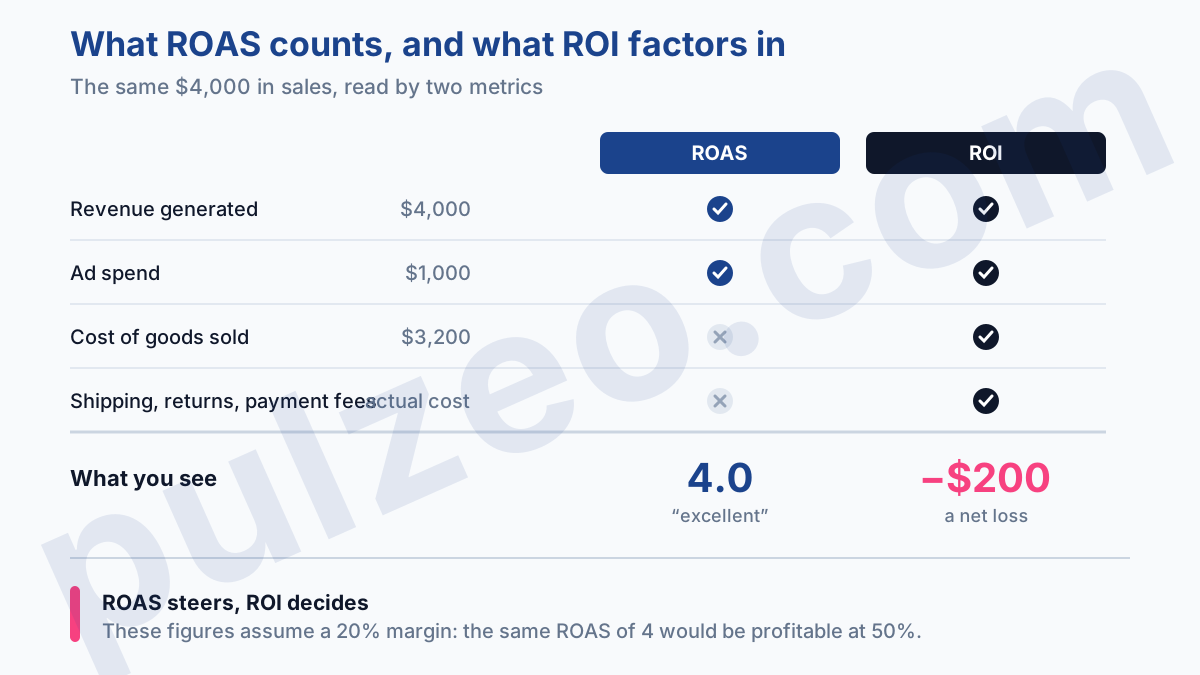
Here's the mistake that costs the most, and there's nothing technical about it. ROAS compares your sales to your ad spend, period. It completely ignores what those sales leave you once the product, shipping, and fees are paid for. In other words, it measures revenue, never profit. A flattering ROAS can easily cover up a money-losing operation.
It all depends on your margin, and the threshold is disarmingly simple: your break-even ROAS equals 100 divided by your margin as a percentage. With a 50% margin, you need a ROAS of 2 to cover your costs. With a 20% margin, you need 5. So the same ROAS of 4 makes you money in the first case and loses you money in the second. Same number, opposite result.
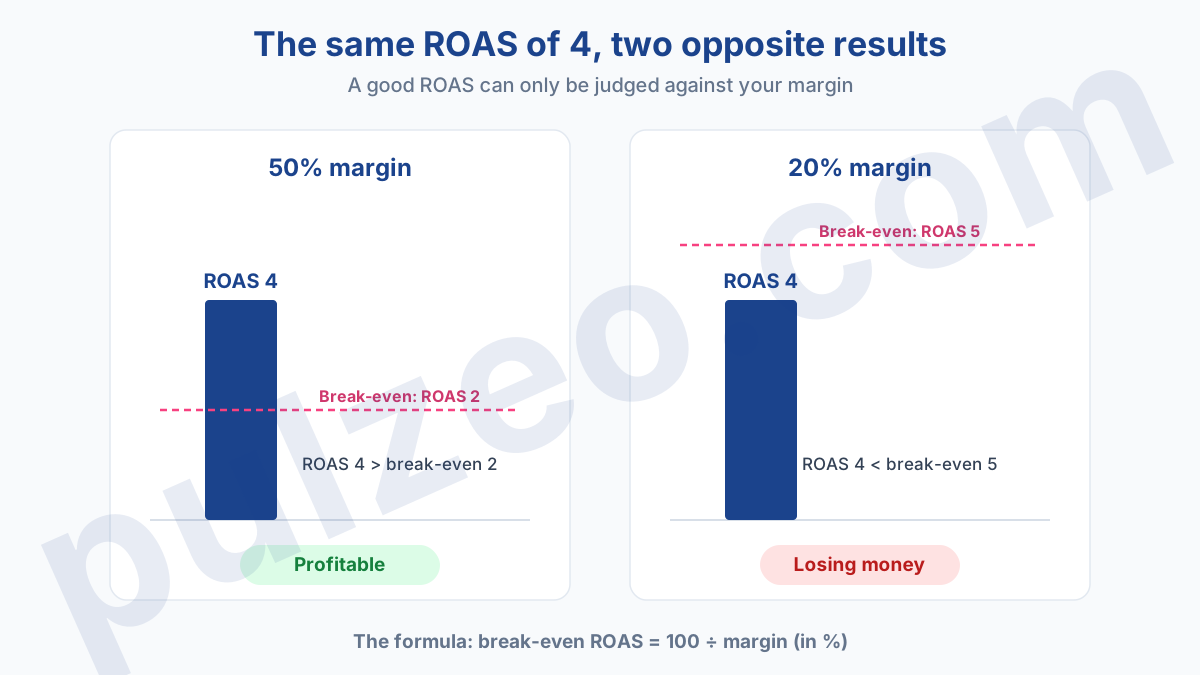
A worked example to make it stick. You spend $1,000 and generate $4,000 in sales: a ROAS of 4. On that $4,000 of revenue, a product with a 20% margin leaves you $800 in gross margin. Take away the $1,000 of advertising and you're at minus $200. Yet the dashboard shows a ROAS of 4, the kind everyone would envy you for.
And the margin you think you have is often optimistic. Free shipping, returns, discounts, payment fees: all little nibbles that shave your real margin below the one in your calculation. When you set your threshold, start from the margin after those costs, not the theoretical margin on the price tag, or you'll aim too low and slip back into the red without seeing it.
That's why the famous "a good ROAS is between 3 and 5", the stock answer when you ask what a good ROAS is for e-commerce, is useless at best and dangerous at worst. A ROAS of 3 is excellent for a product with a 60% margin and a disaster for one at 15%. Serving one universal range to margins that vary fourfold means promising half the readers they're profitable while they're draining their cash.
The only "good ROAS" is the one that clears your own break-even. To set it from your margin, our break-even calculator gives it to you as a single number.
ROAS vs ROI: what's the difference?
People often mix the two up, and that's exactly what leads to the trap above. ROAS weighs sales against ad spend alone. ROI, on the other hand, works in net profit: it subtracts every cost, so your margin is part of the math. A ROAS can shine while the ROI sinks into the red.
Remember the hierarchy. ROAS steers your campaigns day to day because it's immediate and visible right in the interface. ROI tells you whether your business makes money, but it's calculated outside Google Ads, with your real costs. The first is a dashboard, the second is the verdict.
Is your ROAS accurate before you optimize it?
Before you touch a single bid, here's a question that saves hours: is the ROAS you're reading even reliable? In a lot of accounts, it's wrong before it's even good or bad, and you end up optimizing in a vacuum.
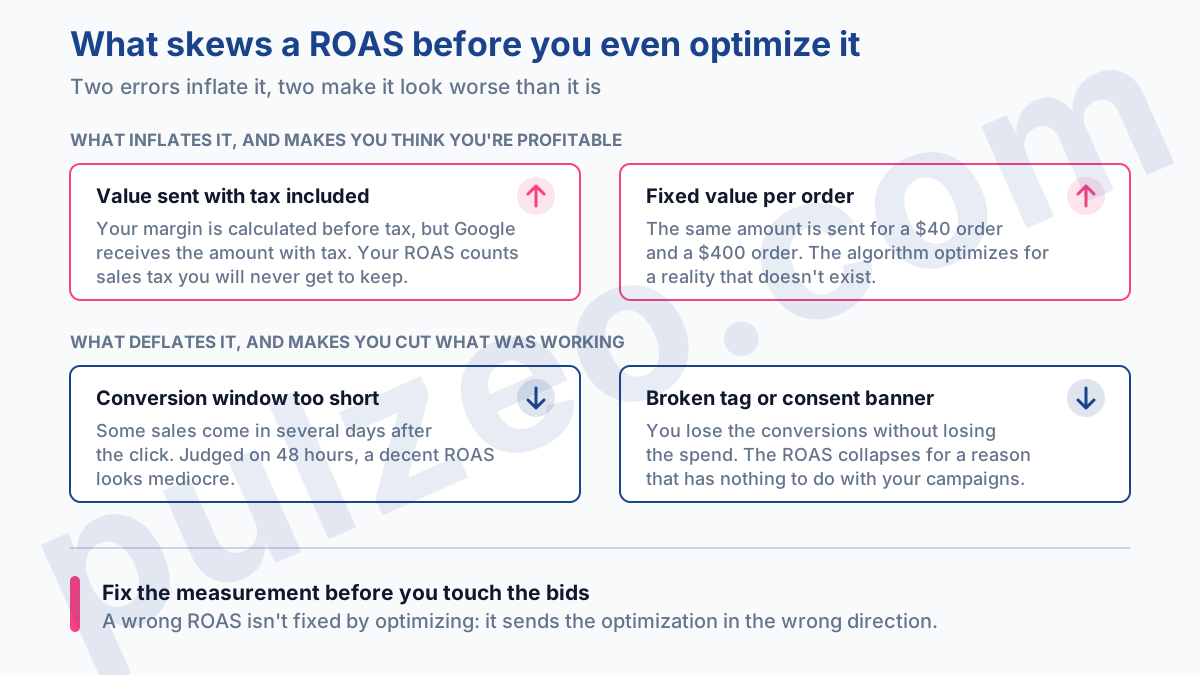
The first suspect is the conversion value. If you send Google revenue with tax included while your margin is calculated before tax, your ROAS is artificially inflated.
Worse, some accounts send a fixed value per order when cart values vary tenfold: the algorithm optimizes for a reality that doesn't exist. Sending the real value, ideally the margin rather than revenue, changes the way you steer the whole account.
That switch has a name: POAS, for profit on ad spend. Instead of sending revenue as the conversion value, you send the margin. Smart Bidding then optimizes for what stays in your pocket, not for raw sales volume.
It means sending a net value (the margin per order) rather than the cart total, but it's the only way to make the number you steer by match the one you actually live on.
Next come the conversion window and delayed conversions. In e-commerce, a share of sales happens several days after the click. A ROAS judged on the last 48 hours looks mediocre when the conversions are still on their way in.
And if a tag misfires, or a consent banner blocks tracking, you lose conversions without losing the spend: the ROAS collapses for a reason that has nothing to do with your campaigns. I've covered these measurement traps in the guide on badly configured conversions. Get the measurement right first, then optimize.
The levers that improve your ROAS
Once the measurement is squared away, you can really move the ROAS. Two directions, never both at once: either you raise the value generated, or you lower the cost of that value. Most quick wins come down to a handful of moves:
- cut the search terms that spend without ever converting;
- focus budget on the products and campaigns that are genuinely profitable;
- strengthen the landing page, because a better conversion rate improves ROAS without touching bids.
Raising the value generated
On the value side, the idea is to sell more, or at higher prices, with the same budget. Push your high-margin products rather than advertising everything evenly, polish your product data and images in Shopping, and send the algorithm the real value of each conversion so it goes after the carts that matter.
For an e-commerce account, that's often where the biggest gains lie dormant, long before any fine-tuning of bids.
Bringing the cost down
On the cost side, the goal is to pay less for the same value. The fundamental lever is still Quality Score: more relevant ads bring the CPC down for the same position, which lifts the ROAS. Add remarketing, which brings back already-qualified visitors at a lower cost, and exclusions for whatever burns budget, whether that's locations, audiences, or off-topic queries.
Watch out for a knee-jerk move that backfires: raising Smart Bidding's Target ROAS in one go to force profitability. The algorithm then only bids in the safest auctions, volume collapses, and you end up with a flattering ROAS on three sales a week.
Raise the Target ROAS in steps of 10 to 20%, never abruptly. And don't set a single target for the whole catalog: a product with a 15% margin and a product with a 60% margin don't share the same break-even, and locking them under one target is bound to sacrifice one of them.
Why ROAS alone means nothing
Everything above comes down to one simple idea: a ROAS means nothing on its own. You have to measure it against your margin to know whether it's profitable, check that it's measured properly before you trust it, and track it over time instead of reacting to a single number. The snag is that nobody has time to redo that analysis every week, on every account.
That's exactly what Pulzeo automates. Zeo, the built-in assistant, watches your ROAS continuously, checks it against your break-even point, and warns you when profitability slips, instead of letting you discover the leak at the end of the month. You're no longer flying blind on a raw number: you know, in real time, whether every dollar you spend is really working for you.
A good ROAS isn't a high number. It's a number above your break-even, measured right, and held over time.
Common questions
How do you calculate ROAS in Google Ads?
You calculate ROAS by dividing the revenue generated by your ad spend. A thousand dollars of budget that brings in four thousand dollars in sales gives a ROAS of 4, or 400%. In the interface, the "Conv. value / cost" column shows it campaign by campaign, provided you're sending a reliable conversion value.
What's a good ROAS?
There's no universal good ROAS, and the "between 3 and 5" range you read everywhere is a trap. The only valid benchmark is your break-even point, equal to 100 divided by your margin as a percentage. With a 50% margin, a ROAS of 2 is enough; with a 20% margin, you need 5. A good ROAS is simply one above that break-even.
What's the difference between ROAS and ROI?
ROAS sets your sales against ad spend alone. ROI works in net profit, after deducting every cost, so your margin is part of the math. A high ROAS can hide a negative ROI if your margin is thin. ROAS steers the campaigns day to day, while ROI tells you whether the business makes money.
Should every product have the same target ROAS?
No. A product with a 15% margin and one with a 60% margin don't have the same break-even. Forcing a single target ROAS on both sacrifices one or the other: too low for the low-margin product, too high for the high-margin one. Group your campaigns by margin level and set one target per group.
