
How much traffic do you need for Google Ads remarketing?

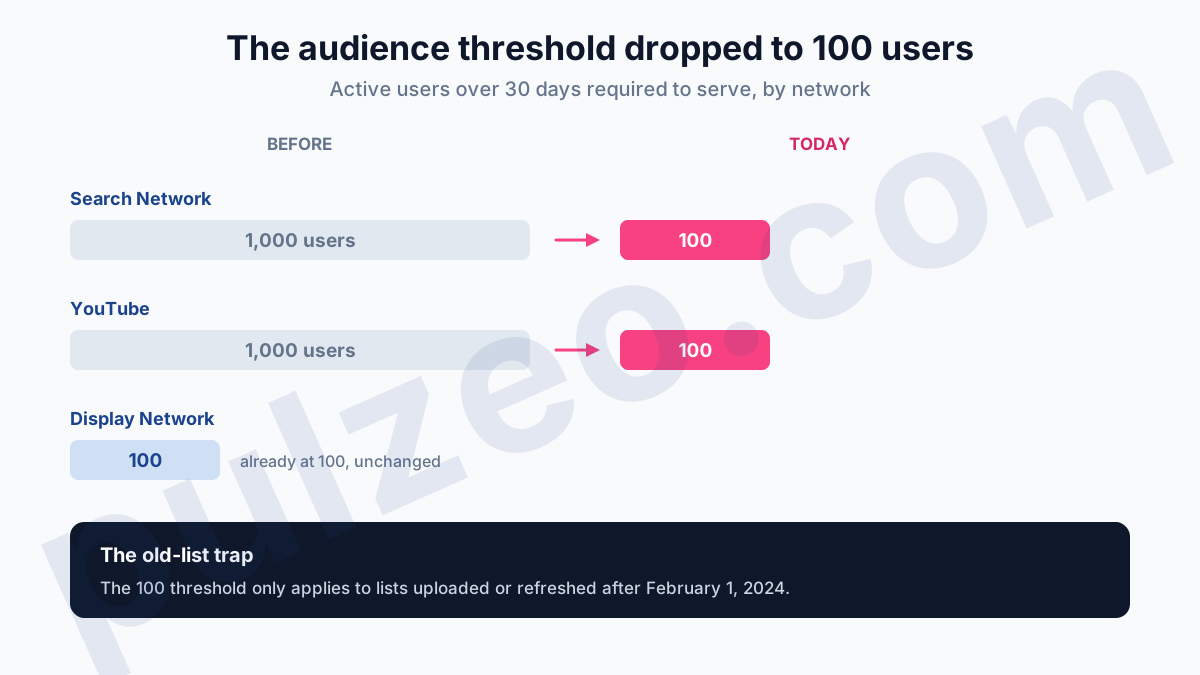
"We don't have enough traffic for remarketing." It's the line I hear most often on small accounts, and it's no longer true. Google now asks for 100 active users over 30 days to serve Google Ads remarketing, and that figure holds on all three networks: Display, Search and YouTube.
Search and YouTube used to demand 1,000 users. That floor automatically shut out low-traffic accounts, and plenty of advertisers now qualify without knowing it.
There's a second change almost nobody points out: the word "remarketing" has disappeared from the interface. If you go looking for the menu, you won't find it. Here's the real threshold, the trap that can still block you, and how to retarget without wasting money.
The minimum audience size Google requires for remarketing
The threshold fits in one sentence: your segment needs at least 100 active users over the last 30 days to serve. Same figure on the Display Network, the Search Network and YouTube.
This is no settings footnote. For years, retargeting on Search stayed out of reach for modest accounts, with a floor ten times higher.
One word of caution before you celebrate: don't read this threshold as a raw traffic figure. Google counts the active users it can identify, and that's always a fraction of your real visitors. Leave yourself a wide margin. An account with a few hundred monthly visitors is in the running today, which wasn't true two years ago.
Now for the trap, because it's going to block some of you. It doesn't affect the website visitor segments, which update on their own, but the customer lists you upload yourself.
For those, the 100 threshold only applies if the list was uploaded or refreshed after February 1, 2024. An older list that nobody has touched since stays subject to the old floor of 1,000 matched users. If your customer file has been gathering dust since 2023 and refuses to serve, upload it again: it will switch over to the new rule.
Where did the word "remarketing" go?
It's gone, and on purpose. Google replaced "remarketing" with "your data" in its interface, and "audience types" with "audience segments". The concept hasn't moved an inch; only the vocabulary changed.
In practice, you're no longer looking for a remarketing list: you're looking for a data segment, in Audience manager. It's a silly detail, but it wastes a ridiculous amount of time. Nearly every tutorial online still describes menus that no longer go by that name, and you end up believing the feature was removed.
What do you need to set up before you start remarketing?
Remarketing, which plenty of people call retargeting, doesn't generate its own data. It needs a Google tag that fires on every one of your pages, and a consent setup that doesn't block collection for everyone.
It's the first thing I check when remarketing audiences refuse to grow. Nine times out of ten, the problem isn't traffic volume. It's a tag that doesn't fire on half the site, or a badly wired consent banner that cuts off measurement before it even starts. The same kind of silent failure you get with conversion tracking.
A case that comes up often: an online store whose segments topped out at around thirty people while monthly traffic was well over a thousand visitors. The tag was properly installed on the category pages, but missing from the checkout flow, which had been added later on a subdomain. The result: the most valuable visitors, the ones who had put an item in their cart, never entered any list.
The check takes five minutes and saves you weeks of wrong conclusions. Open Audience manager, look at the size of each segment, and compare it with your real traffic. A moderate gap is normal, since Google only retains part of your visitors. A huge gap, on the other hand, calls for inspecting the tag page by page.
A word on cookies, since the question comes up every time. Contrary to much of what you've read, Google gave up on removing third-party cookies from Chrome, a decision announced in July 2024 and confirmed in April 2025: they're still there.
That doesn't change much for you, because retargeting starts from your own tag, on your own site. It does rely on Google cookies to fill its audiences, but its lists are born from your visits, not from data bought elsewhere. That's what makes it sturdier than targeting fed by third-party data, which Safari and Firefox have been blocking for years.
Segment your audiences by intent
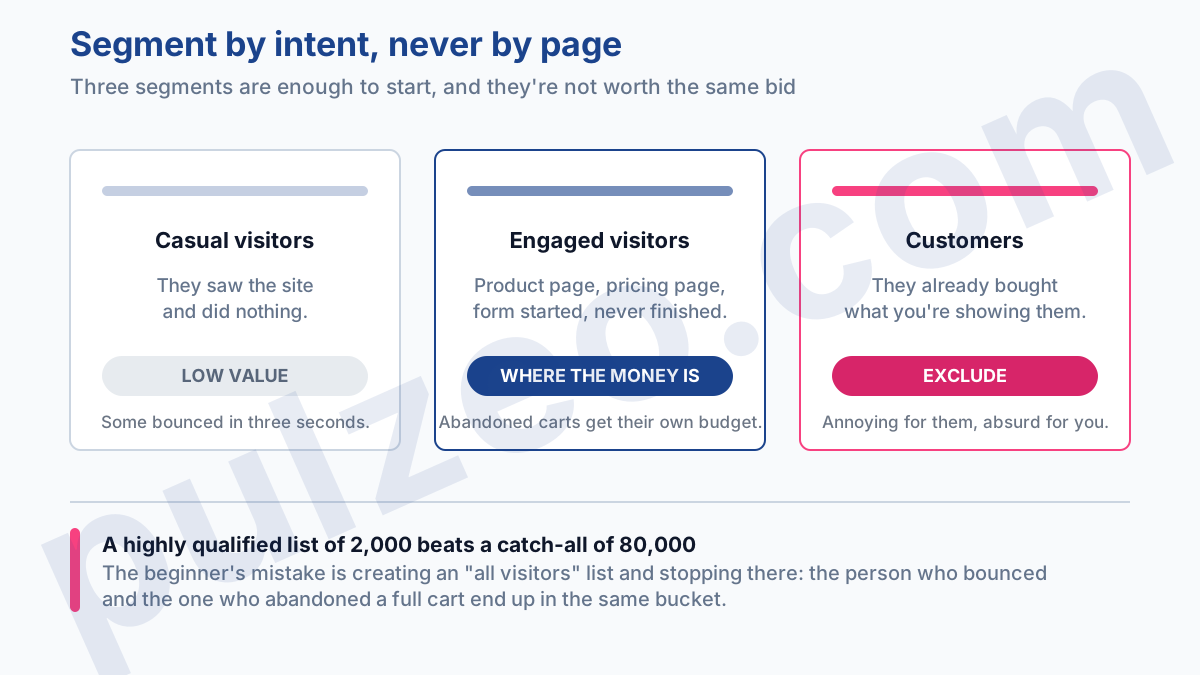
The beginner's mistake is to create an "all visitors" list and stop there. You then lump together the person who bounced in three seconds and the one who abandoned a full cart. Those two aren't worth the same bid.
The foundation that works for almost everyone
Three segments are enough to start, and they're set apart by intent rather than by URL. Casual visitors, who saw the site and did nothing. Engaged visitors, who viewed a product page or a pricing page, or started a form without finishing it. Customers, whom you need to isolate so you stop selling them what they've already bought.
This split works for any business, and you build it with URL rules in Audience manager. If you only do one thing this week, make it this one.
What changes depending on your business
Beyond the foundation, segmentation follows what you sell:
- E-commerce: the abandoned cart deserves its own segment and its own budget, as it's by far the most profitable;
- E-commerce again: dynamic remarketing shows people the exact products they viewed, as long as you have a product feed connected;
- Lead generation: separate the people who opened the form from the ones who submitted it, since the message is completely different;
- Long sales cycle: segment by how recent the visit is, since you don't talk to this week's prospect the way you talk to one from three months ago.
No need to pile on segments for the sake of it. A highly qualified list of 2,000 people will almost always beat a catch-all of 80,000 vaguely interested visitors.
How long can you retarget a visitor?
The ceiling Google allows is 540 days, or about 18 months. But it's a technical limit, not advice, and mistaking it for a recommendation gets expensive.
Think about your real sales cycle. On a $30 impulse buy, the intent is dead after a week; paying to bring that product back for 6 months means burning budget in front of someone who has forgotten you even exist. On a service worth several thousand dollars with 3 months of consideration, a long window is perfectly defensible.
My rule of thumb from the field: match the membership duration to the actual time between the first visit and the purchase, then add a buffer. That number is in your conversion data; you only have to look at it.
In practice, windows vary widely from one account to the next. For a consumables store, almost every sale happens within 7 days of the first visit: a 30-day list is enough, and anything beyond that is wasted budget.
For a B2B service, the gap between first contact and signing is measured in weeks, and a 90-day window becomes the bare minimum.
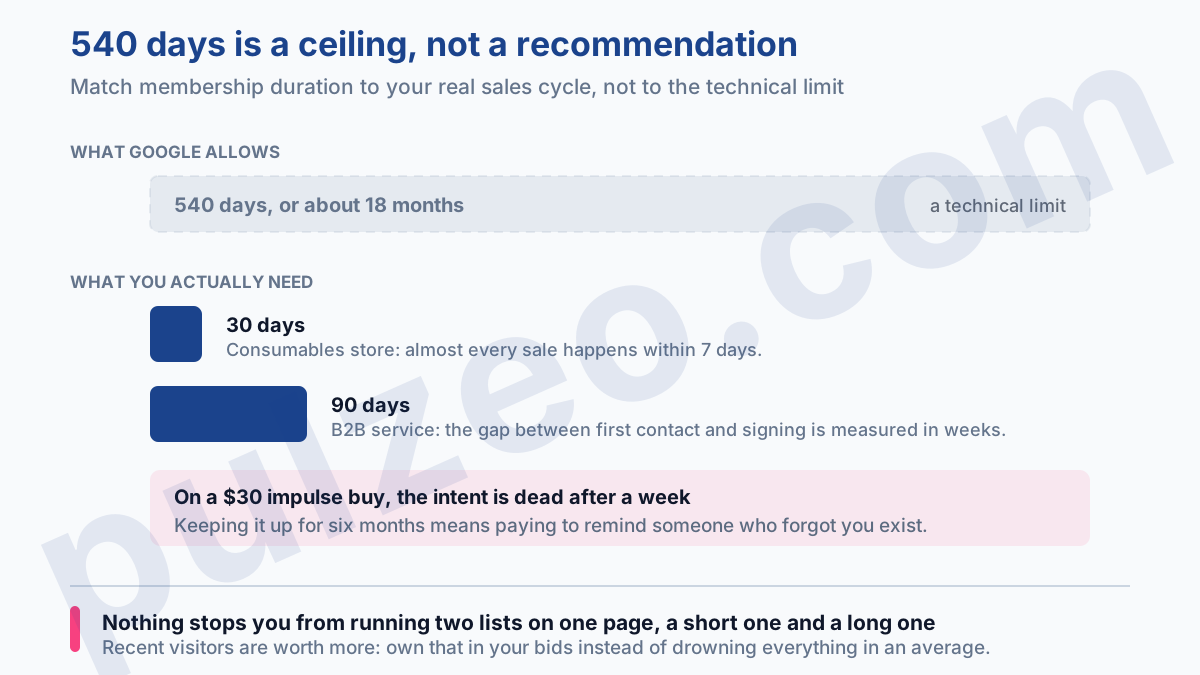
The smart move is to stop thinking in terms of a single list. Nothing stops you from creating two on the same page, a short one and a long one, with different bids and messages. Recent visitors are worth more, so you might as well own that in your settings rather than drowning everything in an average.
The three budget drains that keep coming back
The first, and the most painful, is not excluding the people who have already converted. Without an exclusion, you pay to show a "check out our offer" ad to someone who signed the day before. It's annoying for them and absurd for you.
The second is having no frequency cap. The same person seeing your banner fifteen times a day doesn't become fifteen times more convinced: they develop an aversion to your brand. Set a cap; a few impressions a day is more than enough.
The third is subtler: serving the same message to everyone. If you've taken the trouble to segment by intent, the message has to follow. A visitor who abandoned their cart needs a reason to come back now, not the same awareness ad as someone who skimmed your homepage.
The traffic you need to get started
That, in the end, is what has changed. The volume excuse no longer holds up: at 100 active users, the door is open. What remains hard is knowing which segments are worth it on YOUR account, which ones sit there bringing in nothing, and at what point a retargeting window has become too long.
That's exactly the kind of analysis Pulzeo does for you: spotting the segments that spend without converting and the ones that are missing, then telling you what to fix first. And if you're still wondering whether your account has enough volume for these numbers to mean anything, the question of the conversion threshold is worth a look before anything else.
Retargeting isn't about getting in front of the same people as often as possible. It's about speaking again, at the right moment, to the people who had almost made up their minds.
Common questions
How many visitors do you need to run remarketing on Google Ads?
100 active users over the last 30 days is enough, and the threshold is the same on the Display Network, the Search Network and YouTube. It's a big change: Search and YouTube used to require 1,000 users, which in practice shut out low-traffic accounts. One caveat, though: Google counts the active users it can identify, which is only a fraction of your raw traffic, so leave plenty of margin before you assume you're eligible.
Where did remarketing lists go in Google Ads?
They still exist, but Google changed the vocabulary of its interface: the term "remarketing" was replaced with "your data", and "audience types" with "audience segments". So you're no longer looking for a remarketing list but for a data segment, in Audience manager. Most tutorials online still use the old vocabulary.
What membership duration should you choose for your sales cycle?
Base it on the actual time between the first visit and the purchase, then add a buffer. For a consumables store where almost every sale lands within seven days, a 30-day list is enough and anything longer is wasted budget. For a B2B service where signing takes weeks, 90 days becomes a minimum. The ceiling Google allows, 540 days, is a technical limit, not a recommendation.
Is remarketing threatened by cookie restrictions?
Far less than other kinds of targeting. Google actually gave up on removing third-party cookies from Chrome, a decision announced in July 2024 and confirmed in April 2025: they're still in place. More importantly, retargeting starts from your own data, the site visits your tag records and the customer lists you upload. It does rely on Google cookies to fill its audiences, hence the real requirement: clean data collection, with a tag that fires everywhere and consent that's properly gathered.
