
How to optimize Performance Max campaigns

A Performance Max campaign is a single campaign that runs on all six of Google's channels at once: Search, Maps, YouTube, Discover, Gmail, and the Display Network. You set a goal and a budget, and the AI takes care of the rest.
Your Shopping ads don't form a seventh channel: they travel inside those six as soon as you supply product data. All very convenient, but for a long time it felt like a black box: you watched the budget go out without ever knowing where it went. Good news: that changed in 2025.
The most common instinct is to hand everything over to the algorithm and hope for the best. Bad idea. You control far more than you think, and you can now finally see where the money goes. Here's what Performance Max decides for you, what you really steer, and how to take back control without breaking everything.
What is Performance Max in Google Ads?
Performance Max is the most automated campaign type in Google Ads: one campaign, one budget, and the AI decides almost everything else.
In exchange for your goals and your creative assets, it chooses which channels to serve on, which people to reach, at what price, and with which ad. If you want that kind of automation but confined to Search alone, it's AI Max for Search campaigns you need, not Performance Max.
It rolls into a single campaign what used to take several separate campaign types: Search, Display, video, and Shopping. The algorithm allocates spend across these inventories in real time, based on where it thinks it will find your next conversion. You give it the raw material (goal, budget, signals, creative assets), and it runs the delivery.
The upside is real: the campaign goes looking for conversions on inventory you would never have switched on by hand, and at scale. The principle is laid out in Google's documentation.
Why Performance Max is seen as a black box
The complaint is fair: for a long time, once the campaign was live, you didn't know where your budget was going. Search or Display? YouTube or Gmail? The only data available was totals (impressions, clicks, conversions), with no breakdown by channel or by placement.
No way to tell whether your dollars were buying high-intent search traffic or YouTube views that would never convert.
I've seen accounts where most of a Performance Max campaign's budget was draining into Display and video, with a colossal number of impressions and a handful of conversions at the end of it, without anyone suspecting a thing until they went digging.
That opacity feeds a perfectly legitimate fear: losing control. You're funding a machine whose gears you can't see, and when the results disappoint, you don't even know what to fix. That's what earned Performance Max its black-box reputation, along with a healthy dose of suspicion from account managers used to steering down to the individual keyword.
The Performance Max channel performance report
In 2025, Google finally rolled out a breakdown of your performance across its six channels: Search, Maps, YouTube, Discover, Gmail, and the Display Network. So you can see, in black and white, whether your budget mostly goes to qualified Search traffic or to low-intent Display.
Two clarifications help you read this report without getting it wrong. Search partners get a row of their own, even though Google files them under Search when it defines the channels. And there's a second segmentation, by format this time, with "Ads using product data" on one side and "Ads using video" on the other.
A time-series view has even been added, showing how each channel's contribution shifts over time. That's the data advertisers had been demanding for years.
The wall of opacity hasn't fully come down (placement-level detail is still limited), but the centerpiece is there: you can finally check that the split serves your goal, and react when it drifts away from it. The black box has cracked open.
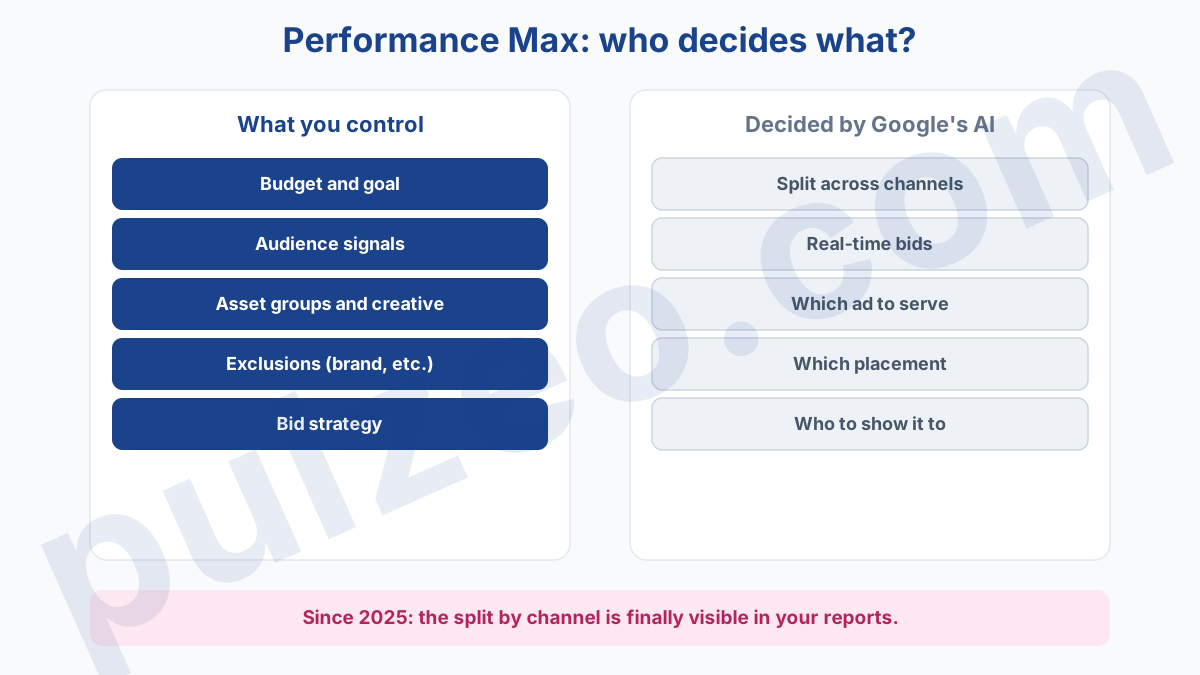
In practice, make a habit of opening this report every week: if a channel captures a share of the budget without returning conversions, that's your cue that your audience signals or your exclusions need adjusting. You don't steer the channels directly, but you steer what influences them.
When to launch Performance Max, and when to hold off
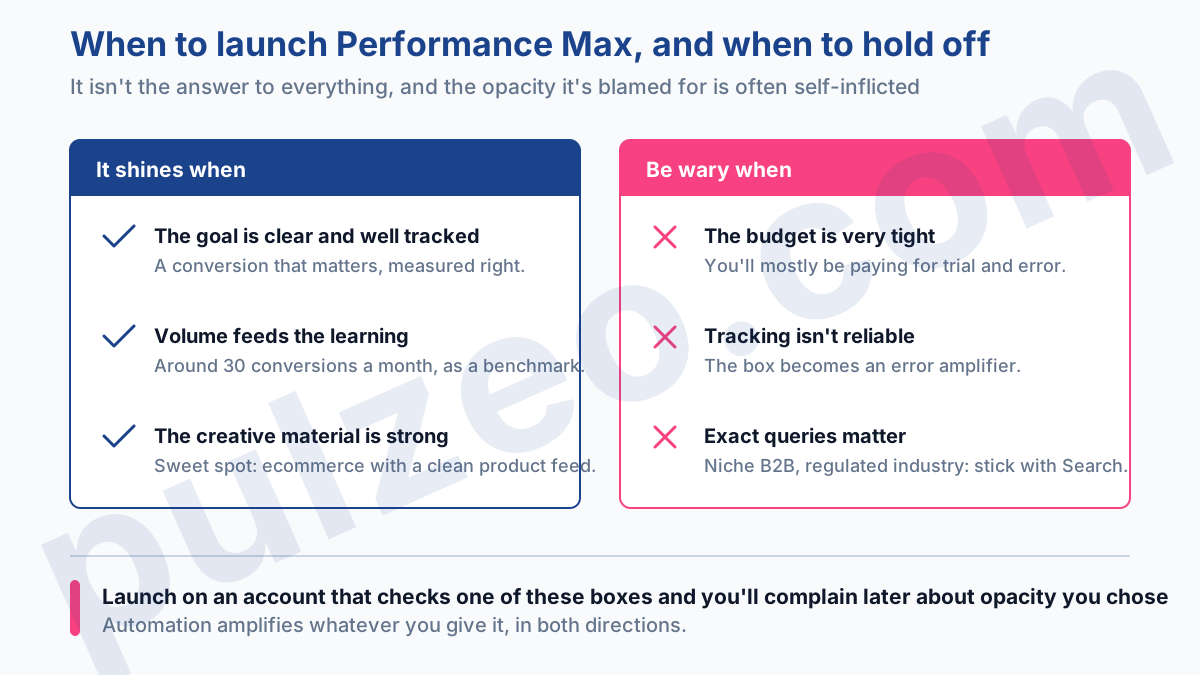
Performance Max isn't the answer to everything. It shines when three conditions are met:
- a clear conversion goal, and tracking that measures it correctly;
- enough volume to feed the learning, with around thirty conversions a month as the most commonly cited benchmark;
- creative assets in both quantity and quality, since that's what the algorithm recombines.
The sweet spot is ecommerce with a clean product feed: the campaign has something to work with and concrete products to push.
Conversely, be wary in three cases. If your budget is very tight, the algorithm will never have the volume to get out of learning, and you'll mostly be paying for trial and error. If your conversion tracking isn't reliable, you'll be optimizing on false data, and the black box turns into an error amplifier.
And if your business needs fine control over exact queries, as some B2B accounts or regulated industries do, a standard Search campaign will give you a much firmer grip. Launching Performance Max on an account that checks one of these boxes means complaining later about opacity you brought on yourself.
What you still control in Performance Max
Here's the truth the black-box reputation makes people forget: you keep control over most of what drives performance. The algorithm executes, but you're the one supplying the raw material. The levers that matter most:
- audience signals, to point the search for customers in the right direction;
- asset groups, which organize your creative assets by theme;
- exclusions, starting with your own brand, and the Display Network placements the campaign can pick up;
- bid strategy, which settles the trade-off between volume and profitability.
Audience signals
An audience signal isn't strict targeting, it's a starting point handed to the AI: your remarketing lists, your existing customers, a custom segment. The algorithm uses it to know where to start looking, then widens out. Good signals save weeks of learning; missing or vague ones leave the machine fumbling around at your expense.
Alongside audience signals, think about search themes: you tip the AI off to the queries you know you're relevant for, without waiting for it to discover them on its own. It's especially useful at launch, when there's no history yet and the campaign is still looking for its target.
Asset groups
An asset group brings together the creative assets (headlines, descriptions, images, videos) and the signals for a single theme. The simple rule: one group per product or service category, never everything lumped together.
And give it material to work with: fifteen or so headlines, five descriptions, images in several formats, and at least one video. Otherwise Google generates one for you, often a mediocre one, from your other assets.
Two more levers, often neglected. Brand exclusions first: without them, a Performance Max campaign captures your brand traffic, traffic that was already yours, and takes credit for conversions it didn't generate, inflating a misleading ROAS.
Bid strategy next: going after conversion volume (Maximize conversions) or value (Maximize conversion value) makes for two different campaigns. If you think in terms of margin, bid on value, as with any target ROAS.
A final word on negative keywords, long missing from Performance Max. Since 2025, you can add up to 10,000 per campaign, just as in Search. Paired with the search terms report, which also arrived in 2025 with the same level of detail as in Search, they give you back part of the control everyone thought was lost.
You're no longer blind to the queries, and that's the real change. I walk through how to set them up in the article on negative keywords.
Managing Performance Max over time
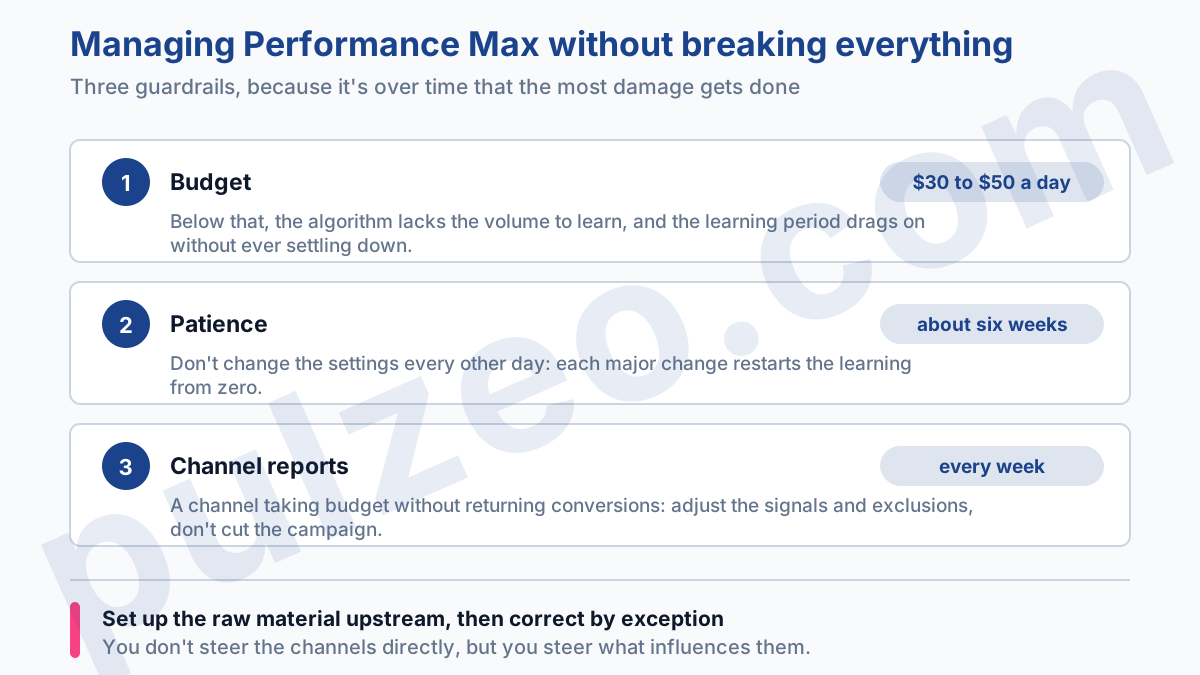
What's left is steering it over time, and that's where the most damage gets done. Three guardrails. First, budget: under $30 to $50 a day, the algorithm lacks the volume to learn, and the learning period drags on.
Next, patience: allow about six weeks before judging, and above all don't change the settings every other day, because every major change sends the learning back to square one. Finally, the channel reports: if you see the budget slipping toward Display when you wanted Search, that's the moment to adjust your signals or your exclusions, not to cut everything.
An example. On one account, the report shows 60% of the budget gone to Display, at half the ROAS of the rest of the campaign. Rather than cutting everything, we strengthen the audience signals on the purchase-intent side and tighten the exclusions.
Three weeks later, the budget has shifted toward the Search and video that actually pay off. The campaign was never paused, just steered, one small nudge at a time, on the strength of data we didn't have a year ago.
Managing Performance Max isn't about micromanaging a campaign you can't see. It's about getting the raw material right upstream, letting the algorithm learn, then correcting by exception when a report flags a gap. The exact opposite of the black box everyone dreads having to put up with.
What to monitor on a Performance Max campaign
The problem with Performance Max has never been the automation. It's letting it run without ever looking at it, because nobody has time to comb through every campaign, every week, on every account. Traffic tipping toward the wrong channel, or a ROAS inflated by brand traffic, then goes unnoticed until the month's bill arrives.
That's where Zeo, the assistant built into Pulzeo, comes in. It watches your campaigns continuously, spots when a Performance Max campaign starts going sideways, and explains what's happening in plain English, instead of leaving you to guess from a number. You stay in control without spending your days on it, and the box stays open.
Performance Max isn't a black box. It's a box too few people take the time to open.
Common questions
What is a Performance Max campaign?
It's the most automated campaign type in Google Ads: a single campaign that serves across Google's six channels, namely Search, Maps, YouTube, Discover, Gmail, and the Display Network. You set a goal and a budget, and supply creative assets and audience signals; the AI decides the rest, channel by channel, in real time.
Can you see where a Performance Max campaign's budget goes?
Yes, and it's recent. Since 2025, Google shows how performance breaks down across its six channels (Search, Maps, YouTube, Discover, Gmail, Display Network), and more recently how that split changes over time. So you finally know whether your budget goes to Search or to Display, which used to be impossible. Search partners get a row of their own, even though Google files them under Search when it defines the channels.
What's the minimum budget for Performance Max?
Plan on at least $30 to $50 a day. Below that, the algorithm lacks the volume to learn, and the learning period drags on without ever settling. It isn't a hard rule, but a threshold below which the campaign struggles to get out of learning.
Performance Max vs. Search: which should you choose?
The two complement each other. Performance Max covers all of Google's inventory and excels at finding conversions in places you wouldn't go yourself. A standard Search campaign keeps fine control over queries and bids. Many accounts run both, excluding their brand from Performance Max so it doesn't cannibalize Search.
