
Which Google Display Network placements should I exclude?

You've probably never opened the placement report for the Google Display Network. No surprise there: on the Search Network you choose keywords, and it never occurs to you to choose places as well.
Yet the habit already exists under another name, since nobody runs a Search campaign without negative keywords. This network works the other way around: you don't pick the sites where your ads show, Google picks them for you, and you only find out by going to look.
And in 2026, this network's status is changing. The campaign type you used to run it is going away, the network stays, and what will keep it in check gets set somewhere else: at the account level. Here's which settings survive, and how to use them.
What happens to the Display Network in 2026
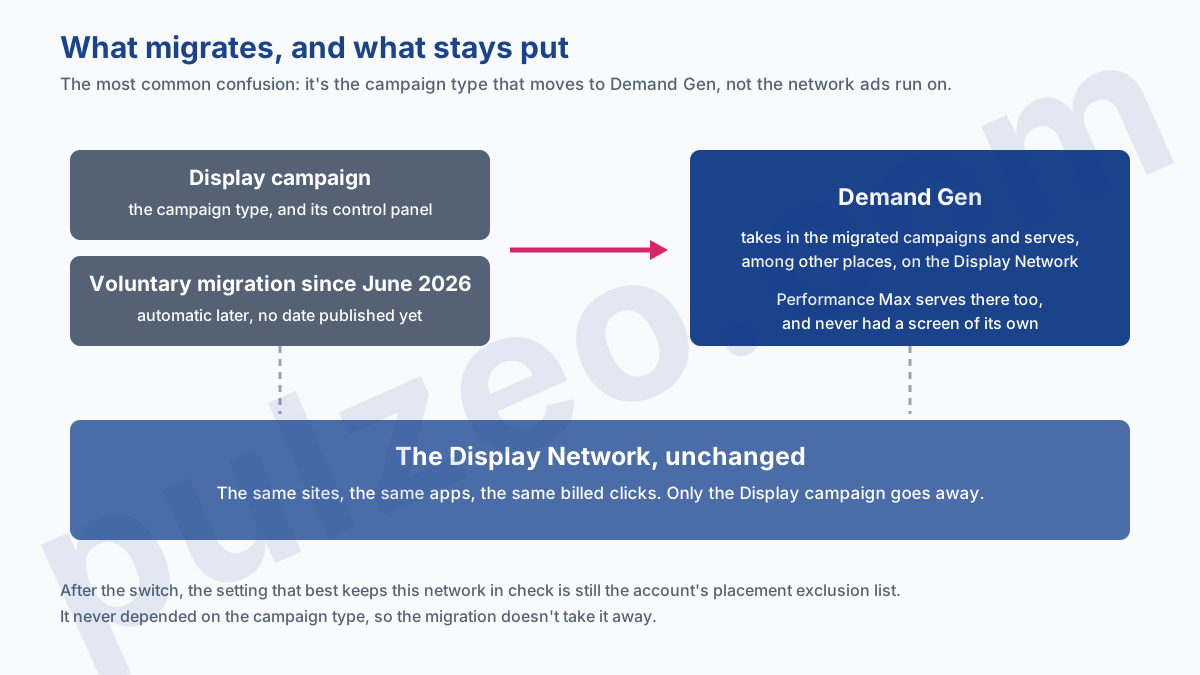
Let's start by clearing up a confusion that's everywhere, including among people who know their stuff. What's migrating is the campaign type, not the network. Google says so unambiguously in its documentation.
Google Display Ads campaigns are moving to Demand Gen as the Google Display Network (GDN).
That sentence is worth reading twice: the campaigns move to Demand Gen, and once there they still serve on the Display Network. The switch has been voluntary since June 2026; later on, you'll only be able to create new campaigns in Demand Gen, and whatever is left will be migrated automatically.
In practice, your ads will keep showing up on the same sites and in the same apps as today. What you lose is the dedicated screen, not the report that shows what happens there: Demand Gen keeps it.
Where the budget goes when nobody's looking
The Display Network covers millions of sites, but also mobile apps, and that's where most of the waste I see on the accounts I take over is concentrated.
The mechanism is mundane. A free game app shows a full-screen banner, the player's thumb slips in the wrong spot, and off goes the click. It's counted, it's billed, and it will never convert. Multiply that by a few thousand and you've got a line of spend nobody ever decided on.
The rest is spread across high-traffic news sites, content aggregators, and pages with no connection whatsoever to your business. None of these placements is illegitimate in itself: they simply got there without anyone choosing them, and they stay until someone removes them.
The four ways to exclude a placement
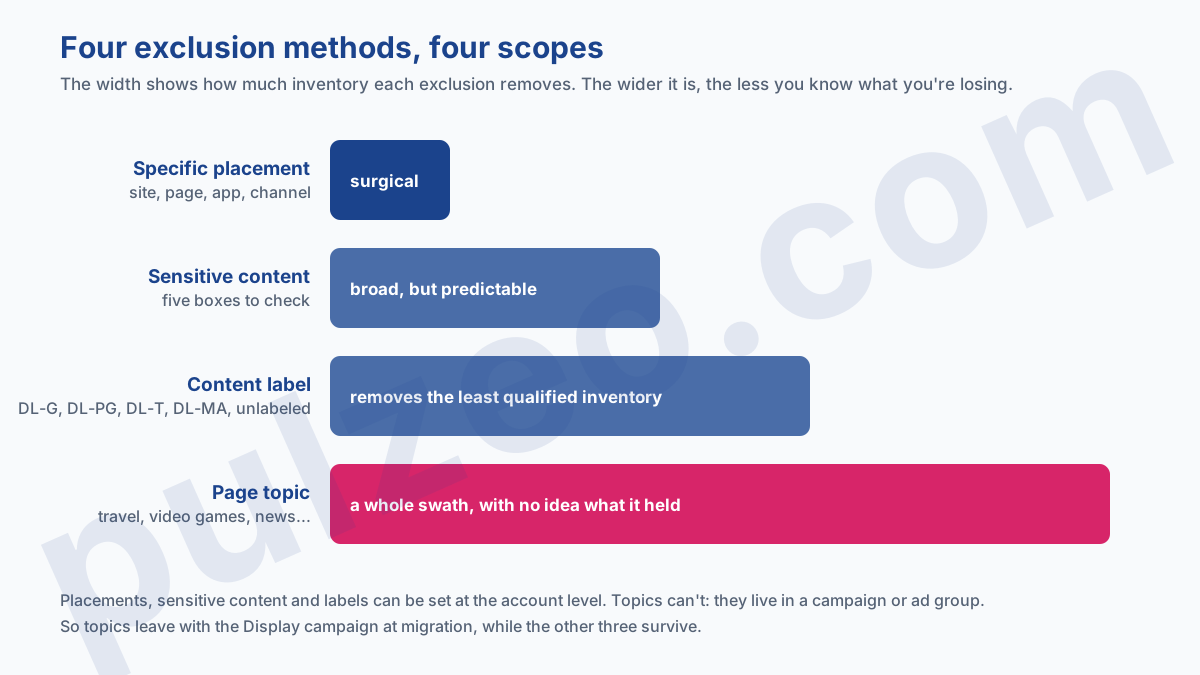
Google offers four, and they don't replace one another. The first is surgical, the other three work in bulk.
By specific placement
It's the most direct: you type in what you don't want. Sites, domains, pages, but also YouTube channels and videos, and since March 2024, sites on the Search Partner Network.
One data-entry detail changes everything, and it explains why some lists accomplish nothing. Write example.com without the www. and the exclusion also covers store.example.com and example.com/store. With the www., you only exclude what you typed, and the subdomain keeps serving.
By type of content
The other three work by category rather than by address. Sensitive content exclusions come with self-explanatory names, and all it takes is checking a box:
- Tragedy and conflict;
- Sensitive social issues;
- Profanity and rough language;
- Sexually suggestive content;
- Sensational and shocking.
Then come digital content labels, which rate placements by audience: DL-G for general audiences, DL-PG for most audiences with parental guidance, DL-T for teen and older audiences, DL-MA for mature audiences. Excluding DL-MA and DL-T strips out a good share of the least qualified inventory in one go.
There's a fifth box, and it's the one people forget: "Not yet labeled," which groups the content Google hasn't classified yet. On a lot of accounts, it's the biggest batch of the five, so it's the one that deserves a look before you check it or leave it alone.
By page topic
The last method is the least known and the bluntest. It targets neither an address nor a sensitivity level, but the subject of the page: excluding Display Network pages about certain topics, like travel, autos, video games, or news.
Handle it with care. A topic covers a whole swath of inventory, and nothing will tell you what you lost: you'll see volume drop without knowing whether the placements you removed were converting. I save this one for obvious mismatches.
Above all, it has a flaw the others don't, and it matters a lot this year: a topic can only be excluded at the campaign or ad group level, never at the account level. In other words, your topic exclusions will leave with the Display campaign on migration day.
Placements, sensitive content, and digital content labels, on the other hand, can be set at the account level. That's where the rest of this article plays out.
Read the placement report before you exclude anything
None of these exclusions is worth anything without the report that tells you where your ads actually ran. It lives in the Campaigns menu, and it comes in two views you need to tell apart.
The first, on the Content page, lists what you targeted yourself. The second, the one that matters, sits under Insights and reports, in "Where ads showed": that's where the placements Google picked on its own show up. It's where you'll find the game apps and aggregator sites nobody has ever heard of.
Sort that second view by cost, highest first, over thirty days at the very least. A placement that has eaten budget without a single conversion in thirty days won't produce any more the following month, and the vast majority of what you'll exclude over your career will come out of that one sort.
Exclude at the account level, not campaign by campaign
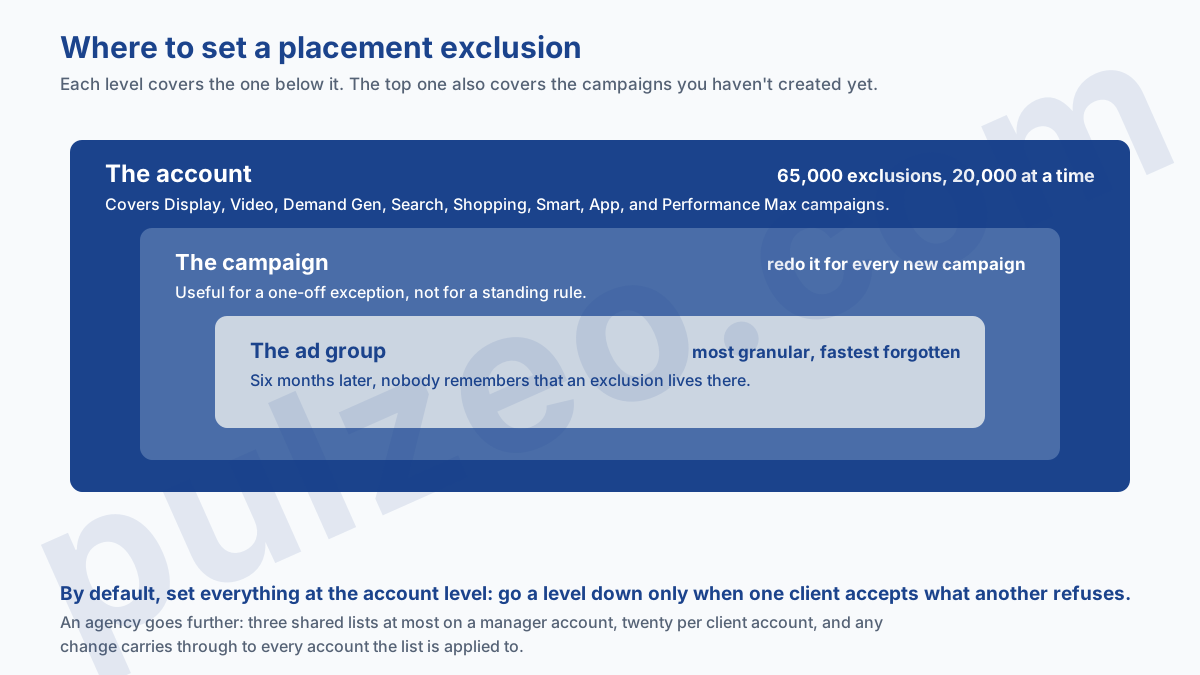
Here's the move that saves the most time, and one I rarely see applied. An exclusion can be set at the ad group level, the campaign level, or for the whole account. The first two force you to redo the work with every new campaign; the third covers everything, including what you'll create tomorrow.
The limits are more than enough: 20,000 exclusions at a time and 65,000 per account. No advertiser will ever reach that number. The real limit is the time you're willing to spend reading your placement reports. Pulzeo doesn't sort placements one by one, but its alerts flag a campaign that's running without useful results, Display included: often the sign it's time to open that report.
Do placement exclusions work on Performance Max?
Yes, and it's the most useful point in this article. Account-level placement exclusions apply to Display, Video, Demand Gen, Search, Shopping, Smart, App, and Performance Max campaigns.
It's worth pausing on, because it's the most persistent complaint about this format: you don't know where the money goes and you have no control over it. The control exists; it's just stored somewhere other than the campaign. Choosing placements is still out of your hands, but you can ban as many as you like.
If you run this format, it's worth a look: I've laid out elsewhere what really stays in your hands on a Performance Max campaign, and the exclusion list is part of it.
It's also what makes this approach last. Once the Display campaign type is gone, your account's exclusion list will keep applying to everything that serves. It survives the migration because it never depended on the format.
So here's a practical recommendation you can apply today: if your exclusions live in a Display campaign you're going to migrate, move them up to the account level before the switch. You won't have to check what the migration did with them, and along the way they'll cover the campaigns you haven't created yet.
What lives at the account level survives the migration. What lives in the campaign leaves with it.
One list for all your client accounts
If you manage several accounts, the Shared library of a manager account lets you create an exclusion list and apply it to as many accounts as you want. Any change then carries through everywhere, without going back over each account.
Two limits apply here, and they're tighter than at the placement level: a manager account can only hold three exclusion lists, and each client account up to twenty.
Three lists isn't much, so you might as well use them wisely. The split that works best, in my experience, separates what's universal from what's contextual:
- a list of apps and sites that convert for nobody, applied everywhere;
- one list per major industry, when you manage clients from very different worlds;
- a brand list, for the placements a client rejects to protect its image.
Where to start
Open the placement report of an account that serves on Display, sort by cost from highest to lowest, and look at the top twenty rows. In three minutes you'll know whether you have the problem, and you'll have your first exclusions right in front of you.
Only then should you set the sensitive content categories and digital content labels at the account level. The order matters: the categories remove volume blindly, while the report shows you what you're really paying for.
One last thing, and it's the only one that's urgent. The migration to Demand Gen removes the dedicated screen and leaves the inventory intact. The day it becomes automatic, people who never opened this report will keep paying for exactly the same clicks, with nothing forcing them to look. You might as well set up the list now, while the timing of the switch is still your call.
Common questions
How many placements can you exclude in a Google Ads account?
Up to 65,000 per account, and 20,000 at a time. In other words, no advertiser will ever hit that ceiling: the constraint isn't technical, it's the time you're willing to spend reading your placement reports. These exclusions cover sites, domains, pages, mobile apps and app categories, as well as YouTube channels and videos.
Is the Display Network going away with Display campaigns?
No, and it's the most common confusion. Google is moving the campaign type to Demand Gen, but the Display Network remains a place where ads serve, used by Demand Gen as well as by Performance Max. So your ads will keep showing up there, with one fewer control panel to run them from.
Does excluding a domain also exclude its subdomains?
Yes, as long as you leave off the www. An exclusion entered as example.com also covers store.example.com and example.com/store. It's a data-entry detail that changes the real reach of your list, and it explains why some exclusions seem to accomplish nothing.
Should you exclude all mobile apps at once?
It's the first instinct of a lot of advertisers, and it holds up when app clicks never convert for you. But check it in your placement report before you cut: on some accounts, a handful of specific apps account for most of the waste and the rest does its job just fine.
