
Is Google consent mode mandatory?

No, not in the sense of a legal obligation, and not for all of your traffic. But the question is badly framed, which is why it keeps coming back. Google consent mode is what it takes to keep measurement, remarketing and personalization for your visitors from the European Economic Area. Without it, your campaigns still run, they just run worse.
That's where the confusion comes from. People look for a deadline and a penalty, when this is first and foremost a technical mechanism: if consent signals don't reach Google, some features switch themselves off. Let's look at what Google requires and for which visitors, what to send, what breaks when it's done badly, and how to check that the wiring holds.
What Google requires for EEA, UK and Swiss traffic
The rule applies to users located in the European Economic Area, meaning the EU countries plus Iceland, Liechtenstein and Norway. To keep using tags and SDKs for measurement, ad personalization and remarketing, you must collect these users' consent and share the matching signals with Google. Google accepts those signals through consent mode or through the IAB's Transparency and Consent Framework (TCF).
Two points are easy to miss on a quick read. First, this also applies when you use Google Analytics data in Google Ads, Search Ads 360 or Display & Video 360: going through GA4 doesn't take you out of scope. Second, if you already use consent mode and don't run any personalized advertising, you have nothing to change.
That last point deserves a closer look, because it undercuts the alarmist articles. An advertiser who runs neither remarketing nor any other personalized advertising, and just measures, has far less at stake than one who sends half the budget to audience lists.
A word on geography, because it's a common point of confusion. The criterion is where the user is, not where the advertiser is. A US business whose site gets visitors from Germany or France is fully in scope for those visitors, even if its campaigns only target the US.
Google's EU user consent policy also covers the UK and Switzerland: visitors there must give their consent too, for ads personalization and for cookies where the law requires it. But Google says it doesn't expect a consent signal, through consent mode or TCF, for UK or Swiss traffic. The signal requirement stops at the EEA.
Everywhere else, neither that policy nor the signal requirement applies. Google's own developer guide recommends scoping your "denied" defaults to the regions where you show a banner, so you don't lose measurement where no banner applies.
That doesn't exempt you from local rules: for U.S. state privacy laws, Google points advertisers to restricted data processing, built around opt-outs such as a "Do Not Sell My Personal Information" link.
The four signals to send
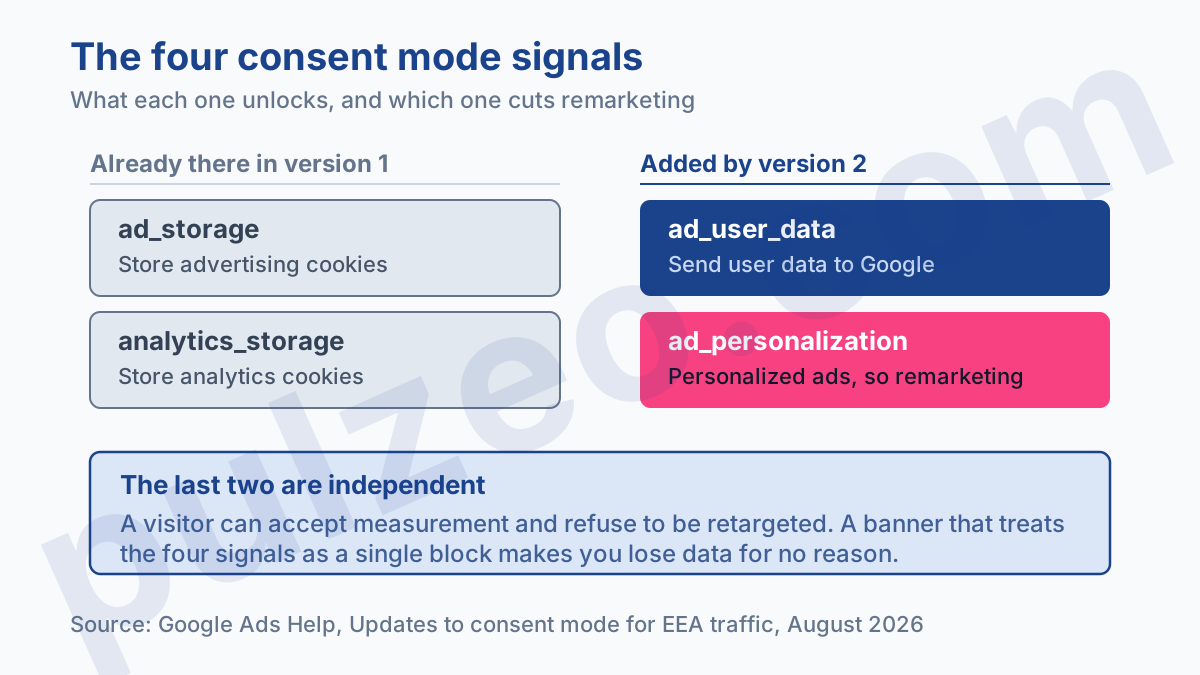
Consent mode relies on parameters that your banner sets to "granted" or "denied". The first two already existed; the next two are the ones version 2 introduced:
ad_storage: permission to store advertising-related information, advertising cookies in practice;analytics_storage: the same thing for analytics;ad_user_data: consent to sending user data to Google for advertising purposes;ad_personalization: consent to personalized advertising, and therefore to remarketing.
Remember the distinction between the last two, because that's the one that causes trouble in practice. A user can accept that their data goes to Google for measurement and still refuse to be retargeted. The two signals are independent, and a banner that treats them as a single block makes you lose data for no reason.
Basic or advanced consent mode: what really changes
This is the decision with the biggest effect on your numbers, and the one people talk about least. Google offers two implementations that are far from equivalent.
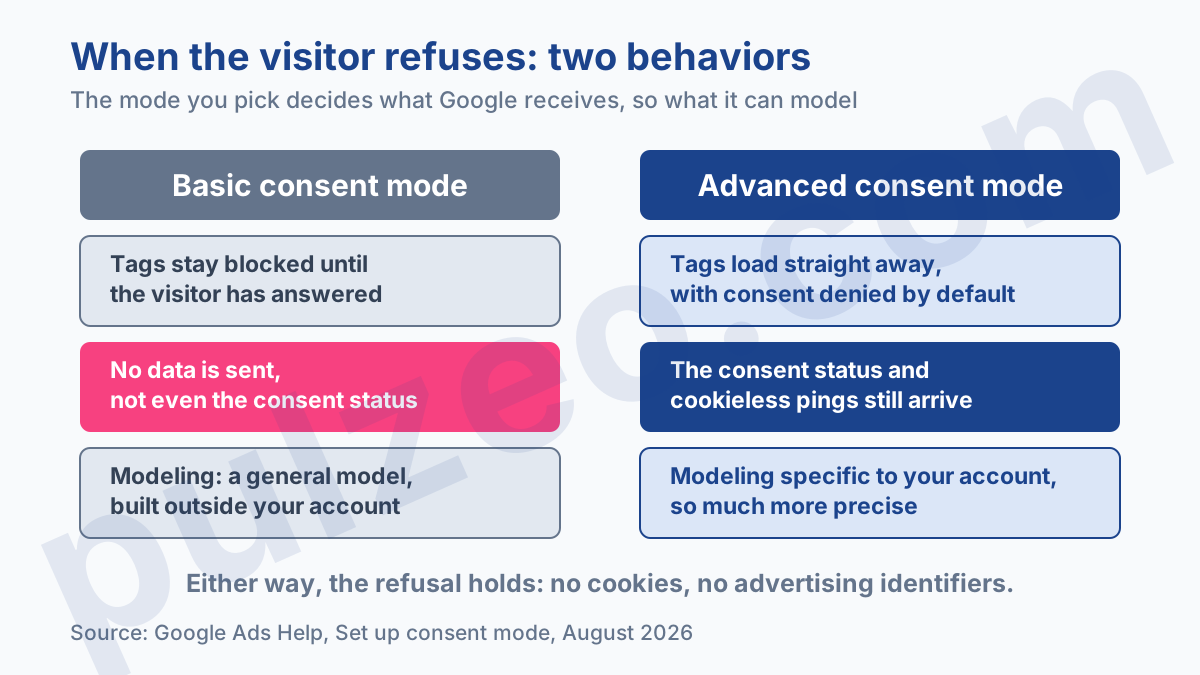
Basic consent mode
Google tags are simply blocked until the user has interacted with the banner. If they refuse, no data goes to Google, not even the consent status itself.
For measurement, the consequence is direct: those visitors don't exist. Google can only compensate with a general model, built from aggregated data rather than yours.
Advanced consent mode
Tags load right away, with consent set to "denied" by default. If the user refuses, Google still receives the consent status and cookieless pings that carry no advertising identifier.
In exchange, modeling becomes specific to your account, and therefore much more precise. That's why two sites with the same refusal rate show very different conversion losses: they didn't pick the same mode.
My advice is clear-cut: unless your legal counsel imposes a specific constraint, go with advanced mode. It respects the user's refusal, reads and sets no cookies, and leaves you with usable measurement. All Google receives is technical signals: timestamp, browser, referrer, consent status, plus the IP address any request carries.
Do you need a Google-certified consent management platform?
It isn't mandatory, and yet it's the choice I recommend to most advertisers.
With a platform certified by Google, the update to the current version of consent mode happens on its own at your provider's end. You don't go through a technical project every time the rules change, which, on this subject, has happened more than once.
With a homemade banner, everything rests on you. Google then says to set the default to "denied", and the update to "granted" once the user accepts. It's doable, but it assumes someone keeps up with the topic over time, which is rarely the case in a small business.
Why your conversions dropped after installing consent mode
A drop is normal; its size isn't always. Three causes come up, in this order of frequency.
The first is the refusal rate itself. If 40% of your visitors refuse, you lose direct measurement of 40% of your traffic, and only modeling fills part of the hole. Nothing is broken, you're simply seeing the reality of your banner.
The second is choosing basic mode without measuring what it costs. On a site with a high refusal rate, the gap with advanced mode runs to tens of percentage points of reported conversions.
The third is a wiring defect, and it's the nastiest because it doesn't look like a bug. I've seen a case where everything looked flawless: container published, consent granted, tags fired with a "Succeeded" status in Tag Assistant. And zero data received.
The gtag engine wasn't properly exposed on the page, so the tags were firing into the void. No console error, no alarm, several days of measurement lost. A drop like this is spotted by volume, not by symptom: it's exactly what Pulzeo's conversion drop alert catches, by comparing the volume received per conversion action with what it should be.
A tag that shows "Succeeded" proves it ran. It doesn't prove a hit went out.
The banner mistakes that cost the most
Consent mode is only as good as the banner feeding it. Four defects come up over and over, and they all cost data.
The first is a default set to "granted". It's the most damaging setting there is: you pass on a consent the user never gave, which exposes you legally without bringing you anything more. Wherever consent is required, the default should be "denied", always.
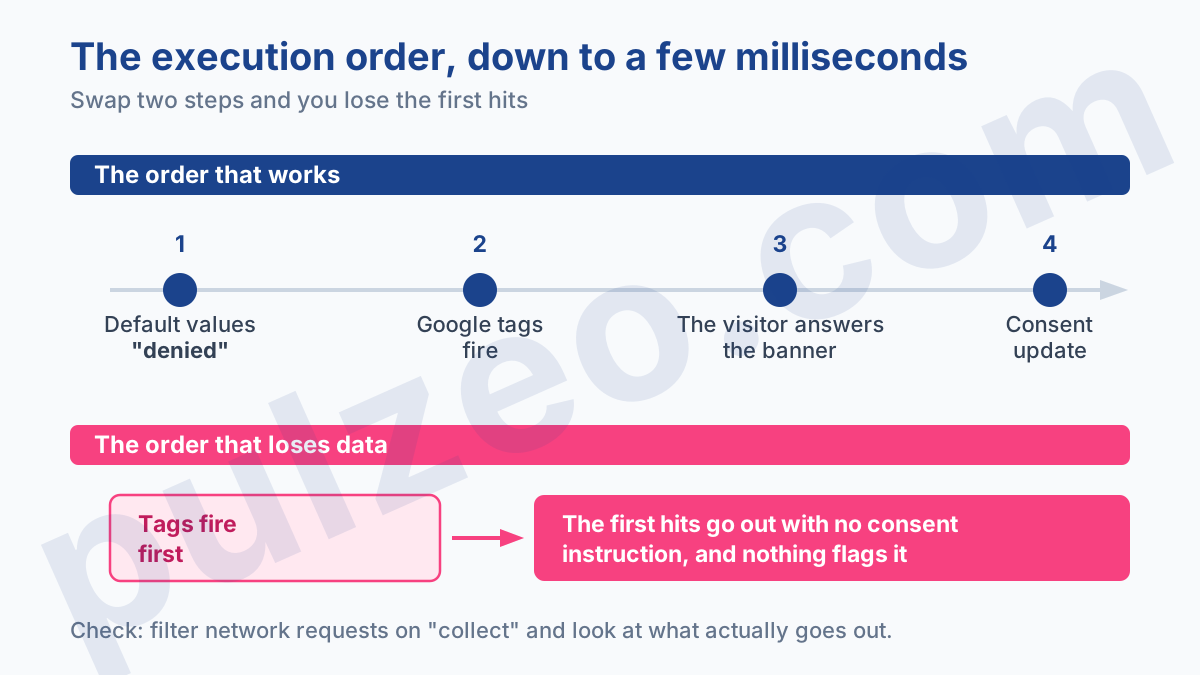
The second is the execution order. Defaults must be set before Google tags fire, otherwise the first hits go out with no consent instruction. On a fast site this plays out in a few tens of milliseconds, invisible to the eye.
The third is making refusal harder than acceptance. Most European regulators, and the UK's ICO in its own guidance, agree on this point: refusing has to be as easy as accepting. A banner that hides refusal behind two screens of settings exposes you, and experience shows it doesn't even lift the acceptance rate as much as people hope.
The fourth is the banner that only collects one global consent. As we saw above, ad_user_data and ad_personalization are separate: merging them treats every refusal to be retargeted as a refusal to be measured, and throws away conversions you could have counted.
What to ask your provider
Almost nobody asks these questions, and yet it's the most valuable conversation you can have on the subject. Whether your banner is handled by your agency, your developer or a consent management platform, six points deserve a written answer:
- which mode is in place, basic or advanced, and on what grounds that choice was made;
- whether the four signals are sent separately, or merged into a single consent;
- what the default value is before any interaction, which should be "denied" wherever consent is required;
- whether the defaults are set before Google tags fire;
- what your real acceptance rate is, month by month;
- who checks that all of this still works in six months.
The last question is the awkward one, and it's the one that counts. Consent mode breaks silently: a site redesign, a new banner platform, a container migration. Nobody notices, since nothing visibly breaks: the numbers just go down.
As for the acceptance rate, it's worth knowing before you judge anything. At 70% acceptance, your measurement stays solid and your lists fill up. At 35%, you're flying half blind, and all your decisions to shift budget between campaigns rest on gaps that may be nothing but noise.
How to check that your consent mode setup works
The only proof is a network request that actually goes out. Open your site in a private window, accept the banner, then inspect the network requests, filtering on collect: a request to the collection server has to appear. If nothing goes out, the problem is upstream of Google Ads.
Then run the test again, this time refusing the banner. In advanced mode, you should still see a signal go out, without cookies. In basic mode, you should see nothing at all. If what you observe doesn't match the mode you think you set up, your implementation isn't doing what you think.
Finally, check the Diagnostics tab of your conversion actions in Google Ads, where alerts about an inactive tag or missing consent surface before the drop shows in the numbers. It's exactly the kind of silent check Pulzeo monitors continuously, and you'll find the details on the page about conversion tracking.
Beyond that, a drop in conversions has plenty of other possible causes, which I've gone through in the guide on badly configured conversions, and setting up the tags themselves is covered in the article on conversion tracking with Tag Manager.
Common questions
What happens if I don't install consent mode?
On traffic from the European Economic Area, you lose access to personalization features, remarketing first among them, and your measurement capabilities shrink. Your campaigns keep serving, but they perform worse: the bidding algorithm works on incomplete conversions, and your remarketing lists stop filling up. It's a technical consequence first. A penalty exists too, but it comes after a Google audit: an account that fixes nothing can lose remarketing and conversion measurement.
What's the difference between basic and advanced consent mode?
In basic mode, Google tags are blocked until the user has answered the banner, and if they refuse, no data is sent, not even the consent status. In advanced mode, tags load right away with consent denied by default, and when the user refuses, only the consent status and cookieless signals come through. In return, advanced mode allows modeling specific to your account, more precise than the general model used in basic mode.
Do you have to use a certified consent management platform?
No, you can maintain your own banner. But if you use a platform certified by Google, it updates itself to the current version of consent mode, which spares you a technical project every time consent mode changes. With a homemade banner, responsibility for the implementation and its upkeep rests entirely with you.
Does consent mode also apply to Google Analytics?
Yes, and it's a point many advertisers discover too late. The requirements also apply when you use Google Analytics data in Google Ads, Search Ads 360 or Display & Video 360. So importing a GA4 conversion into Google Ads doesn't exempt you from anything: the same consent rules apply at the end of the chain.
