
How to make Google Ads lead generation work

For a small business, Google Ads lead generation is probably the best there is. It brings people in at the exact moment they're searching for what you sell, and better than any salesperson, it knows how to find the searches that end with a form filled in.
That's exactly where the trap snaps shut. Google Ads finds filled-in forms. Not clients: forms. And until you teach it the difference, it'll get better and better at sending you the wrong ones.
Here's how to get it to send you the right ones, with what Google officially recommends, what it leaves out, and what it really costs by trade.
What Google Ads does well, and what it does too well
Let's start with what Google itself advises. Its page on lead generation recommends two campaign types, Performance Max and Demand Gen, AI Max for Search campaigns, and two bidding levers: value-based bidding, and broad match paired with Smart Bidding.
All of this advice has one thing in common. It lets the algorithm search on its own, with fewer and fewer constraints from you. That makes sense: these tools really are effective when they know what they're looking for.
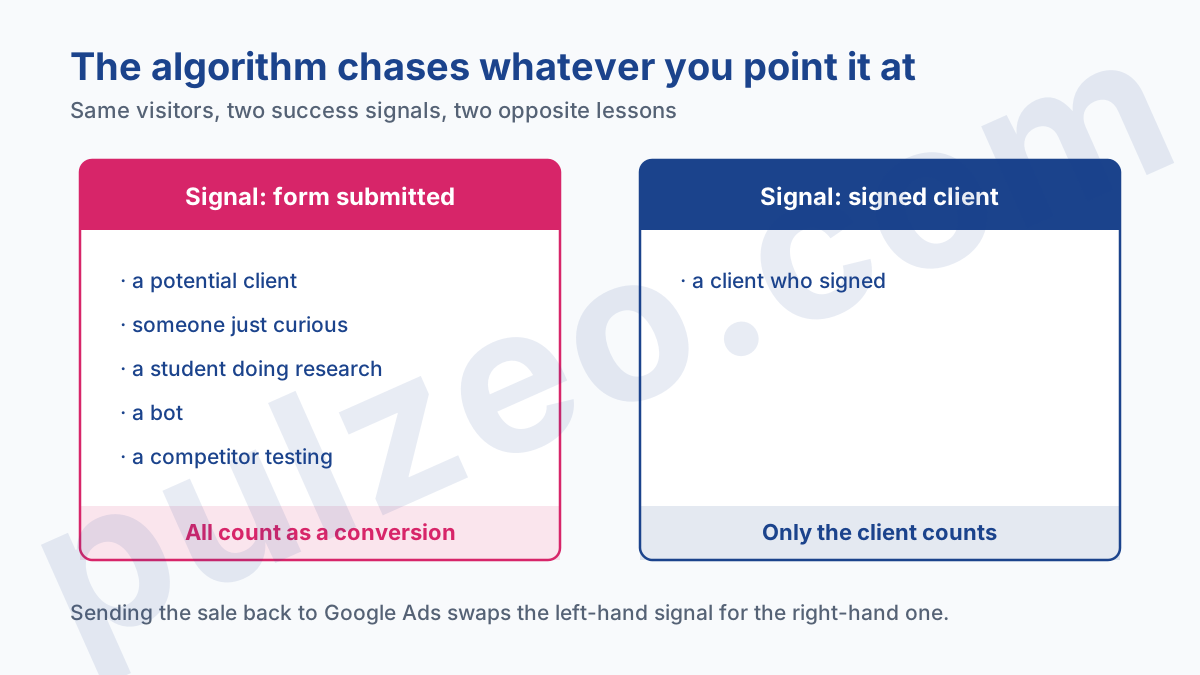
Everything hangs on that last condition. A bidding algorithm has no idea what a good client is. It knows one thing only: the signal you've designated as a success. If that signal is "a form was submitted", it'll find submitted forms, and it'll get excellent at it.
The problem is that people fill in forms for a thousand reasons that have nothing to do with buying. A student doing research, a competitor testing how fast you respond, someone who just wanted a ballpark figure, a bot that fills in everything it comes across. To the algorithm, every one of these people is worth exactly as much as a client.
An algorithm that optimizes for submitted forms ends up finding the people who fill in forms, not the ones who buy.
Google actually says so first on that same page, before it even gets to campaigns: begin by "mapping the complete customer journey, from the initial point of contact to the final sale", then set up measurement. The AI solutions only come at the next step. It's the advice from the second step that everyone remembers, and the advice from the first that almost nobody applies.
What is a qualified lead, in practice
The word gets used everywhere without ever being defined, so let's pin it down. A lead is a contact who left their details. A qualified lead is a contact you've checked could actually become a client.
The check comes down to four questions, and I ask them in this order:
- is it the right type of buyer, a consumer or a business depending on what you sell;
- are they in your area, the one where you can work or deliver;
- do they have a real project, with a defined need rather than simple curiosity;
- do they have a timeline and a budget that fit your offer.
A contact who ticks all four is qualified. A contact who misses even one isn't, even if they filled in the form with enthusiasm.
People also talk about cold, warm and hot leads, a scale that measures how mature the project is rather than how well it fits your target: the cold lead left their details with no project, the warm one has interest but no deadline, the hot one has a project, a budget and a timeline. Only the hot one deserves to be sent back to Google Ads as a success.
B2B and B2C: two lead generation mechanics
Before we get to measurement, one distinction that changes the entire setup, and that most guides mix up.
B2C, where volume comes fast
When you sell to consumers, the lead comes in fast and the decision time is short. Someone searches for a plumber, fills in the form, and will be a client or not within 48 hours. So you know very early whether a lead was any good.
That's a huge advantage for measurement: the sale can be sent back to Google Ads quickly, while the algorithm still remembers the context of the click. The main risk in B2C is the volume of bad leads: consumer searches are broad, and a poorly targeted query brings in hundreds of curious browsers.
B2B, where the cycle is counted in months
In B2B, everything stretches out. A lead enters a sales cycle that's often counted in months, with several people involved, and the final decision comes long after the click.
Two consequences. First, a client is worth a lot more, and justifies a high acquisition cost: at a French accounting firm, I measured a client at around €1,000, which stays profitable because an engagement gets billed over several years.
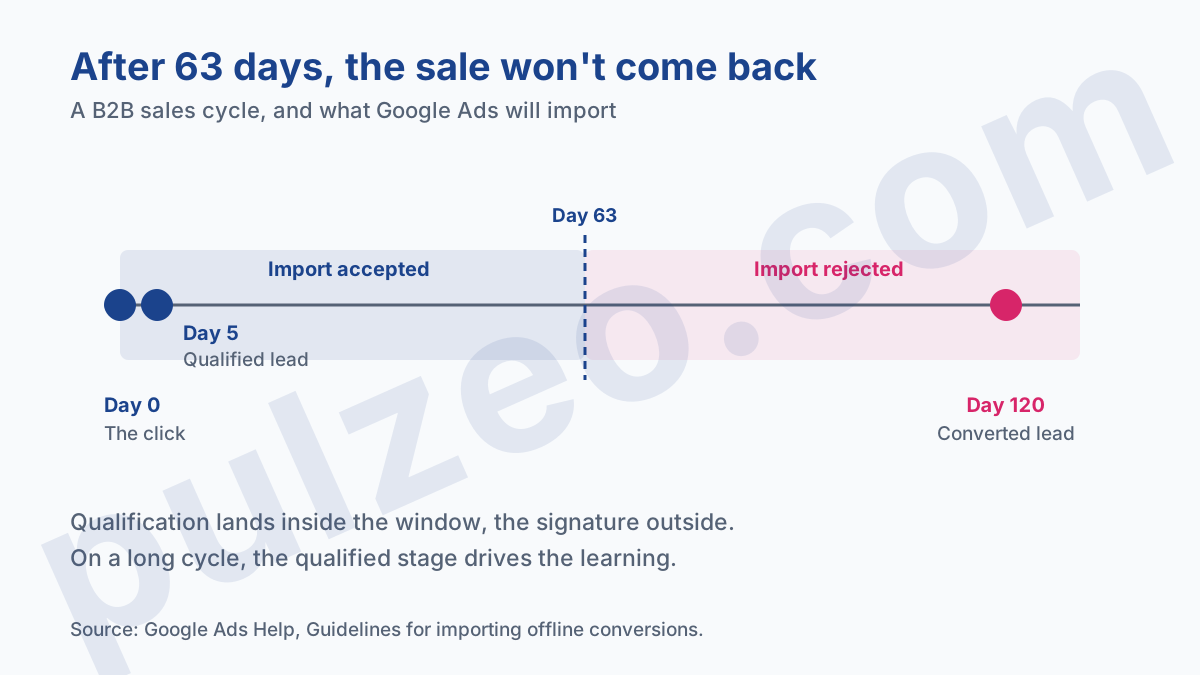
Second, and this is the real challenge, the algorithm may never learn if you wait for the signature to tell it. Google won't import a lead conversion that comes in more than 63 days after the last click: a deal signed in month four simply won't make it back.
The workaround is to send back an intermediate stage, the lead your team has qualified, which comes in within a few days and is a strong predictor of a signed deal: that's what the section on sending sales back, further down, is all about.
Your form is your first filter
Lead quality is decided first on one page: the one where people fill in the form. And it's a dial, not a switch.
A very short form, name and email, brings in lots of contacts and lots of tire-kickers. A form that asks for the type of project, the timeline and the budget scares some of them off, and that's exactly the point: the ones who stay made the effort to describe a real need.
The right setting depends on what you sell. For an emergency repair, every extra field costs you a client who'll call your competitor instead. For a renovation job or a B2B service, two or three qualifying questions screen people before your team even picks up the phone.
A rule I apply: if your salespeople spend more time weeding out bad leads than handling good ones, make the form longer. If the phone stops ringing, make it shorter.
Lead form assets, and who can use them
Google offers a format that even skips your site: the lead form asset, which collects contact details right inside the ad.
It isn't open to everyone. According to the official documentation, it works on Search and Performance Max campaigns, and it requires:
- a good history of policy compliance on the account;
- an eligible vertical or sub-vertical, with sensitive content excluded;
- a privacy policy, which has to be linked in the form.
Two uses are even more restricted: the form in a Display campaign, and the form opened straight from an ad's headline. They're reserved for reputable advertisers spending more than $1,000 on the account, or $15,000 across all their accounts, after further verification.
My take on this format is mixed. It removes a step, so it produces more leads, but it also removes the most natural filter: the effort of going to your site, reading your offer and deciding to write to you.
Google makes up for it in part. The form accepts custom questions, whose answers can automatically mark a contact as qualified, and phone number verification by code, limited to the Search Network. Use them, or this format will hand you lots of contacts and few projects.
One detail that ties in with this article's thesis: to serve this form, the campaign has to be optimized toward the "Google lead form" conversion goal. In other words, precisely toward the "form submitted" signal.
Why isn't a submitted form a conversion?
This is the heart of the matter, and it's a settings question before it's a strategy question.
In Google Ads, a conversion is whatever you declare as one. If you declare "form submitted", every submission counts. The algorithm has no way of knowing that half those submissions come from people who'll never buy, since you're not telling it.
And there's a trap within the trap, one I find on a good share of the accounts I take over: the counting setting. A conversion action counts either "One conversion" per click, or "Every conversion". For a lead, Google itself recommends "One conversion".
The problem is that "Every conversion" is the default setting for website conversion actions. So a contact form created without a second thought is misconfigured from the start: the same person who sends their form twice, out of impatience or by mistake, counts as two leads, and the algorithm learns they're worth double.
Pulzeo detects this poorly chosen counting setting and fixes it in one click.
Counting is only one of six settings that skew measurement, along with inclusion, attribution, windows and duplicates. I go through them one by one in the article on misconfigured conversions, which is the right place to check them in order.
Sending the sale back into Google Ads
Here's the move that turns mediocre lead generation into effective lead generation, and that Google "highly recommends" in its documentation.
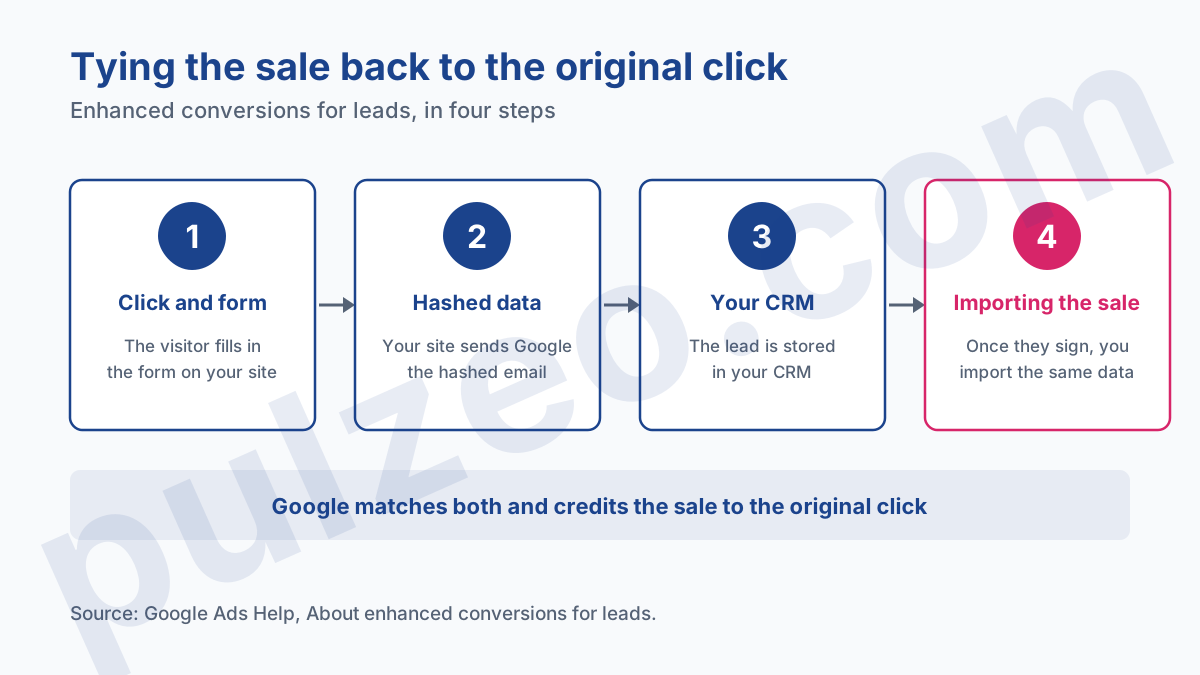
It's called enhanced conversions for leads. According to the official documentation, here's how it works:
- the visitor clicks your ad and fills in a form on your site;
- your site sends Google a hashed version of their contact details, their email address for example;
- you keep those details in your CRM;
- when that lead becomes a client, you import the same hashed data, through Google Ads Data Manager or, since June 15, 2026, through the Data Manager API.
Google then makes the match and credits the sale to the original click. Your algorithm finally learns what you really wanted: no longer the people who fill in forms, but the people who sign.
Google presents it as an upgraded version of offline conversion imports, and documents how to migrate from one to the other. If you're still using the old method, now's the time to switch.
For B2B, where the signature comes too late, send back an intermediate stage. Google draws exactly this line between qualified and converted leads: you record a "qualified lead" as soon as your team has vetted the contact, which happens within a few days, and a "converted lead" at signature.
Remember the 63-day limit: on a cycle of several months, the signature will often come too late to be imported. The "qualified" stage is then the only one that can make it back, and it's the one that drives all the learning.
One caveat that'll spare you a letdown: this setup requires a CRM that's kept up to date. If your salespeople never change a contact's status, there's nothing to send back, and the whole mechanism runs on empty.
How much does a client cost once the lead converts
That's the question everyone is really asking when they say "lead", and the honest answer is about the client: that's who you end up paying for, and the price varies by a factor of forty depending on what you sell, across the five French trades below.
Since the end of July, every Friday, I've been publishing the real bids for one trade in France, with the cost per client that follows from them. These figures assume exactly the measurement described above: they count clients, not forms.
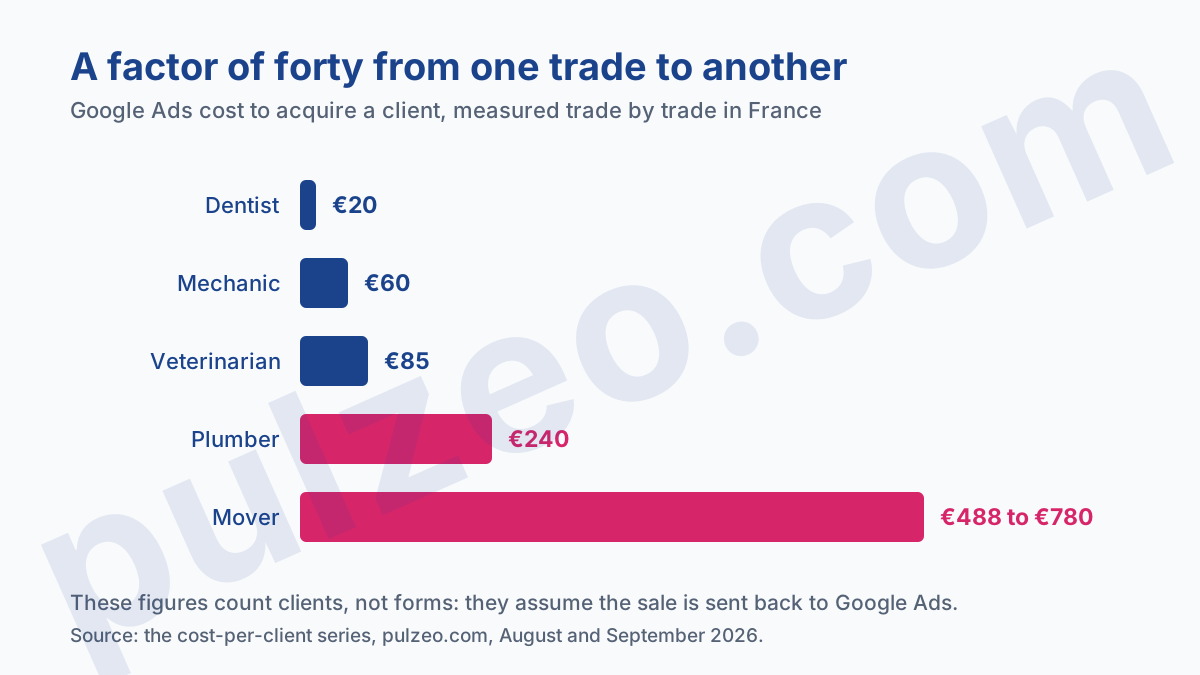
The gap between the two ends of the scale comes down to two compounding causes. A new patient costs around €20 at a dentist, and a client up to €780 at a moving company.
The cost per click explains part of the gap: €1.47 on one side, €13.46 on the other, a factor of nine. The rest comes from the share of clicks that end in a client, much higher at the dentist, where people book an appointment, than at the moving company, where people compare three quotes. And the accounting firm, at €1,000 per client, sits above the top of this scale and is still profitable.
Neither one is good or bad in absolute terms. The only test that matters: the cost of a client has to stay well below what that client brings you.
And if you're weighing buying ready-made leads rather than generating them, the numbers comparing both options are in the ten ways to find clients. Just remember that a bought lead is no more a client than a generated one: you still have to convert it, and that conversion rate is what sets the real price.
The mistakes that generate useless leads
To wrap up, the five mistakes I fix most often on accounts that generate lots of leads and few clients:
- declaring the submitted form as the only conversion, without ever sending the sale back;
- leaving the count on "Every conversion" instead of "One conversion" for a lead action;
- broadening match types or switching to Performance Max before you have a reliable sales signal;
- ignoring the Search terms report, which reveals the queries from browsers, students and job seekers;
- never qualifying leads, which makes it impossible to know which ones were worth anything.
They all share the same root: you ask the algorithm to find clients without ever having told it what a client looks like.
The order of work follows from that. Measurement first, because everything else depends on it: accurate counting, then the sale sent back. Only then broadening, because a well-informed algorithm becomes an ally, and a poorly informed one becomes a vacuum for bad contacts that speeds up with every dollar you feed it.
Common questions
What is a qualified lead in Google Ads?
A contact you've checked could actually become a client, based on four criteria: the right type of buyer, consumer or business; an area you serve; a real project; and a timeline and budget that fit your offer. That check is what separates it from a plain lead. Google Ads won't do it for you: it counts a submitted form as a conversion, whether the person is a potential client or a student working on a school paper.
Are Google Ads lead form assets available to everyone?
No. Google limits them to Search and Performance Max campaigns and sets conditions: a good history of policy compliance, an eligible vertical, and a privacy policy linked to the form. A lead form in a Display campaign, or opened from an ad's headline, is reserved for advertisers spending more than $1,000 on the account or $15,000 across all their accounts, after further verification.
How much does a client from Google Ads cost?
It all depends on the trade, and the gap is huge. On the French trades I've measured, a new patient costs around €20 at a dentist, a client €60 at a car mechanic, €240 at a plumber, and up to €780 at a moving company. These figures assume tracking that tells a contact apart from a client; without it, you're measuring the price of a form.
Should you use broad match for lead generation?
Only if Google Ads can tell a good lead from a bad one. Broad match and Smart Bidding let the algorithm search on its own: fed a submitted-form signal, they find forms, good or bad. Fed a signed-client signal, they become formidable. Send the sale back before you broaden, never after.
