

I often get sent an account with the same sentence attached: "it's underperforming, it needs an audit." And nine times out of ten, the person has already opened twenty tabs without knowing which of them shows the real problem. Because a Google Ads audit isn't ticking thirty boxes in a spreadsheet. It's looking at the right numbers, in the right order, and being able to say which ones are abnormal.
Most of the checklists you'll find online list what to check, and some still carry the platform's old name, "Google AdWords audit". Almost none of them tell you at what threshold an item becomes a problem, or why the order matters.
Yet auditing in no particular order is like repainting a room before fixing the leak in the ceiling: it keeps you busy, but it solves nothing. Here's the complete method, layer by layer, with the concrete warning sign to watch for at each one.
Where do you start a Google Ads account audit?
With tracking. Always. And that's exactly the mistake I see most often: you open the account, look at the cost per conversion, and pass judgment on the campaigns. Except that if conversion tracking is broken or badly set up, all those numbers are wrong, and you're about to spend an hour optimizing on data that means nothing.
A Google Ads account reads like a stack of layers that depend on one another. Tracking holds up everything else. Next comes structure, which determines how readable the data is. Then keywords, ads, bidding, and finally landing pages. Audit in that order, from the bottom up, and every step stands on solid ground.
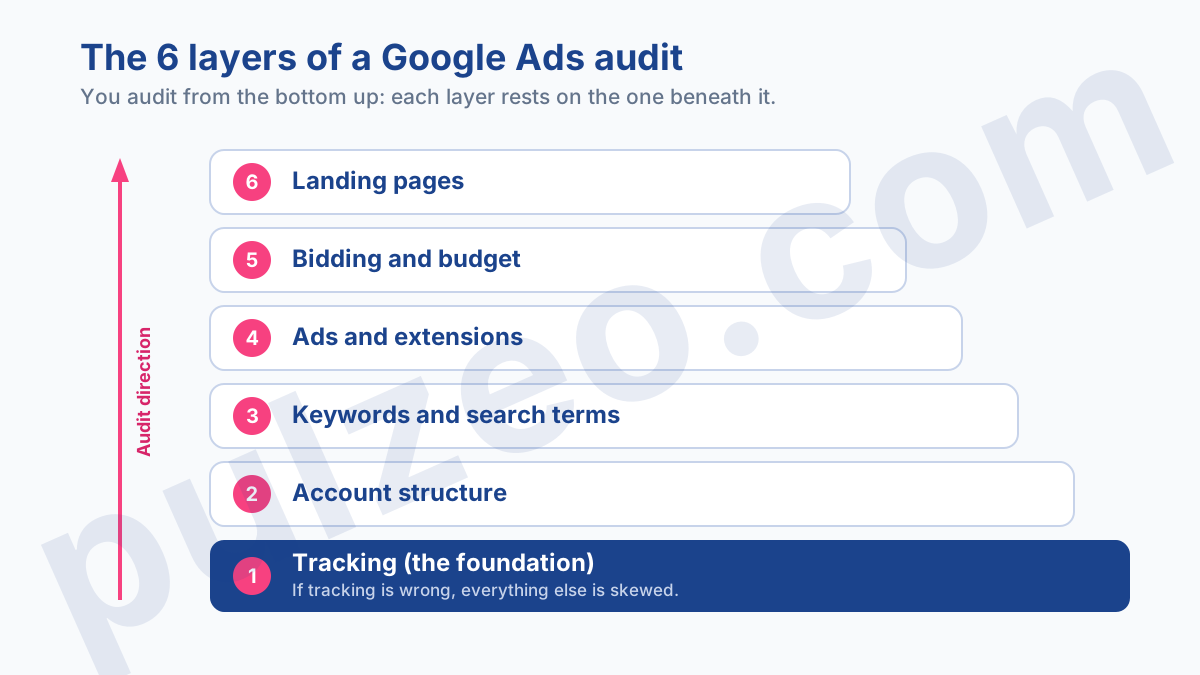
Layer 1: conversion tracking
Start by checking that your main conversions are actually counted in the "Conversions" column, and not only in "All conversions". That first column is the one Smart Bidding uses to optimize. File a key conversion in the wrong place by mistake, and the algorithm is bidding in the dark.
Next, check whether the number of conversions for any specific action has suddenly dropped to zero over the last few weeks. A healthy account doesn't lose 100% of its conversions overnight for a business reason.
When that happens, it's almost always a tag broken by a site redesign or a change in cookie consent. The subject deserves a check of its own, which I've covered in detail in the article on misconfigured Google Ads conversions.
One last check, and a less obvious one. Be wary of a conversion rate that looks too good. If an ad group on cold traffic shows a 15% conversion rate, that's not a feat, it's probably double counting. Check that the same action isn't being tracked twice, by the native tag and by a parallel import.
In both cases, the rule is the same: a conversion action that drops to zero with no matching drop in traffic, or a rate that defies the logic of your industry, points to a measurement problem, never a performance one. It's exactly the kind of false signal that would have you fixing the wrong thing.
Layer 2: account structure
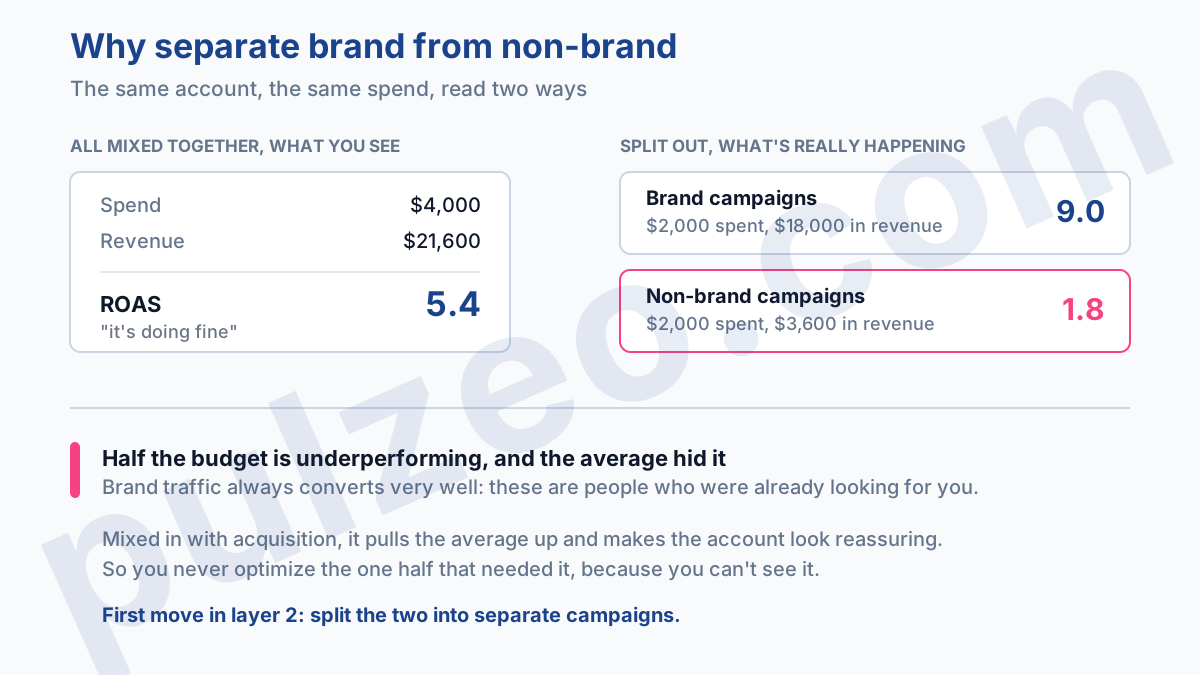
Once the numbers are reliable, look at how the account is organized. The first thing to check is the separation between brand and non-brand campaigns.
When the two are mixed, brand traffic, which always converts very well, inflates the average and hides how acquisition is really performing. You think you have a comfortable ROAS while half your budget is underperforming.
Then go down to the ad group level. An ad group should stick to a single theme. If you come across one holding forty keywords with nothing to do with each other, no ad can be relevant to the whole set, and Quality Score inevitably suffers.
What should set off an alarm: an ad group with more than twenty keywords, or keywords that clearly have nothing to do with one another. It's the symptom of a structure that gets in the way of optimization rather than serving it.
That leaves one setting that slips past almost every audit, and that bleeds local businesses dry: location targeting. By default, Google targets "People in, regularly in, or who've shown interest in your included locations", an option it labels as recommended.
In plain terms: someone searching from Boston can see an ad for a Miami contractor, simply because they've shown interest in Miami.
For an online store that ships everywhere, it makes no difference. For a plumber, a restaurant or a dental practice, it's budget spent on people who will never walk through the door. The "Presence" option restricts delivery to people who are actually in, or regularly in, your locations, and Google walks through the change in its help page on preventing clicks outside your targeted locations.
The check takes ten seconds per campaign: Settings, the Locations section, then Location options. On a local account, it's often the most profitable fix in all of layer 2.
Layer 3: keywords and search terms
Here, one distinction changes everything. Your keywords are the terms you decided to bid on. Search terms are the actual queries that triggered your ads. It's the search terms report you need to open, because that's where the money really goes.
Go through the search terms from the last few weeks and pick out the ones that spent without ever converting. On broad match that nobody watches closely, you routinely find off-topic terms eating 10 or 15% of the budget for nothing. Every wasteful term is a candidate for exclusion. This step almost always produces the fastest wins of an audit.
While you're at it, take a look at Quality Score, without obsessing over it. Below 5, a keyword signals a mismatch, often between the intent behind the search and what the ad or the landing page says.
Above 7, it's a good sign. But remember that Quality Score is a thermometer, not a target. You don't "work on" your Quality Score, you fix whatever is dragging it down.
The term to isolate first is the one that swallowed a significant budget without a single conversion. A big share of spend gone on broad queries that nobody watches deserves the same treatment.
A serious audit also looks at the other side of the coin: what you don't cover yet. Running the list through a PPC keyword research tool shows the real volumes in your market, and often turns up a phrasing people search for that nobody had thought to buy.
Layer 4: ads and extensions
First check the number of ads per active ad group. The simple rule is two to three responsive search ads per ad group, not just one. An ad group with a single ad leaves Google no room to test, and you'll never know whether another message would have worked better.
Check the Ad strength of each responsive search ad. An "Average" or "Poor" rating often means you haven't provided enough distinct headlines, or that they repeat each other. Also make sure no disapproved ad has been sitting there for weeks without anyone noticing: it happens more often than you'd think.
Finally, extensions, which Google now calls assets. Sitelinks, callouts, structured snippets. An ad without extensions takes up less space on the page and gets fewer clicks for the same budget. It's a free win that plenty of accounts leave on the table.
The red flag: an active ad group with a single ad, weak Ad strength across the board, or no extensions on your main campaigns.
Layer 5: bidding and budget
The bid strategy has to match the account's data volume. A Target CPA or Target ROAS strategy needs enough data to learn from.
In my experience, below fifteen or so conversions a month, the algorithm lacks signal and turns erratic. On a low-volume account, a simpler strategy will often get better results than Smart Bidding starved of data.
Watch out for targets set too aggressively. A target CPA set well below your actual CPA doesn't lower your costs by magic, it chokes delivery. You'll spot it when impressions collapse after the change.
Also check the relationship between budget and actual spend. A campaign that only spends a fraction of its budget doesn't have a budget problem, it has a delivery problem, often a bid that's too low or targeting that's too narrow.
It's a classic mix-up, the same one that sends a cost per acquisition climbing, a topic I dug into in the article on a CPA that shoots up.
The telltale sign: impressions dropping after a change of strategy or target, or a campaign that leaves most of its budget sitting idle.
Layer 6: landing pages
The click is worth nothing if the landing page breaks the ad's promise. Check that the two are consistent: an ad about a specific product should lead to that product, not to the homepage.
Check loading speed, especially on mobile, where, in my experience, main content that takes more than two and a half seconds to appear drives some of your visitors away. And simply test the form or the buy button yourself, under real conditions.
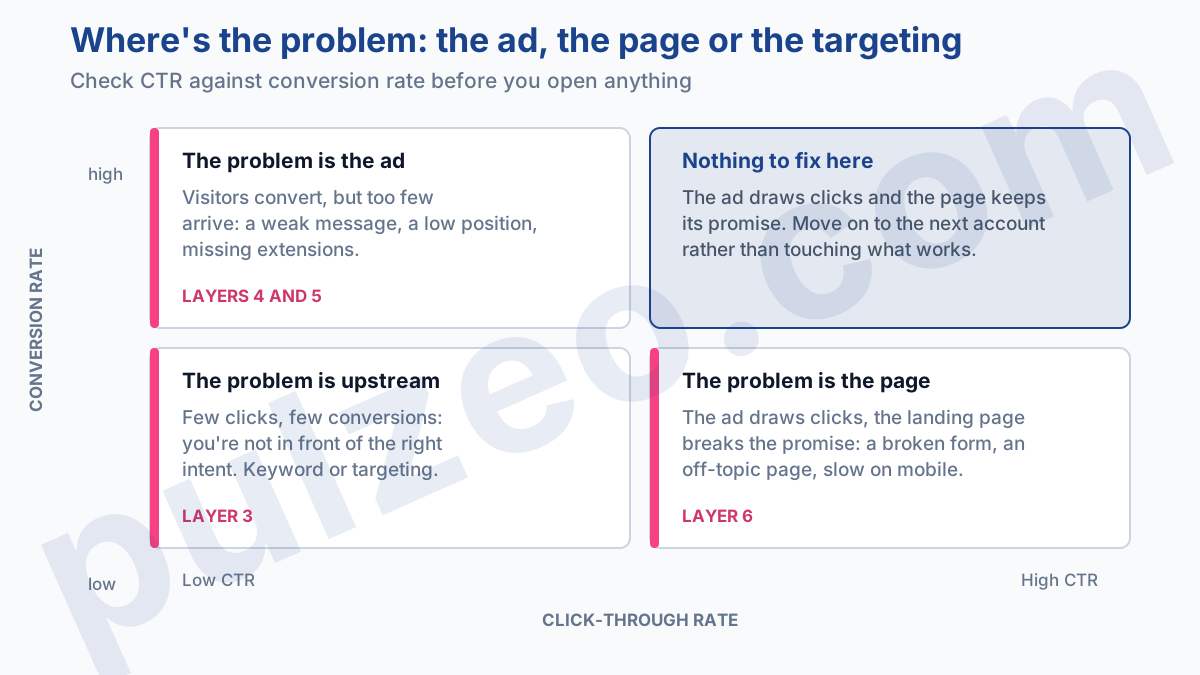
The textbook case is a good click-through rate paired with a conversion rate through the floor. The problem then isn't in the ad or in the keyword, it's on the page, often a broken form or an off-topic page.
That reasoning generalizes, and it's the most profitable shortcut in the whole audit: simply cross-check your two rates before opening anything, and they point you to the layer to look at.
How often should you audit Google Ads, and how long does it take?
Two cadences work together: an in-depth audit every quarter, and a quick check every week.
The full audit, every three months
A full audit like this one, from tracking to landing pages, is worth doing every three months. Allow one to two hours for a mid-sized account. It's the right cadence for straightening out the structure and the core settings.
The quick check, every week
But the quarterly audit isn't enough. In between, you need a quick check, every week, that fits in a quarter of an hour and focuses on what moves fast:
- the search terms from the last seven days, to cut the new wasteful ones
- the status of your key conversions, to catch a broken tag right away
- spend against budget, to spot delivery that's slipping
It's those fifteen minutes a week that make the difference on an account, far more than the big quarterly audit. Most expensive problems don't come from a fundamental mistake, they come from a small detail left unchecked for three weeks.
How to monitor your account without redoing the audit every week
This method works. I've been applying it for years. The catch is that by hand, week after week, across several accounts, it demands a discipline nobody really keeps up over time, me included. You put it off, you forget an account, and things drift while you're looking elsewhere.
That's exactly what Pulzeo automates. Zeo, the built-in assistant, watches your accounts continuously and runs these checks for you, pointing to the layer involved and the likely cause instead of showing you one more red number.
You can also run an audit of your tracking and conversions in a few clicks, where the manual version would take you a morning. The quarterly audit is still useful for the big decisions, but day-to-day monitoring no longer has to rely on your memory.
Other tools run automated audits too, each with a different take from ours. If you're comparing before you choose, we've laid the numbers out side by side against SEISO, the French monthly audit tool, against Opteo, and against Google's own Optimization score.
A good audit isn't measured by the number of boxes ticked, but by your ability to spot, on each layer, the one number that's off.
Common questions
How often should you do a Google Ads audit?
A full audit every three months is enough for most accounts. But it doesn't replace a quick weekly check of search terms, budget and conversions. It's that short, regular check that catches drift before it gets expensive, not the quarterly audit.
How long does a Google Ads audit take?
Allow one to two hours for a full audit of a mid-sized account. The quick version, which checks tracking, search terms and budget, takes fifteen minutes. A very large account, or one that has been neglected for a long time, can take half a day.
Can you audit your own Google Ads account?
Yes, as long as you follow a logical order and know what to look at. The hard part isn't opening the right screens, it's judging what you see there: is a Quality Score of 6 good or bad, is low spend a budget problem or a delivery problem? That's where this checklist helps.
What is a good Quality Score in Google Ads?
Above 7, your keyword is well aligned with the ad and the landing page. Between 5 and 6, it's acceptable, nothing more. Below 5, something doesn't fit, often the ad's relevance or the landing page. Quality Score remains a thermometer, not a goal to optimize for its own sake.
