
Google Ads Quality Score explained

"How do I get my Google Ads Quality Score up?" It's one of the questions I get asked most, and it starts off on the wrong foot. Because Google itself says the exact opposite, in black and white: don't optimize it.
Quality Score isn't a counter you push upward, it's a warning light on a dashboard. A light people spend their time misreading, staring at the overall score out of 10 instead of the three small indicators that actually tell you what to repair.
Here's how to read it properly: what it measures, what it doesn't do (no, it isn't used in the auction), and above all how to use it as a diagnosis, component by component, rather than as a score to inflate.
What is Google Ads Quality Score?
Quality Score is a rating from 1 to 10 that Google assigns, keyword by keyword, to estimate how relevant your ad and your page are to someone typing that search. Not a score for your account, not for your campaign: for each keyword, taken one at a time.
And this score isn't absolute, it's comparative. Google measures you against the other advertisers who showed up for the same keyword over a recent period.
So a 6 out of 10 doesn't mean "average in absolute terms", it means "middle of the pack among the people going after this keyword". The playing field matters: the same work earns an 8 on a keyword few people fight over and a 5 on a keyword where everyone is fighting.
A word on the name: Quality Score is older than Google Ads itself. It already existed when the platform was still called AdWords, which is why you'll often see it referred to as the AdWords Quality Score.
The three components of Quality Score
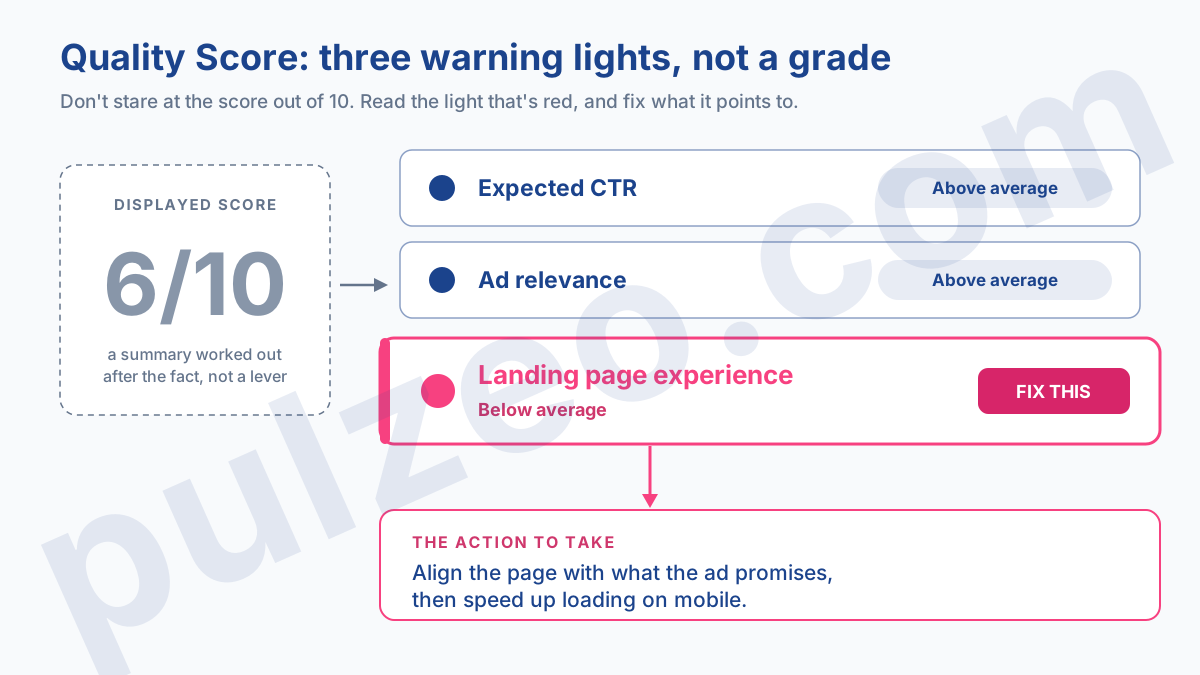
On its own, the score out of 10 is almost useless. What matters lives underneath. Google breaks Quality Score down into three components, and that's where the useful information hides. Each one gets a simple status, "Below average", "Average" or "Above average":
- expected clickthrough rate (expected CTR): the likelihood that someone clicks your ad when it shows for this keyword;
- ad relevance: how closely your message matches the intent behind the search;
- landing page experience: how useful the landing page is, and whether it keeps the ad's promise.
Remember these three lines, because the rest of the article revolves around them. The score out of 10 is only a summary; these three lights are the real diagnosis.
Is Quality Score used in the ad auction?
Here's the point nine out of ten articles miss, and it changes everything.
You read it everywhere: "improve your Quality Score to pay less." Except Google writes the exact opposite in its own documentation: Quality Score "is not an input in the ad auction", it's "a diagnostic tool". It even adds, in black and white, that it shouldn't be optimized or mixed in with the rest of your data.
How do you square the two? It's simple. The score out of 10 you see in the interface is a snapshot, calculated after the fact to help you understand. It isn't what goes into the auction.
The moment someone types their search, Google recalculates a quality assessment in real time, with far more signals than those three: the context, the device, the time of day, the exact wording of the query. It's that invisible assessment, not the displayed score, that feeds into Ad Rank and decides your position and your cost.
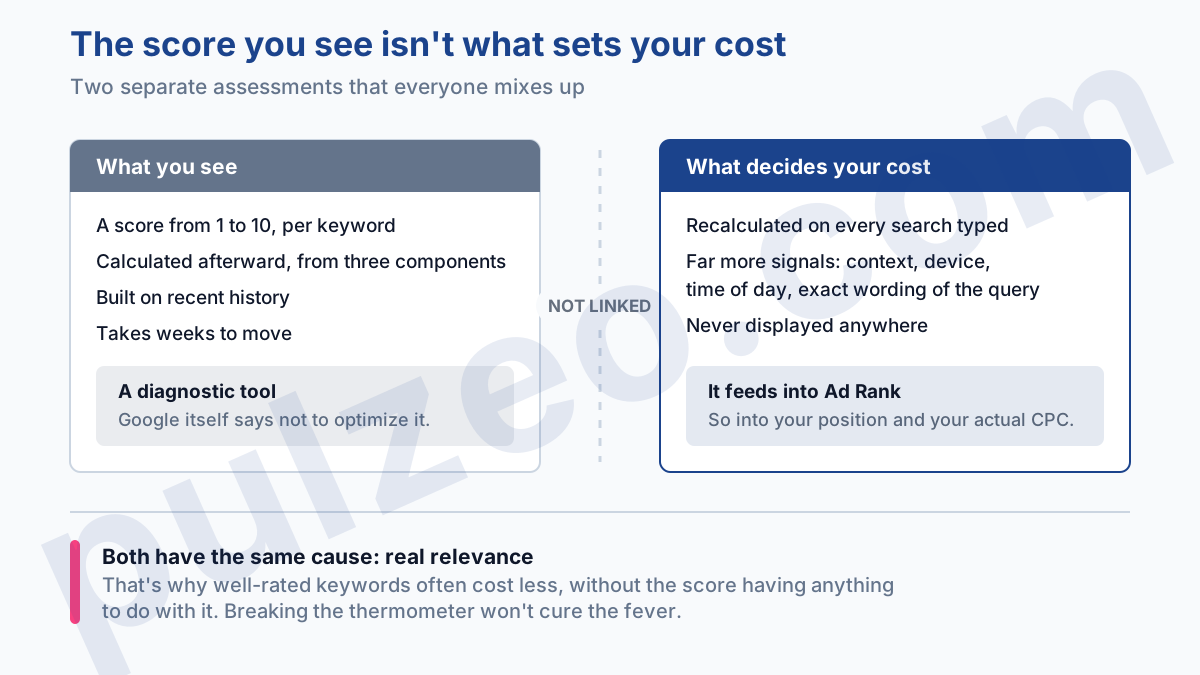
Once you've grasped it, the consequence is freeing: chasing the displayed number means chasing a shadow. You don't "raise" a Quality Score. You improve the real relevance of your ads and your pages, and the light ends up reflecting it. The order matters. Breaking the thermometer won't cure the fever.
And the old formula everyone still trots out, "Ad Rank = max CPC bid multiplied by Quality Score"? A teaching shortcut from ten years ago. The real calculation is more complex, and above all it doesn't use the score you see. Keep it for explaining the idea to a client, not for running an account.
The real effect of Quality Score on CPC
Why bother with it, then? Because even though it stays out of the auction, this light points at what goes in. A keyword whose three components are all "Above average" is almost always a keyword you pay less for at the same position: the relevance the light measures is exactly what the auction rewards. Correlation, not magic. Both come from the same cause, real quality.
In practice, the gap shows up on the bill. On the accounts I take over, two keywords going after the same thing can end up with one CPC double the other, only because one has aligned ads and a matching page and the other doesn't. Quality Score doesn't give you the amount, but it tells you where to look to bring it down. It reveals, it doesn't reward.
Diagnose by component: which light, which action
This is where Quality Score becomes genuinely useful. You don't act on the score, you act on the component that has slipped to "Below average". Open the culprit's column, and the action to take becomes obvious. Three cases, three fixes.
When expected CTR is low
People don't find your ad appealing enough for this keyword. The fix is straightforward: rework the headlines so they pick up the words of the search and a clear promise, test two or three variants rather than just one, and add assets (sitelinks, callouts) that give your ad more real estate and people more reasons to click.
If the CTR stays low despite all that, the keyword may be too broad for the ad it triggers: either you tighten it, or you accept it as a discovery keyword, on a small budget.
When ad relevance is low
Here, the problem is the link between the keyword and the ad text. The fix that works: make sure the keyword, or its exact wording, really appears in the ad headline.
But the real cause often sits further up, in a catch-all ad group where fifteen keywords that aren't about the same thing live side by side, served by a single vague ad. Split that group by intent, and relevance climbs back almost on its own.
When landing page experience is low
The click arrives, but the page disappoints or breaks the promise. Two jobs, in this order: first the match (does the page talk about exactly what the ad promised, or does it send people to a generic homepage?), then speed, especially on mobile.
A slow page drives people away before it's even read, and Google knows it. Send each ad to the most specific page you have, never to the homepage by default.
Single keyword ad groups (SKAGs)
One last trap, and it's dated. For years, the go-to advice for "boosting your score" was the SKAG: a single keyword per ad group, with a tailor-made ad for each one. It worked back when match types were strict.
Today, with broad match now the norm and Smart Bidding running the bids, that hyper-segmentation no longer holds up. Google even explicitly recommends consolidating: an ad group cut down to a single keyword gathers too little data for the algorithm to learn anything.
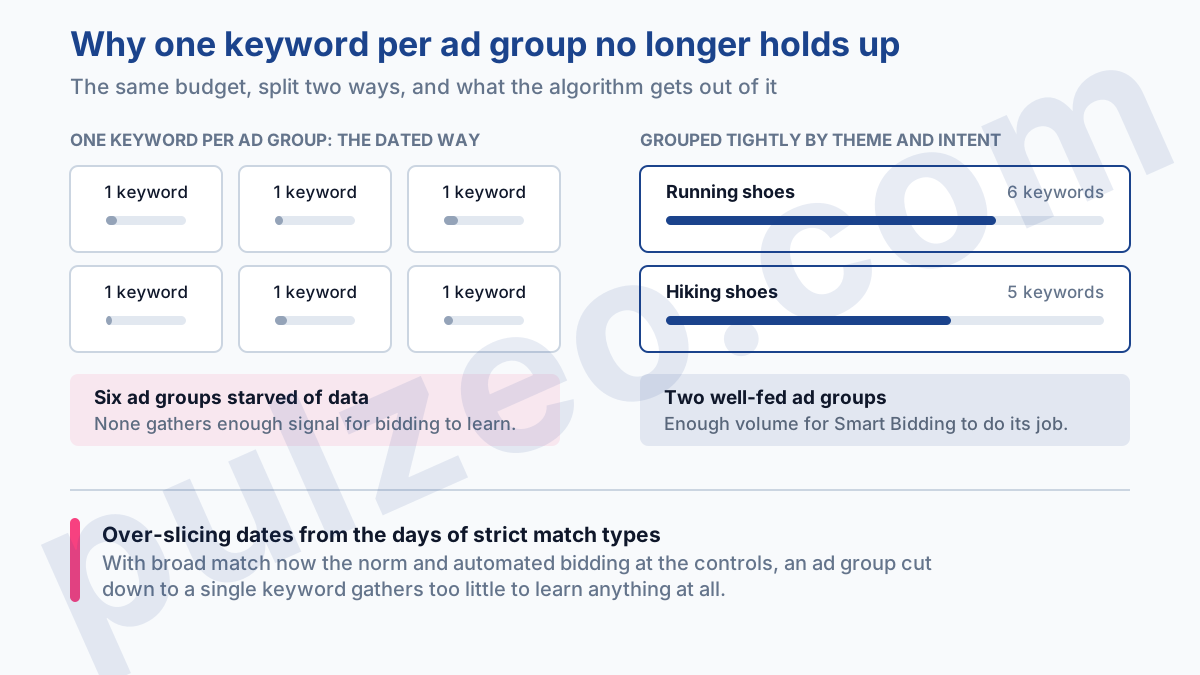
The sweet spot today is tight ad groups built around a theme and an intent, with enough volume to feed automated bidding, and well-stocked responsive search ads. You're after consistency, not over-slicing. If you're still reading an article that sells you one keyword per ad group as the miracle cure, it hasn't been updated in a good while.
The right Quality Score to aim for
So do you just ignore Quality Score? No. You stop worshiping it. Aiming for 10 out of 10 everywhere is a waste of time: some very competitive keywords will top out at 6 or 7 while staying perfectly profitable, and a keyword at 9 out of 10 that doesn't convert isn't worth a single click.
The fight worth having is watching the weak components where it counts, on the keywords that get most of your budget, and leaving the rest alone.
The snag is time. Nobody opens the component columns keyword by keyword, across all their accounts, every week. That's exactly the kind of check Pulzeo runs for you: the tracking audit goes through the account with a fine-tooth comb and flags what's wrong with its health, instead of leaving you to dig through a dashboard.
A component slipping on an important keyword becomes a signal, not a box to tick in a review you keep pushing back week after week. It's also what gets inspected in a full Google Ads audit, and it's often the real cause behind a CPA climbing for no apparent reason.
Quality Score isn't a grade to push up. It's a warning light: your job isn't to paint it green, it's to go fix what it's pointing at.
Common questions
What's a good Quality Score in Google Ads?
There's no magic number. People often quote 7 out of 10 and up as a good level, but the figure alone tells you nothing: what matters is having all three components (expected CTR, ad relevance, landing page experience) at "Above average" on the keywords that get most of your budget. A 6 out of 10 on a profitable keyword beats a 9 out of 10 on a keyword that never converts.
Does Quality Score really affect your cost per click?
Indirectly, yes. Google is clear: the score you see isn't an input in the auction, it's a diagnostic tool. But what it measures, relevance to the searcher, is exactly what the auction rewards in real time. Improve the actual relevance and your CPC comes down; the score will follow, with a lag.
Where do you find Quality Score and its components in Google Ads?
On the Keywords page, by adding the dedicated columns from the Quality Score section. You can display Quality Score itself (the score out of 10), but above all its three components, each marked "Below average", "Average" or "Above average". It's those three statuses, not the overall score, that tell you what to fix.
Can you improve your Quality Score quickly?
No, and you have to accept that. Expected CTR is built on your ads' recent history, so even a good fix takes weeks to show. You don't fix a number, you fix what it measures, then you let time bring the score back up.
