
Which Google Ads extensions should I use?

You've been sold Google Ads extensions as a magic button: switch them on, your CTR jumps 15%, end of story. That's wrong on two counts. First, Google doesn't promise any CTR figure; that "+15%" comes out of nowhere. Second, and this is the real issue, you're not the one who decides which extensions show: Google makes the call, auction by auction.
Ad extensions (Google now calls them assets) are free, they feed your ranking, and yet eight out of ten accounts I take over run them on autopilot. Three sitelinks set up two years ago and never looked at since.
Your job isn't to check boxes: it's to give Google enough good assets that it always has a strong card to play. Here's what really matters, and which ones to pick for your kind of business.
What ad extensions are for, according to Google
Let's start by clearing up the myths. Google's official documentation is clear on one point: adding assets to your campaigns costs nothing. You pay for the click as usual, and billing is even capped at two clicks per impression for an ad and its assets combined. And seller ratings are never charged.
On CTR, though, Google stays deliberately vague. Its documentation says assets "often increase your total number of clicks" and show when they're "predicted to improve your ad's performance." No percentage. The "+10%", "+15%", "+25%" you run into everywhere are agency estimates, never a commitment from Google. I'm not saying they're wrong. I'm saying none of them applies to your particular account.
The right way to put it: a relevant extension takes up more room on the page and gives people one more reason to click. It can lift your click-through rate. "Can." On an ad that's already excellent, the gain is marginal. On a bare ad up against three competitors loaded with links and callouts, the gap is obvious at a glance.
How extensions affect your Ad Rank
Here's the idea almost nobody explains. Assets don't just pump up a CTR: they go into the calculation of your Ad Rank, the score that decides your position in every auction. Google says it in black and white: the expected impact from your assets is one of the six Ad Rank factors, just like your bid and your ad quality.
Translate that into money. At the same bid, an ad better stocked with relevant assets can win a better position, with more visibility. Its actual CPC tends to rise, as Google itself says, but often by less than it would cost to climb a spot by raising your bid.
It's one of the few free levers in Google Ads: you don't touch your bid, you just give the system better cards to play. Ignoring extensions means leaving position on the table while the advertiser next to you scoops it up.
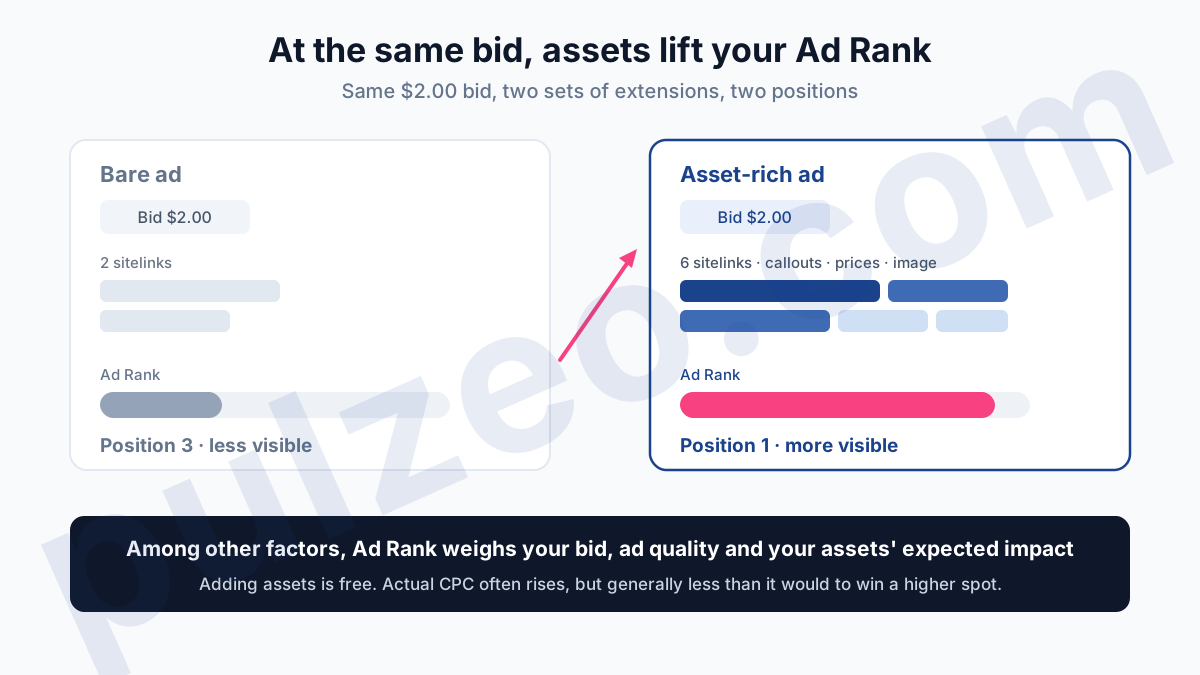
That's also why the reasoning "I don't use extensions, my CTR is already good" doesn't hold up. CTR is only part of the story. The presence and quality of your assets weigh in upstream, in your eligibility for a better ranking, before a searcher has even clicked on anything.
Google picks which extensions show, auction by auction
A question I get all the time: "I added six sitelinks, so why do only two show?" Because you don't control what shows. You supply a deck of assets, and at every auction Google draws the one it judges most likely to perform, based on the search, the device, and the position.
The consequence is counterintuitive, but freeing. You don't have to find THE perfect callout on the first try. What you do have to supply is a pool broad enough and good enough that Google always holds a strong card, whatever the context. Give it two vague sitelinks and it has nothing to optimize. Give it eight specific sitelinks pointing to real pages and it has what it needs to match every search intent.
The mechanism is exactly the same one level up, on the ad text itself. It's what decides how many headlines are worth writing.
Hence my rule of thumb: you don't judge an asset in isolation, you judge the depth of the deck. A well-stocked account is one where Google is never stuck showing a so-so asset for lack of anything better.
A concrete case. I took over a home services account that was stuck in second position on its main searches, with bids already stretched thin. We didn't touch the bids. We took the sitelinks from two to eight, and added four callouts and a call asset.
Two weeks later, the ad was regularly moving up to first position on the same keywords, at the same average CPC. The reason is simple: on an unchanged budget, we'd given Google what it needed to rank the ad higher, and it did.
Which extensions to turn on first
Rather than walking through every type like a catalog, here's how I prioritize them in practice. There's a foundation that holds for everyone, and extensions to turn on depending on what you sell.
The foundation, whatever your industry
Three assets should be running on nearly every campaign. Sitelinks first: they take up the most space and open doors to your key pages, like categories, pricing, or contact.
Callouts next, those short phrases under the ad that spell out your selling points: next-day delivery, free quote, no commitment. And finally structured snippets, which list one facet of your offer, such as the brands you carry, your services, or the areas you serve.
This trio needs no technical data and works for any business. If you only did one thing this month, it should be filling it in properly on all your active campaigns.
The rest, depending on what you sell
Beyond the foundation, what you turn on depends on your business:
- E-commerce: price assets and promotion assets, which show your prices right in the ad and pre-qualify the click (whoever clicks already knows the ballpark);
- Local store or neighborhood service: the call asset and the location asset, to trigger a call or a request for directions without even going through the site;
- B2B lead generation: the lead form asset, which captures the contact inside the ad itself;
- Brand with a strong visual identity: the image asset, which places a visual next to your ad, on desktop as well as mobile.
No need to turn everything on as a matter of principle. A location asset on a 100% online store that ships nationwide does nothing, and a call asset with nobody to pick up the phone actually backfires. You turn on what makes sense, not what fills a box.
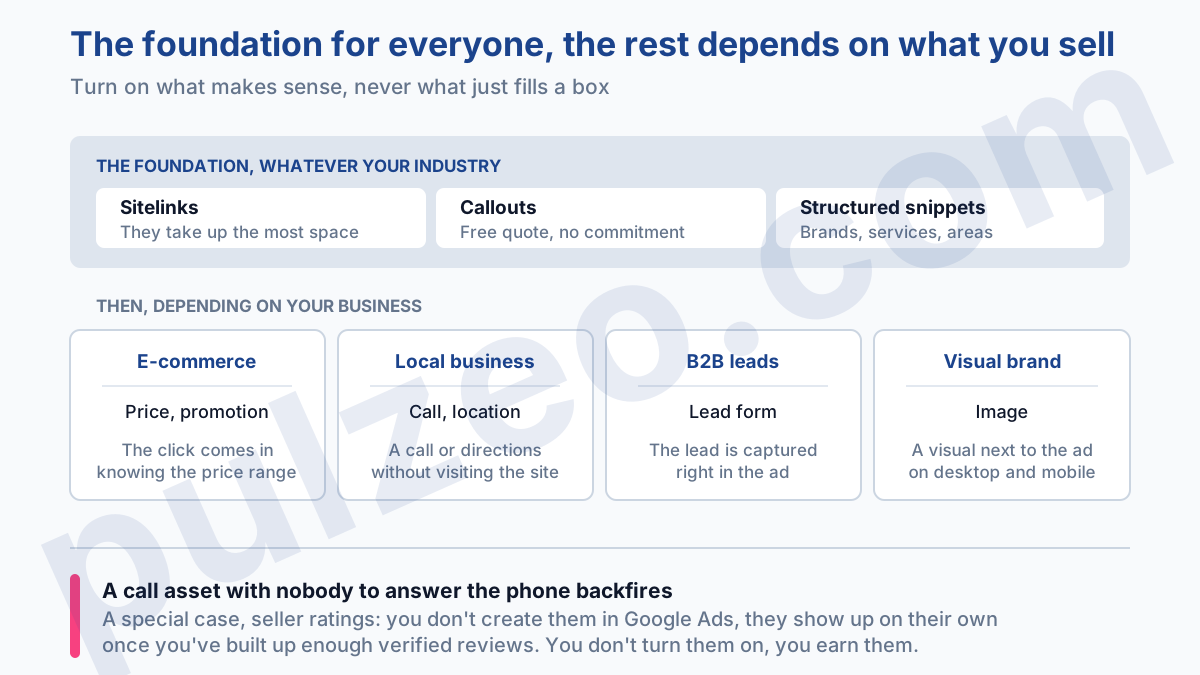
A separate word on seller ratings, those yellow stars under the ad: you don't create them in Google Ads. They show up on their own once you've built up enough verified reviews on a recognized platform. You don't switch them on, you earn them, but their effect on click-through rate is among the clearest, and clicks on them are never charged.
Should you be wary of automated assets?
Yes, but without throwing them all out. It's a blind spot I check every time on the accounts I take over. Google adds, on its own initiative, assets it generates from your site: dynamic sitelinks, dynamic callouts, dynamic structured snippets. The intention is good. The result, not always.
The problem is control. A dynamic sitelink can send people to a page you really didn't want to promote. A dynamic callout can pick up dated wording lying around on your site. You didn't write it, but it shows under your brand, with your budget behind it. On one account, I saw a dynamic callout touting an offer that had expired months before.
That doesn't mean switching them off reflexively: well tuned, they plug the gaps when your manual assets don't cover a search. But they need watching. Open the Account-level automated assets table, check what Google is showing in your name, and turn off, case by case, whatever doesn't fit. Don't write automation a blank check.
How many extensions should you use, and when should you review them?
The deck logic gives you the answer: as many as are genuinely relevant, never filler. For sitelinks, Google recommends providing at least six with descriptions. You need at least two for them to show at all, and it displays up to six on desktop, eight on mobile in a carousel.
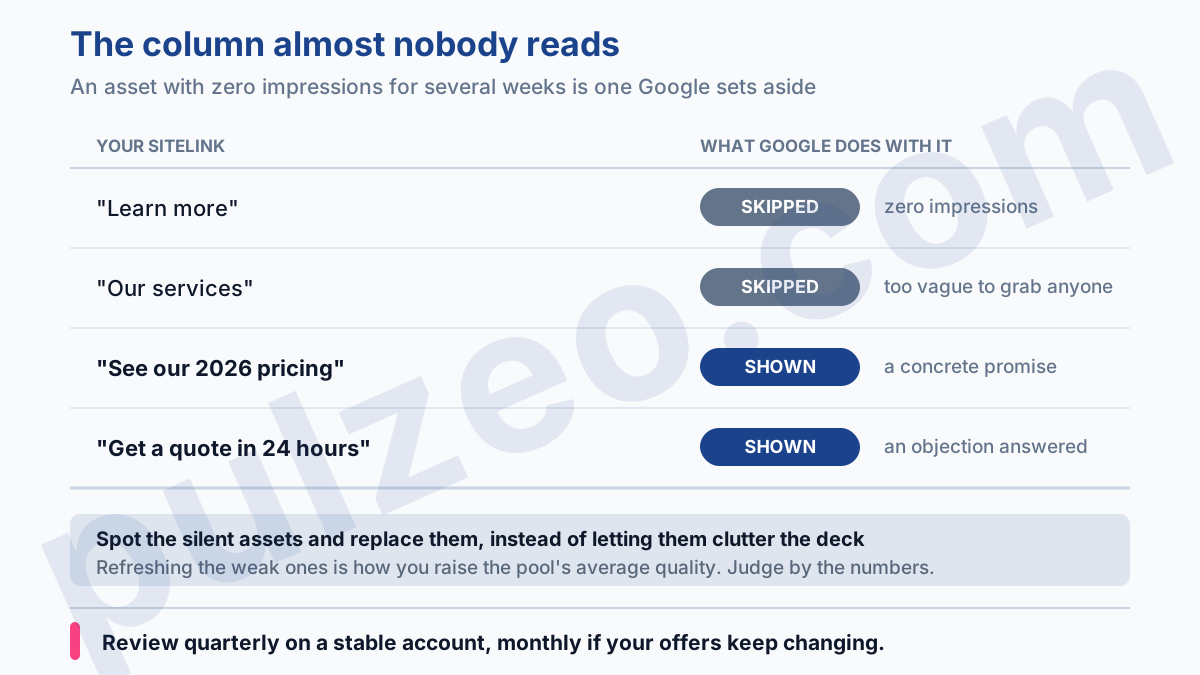
As for frequency, a quarterly review is enough on a stable account, and a monthly one if you push promotions or change offers often.
And during that review, look at a column almost nobody checks: each asset's impressions. On Search campaigns, Google has retired its "Performance label" column in favor of full performance statistics: you now judge by the numbers. An asset that gets zero impressions for several weeks is one Google sets aside, because it expects others to perform better.
The useful move, and the one Google itself recommends, is to replace those silent assets instead of letting them clutter the deck. A "Learn more" sitelink will almost never get drawn; a "See our 2026 pricing" link has something to hook people with. Refreshing the weak ones is how you raise the average quality of the pool.
That's where autopilot hurts. Assets get set up once and never looked at again. Links point to dead pages, the promotions ended back at Christmas, and a disapproved extension quietly stops showing without anyone noticing.
It's exactly the kind of blind spot Pulzeo catches for you: missing, underused, or broken assets on every campaign, without opening twelve tabs. And on Performance Max campaigns, where assets are the engine room, the stakes go up another notch.
Extensions aren't boxes to check, they're a garden to tend. Your job isn't to choose what shows, it's to give Google a deck so good it never has a bad card to play.
Common questions
Do ad extensions cost extra?
No. Adding extensions (or assets) to your campaigns costs nothing: you pay for the click at the usual rate, whether it lands on the ad or on an extension. Google even caps billing at two clicks per impression for an ad and its extensions combined, and seller ratings are never charged. It's one of the few free levers in Google Ads.
How many extensions should one campaign have?
As many as you have genuinely relevant items, never filler. For sitelinks, Google recommends providing at least six with descriptions; you need at least two for them to show, and it displays up to six on desktop, eight on mobile. The logic holds for every type: give Google a broad, strong deck, and it will pick the best card at each auction.
Why aren't my Google Ads extensions showing?
Because you don't decide what shows: at each auction, Google picks the extensions it judges most likely to perform, based on the search, the device, and your position. An extension can also fail to show if your Ad Rank is too low, if it has been disapproved, or if you haven't supplied enough of them (two sitelinks minimum). Supplying more quality extensions raises the odds that a good one shows.
Should you keep the automated assets Google adds?
Not blindly. Google generates automated assets from your site (dynamic sitelinks, callouts, structured snippets): well tuned, they plug the gaps your manual extensions don't cover. But they can point to the wrong page or reuse dated wording. Check the Account-level automated assets table regularly and turn off, case by case, whatever doesn't fit your message.
