
How many headlines do responsive search ads need?

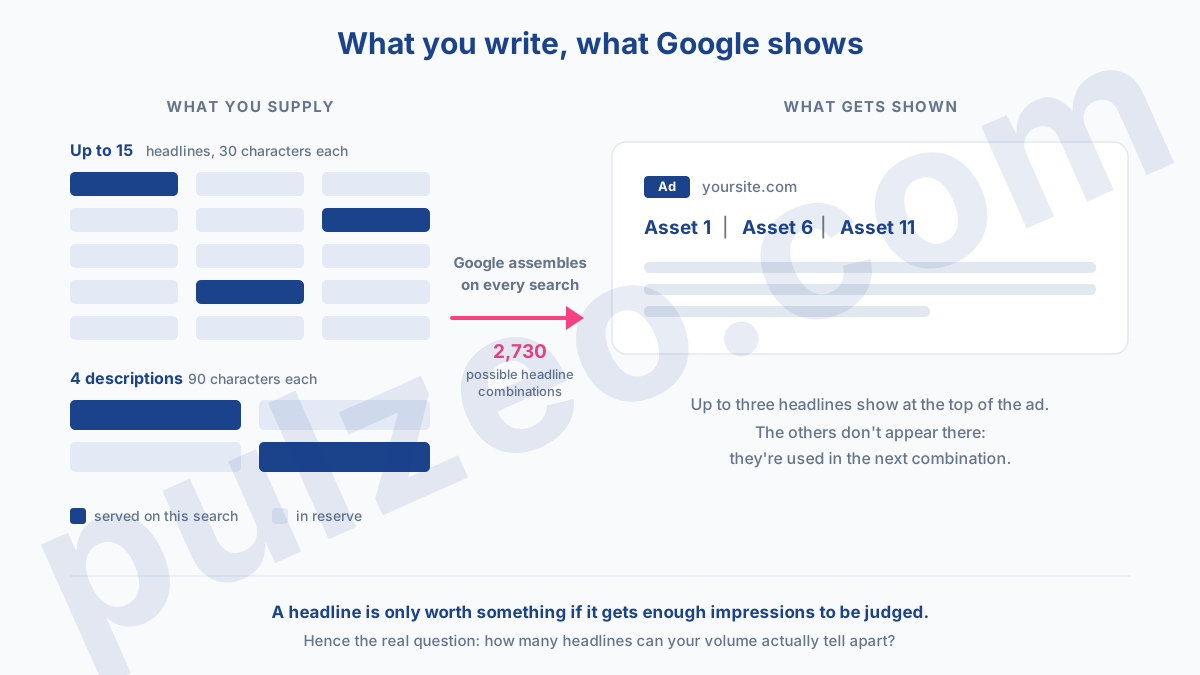
Responsive search ads in Google Ads accept up to 15 headlines and 4 descriptions. At the top of the ad, Google never shows more than three headlines at a time, and in my experience it's often just two. In other words, of the fifteen headlines you're about to write this morning, most won't be on screen when your ad goes out.
Should you still fill them all in? The honest answer, the one checklists never give you, is that it depends entirely on your ad group's volume. On an ad group getting fifteen clicks a day, fifteen headlines will never produce a winner. On one getting a thousand, they become a real lab.
Here's what Google actually does with your headlines, what its documentation says when you read it all the way through, and how to decide based on your traffic.
How Google assembles your responsive search ad
The principle fits in one sentence: you supply the parts, Google does the assembly. On every search, it picks from your headlines and descriptions, assembles an ad, serves it, then puts together a different one for the next query.
The limits are set by Google's documentation: between 3 and 15 headlines of up to 30 characters, between 2 and 4 descriptions of up to 90 characters. When the ad shows, up to three headlines appear in the traditional headline position. Google can also show a headline's text at the start of the description, and up to two unused headlines in the space that used to be reserved for sitelinks.
How many combinations does that make? Do the math. Picking three headlines out of fifteen, in an order that matters, gives you 15 × 14 × 13, or 2,730 different ads. Add the descriptions and you're well past ten thousand.
That's the real change to the job, and it slipped in fairly quietly. You no longer write an ad, you feed an engine. The skill is no longer finding the perfect line, it's supplying enough variety that the engine has something to choose from.
The flip side, which a lot of people struggle with: you don't decide what shows. It's the same shift as with assets, formerly called ad extensions, where Google picks which ones to serve based on the query and the device.
Should you use all 15 headlines in a responsive search ad?
No, not automatically. And the deciding factor is neither your industry nor your overall budget: it's the number of clicks in that particular ad group. A test needs data to decide, and data arrives at the pace of your traffic, not the pace of your ambitions.
Below a certain volume, your headlines never get a verdict
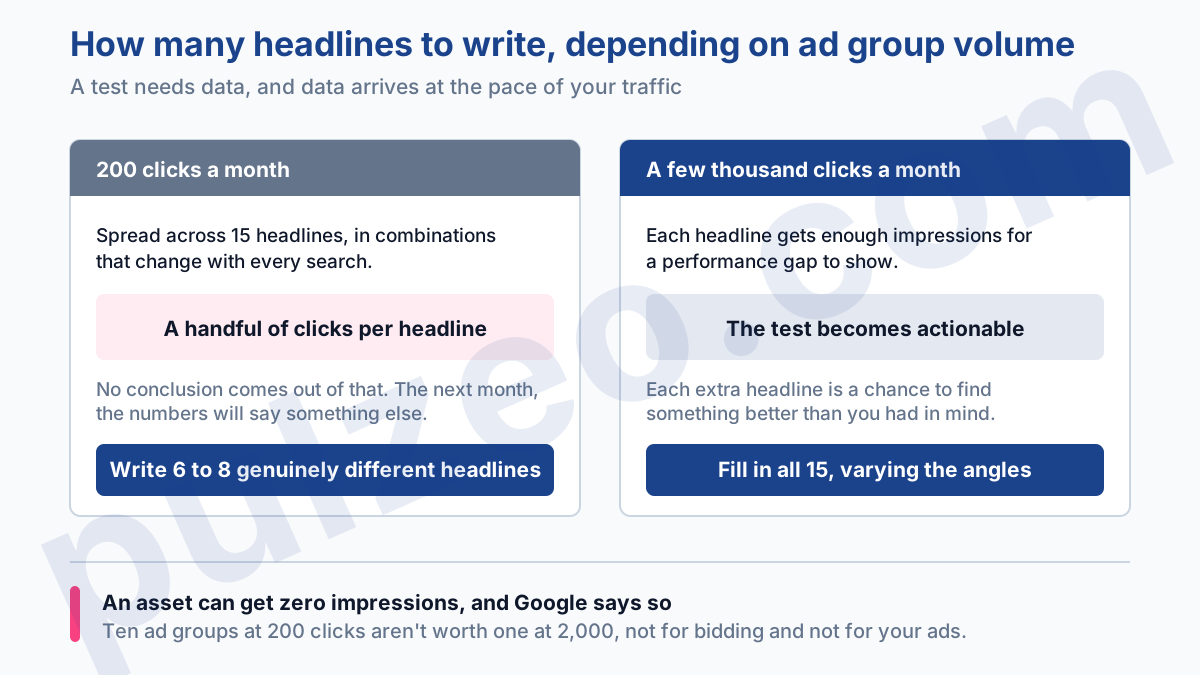
Take an ad group getting 200 clicks a month. Those 200 clicks have to be split across fifteen headlines, in combinations that change with every search. Do the division: a handful of clicks per headline, spread over a whole month.
You can't draw any conclusions from that. You'll have numbers, they won't mean anything, and the following month they'll say something else. Worse, some of your headlines will simply never be served: Google writes in black and white that an asset may not get any impressions if other assets are predicted to perform better.
So on a low-volume ad group, I write between six and eight genuinely different headlines, and I stop there. Six solid headlines beat fifteen lukewarm variations that nobody will ever be able to rank. They're also six headlines you'll actually reread before publishing them.
Above it, all 15 headlines become a real test
At a few thousand clicks a month on a single ad group, the math flips completely. Each headline gets enough impressions for a performance gap to show, and each extra headline is a chance to find something better than what you had in mind.
At that point, fill them all in. But vary the angles instead of spinning the same message fifteen times with synonyms. A useful mix covers different promises:
- the main benefit, stated simply;
- an objection handled (price, timing, commitment);
- proof (years in business, number of customers, guarantee);
- the call to action.
That's also why I'm wary of over-segmentation. Ten ad groups at 200 clicks aren't worth one at 2,000, not for automated bidding and not for your ads: slice things too thin and you starve every ad group, until nothing has enough data left to improve.
Should you pin headlines in Google Ads?
The advice going around everywhere fits in two words: don't pin. That's not what Google says, and the difference changes everything.
Google does advise most advertisers against pinning, because it cuts down the number of combinations that can be tested. But the same page spells out what to do for those who need it: pin two or three different assets to the same position, never just one.
The gap between those two practices is huge. A single headline pinned to position 1 is a static ad dressed up as a responsive one: you've made the format useless while keeping all its complexity. Three headlines pinned to the same position is a narrower test, but it's still a test.
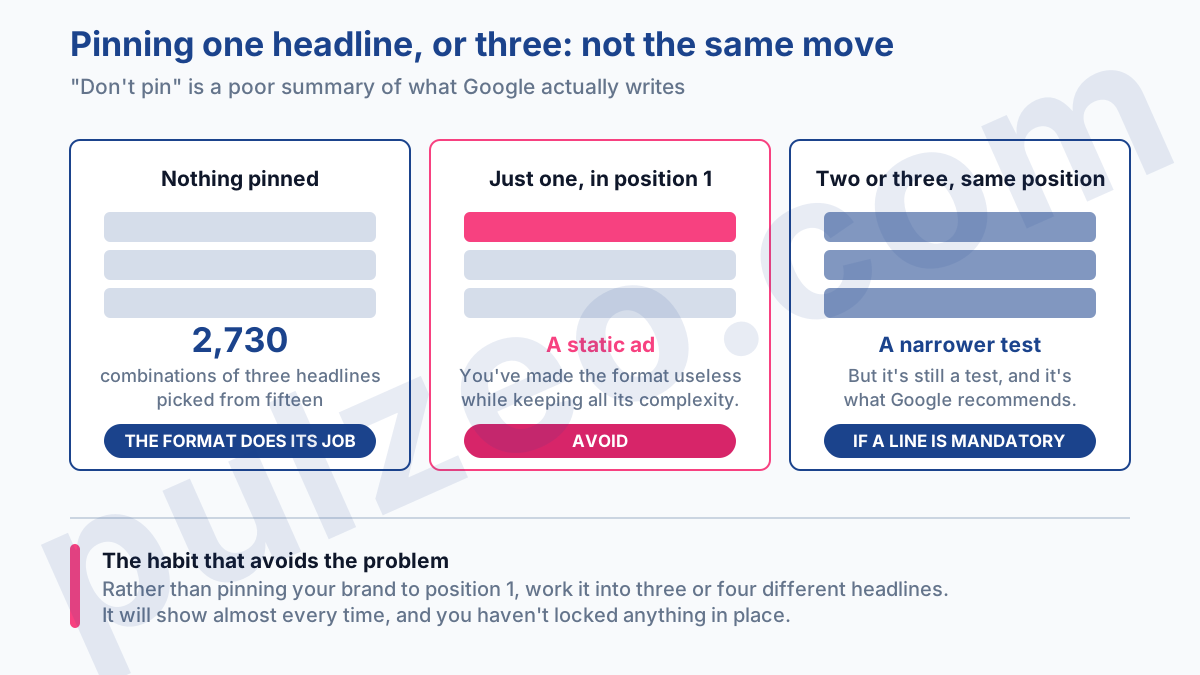
When is pinning really justified? When a line has to appear, not when you'd like it to. A regulated industry that requires set wording, a reseller required to display the brand, a mandatory disclaimer. The rest of the time, it's the copywriter's security blanket.
The habit that avoids the problem: rather than pinning your brand name to position 1, work it into three or four different headlines. Statistically, it will show almost every time, and you haven't locked anything in place.
What Ad strength actually measures
Ad strength rates your ad from "Incomplete" to "Excellent," by way of Poor, Average, and Good. Plenty of people treat it as a score to push up at all costs. Yet Google writes, in its own documentation, that it isn't used to calculate Ad Rank, Quality Score, or auction wins.
It's feedback on the diversity of your assets, not a bidding lever. Exactly the same misunderstanding as with Quality Score, which I've already covered in detail elsewhere.
Should you ignore it, then? No. Google measures the payoff: responsive search ads going from "Poor" to "Excellent" Ad strength get 15% more clicks and conversions. But get the cause and effect right: the rating doesn't produce the gain, the real diversity the rating detects does. Adding three hollow headlines to go from Good to Excellent won't earn you a thing.
Reading the asset report
If you're still looking for the "Performance label" column, stop: Google removed it. It's been replaced by full performance statistics for each asset: impressions, clicks, conversions, conversion value, and cost.
It's better, and it's more demanding. A label told you what to think. Columns of numbers ask you to know how to read them, and above all to recognize when they're saying nothing.
The first column to look at isn't a headline's conversion rate, it's impressions. A headline with zero impressions for six weeks isn't a bad headline: it's a headline Google never saw fit to test. Google itself recommends replacing assets that are still at zero impressions after several weeks.
Next, be wary of small numbers. A headline with 40 impressions and 2 conversions shows a gorgeous rate that won't survive the next month. On assets, I don't draw conclusions below a few hundred impressions, and I change one headline at a time so I know what caused the difference.
One last point, and a less obvious one. Asset stats don't measure a headline on its own, they measure a headline inside combinations. A mediocre headline can post good numbers because it often ran alongside your best hook. That doesn't invalidate the report, it's just a reason not to replace eight headlines at once thinking you're cleaning house.
What if Google writes your headlines for you?
It can, and you may already have run into it under its old name, automatically created assets. Google generates headlines and descriptions from your domain, your landing page, your keywords, and your existing ads.
Tempting when you're short on time. But there are conditions: text customization, its current name, is set at the campaign level and requires AI Max, which Google switches on automatically starting in September 2026 for campaigns still using automatically created assets.
Two habits if you turn it on. First, go read what was generated, in the asset details report and the "Added by" column. It's your brand talking, and a sentence lifted from a meta tag you forgot about three years ago can catch you off guard.
Second, keep in mind that these generated headlines only serve when they're predicted to beat yours. So you're adding extra candidates to a pool your volume already struggles to rank. On an ad group at 200 clicks a month, that's precisely what not to do.
The date to remember is September 2026: that's the month Google set for automatically upgrading campaigns still using automatically created assets to AI Max. I've laid out that timeline and what it changes in the article on AI Max.
How many responsive search ads per ad group?
Two at a minimum, three at most. That's not a personal opinion: three is a technical limit in Google Ads, and you can't enable more than that in a single ad group.
Google puts a number on the gain, which is rare enough to point out. Going from one to two responsive search ads in an ad group brings an average of 6.6% more conversions, at a similar cost per conversion. Going from two to three adds another 3.7%.
The returns diminish, which makes sense: the second ad brings a clear alternative, the third refines at the margin. If you only have one today, the second is by far the best return on your time all week.
Where to start if your ads are a year old
Open an ad group, any ad group, and check three things in this order. How many active ads? If there's only one, duplicate it and genuinely change the angle of the message, not just two words.
How many pinned headlines? If a headline is alone in its position, either unpin it or add two more to that same position. Finally, how many headlines have had zero impressions for several weeks? Those are dead: replace them with an angle you haven't tried yet.
This check takes ten minutes on one account. Across thirty accounts, it's an entire afternoon nobody ever has to spare, and that's exactly why these ads sit untouched for a year. It's the kind of review Zeo runs continuously in Pulzeo: it combs through your ad groups and surfaces the optimizations worth making, ranked by impact, instead of leaving you to open thirty tabs on a Sunday night.
You're no longer writing an ad, you're feeding an engine. The right move isn't to give it as much as possible, it's to give it enough to make a call.
Common questions
How many headlines should a Google Ads responsive search ad have?
Google accepts between 3 and 15 headlines, but the right number depends on your ad group's volume. Under a few hundred clicks a month, six to eight genuinely different headlines beat fifteen variations that Google will never have enough data to rank. Beyond a few thousand clicks a month, fill in all fifteen: the test becomes truly actionable.
Should you pin headlines in a responsive search ad?
Only when a line absolutely has to appear, for example a regulatory requirement or a mandated brand name. And in that case, Google recommends pinning two or three different assets to the same position, never just one: a single pinned headline turns your responsive search ad into a static ad and defeats the whole point of the format.
How many responsive search ads can an ad group have?
Three at most; that's a technical limit in Google Ads. The recommendation is to have at least two rated Good or Excellent for Ad strength: Google measures an average of 6.6% more conversions going from one ad to two, and 3.7% more going from two to three, at a similar cost per conversion.
Does Ad strength affect Ad Rank?
No. Google states explicitly that this metric isn't used to calculate Ad Rank, Quality Score, or auction wins. It's feedback on the diversity of your assets, not a bidding lever. Pushing it up artificially won't win you anything in the auction.
