
Why does the Google Ads search terms report hide queries?

The Google Ads search terms report is the only place that tells you what people really typed before they clicked. Not what you bought: what they wrote. That's where your best keyword ideas lie dormant, and where you can see the budget leaking out.
Except there's one detail almost nobody mentions: this report doesn't show you everything. Some of your searches, and so some of your spend, will never appear in it. Here's how to read it fast, what Google takes out of it, and where to find what's missing.
The keyword you buy versus the query people type
A keyword is what you buy. A search term is what the person typed. The whole subject comes down to the gap between the two.
On exact match, the gap is thin. On broad match, it becomes a chasm: a single keyword can trigger hundreds of different searches, many of which have nothing to do with what you sell. You buy one intent, Google delivers a whole family of intents, and you pay for the entire family.
An example. You bid on "google ads software" on broad match. The report will show you "free google ads software", "google ads software course", "what is google ads". Three searches, three intents, one bill. The first will never convert if you sell a paid subscription, the second is looking for a class, the third for a definition.
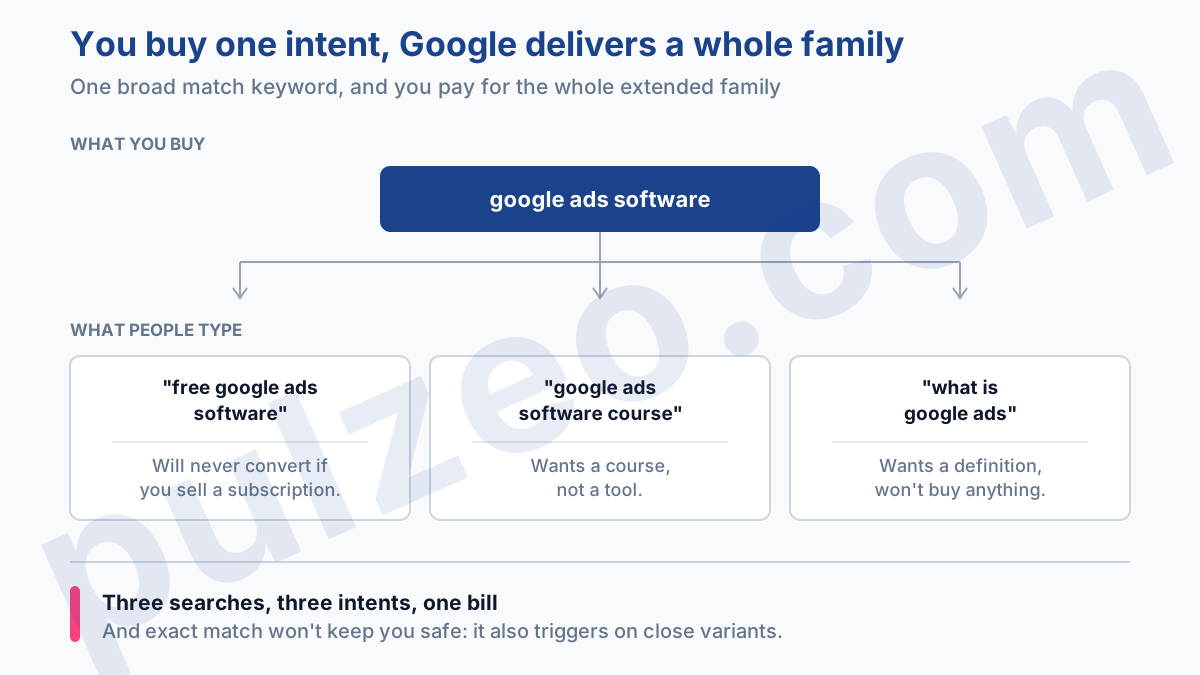
And don't think exact match keeps you safe. Google triggers exact match on "close variants": same meaning, rewordings, plurals, misspellings. You buy "running shoes", and your ad also shows for "sneakers for running". That's the subject of the article on how keyword matching really works, which also explains which of your keywords fires when several could match.
The report shows these variants, and that's exactly where you check whether Google is reading your intent correctly, or stretching it too far.
Where is the search terms report in Google Ads?
The path is Campaigns, then Insights and reports, then Search terms (Google documentation).
Once you're there, one move changes everything: turn on the "Keyword" column. It's off by default, and yet it's the one that tells you which keyword triggered which search. Without it, you see the symptom but never trace it back to the culprit. Add the match type while you're at it, and you'll know where every search comes from.
Why are some search terms missing from the report?
Because Google deliberately takes some of them out. It isn't a display bug or a processing delay: it's a rule, and Google owns it.
Queries hidden for privacy reasons
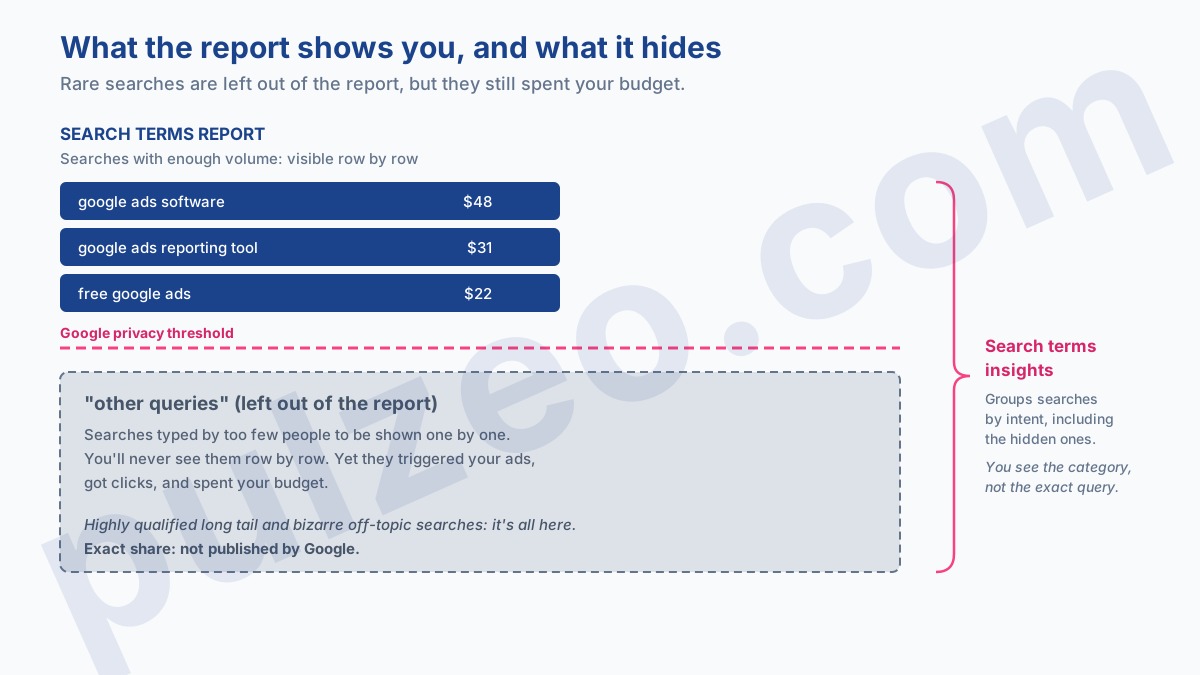
It's been the rule since September 2020, and the documentation spells it out in black and white: some search terms that "don't have enough query activity are omitted from the search terms report", in keeping with Google's data privacy standards (source). In plain English: a search typed by too few people won't be shown to you, even if it triggered your ad, got a click and spent your budget.
It's counterintuitive, because the rare searches are precisely the most interesting ones. That's where the highly qualified long tail hides. So do the bizarre off-topic searches that cost you dearly.
Google doesn't publish the exact share of what's hidden, and I'm wary of the percentages that get passed around: they date from the first months after the change and nobody has rechecked them since. What's certain is that the smaller your account, the bigger the invisible portion: your searches are inevitably rarer.
And if you run Performance Max, note that this report only reached it in 2025, as "Search terms and landing pages for Performance Max": for years, you got categories, not queries. What follows applies mainly to your Search campaigns, and it's one more reason not to switch everything to automation overnight.
Search terms insights: the workaround
There's a second view, and almost nobody opens it.
The path: Campaigns, Insights and reports, Insights, then the "Search terms insights" card. Google groups searches there by intent, and the documentation is explicit: these groupings cover all search terms, "including those not exposed in the search terms report due to privacy reasons" (source).
In other words: what the standard report hides from you row by row, this view shows you by category, with its clicks, its conversions and its value. You won't get the exact query, so you can't exclude it word for word. But you'll finally know which family of intents is eating your clicks, which beats ignoring the blind spot.
Analyzing the report: three questions per query
Sort by cost, highest first, and nothing else. Not by clicks, not by impressions: by what the search cost you. The first twenty rows drive most of the decision; the rest is noise you'll never have time to deal with anyway.
Then, for each row, three questions in this order:
- Did it convert?
- Can it convert, given the intent behind the words?
- Is it already covered by one of your keywords?
The answers make the decision for you. It converts and isn't covered: that's a keyword to create. It doesn't convert and can't convert: that's an exclusion. It doesn't convert yet but the intent is right: you leave it alone and let the volume speak.
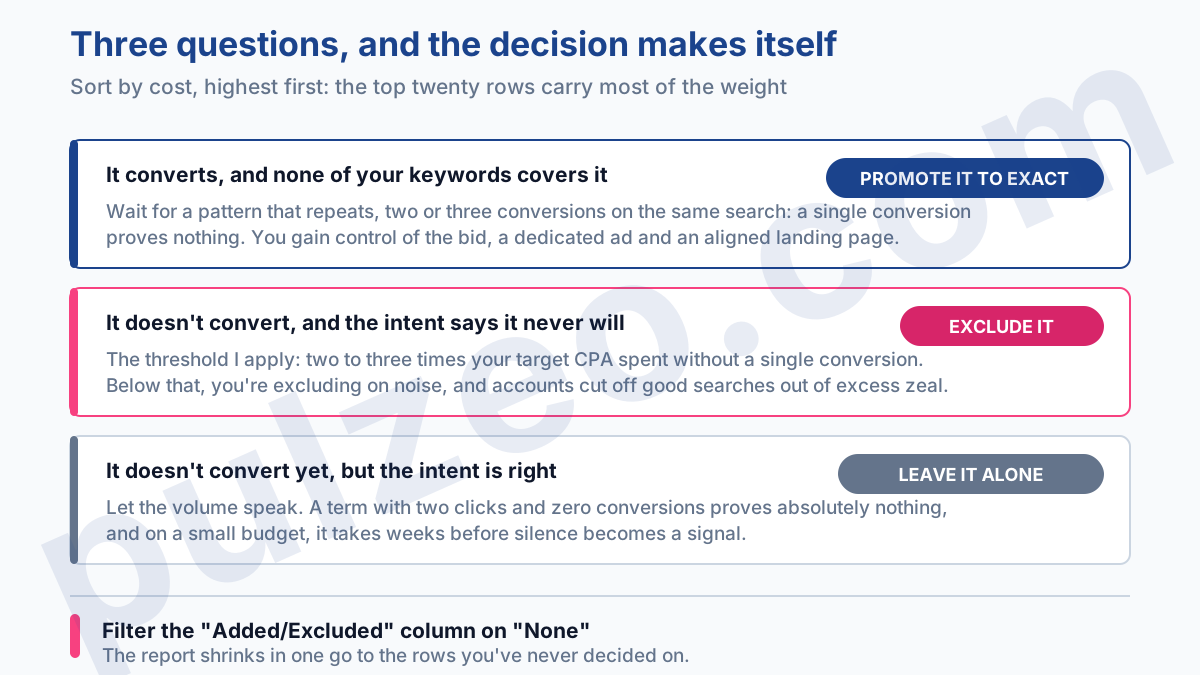
One last habit saves a huge amount of time, and it's right in front of you: the "Added/Excluded" column. It tells you whether you've already ruled on the search. Filter it on "None" and the report shrinks in one go to just the rows you've never decided on, which spares you rereading every week what you've already settled.
The queries to promote to keywords
Some Google Ads search queries shouldn't stay queries. A long-tail search that converts regularly deserves its own keyword, on exact match. Once promoted, it gives you three things you didn't have: control over the bid, an ad written for it, and a landing page aligned with what it asks for.
The trap is promoting too fast. A single conversion proves nothing; it may be a fluke. From experience, I wait for a pattern that repeats: two or three conversions on the same search, or enough clicks for silence to become a signal. On a small-budget account, that takes weeks, and that's normal.
A case that comes up often. A long, very specific search shows up in the report every week: a dozen clicks, three conversions, a CPA twice as good as the account average.
It's buried in a broad match ad group, served by a generic ad that speaks to everyone and no one. Pulled out on exact match, with its own ad and its own page, it becomes one of the best rows in the account. It had been right under the account manager's nose for months.
There's a hidden benefit to this promotion that nobody calculates: Quality Score. An ad written for a specific search is inherently more relevant than a broad message calibrated to cover a whole ad group. And better relevance means a cheaper click at the same position. You don't just gain a conversion, you lower the price of the ones that follow.
The search terms to exclude
It's the other half of the report, and by far the most profitable in the short term. Every off-topic search you cut is budget that immediately flows back to what converts.
The move deserves a how-to of its own, because a badly set negative doesn't block what you think it does: I've covered match types and levels in the article on the negative broad match trap. Here, only one question matters: which rows of the report deserve exclusion?
The threshold I apply: a search that has spent two to three times your target CPA without a single conversion is a serious candidate. Below that, you're excluding on noise. A term with two clicks and zero conversions proves absolutely nothing, and I regularly see accounts cut off good searches out of excess zeal.
Still, watch out for the opposite mistake, which is more common: letting it slide. A handful of wasteful searches is enough to drag down the average of an entire account, exactly like a CPA that climbs without anyone noticing.
How often to check the search terms report
None of the above is complicated. The problem was never the method, it's consistency. The report doesn't read itself, and nobody has time to sort twenty rows per account, every week, across fifteen accounts. So you put it off. And you rediscover the waste three months later, when it has already cost a month's worth of budget.
That's exactly what Pulzeo takes off your hands. Zeo screens your search terms continuously and surfaces the queries that spend without converting, ranked by what they cost you, ready to exclude or to promote to a new keyword. You're no longer reading a table: you're working through a short list of decisions.
The search terms report never lies. It just stays silent about part of what you pay for.
Common questions
Which column should you turn on in the search terms report?
The "Keyword" column, which is off by default even though it's the one that tells you which keyword triggered which search: without it, you see the symptom but never trace it back to the culprit. Add match type while you're at it and you have the full diagnosis on a single row. The "Added/Excluded" column, filtered on "None", then narrows the report down to the rows you've never ruled on.
Why don't some search terms show up in the report?
Because Google removes them on purpose. Since September 2020, searches that don't have enough query activity have been left out of the report in keeping with its data privacy standards. Yet they triggered your ads and spent your budget. To see them, grouped by category, you have to open search terms insights.
What's the difference between a search term and a keyword?
The keyword is what you buy. The search term is what the person actually typed. On exact match, the two look alike. On broad match, a single keyword can trigger hundreds of different terms, and you pay for every one of them.
How often should you review the search terms report?
Once a week on an active account, once a month on a small budget. The real rule isn't the calendar, it's volume: you need enough accumulated clicks for a lack of conversions to be a signal rather than chance. Always sort by cost, highest first, and only work through the top of the list.
