
How do Google Ads keyword match types work?

You put square brackets around a keyword and tell yourself it's locked down. Your ad will now only show on that search, word for word. That's not what happens, and it's the biggest misunderstanding about Google Ads keyword match types.
Match types decide which searches can trigger your ads. They don't decide the exact wording the searcher types, or which of your keywords will serve.
Because when several keywords in your account can answer the same search, only one enters the auction. Google picks it, applying a priority hierarchy that its documentation spells out in black and white.
That's where it gets interesting. Because once you understand that rule, you stop wasting time on syntax and start working on what really carries weight.
The three keyword match types
Let's start with the foundation, which fits in a few lines. Three match types exist today, and only their punctuation tells them apart:
- broad match: the keyword typed as is, with no special symbol;
- phrase match: the keyword in quotation marks,
"tennis shoes"; - exact match: the keyword in square brackets,
[tennis shoes].
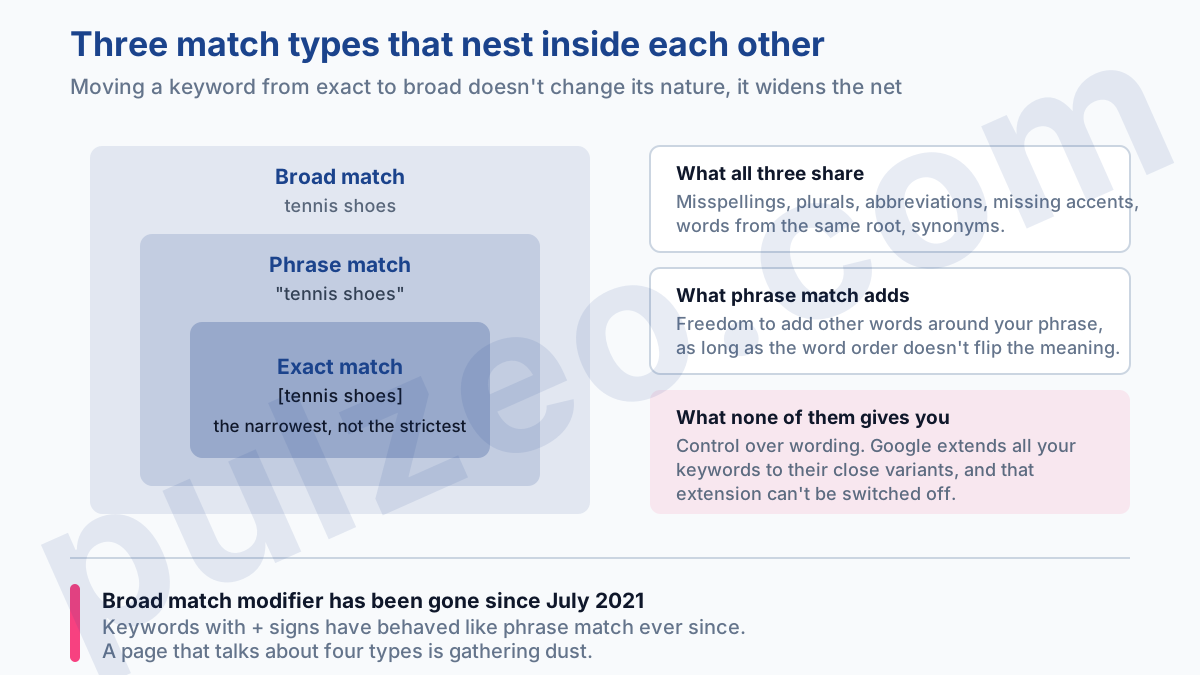
They nest like Russian dolls. Exact match is the narrowest, phrase match covers everything it covers and more, and broad match covers all the rest. The same keyword moved from exact to broad doesn't change its nature, it just casts a wider net.
If you still come across a page that talks about four types, it's gathering dust. Broad match modifier, the notation with a + in front of each term, was retired in July 2021. Keywords that still use it have behaved like phrase match ever since, and you can no longer create new ones.
Why your ad shows on searches you never targeted
Because no match type gives you control over the wording. Google always extends your keywords to their close variants, and that extension can't be switched off.
"By default, all keyword match types are eligible to match to close variants. There's no way to opt out."
Those lines from Google's documentation deserve a pause, because they contradict what most account managers believe. Exact match isn't a strict mode. It's simply the least broad of the three.
What an exact match keyword still lets through
The list is longer than you'd think. Misspellings, of course, but also singular and plural forms, abbreviations, missing accents and words from the same root, "floor" and "flooring" for example.
Add to that reordered words when the meaning still holds, [mens shoes] and [shoes mens], and function words dropped or added freely, the prepositions and articles that have no effect on intent.
Then it goes up a notch, and this is where it gets surprising. Implied words: the keyword [daydream vr headset] matches "daydream headset". Synonyms: [bathing suits] matches "swimming suits". And even plain shared intent: [images royalty free] matches "free copyright images".
What phrase match adds on top
The same set of variants, plus the freedom to surround your phrase with any other words. "red shoes" can match "running shoes red".
One detail is worth remembering, because it's the last safeguard syntax gives you: word order still counts when the meaning depends on it. The phrase match keyword "moving services NYC to Boston" won't trigger for someone looking to move from Boston to NYC. Google refuses the match as soon as the wording flips the meaning.
Which keyword triggers when multiple keywords match?
Just one, and not necessarily the one you have in mind. This is the real matching question, the one with practical consequences.
Your account is full of overlaps. The same search term is eligible for three, four, sometimes ten of your keywords spread across several ad groups. You may picture them fighting it out in the auction, or the most precise one winning on principle. Google does it quite differently.
"If multiple keywords […] are eligible to match the same search term, they don't compete with each other in the auction. […] Only one of those keywords can trigger an ad for the term."
Google then applies a four-step hierarchy, always in the same order. First, an exact match keyword identical to the search term, which jumps ahead of everyone. Next, a phrase or broad match keyword identical to the term. If nothing is identical, an AI compares how relevant the ad groups are and keeps only the most relevant one. Ad Rank only comes in last, to break a tie between equal candidates.
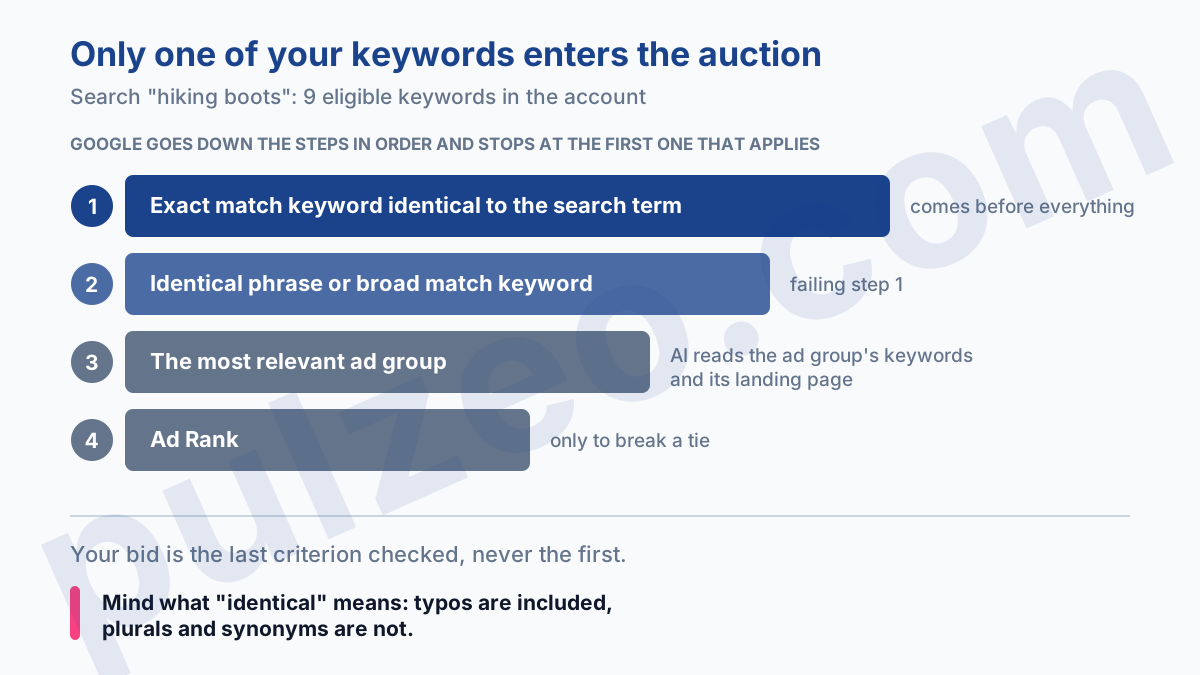
Above all, keep the order in mind: your bid is the last criterion checked, not the first. Paying more doesn't move a keyword up this queue.
What Google means by "identical"
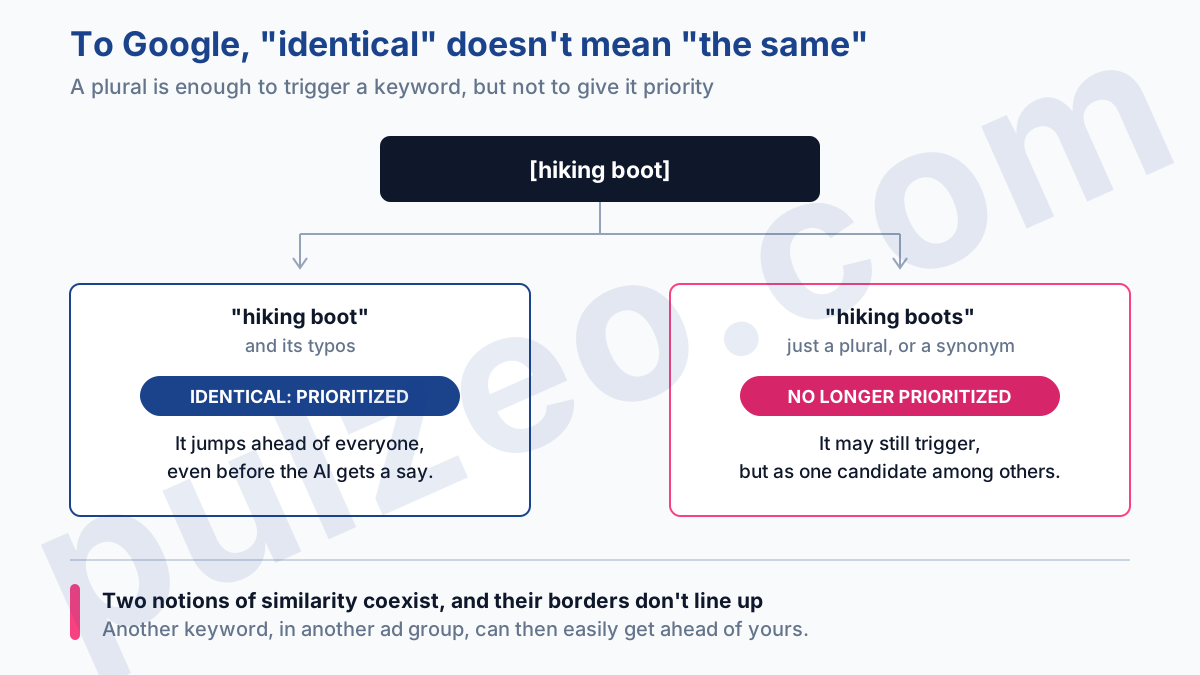
Here's the detail that turns all of this on its head, and it sits in a footnote in the documentation. The word "identical" covers typos, but not plurals or synonyms.
Reread the hierarchy with that in mind. Your exact match keyword [hiking boot] only takes priority on the search written exactly that way. Someone types "hiking boots" in the plural, and your exact keyword loses its free pass: it becomes one candidate among others again, and ad group relevance settles it.
It may still trigger, since the plural is a close variant. But it no longer gets priority, and another keyword, in another ad group, can easily get ahead of it.
It's a deliberate quirk: a plural is enough to trigger a keyword, not enough to give it priority. Two notions of similarity live side by side in the same system, with borders that don't line up.
How Google chooses when no keyword is identical
When no keyword is identical to the search term, which covers the vast majority of searches, the decision is made somewhere other than in your keywords.
Google doesn't compare your keywords one by one. It compares your ad groups, and judges them on three things: the meaning of the search term, all the keywords in the ad group, and the landing pages set up in it. In other words, your landing page has a say in which keyword represents you.
The documentation's example says it all. A skydiving school has two ad groups, one built around the license, the other around advanced courses. Someone searches for "skydiving certifications near me". Both ad groups are eligible, but only the license one enters the auction, because "license" and "certifications" are semantically closer than "courses" and "certifications".
This mechanism gives you a very concrete rule, and it has nothing to do with syntax: an ad group should have one theme, just one, with a landing page that talks about that theme.
A catch-all ad group doesn't just lose on Quality Score, it loses contests it should have won. It's one of the arguments I make in the article on Google Ads account structure, and matching is what really justifies it.
Six cases where the hierarchy doesn't apply
Before you conclude there's a matching problem, run through these situations: they short-circuit everything above. Four come down to the state of your account:
- the keyword has the Low search volume status, so it's temporarily inactive;
- the ad group's ads or landing pages have been disapproved;
- location or audience targeting, or an IP exclusion, rules that searcher out;
- the campaign is limited by budget, and Google eases off so as not to overspend it.
The fourth is the sneakiest, because it turns a budget problem into what looks like a targeting problem. You see your best keywords triggering less often, you suspect matching, and the real cause lies elsewhere.
The last two cases don't depend on you. First, Shopping: the priority rules don't cover that inventory, so a Shopping ad can show alongside yours even when you hold the identical exact match keyword.
Then, and this is the most interesting one for what comes next, search journeys that go through Lens, AI Mode, AI Overviews or autocomplete. The term shown in your reports is then only an approximation of the real intent. Since it isn't technically identical to a keyword, it no longer triggers automatic priority: AI prioritization takes over.
Remember the consequence, because it shapes everything. The first step of the hierarchy, the identical exact match keyword, fades as searches become conversational. The weight shifts toward ad group relevance, in other words toward the only lever that doesn't depend on syntax.
Should you use broad match for all your keywords?
My answer comes with a condition, one Google itself sets out without beating around the bush.
"It's critical to use Smart Bidding with broad match."
The logic holds: broad match gets you into thousands of different phrasings, some worth a lot and others worth nothing at all. A single manual bid treats those searches equally, which guarantees you overpay for the bad ones. It's your choice of bidding strategy that determines how broad you can afford to go, not the other way around.
On an account that has neither the conversion volume nor the history to feed Smart Bidding, broad match across the board amounts to funding Google's learning with your budget. Start tight, and widen once your conversions are coming through cleanly. Conversely, on a mature account, clinging to all-exact cuts you off from rephrasings you would never have listed.
Starting tight assumes you have the right list to begin with. That's the job of a Google Ads keyword research tool, upstream: it gives you the real volumes in your market, and so the phrases worth buying on exact match before anyone talks about widening.
Either way, the safeguard stays the same, and it sits downstream: the search terms report. It's the only place that tells you what Google actually did with your keywords, week after week.
And that's where you can check everything I've just described with your own eyes. The report has two columns to read together: "Keyword", which names the keyword that actually captured each search, and "Match type", which shows how broadly it matched. Google doesn't show the first one by default: turn it on once and for all via the Columns icon.
You'll notice something telling there: the match type shown for a given term sometimes differs from the one you chose for the keyword. That's the whole mechanism of this article, made visible row by row. Pulzeo reads those same search terms for you and surfaces the ones that spend without converting, with the exclusion ready to apply in one click.
One detail that matters: on the exclusion side, the rules flip. A negative keyword doesn't match close variants, so you have to add plurals and synonyms by hand. It's a trap in its own right, which I've covered in the article on negative keywords.
What to work on instead of match types
If you only remember one thing: match type is a reach setting. It sets how wide the net is, and that's where it stops.
Your real levers are elsewhere, and there are three of them. How tightly themed your ad groups are, which decides the contests you win. Your landing pages, judged on conversion rate even though they also affect targeting. And your negative keyword list, the only place where you take back real control over the searches you buy.
Brackets and quotation marks just open the conversation with Google. What follows plays out on those three fronts, and it plays out again every week. It's repetitive work that you either do seriously or not at all: Pulzeo turns it into an action plan ranked by gain and effort, instead of one more column to comb through on a Sunday night.
Common questions
What are the Google Ads keyword match types?
There are three: broad match (the keyword typed as is, with no symbol), phrase match (in quotation marks) and exact match (in square brackets). They nest inside one another: broad match covers everything phrase match covers, which itself covers everything exact match covers. Broad match modifier (+keyword) was retired in July 2021, and keywords that use it have behaved like phrase match ever since.
Can you turn off close variants on an exact match keyword?
No. Google's documentation is explicit: every keyword can match to close variants, whatever its match type, and there's no way to opt out. So an exact match keyword also triggers on searches that are plural, misspelled, rephrased or synonymous. The only control left is your negative keyword list.
If I have the same keyword in broad and exact match, which one triggers?
Only one enters the auction, never both. If the search is identical to the keyword, the exact match version goes first: an identical exact match keyword sits on the first priority step, an identical broad match keyword only on the second. If none is identical, an AI compares how relevant the ad groups are (their keywords and their landing pages) and keeps only the most relevant one. Only when relevance is equal does the better Ad Rank break the tie.
Why didn't my ad trigger on the right keyword?
Six situations override the priority rules. Four come down to your account: the Low search volume status, which makes the keyword inactive; disapproved ads or landing pages; location or audience targeting that rules the searcher out; a campaign limited by budget. The other two don't depend on you: Shopping ads, which fall outside these rules, and searches that go through Lens or AI Mode, which aren't considered identical to a keyword.
