
How to read Google Keyword Planner search volume

You open Google Keyword Planner, type in what your business does, and come away with a table of numbers. Getting in isn't the problem: every tutorial shows you where to click. The problem is that three of those columns don't say what you think you're reading.
I made two of these mistakes this week, while writing another article. The good news is that they can be fixed once and for all, and that the tool becomes genuinely useful once you know what it really measures.
What Google Keyword Planner is for
The tool does two very different things, and mixing them up explains a good share of the misreadings. The menu keeps them clearly apart, in fact.
Discover new keywords
You enter a word, a phrase or your site's address, and Google sends back a list of related queries with, for each one, an average search volume, a competition level and two bid columns. This is the exploratory mode, the one you use to scout a market you don't know yet.
Get search volume and forecasts
This time you start from a list of keywords you already have, you set a bid and a budget, and the tool estimates clicks, impressions and cost over the period. This is the costing mode, and it doesn't run on the same data at all. Google's Help Center states that these forecasts are refreshed daily based on the last 7 to 10 days, then adjusted for seasonality.
Remember the distinction, because it comes up in every section of this article: ideas rest on twelve months of history, forecasts on the last seven to ten days.
How do you access Keyword Planner without an active campaign?
You don't need a running campaign, or to have spent a dime. The tool is free.
There's one condition, and it often catches people off guard: Google Ads Help says you have to complete your account setup, billing information included, to access the basic features. So you enter a payment method, and nothing gets charged as long as no campaign is running.
It's the most common roadblock for people who just want to do keyword research: they create an account, skip the billing step, and end up with a stripped-down tool and no idea why. Access isn't everything, though, as the next section will show.
Why Keyword Planner shows search volume ranges
Seeing "1K-10K" where you expected a number? Your account isn't spending.
On an account with no active campaign, Google replaces volumes with wide brackets. And they're so wide they're unusable: between a thousand and ten thousand searches a month lies the factor of ten that separates a marginal topic from a pillar of your strategy. As soon as a campaign starts spending, even modestly, the figures show in full.
Google doesn't document this switch, so take what follows for what it is, an observation from the field and not a published rule. In most accounts it really is spend that flips it, and neither the account's age nor the number of keywords analyzed changes much.
Some advertisers still report keeping their ranges with an active campaign, so the behavior isn't uniform. It does stay consistent with the tool's logic: Keyword Planner is there to prepare campaigns, not to hand out data.
To get closer to the exact search volume without spending anything, there's a way around it: switch to forecasts, add your keywords as exact match, push the bid very high, and read the forecast impressions. You get a much tighter estimate than the bracket. It's a workaround, and should be treated as one. Pulzeo, on the other hand, gives you access to these volumes without having to set up a campaign.
What the top of page bid column measures
Here's the first mistake I made this week, and I see it everywhere else.
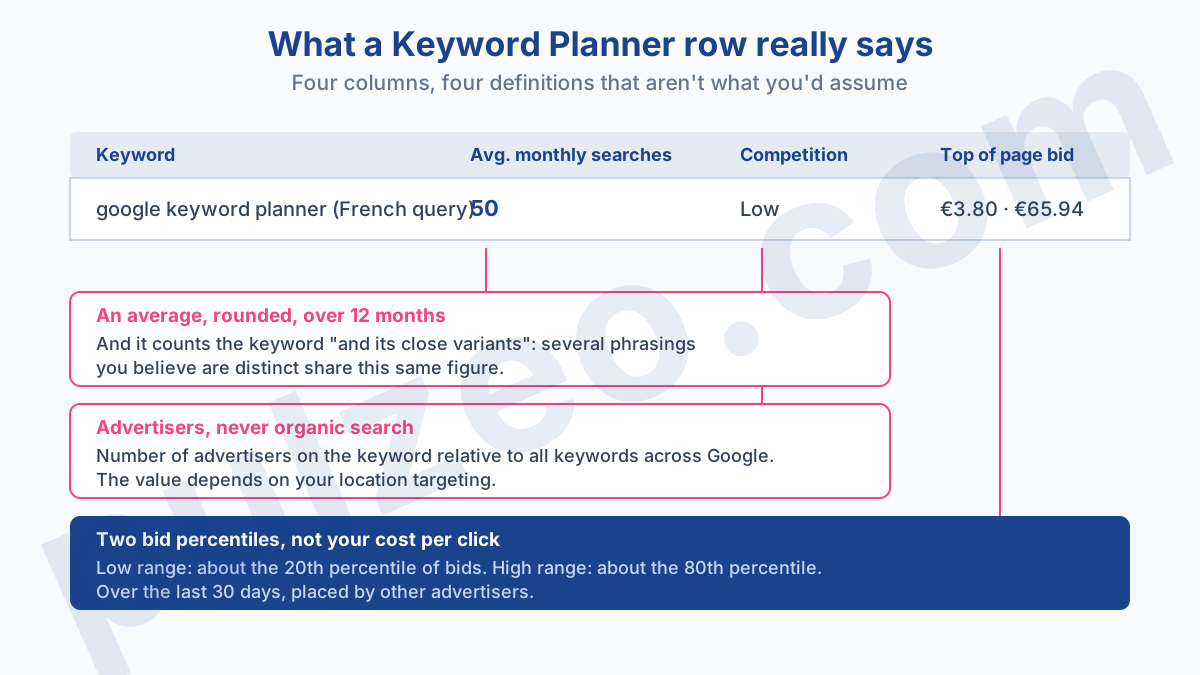
The two "Top of page bid" columns, low range and high range, are not a cost per click. Google's documentation is explicit: the low range is an approximation of the 20th percentile of bids, and the high range an approximation of the 80th percentile, all of it over the last 30 days.
So these are percentiles of bids placed by other advertisers to show at the top of the page. Not what you'll pay. Your real cost will depend on your Quality Score, the competition at the moment of the auction and your strategy, and it can land well below the low range just as it can go past the high one.
The right use of these two columns is comparative, not predictive. A keyword whose high range sits at $15 and another at $1.20 aren't playing in the same league, and that's solid information. Working out a budget to the cent from them isn't.
This distinction changes how you calculate whether a keyword pays for itself: the click price goes into the division that gives you the advertising cost of a sale, and feeding it a bid range instead of a CPC skews the result from the very first line.
What the Competition column means
A third misread column, and this one wastes the time of everyone who comes from SEO.
"Low," "Medium," "High": you think you're reading a ranking difficulty. It isn't one. The documentation defines it as the number of advertisers that showed on the keyword relative to all keywords across Google. It's a measure of ad crowding, nothing more.
So a keyword can show low competition and be impossible to win organically, because the top three organic positions are held by sites far stronger than yours. The reverse happens too: a query hotly contested by advertisers, where a well-made page gets through without a fight because nobody has written seriously about it.
A detail almost nobody checks, and it skews the whole table: the documentation notes that this value depends on your Search Network and location targeting. A keyword rated "High" in the United States can come out "Medium" if your targeting was left on All locations by default, and you'll then be comparing rows that don't describe the same market.
So your first move when you open the tool should be to set the location and the network, before you even type a query. Language, on the other hand, filters nothing: Google says searches are averaged regardless of language. Pulzeo applies the location setting to every pull by default, precisely because it gets forgotten half the time.
Close variants counted as a single keyword
The second mistake, and by far the most expensive one, because it's invisible.
The volume shown isn't the volume of your query. Google puts it in black and white in the column's definition, and the passage is worth reading in full:
The average number of times people have searched for a keyword and its close variants based on the month range as well as the location and Search Network settings you selected.
Four words carry all the weight: "and its close variants." Several phrasings you believe are distinct share one and the same volume line.
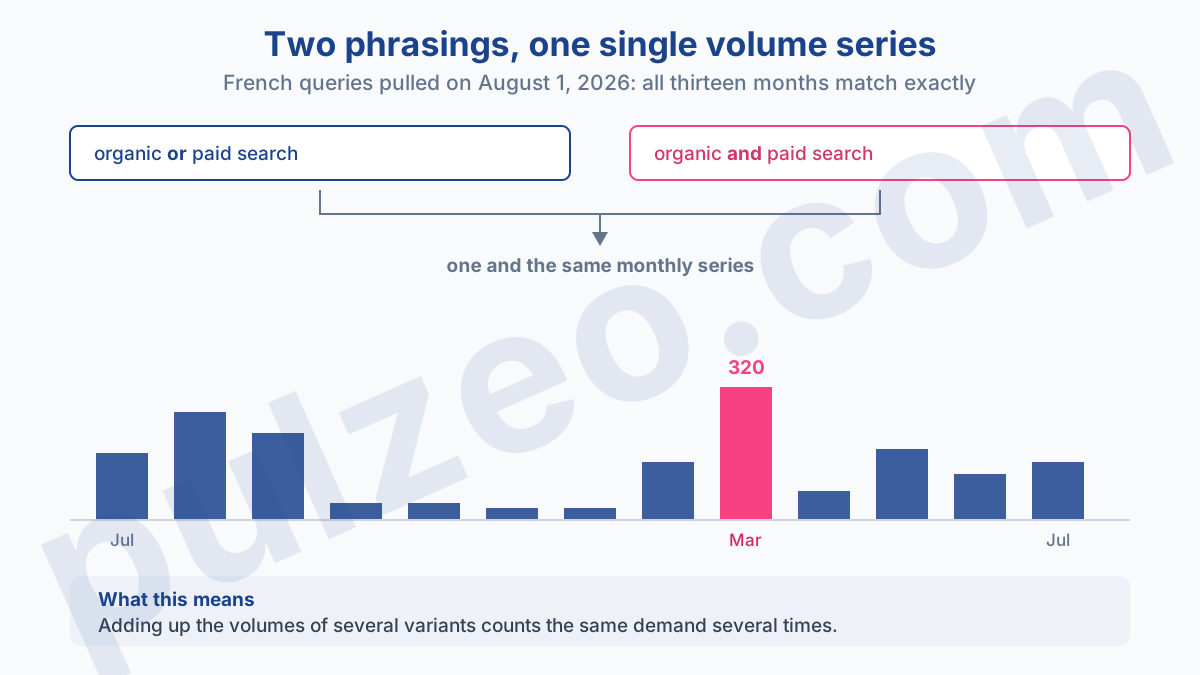
I measured it on August 1, on two French queries for an article I was writing. They translate as "organic or paid search" and "organic and paid search": the same 140 searches a month, and above all the same monthly series, down to the last search, over thirteen months, right up to the March peak of 320. Two queries, one volume, duplicated.
The practical consequence is brutal. If you add up the volumes of five variants to size an opportunity, you may be counting the same demand five times. I've seen content plans built on that inflated total, with traffic targets that were out of reach by design.
The habit that protects you: before adding two rows together, compare their monthly series. If they're identical, it's the same keyword seen twice, and it only counts once. It's also why a query in the singular and in the plural almost always shows the same figure, even though their results pages can differ.
Note that this grouping has nothing to do with your keywords' match types in a campaign: the planner aggregates to size a market, whereas match type decides which search triggers your ad. Two independent mechanisms, often confused.
Is a zero search volume keyword useless?
No, and it's the misconception I see most often in people new to the tool.
A zero in the monthly searches column means Google shows no volume for that query. It doesn't mean nobody types it. On narrow professional topics, the vast majority of useful queries live right there, in what Google doesn't show.
An example from this morning. I was looking for an article topic and pulled the French query for "merchant center account suspended": zero searches a month, on the full phrasing as well as the short one. Yet a merchant whose account has just been suspended looks for that information immediately, with an urgency few queries at a thousand searches a month can match.
What the zero really tells you is that the topic won't drive your traffic. What it doesn't tell you is whether it drives your revenue. A keyword at ten searches a month with a $3,000 order value beats a keyword at two thousand searches where nobody buys.
The right way to decide, when volume is zero, is to look at the bid column rather than the volume column. If advertisers pay to show up on a query Google reports at zero, it's because it works for them, and that information is often worth more than the volume itself.
Can you use Keyword Planner for SEO?
Yes, provided you know what you're asking of it. It's an advertising tool pressed into another job, and that comes at a price.
Three limits add up, and they all pull in the same direction:
- volumes are rounded, the documentation says so;
- they're averaged over twelve months by default, which flattens seasonality;
- they group close variants, so they describe a family of queries rather than a single phrasing.
To choose between two article topics, that's plenty: knowing that one topic is ten times bigger than the other is enough to decide, and it's exactly what the tool does well. Promising a traffic volume based on a displayed figure is another matter. You'd be comparing an estimate of advertising searches with a forecast of organic clicks, two things with different scopes and different methods.
The pitfall that costs the most is the annual average. A keyword shown at 90 searches a month on average can easily do 20 in August and 210 in January. Publishing an article in April that was timed for the March peak means showing up after the party's over. Always open the monthly breakdown before planning a seasonal publication.
How to decide based on these numbers
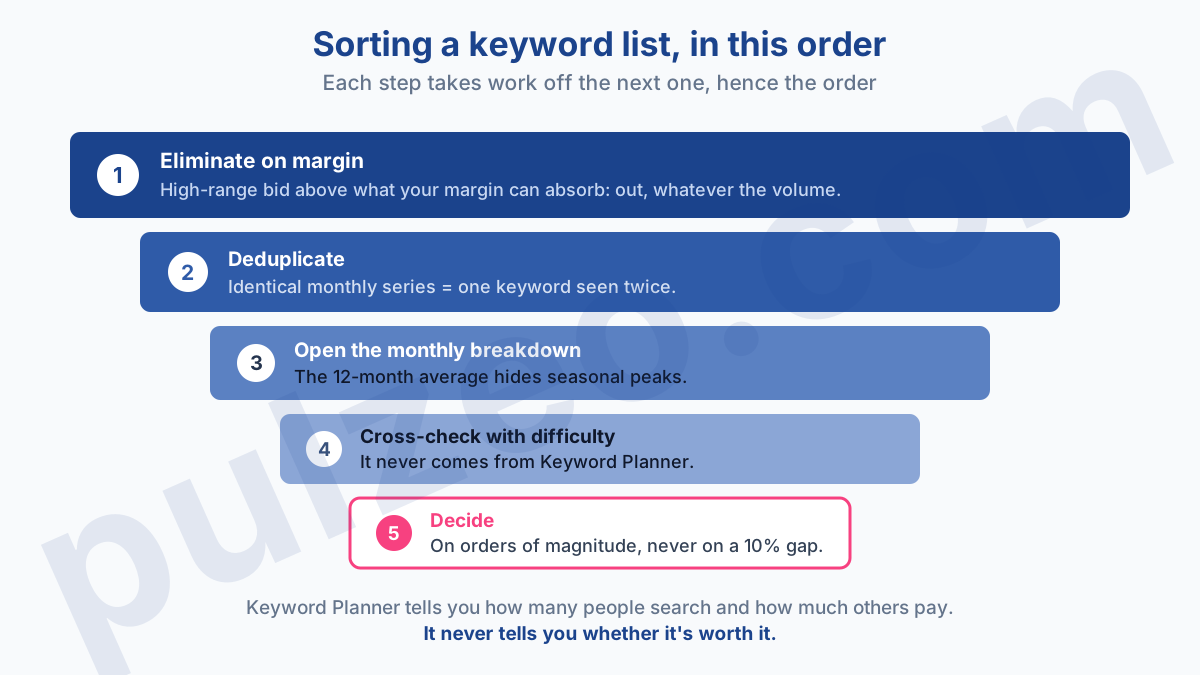
Here's how I use it, in this order, and the order matters because each step strips out useless work for the next one.
- Eliminate. A keyword whose high-range bid exceeds what your margin can absorb leaves the list right away, whatever its volume. It's the most profitable cut, and nobody makes it first.
- Deduplicate. Compare the monthly series of neighboring phrasings, and keep only one per identical series.
- Open the monthly breakdown of the survivors, to spot a seasonality the annual average was hiding.
- Cross-check with difficulty, which doesn't come from Keyword Planner. The tool tells you how many people search and how much advertisers bid, never whether you can win the spot.
- Decide, knowing you're working with ballpark figures. A decision that hinges on a 10% gap between two rows isn't a decision, it's an illusion of precision.
This sort takes about twenty minutes by hand for a serious list, and you have to redo it for every new market. It's the kind of repetitive work Pulzeo knocks out for you: volumes, competition and bid ranges come back set to your geographic area, without opening Google Ads or setting up a campaign to get them.
Keyword Planner remains an excellent tool, on one condition. It never answers the question you're really asking it, which is "is this worth it?" It answers "how many people search, and how much do others pay?" That's already a lot, and it's all you should ask of it.
Common questions
Is Google Keyword Planner free?
Yes, the tool costs nothing. But Google Ads Help says you have to complete your account setup, billing information included, to access the basic features. You don't need an active campaign or to spend anything, just a complete account.
Why do I only see a range instead of the search volume?
Because your account isn't spending. On an account with no active campaign, Keyword Planner replaces the figures with wide brackets such as 1K to 10K. As soon as a campaign starts spending, even modestly, the volumes show in full. Google doesn't document this switch, so treat it as an observation from the field: in most accounts, spend is what flips it.
Is Keyword Planner data reliable for SEO?
It gives you a ballpark, not a measurement. Volumes are rounded, averaged over twelve months, and they lump together the close variants of a query. That's enough to choose between two article topics. It isn't enough to promise traffic based on a displayed volume: you'd be comparing an advertising estimate with a forecast of organic clicks.
Is the top of page bid what I'll actually pay?
No, and it's the most common misreading. Google defines the low range as an approximation of the 20th percentile of bids and the high range as an approximation of the 80th percentile, over the last 30 days. These are bids placed by other advertisers, not the price you'll pay, which will depend on your Quality Score and on the competition at the moment of the auction.
