
What is a Google Ads Demand Gen campaign used for?

A Google Ads Demand Gen campaign is for creating demand among people who weren't looking for you. That's the fundamental difference from Search, where you capture an intent that has already formed, and it's also the source of every misunderstanding around this format.
I regularly see advertisers shut it off after three weeks, concluding that it doesn't work. In most cases, it was working: they were looking at it through Search metrics, and those metrics can't see it.
Where your Demand Gen ads show up
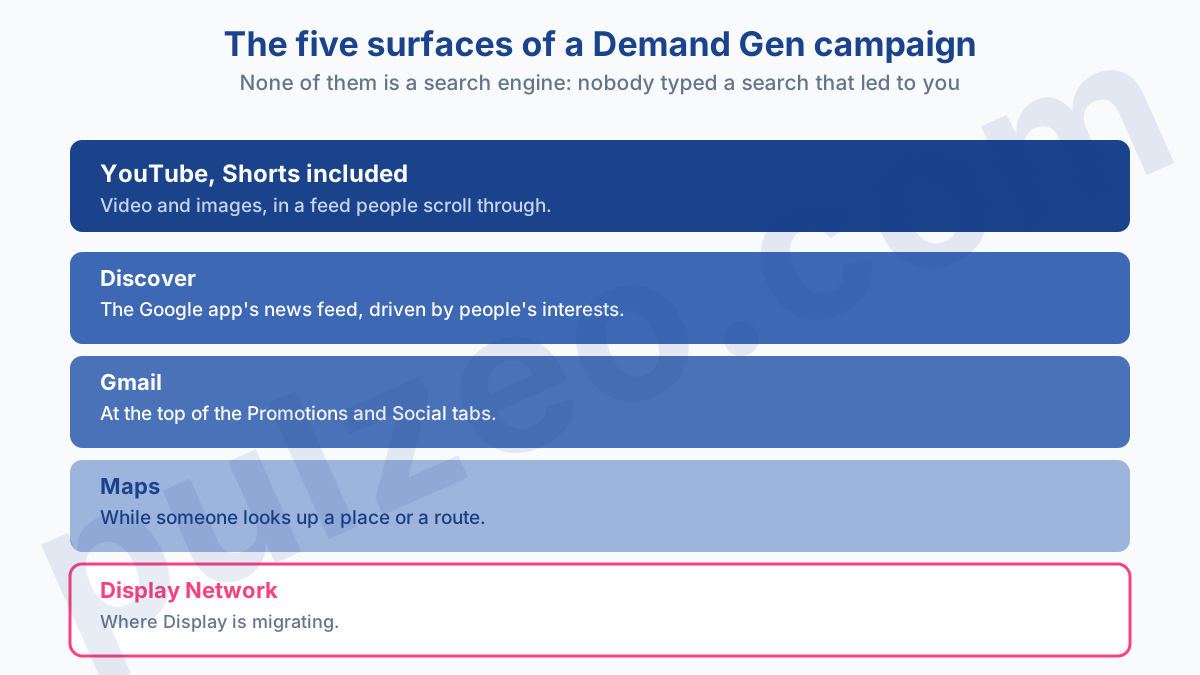
On five surfaces, and it's worth keeping them in mind before you judge anything: YouTube, Shorts included, Discover, Gmail, Maps, and the Display Network.
What these five placements have in common is that none of them is a search engine. Nobody typed a search that brought up your ad. People are scrolling through Shorts, checking their inbox, or looking up directions, and your ad slips into that path.
That's exactly what makes the format interesting, and what makes it hard to evaluate. You're talking to people who didn't know yet that they were interested.
On the format side, you supply images in several aspect ratios, videos, and text, and you can build carousels of two to ten cards or plug in a product feed. Google does the assembly, putting the combinations together according to the audience.
What Demand Gen replaces
It first took over from Discovery campaigns, widening the placements and adding video, which Discovery didn't have.
It then absorbed Video action campaigns, the ones used to drive conversions on YouTube. Google removed the option to create them in April 2025 and converted the last ones in spring 2026, which changes how you read the price of YouTube advertising: what's left under the Video campaign label no longer aims for conversions.
The shift didn't stop there, and it's the point many advertisers haven't taken on board yet: Google is also moving Display campaigns into Demand Gen on its Display Network. Migration has been voluntary since June 2026, and it will become automatic later on.
In other words, if you run Display today, the question is no longer whether you'll test Demand Gen, but when you'll be switched over. You might as well understand the format before it lands on you. The exact dates shift from one month to the next, and I keep them current in the roundup of Google Ads changes for July 2026.
In practice, if you have Display campaigns running, get ahead of it while migration is still voluntary. Migrating yourself lets you pick the moment, review your audiences, and supply creatives in the right formats.
Letting the automatic switch happen to you means discovering, one morning, campaigns whose settings were translated by a machine, in a format whose metrics don't read like the ones you knew. The cost of the change is the same either way. Only your control over the timing differs.
Use it to clean house. A migration is the only time anyone really reopens campaigns that have run untouched for two years, and that's often where you find stale audiences and visuals sized for another era.
Why your CPA misjudges Demand Gen
This is the heart of the problem, and the reason so many tests get abandoned too early.
Last-click CPA credits the conversion to the last touchpoint before the purchase. But Demand Gen comes in upstream, often well before the decision. Someone sees your ad in their Shorts on a Tuesday, doesn't click, thinks about it again, types your name three days later, and buys.
That sale will be credited to Search, on your brand name. Demand Gen did the work, Search collected the credit, and your dashboard shows you a campaign that costs money without bringing anything in.
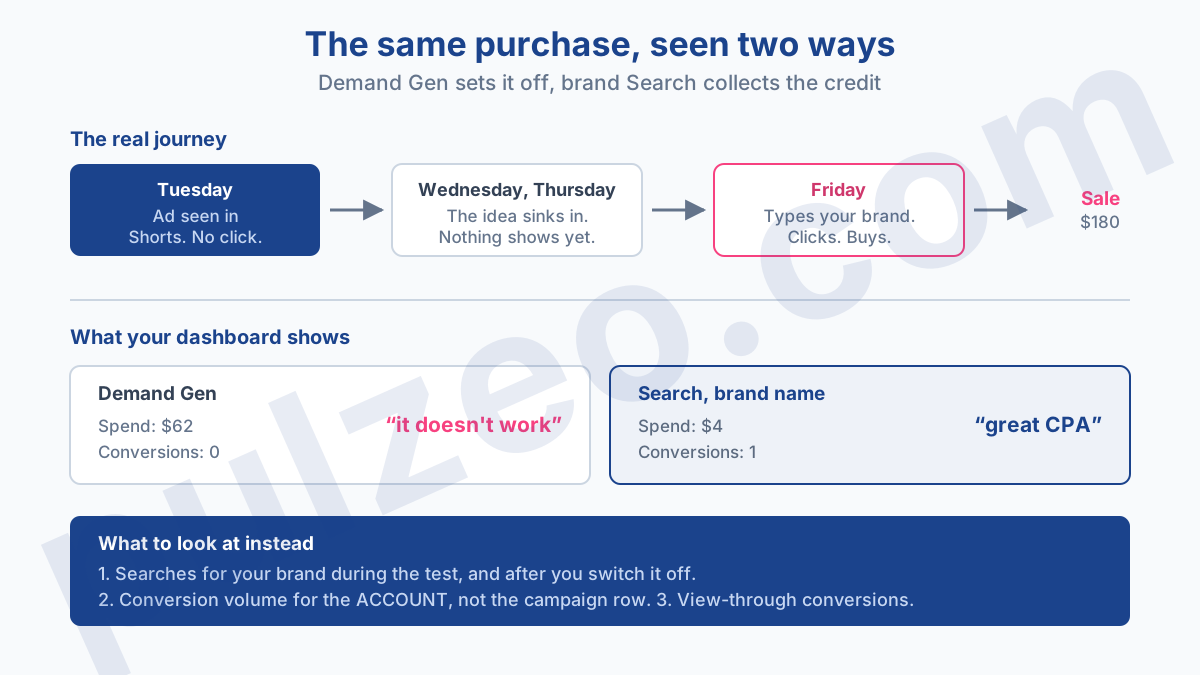
What to look at instead, in this order: how searches for your brand move during the test, the conversion volume of the whole account rather than of the campaign alone, and the view-through conversions Google reports separately.
If your brand searches climb while Demand Gen runs and drop back when you switch it off, you have your answer, whatever CPA shows on the row.
It's the kind of tracking nobody keeps up by hand over the length of a test. The Pulzeo dashboard compares every figure with the previous period at account level, which is precisely the level where the effect shows.
Who sees your ads, and who decides
This is the question that really sets Demand Gen apart from Search, where the keyword decides everything. Here, you describe people, and Google goes looking for the ones who resemble them.
The audiences you choose
You have classic demographic targeting, plus language and location, which you can set at the campaign or ad group level, and device targeting, from computers all the way to TV screens.
Then come the audiences proper: custom segments you build from the searches and websites your target audience uses, lookalike segments built on your own lists, interests, and detailed demographics. You can also exclude, which often pays better than adding.
Optimized targeting, which decides for you
It's turned on by default in every campaign, and you need to know what it does before you leave it checked. It serves beyond the criteria you set whenever the algorithm expects to find conversions there, but more importantly, the documentation states that if it finds better-performing traffic, "it may reduce or stop serving traffic on your signals." Your segments don't just get supplemented; they can get dropped.
On an account that measures well, that's a good thing, and it unlocks volume. On an account with shaky tracking, it amplifies the error: the algorithm widens toward profiles it believes are profitable on the strength of miscounted conversions. Uncheck it for the duration of the test if your measurement isn't clean; you can always turn it back on afterward.
A word on what this means for your creatives. Since Google assembles the combinations of images, videos, and text itself based on the audience, you need assets in several aspect ratios, not one banner resized over and over. The two-to-ten-card carousel and the product feed are mostly for catalogs.
How many conversions does Demand Gen need?
Google recommends waiting for 50 conversions before changing a campaign, the time it takes for the learning period to end.
That threshold isn't a settings detail, it's an eligibility criterion. Below it, the algorithm doesn't have enough signal to optimize, and you don't have enough volume to tell a result from a coincidence. You're judging noise, and your corrections do more harm than good.
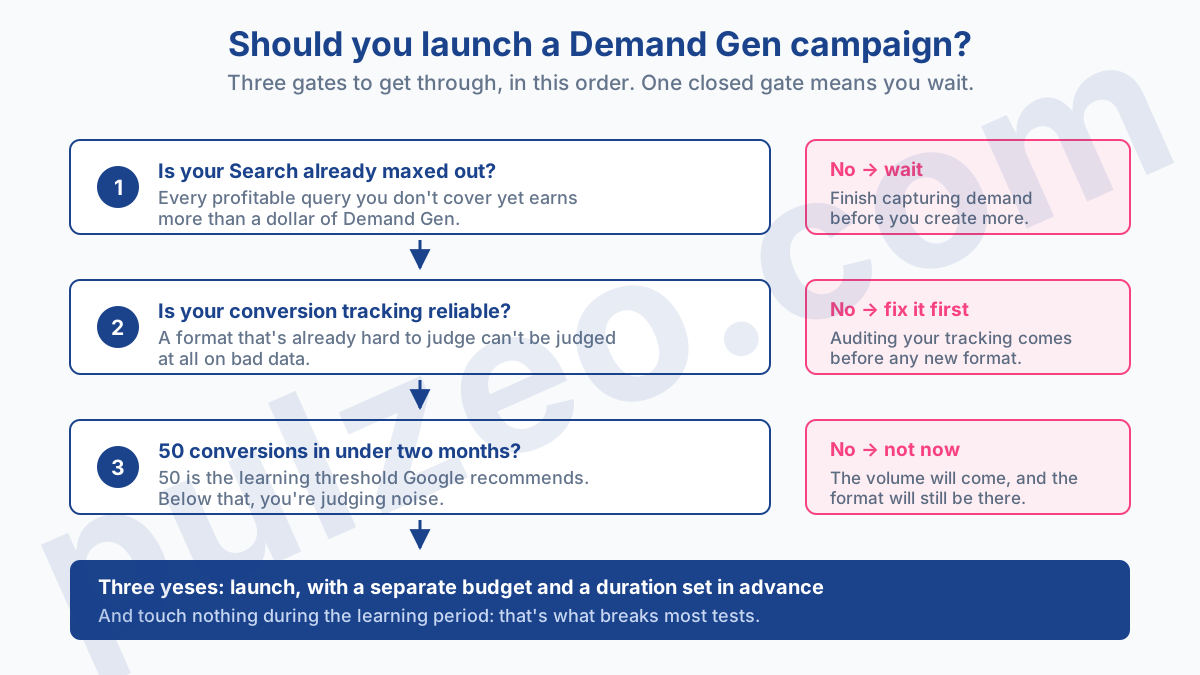
So ask yourself the question the other way around before you launch: how long does my account take to produce fifty conversions? If the answer is more than two months, the format can wait, for exactly the same reasons that an undersized budget can't prove anything.
Who Demand Gen is a waste of time for
Three profiles, and I'd rather say it bluntly than let you find out by spending.
- The account that hasn't maxed out its Search yet. As long as profitable queries remain uncovered, every dollar there earns more. Creating demand when you aren't yet capturing the demand that already exists is doing things in the wrong order.
- The account without reliable conversion tracking. On a format that's already misjudged with good data, judging it with bad data leads nowhere. Check your measurement first.
- The account without creatives. Demand Gen burns through images and videos. Without decent assets, you're serving mediocre ads on five surfaces at once, and the only thing you're testing is your audience's patience.
Conversely, the format makes sense when your brand is little known, your product is easy to grasp in a picture, and your buying cycle gives a decision time to ripen.
How to test Demand Gen without breaking the rest of the account
A clean test comes down to four points, and the order matters as much as the content.
- A separate budget, never taken from the Search campaigns that work. The goal is to add, not to rob Peter to pay Paul.
- A duration decided in advance, based on the time you need to reach fifty conversions, not on your patience.
- A success metric fixed before you start, and it isn't the campaign's CPA. Account conversion volume and brand searches make much better judges.
- No changes during the learning period, however tempting.
That last point is the one that breaks the most tests. You check on day three, the CPA looks bad, you tighten things up, you restart the learning period, and you repeat until you conclude the format doesn't work. Pulzeo watches for this kind of drift for you and flags a campaign that spends without bringing anything in before the month's budget disappears into it.
Which bid strategy to choose
Demand Gen accepts strategies with and without conversions: Maximize clicks, Maximize conversions, Maximize conversion value, and the target versions, namely Target CPC, Target CPA, and Target ROAS. You choose based on what you can measure, never on what sounds best.
"Maximize clicks" buys visit volume. Along with Target CPC, it's the only one that really works when your conversion tracking isn't reliable, because it doesn't depend on any data you don't control. It'll tell you how much you pay per click, and nothing about what that click brings in. It's an honest starting point for a first test, as long as you know you're not optimizing anything.
"Maximize conversions" requires clean tracking and volume. It's the reasonable default for most accounts, and the one that makes the fifty-conversion threshold truly binding.
"Maximize conversion value" also assumes your conversions carry accurate values at the source. Without that, you're asking the algorithm to optimize a made-up number, and it will do it very well, which is the worst case.
That's where the fifty-conversion threshold really matters: Google recommends starting with "Maximize conversions," then switching to Target CPA or Target ROAS once you've reached those fifty conversions. So the threshold isn't just an evaluation limit, it's what unlocks bidding to a target.
The habit that prevents the mistake: check your conversion value column before choosing. If it's empty, at zero, or filled with flat amounts set two years ago, anything that relies on value is out of reach today, however much you'd like to go there.
A Demand Gen campaign is judged by what it sets off elsewhere in the account, never by its own CPA row.
Common questions
Does Demand Gen replace Discovery campaigns?
Yes, Demand Gen took over from Discovery, with wider placements and video formats that Discovery didn't have. And the shift keeps going: Google is also moving Display campaigns into Demand Gen on its Display Network, with voluntary migration since June 2026 and automatic migration later on.
Where do my Demand Gen ads show?
On YouTube, Shorts included, as well as on Discover, Gmail, Maps, and the Google Display Network. These are browsing placements, not search placements: nobody typed a search that brought up your ad. That's what changes everything about how to judge it.
How many conversions does it take for Demand Gen to work?
Google recommends waiting for 50 conversions before changing a campaign, the time it takes for the learning period to end. Below that volume, you're judging noise and your adjustments do more harm than good. If your account can't produce 50 conversions within a reasonable time, this format isn't for you today.
Which bid strategies are available in Demand Gen?
Strategies with and without conversions are both supported: Maximize clicks, Maximize conversions, Maximize conversion value, plus Target CPC, Target CPA, and Target ROAS. Google recommends starting with Maximize conversions, then moving to Target CPA or Target ROAS once you've reached fifty conversions. Without reliable tracking, only the click-based strategies really work, and they'll only tell you how much you pay per click.
