
What is a Google Ads manager account used for?

Managing several Google Ads accounts isn't doing the same job fifteen times over: it's a different job altogether. The first thing anyone will tell you is to get a Google Ads manager account, better known as an MCC. Good advice, but incomplete: the manager account sorts out access to your accounts, not your attention.
With twenty accounts open, the problem isn't logging in, it's knowing which one needs you today.
What sinks Google Ads management at scale isn't the number of accounts, it's an illusion: the idea that you have to watch them all the same way, all the time. Getting your head back above water takes two steps: lay the right foundation once, then adopt a triage discipline. Here's how.
Setting up a Google Ads manager account
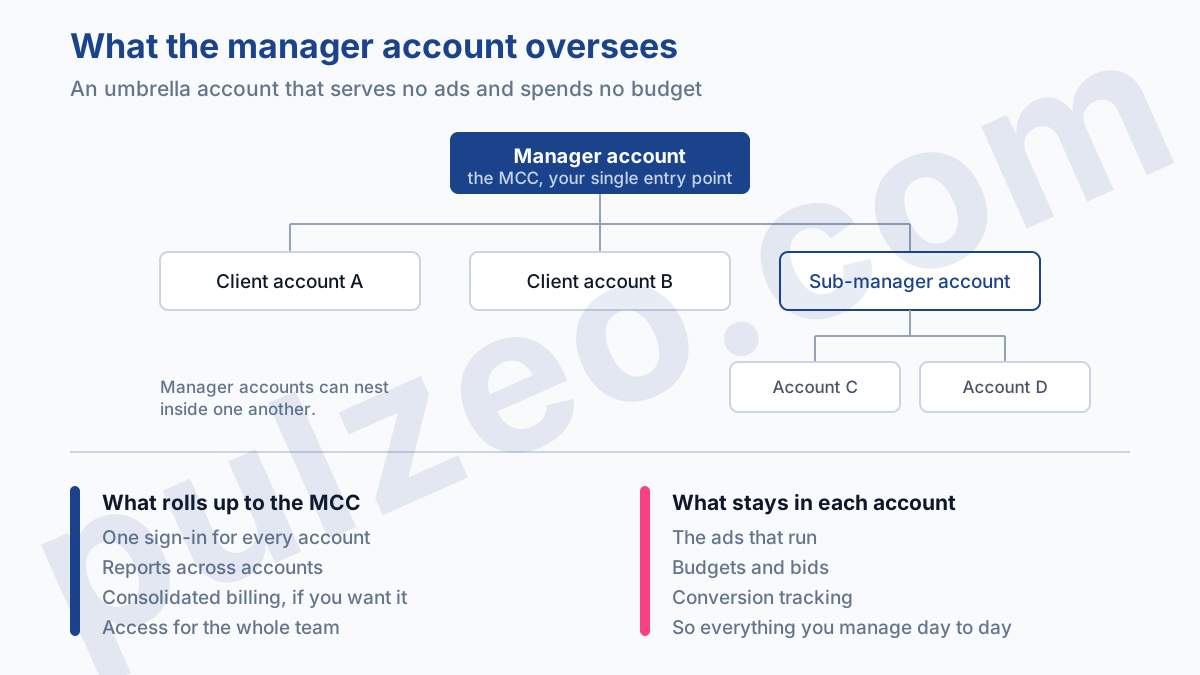
Let's start with the foundation, but quickly, because it's the easy part. A manager account, often just called an MCC, is an umbrella account that sits above your accounts.
It doesn't serve ads and doesn't spend budget: it gives you a single sign-in to reach everything, cross-account reports, and consolidated billing if you want it. As soon as you have more than one account, it's the go-to tool. Two settings deserve a closer look, because they cost you dearly later if you rush them.
Organize the hierarchy from the start
A manager account can sit above other manager accounts, layer after layer. Handy for a large organization, a trap for everyone when it's poorly organized. The day you have thirty accounts stacked up with no rhyme or reason, finding the right one becomes a daily chore.
Decide early on a simple structure and a clear naming convention (client, brand, country), and stick to it. An account you can't find is an account nobody watches.
Give the right access level
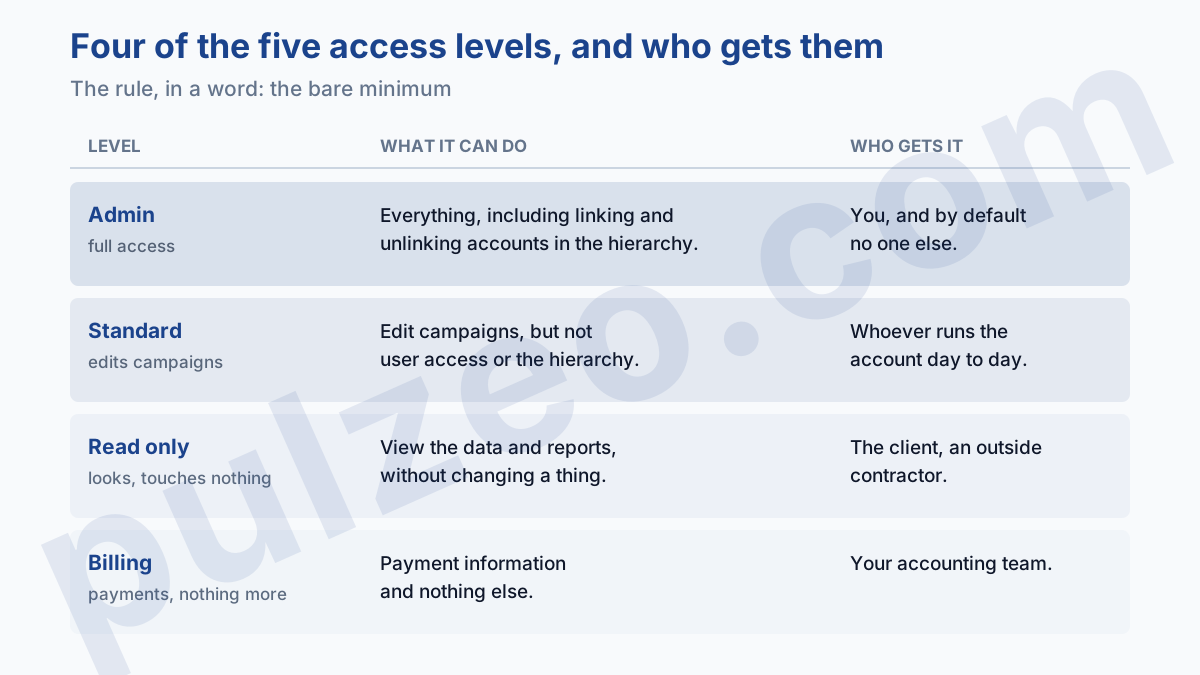
The manager account handles the whole team's permissions from one place. Google offers five access levels, including Email only, which does nothing but receive notifications. That leaves four, to be handed out sparingly:
- Admin: full access, can link or unlink accounts;
- Standard: edits campaigns, but not user access or the hierarchy;
- Read only: views the data, touches nothing;
- Billing: access to payment information only.
The rule, in a word: the bare minimum. A contractor who only needs to see the numbers has no business being an Admin.
One exception to that restraint: the advertiser. Every client account should keep at least one company address as an Admin, because that is what lets you get back into the Google Ads account the day a contractor disappears.
What a manager account doesn't do
So much for the foundation. The trouble is that people stop there, as if sorting out access sorted out management. The manager account pools access to multiple Google Ads accounts; it doesn't pool attention. It puts twenty accounts in front of you at once, and that's exactly where the drowning starts: a wall of numbers where everything looks the same and nothing stands out.
You open the consolidated view, you see twenty rows, and not one of them says "look at me, I've got a problem today." So either you spend an hour combing through everything, or you skim and miss the real alarm. Both end badly, one in wasted time, the other in budget going up in smoke on an account nobody was watching.
A telling example. You manage twenty-two accounts, you open the overview on a Monday, and total spend is up 8%. Reassuring, on the face of it. Except that the average hides everything: one account whose spend tripled in three days because of a runaway bid, and three others whose delivery collapsed.
The aggregate shows a calm number while four accounts needed immediate action. Consolidation smooths reality over, and that's precisely what you don't want when you're hunting for the anomaly.
That's why adding accounts under an MCC costs nothing but fixes nothing. The limit was never how many accounts you can get into, it's how many accounts a human brain can really examine in a morning. Past five or six, it's no longer a question of tools, it's a question of method.
How to monitor twenty accounts without opening them all
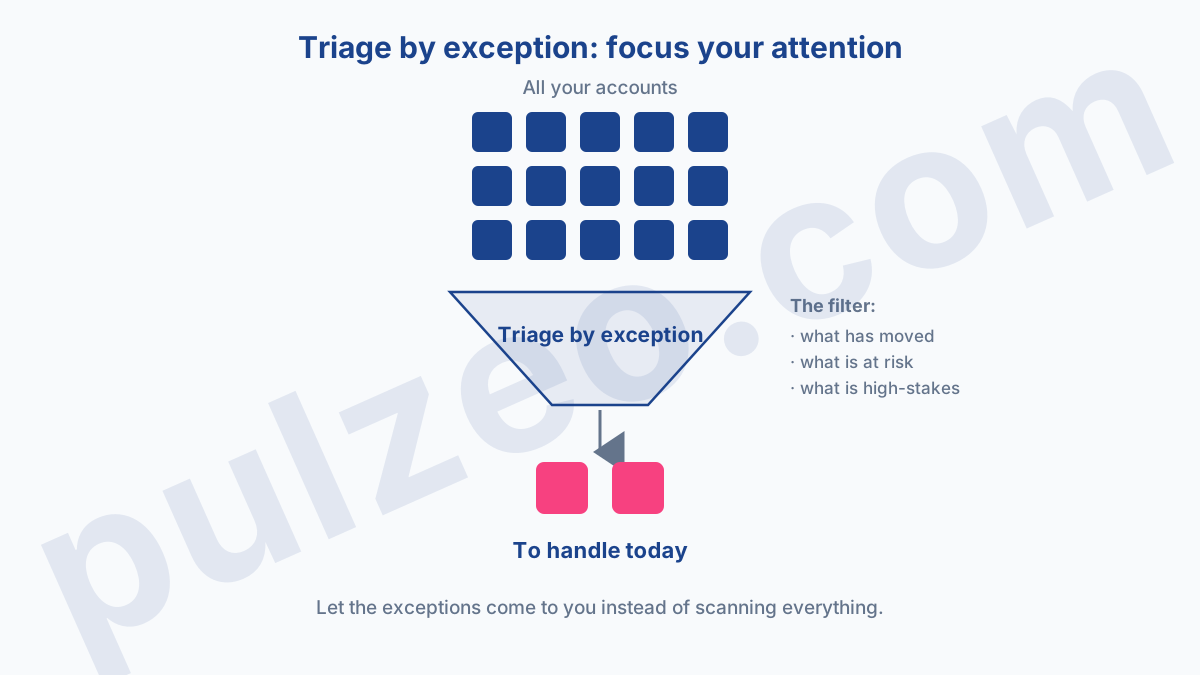
Managing multiple accounts isn't about looking at everything, it's about knowing what not to look at. A seasoned account manager doesn't watch all twenty accounts equally every morning. They know that out of twenty accounts on any given day, two or three have moved, and the others can safely wait.
Triage rests on three questions, in this order. What changed: spend that doubles, conversions that stop dead. What's at risk: a budget that will run dry before the end of the month, a CPA that has been climbing for ten days.
And what's high-stakes: the big client, the campaign that drives the revenue. A stable account, for a quiet client, that hasn't moved since last week doesn't deserve your Monday morning. The account whose conversions dropped to zero on Friday does.
This triage is counterintuitive, because it asks you to own the choice of not looking at some accounts. It feels like you're doing your job badly when you leave nineteen accounts aside one morning.
It's the opposite: refusing to open them all is what leaves you the energy to deal thoroughly with the two that matter. The manager who sweeps through all twenty accounts every day isn't more conscientious, just more tired, and hardly more effective.
Where should you start each week in Google Ads?
With a light routine, never with a full review. The right cadence rests on three nested rhythms, from the shortest to the deepest.
Every day, a quick five-minute check, but only on what has moved. In practice, three signals to scan across all your accounts:
- a key conversion dropping to zero, almost always a broken tag, never a business reason;
- spend moving clearly away from normal, up as well as down;
- a CPA or ROAS worsening over several days, not over a single day.
A typical morning looks like this: you don't look at your accounts, you look at what has changed since yesterday. Three come up, seventeen haven't moved, and you don't even open them.
In ten minutes, you've dealt with what's real and left the rest alone. This short, regular check is what catches deviations while they still cost almost nothing, far more than the big monthly review does.
You still have to define what "clearly away from normal" means, or you fall into the opposite trap: too many alerts. Make the threshold too sensitive and every account comes up every day, and you're back to ignoring everything. Too loose, and the problem flies under the radar until the invoice arrives.
The right calibration is set against each account's own history, not an absolute number. Spend that swings 40% on a Tuesday doesn't mean the same thing on a steady account as on a seasonal one. The right threshold only surfaces what you would actually have acted on, and nothing else.
Every week, a more deliberate pass, on rotation: you don't do all twenty accounts on the same day, you take a third at a time, and over three weeks you've covered everything in depth without sacrificing your evenings. Every month, the deep audit on the accounts that matter most, the one that puts structure and bidding back on track.
The idea isn't to work more, it's to put your attention where it pays. The daily check catches the emergency, the weekly one catches the slow drift, the monthly one catches the fundamentals. Each level picks up what the one before lets slip through.
Mistakes to avoid with an MCC
A few habits sink multi-account management, and I see them over and over in the account portfolios I take over.
Looking at everything equally. It's the root mistake, the one all the others flow from. Trying to give every account the same attention every day is a guarantee you won't see anything coming: skim everything long enough and you miss the one account that had a real problem.
Not setting alerts. As long as you discover problems by opening accounts by hand, you discover them too late. Across twenty accounts, a tag that breaks on a Monday can stay broken for three days before you open that particular account, and the week's budget is already gone.
Mixing your billing with your clients'. Consolidated billing is convenient, but then one client's failed payment can stop other accounts from serving. For an agency, it's better to keep each client on their own payment method, and on their own login: it's the first point to lock down in an agency contract.
Neglecting naming. It looks cosmetic, but a portfolio of accounts with no clear convention becomes impossible to monitor: you lose ten minutes finding the right account, and you end up not opening them at all.
Surface the exceptions instead of scanning everything
All these methods rest on the same shift: stop going out to look for problems, and let them come to you. On two or three accounts, manual discipline is enough. On twenty, it always gives way in the end, because nobody keeps up a flawless daily ritual for long, especially when everything is fine and nothing is urgent.
That's exactly what Pulzeo automates. Zeo, the built-in assistant, watches all your accounts gathered in a single view and alerts you when one of them slips, pointing out which one and why, instead of leaving you to dig through a wall of numbers. You no longer look at twenty accounts to find two: the two come to you.
As for the other chore, client reports build themselves instead of being done account by account. That's the whole point of a tool built for agencies: your attention becomes a resource you direct, not one you scatter.
Managing a lot of accounts isn't about watching everything. It's about knowing, every morning, which two accounts deserve your attention, and leaving the others alone.
Common questions
What is a Google Ads manager account (MCC)?
A manager account (also called an MCC) is an umbrella account that sits above several Google Ads accounts. It serves no ads and spends no budget: it lets you reach all your accounts from a single sign-in, with consolidated reports and billing. It's the go-to tool as soon as you manage more than one account.
How many accounts can you manage with a manager account?
Without a manager account, a single email address can be associated with 20 Google Ads accounts at most. A manager account lifts that limit: it can sit above a large number of accounts, and even above other manager accounts, layer after layer. Beyond a handful of accounts, it quickly becomes indispensable.
Is a Google Ads manager account free?
Yes, creating and using one is completely free. You only pay for your accounts' advertising budgets, exactly as you would without a manager account. It adds no cost, only organization and consolidated billing if you want it.
How do you know which account to look at first when you manage several?
Don't look at them all equally. Each day, only deal with the accounts where something has moved or is at risk of going wrong: a conversion that dropped to zero, abnormal spend, a climbing CPA. Stable accounts can wait for the weekly review. Ideally, let the exceptions come to you through alerts, rather than scanning every account by hand.
