
How to fix Google Ads login problems

You search for your Google Ads login, click the first link, and instead of your campaigns, Google kindly offers to create an account. Yours exists, though. It even spends money every day. Don't worry, it hasn't vanished. A Google Ads account has no password of its own: it is attached to one or more Google addresses, and the address is almost always where it breaks.
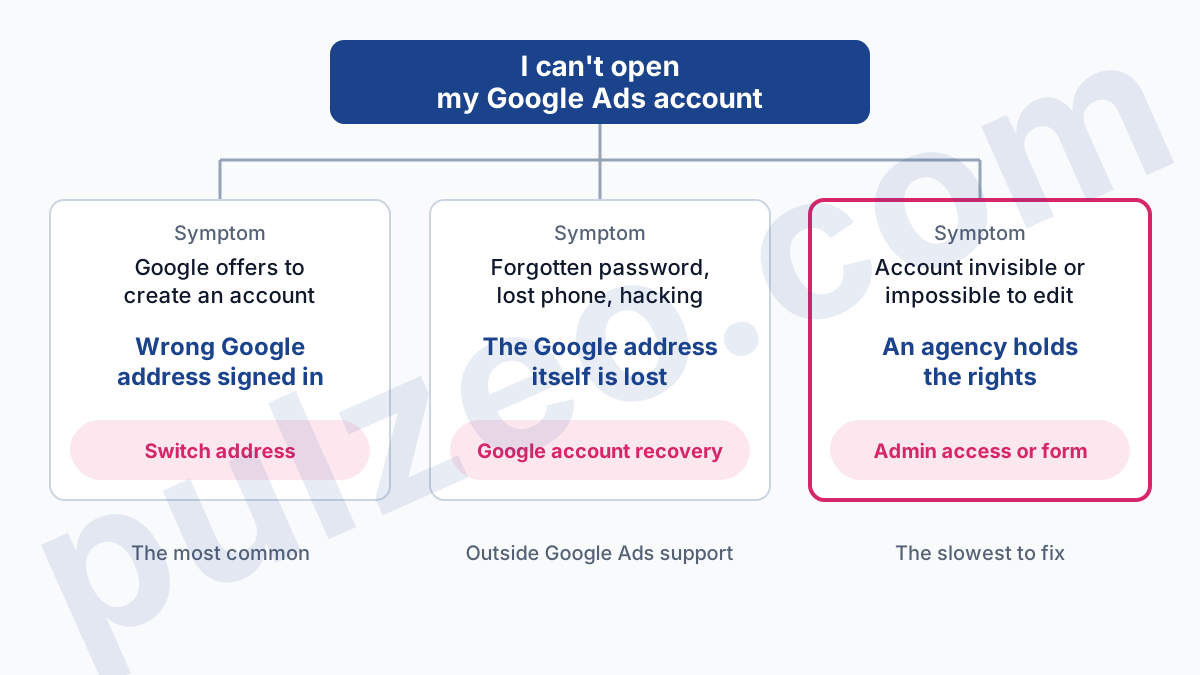
Three situations cover most of the lost access I come across. You are signed in with the wrong address, you have lost the address itself, or someone else holds the rights, usually a former agency. Each one has its way out, and they don't go through the same door.
How to sign in to your Google Ads account
You sign in to Google Ads at ads.google.com, with a Google account: a Gmail address or a work address managed by Google. There is no separate Google Ads username. The ad account itself is just a record Google has linked to a set of addresses, each with an access level.
One address can open several ad accounts. Once signed in, click your profile picture in the top right corner: Google lists the Google Ads accounts associated with your current Google account, and you switch between them without signing out. If you manage a lot of accounts, now is a good time to look at what a manager account (MCC) does.
In the same place, under the account name, you'll find the 10-digit customer ID. Write it down today, while you still have access. It is the one piece of information Google will ask for, without fail, on the day you can't get in, and nobody looks for it before they need it.
If you juggle several Google addresses in the same browser, Google's "Switch account" menu keeps them side by side without merging their data. Handy, and exactly what causes the first breakdown. Pulzeo runs the same inventory when you connect: it lists every ad account the authorized address can reach, including those managed under a manager account.
Why does Google Ads show the sign-up page instead of my account?
If Google offers to create an account, the address you are signed in with has access to no Google Ads account at all. The official help puts it plainly:
"If you sign in to a Google account that isn't yet associated with a Google Ads account, you'll be directed to the Google Ads sign-up page." (Google Ads Help)
The classic case: your browser is signed in to your personal Gmail, while the ad account was opened with the company address, or a former employee's. Google looks no further. It takes the active address and finds that it opens nothing.
The reflex to avoid is following the prompt. You would end up with a second, empty account with its own billing, while the old one keeps running without you. Sign out, sign back in with every plausible address, and see which one shows the account.
None of them works? Search your inbox for an email from Google Ads: an invoice, a payment alert, an invitation. The recipient address is often the one holding the rights, and the customer ID is in the message.
Forgotten password or hacked Google account
Here, the Google address itself is what's blocking you. Google Ads support doesn't handle it: its sign-in page states that Google account recovery problems, 2-step verification included, fall outside its scope.
The right door is Google account recovery. It relies on the backup information you saved: a phone number, a recovery email address. If the address belonged to a former employee, it is the administrator of your work domain who can reactivate it or reset its password.
One case deserves a word of its own. Google Ads also has its own 2-step verification, set under Access and security, Security tab, "Verification during sign-in" section.
If your Google address works but this verification is what blocks you, because the phone that carried it is lost, the Google Ads access form has a request type for exactly this, "Disable 2-step verification process".
Turn it back on as soon as you are in: Google notes that this verification is often required to confirm your identity when contacting support.
And if the account was hacked, the form asks the question outright. Answer it honestly: the rest of the process depends on it.
Google Ads account access levels
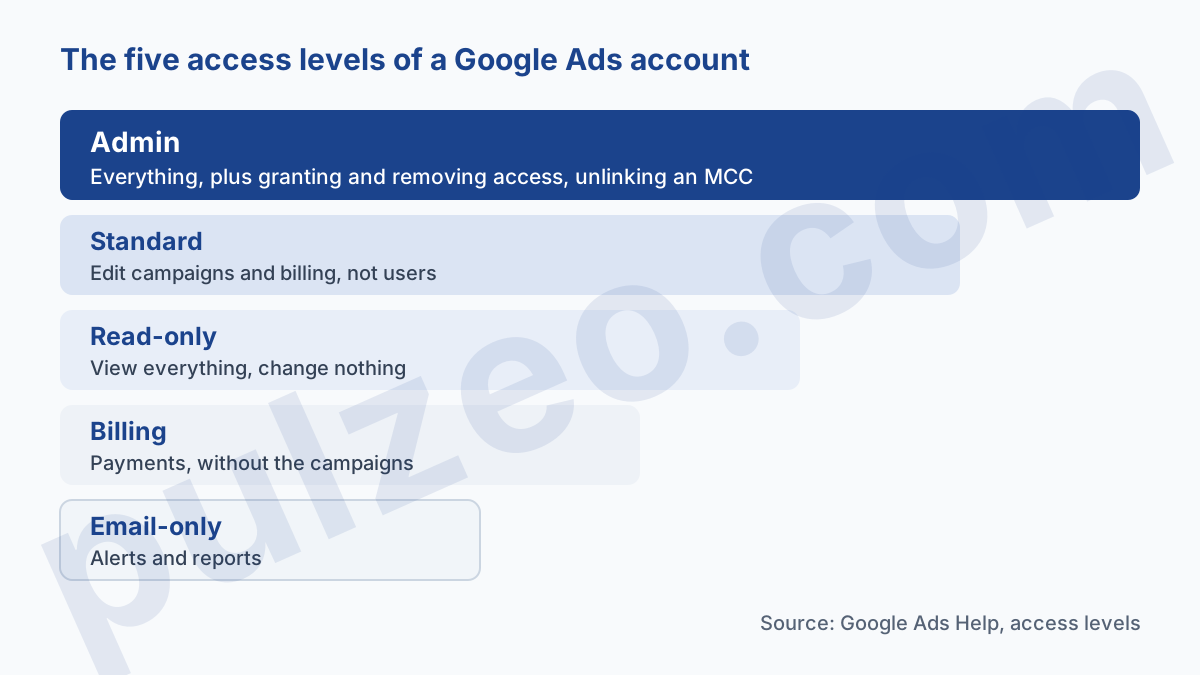
Even signed in with the right address, you can hit an account where you see nothing, or can change nothing. The access level decides. Google has five of them, from the narrowest to the broadest:
- "Email-only": notifications and reports by email, nothing else;
- "Billing": payment methods and invoices, without seeing the campaigns;
- "Read-only": view everything, run reports, change nothing;
- "Standard": edit campaigns and billing, without managing users;
- "Admin": all of the above, plus granting and removing access, and unlinking a manager account.
The last line is the one that matters. Only an admin can invite someone or change an access level. Standard access feels complete day to day: you launch campaigns, you change bids. The day you need to remove the agency or add a new contractor, you find out it doesn't let you do it.
My view on this is firm. An account whose invoices you pay should carry your own address as an admin, no exceptions, even if an agency does all the work.
How to get a Google Ads account back from an agency?
This is the most painful case, because it mixes technical and commercial issues. You switch providers and realize the former agency is the only one with the rights. Good news first: the data belongs to you. Google says it in black and white, the client account still owns its data, and the history stays in the account.
To recover a Google Ads account from an agency, you need to understand ownership. A client account can have only one owning manager account. If the agency created your account from its MCC, it owns it automatically; if it only linked an existing account, it doesn't, unless you turned those rights on.
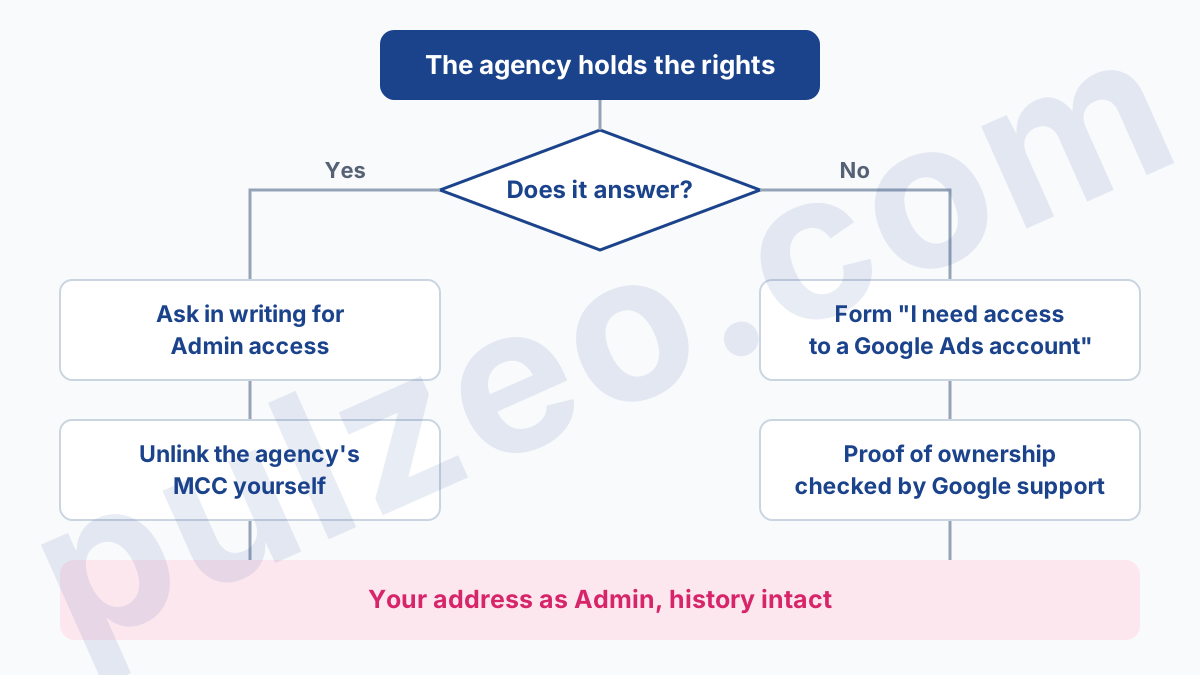
If the agency answers
Ask in writing for Admin access on your address, not Standard access. An owning agency can grant that level; an agency that is merely linked, according to Google, can only invite Standard, Read-only or Email-only users. In that second case, an existing admin of the account has to add you.
Once you are an admin, you unlink the agency's MCC yourself. Google explicitly lets users of the client account do this, and that is how ownership ends. Do it after exporting what you need, and after checking that your address really is among the admins.
If the agency stops answering
Google then offers the form "I need access to a Google Ads account". It says upfront that the best approach is still to contact an existing admin. Failing that, access is granted once support has received and validated proof that the account is yours. Before filling it in, have ready:
- the customer ID of the account itself, not the agency's MCC, which the form asks you not to enter;
- the name of the advertised business, meaning yours;
- the address to add and the level requested, Admin;
- your proof of ownership, which support will review.
Google doesn't publish a closed list of acceptable documents. In my experience, the strongest proof is whatever ties the account to your money: Google Ads invoices in your company's name, a payment method in your name. An account paid with the agency's card, then rebilled to you, takes much longer to prove.
That is also why I advise against letting an agency open the account from its own MCC. Open it yourself, with your address and your card, then invite them. If you are choosing a provider, the access question belongs in the contract, settled before signing.
How to never lose access to your Google Ads account again
Once you are back in, a few settings save you from going through all this again in two years. They take ten minutes, under Admin, then Access and security.
First, at least two admins, on two addresses the business controls. Not two employees who could leave in the same quarter: one named address and one generic company address, for example.
Next, end dates for temporary access. Google lets you set an expiration date on a user's access; by default it is set to "Never". A freelancer hired for three months has no reason to keep the keys forever, and the access disappears on its own on the chosen date.
Third, personal addresses. Google lets admins ask users to switch to a business email address, provided the company uses Google Workspace or Cloud Identity. After a 30-day grace period, the system automatically removes users still on a personal address. If you receive that request, don't let it sit.
Finally, glance at the user list now and then: an admin can see each user's authentication method and last sign-in time. A former contractor who still signs in every week stands out immediately.
Monitoring several accounts without handing out more access
That leaves the underlying question for an agency or an advertiser running several accounts: how to keep an eye on everything without handing out Admin access to everyone. Google already provides two answers: a manager account (MCC) to bring your accounts under a single sign-in, and Read-only access for a client who wants to check their results without being able to change anything.
If you also want consolidated monitoring of all those accounts, that is what Pulzeo's multi-account view does. You connect your Google account once, authorization goes through Google and Pulzeo never sees your password, then you tick the ad accounts to follow among those your address can reach.
On the Agency plan, you can also give a client a read-only view of their own account, with its stats and reports. They see their results without anyone touching the rights on the Google Ads account itself, and Admin access stays where it belongs: with whoever pays the bills.
Common questions
How do I access my Google Ads account?
Sign in at ads.google.com with the Google address that was given access to the account, which is not always your everyday address. If several Google Ads accounts are linked to that address, click your profile picture in the top right corner: the list of associated accounts appears and you pick the one to open.
Why does Google Ads ask me to create an account when I already have one?
Because the Google address you are signed in with has no access to any Google Ads account. Google's help is explicit: an address that isn't associated with an account is directed to the sign-up page. Don't create an account: sign out and sign back in with the address that was invited to the existing one.
My agency won't give me access to my Google Ads account. What can I do?
Ask in writing for Admin access on your own address, from the agency if its manager account owns yours, otherwise from an existing admin of the account: it is the only level that lets you manage the other users afterwards. If the agency doesn't answer, Google offers the form "I need access to a Google Ads account". Access is granted after support has checked documents proving you own the account.
Where do I find my Google Ads customer ID?
Once signed in, click your profile picture in the top right corner: the 10-digit customer ID sits under the account name. It also appears in Google Ads emails, on statements and in the payments profile. Write it down somewhere: the access recovery form asks for it.
