
Which Google Ads audience targeting should I use?

Which type of audience you pick matters less than the setting that goes with it. Google Ads offers seven types of segments, but the most expensive mistake isn't picking the wrong one: it's leaving the setting on "Targeting" when it should have been "Observation." Badly set Google Ads audience targeting doesn't show up in the reports: it shows up as volume falling off a cliff.
So let's go through the seven types, what each one is worth, then that all-important setting. And if you only remember one thing from this article, make it the second part.
The seven types of audience segments
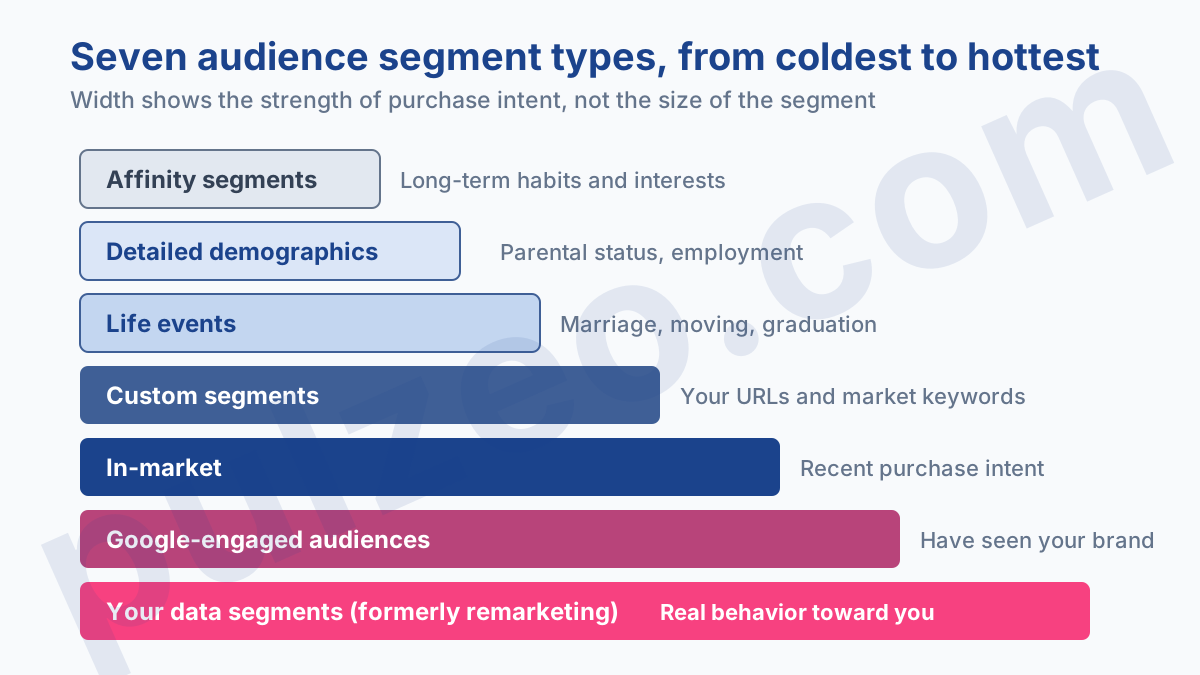
Google sorts its audience segments into seven categories, and what really sets them apart is how warm the intent is.
- Affinity segments: people reached based on their habits, their interests and the topics they're passionate about. It's the coldest, useful for awareness.
- Detailed demographics: long-term life facts that define someone, such as parental status or employment.
- Life events: the milestones that trigger purchases, like getting married, moving or graduating.
- Custom segments: you build them yourself by entering URLs, apps and keywords relevant to your offer.
- In-market: people identified by their recent purchase intent. It's the warmest of the segments Google supplies.
- Your data segments: formerly remarketing, they cover your website and app visitors, plus Customer Match.
- Google-engaged audiences: people who have interacted with you on Google Search, YouTube or other Google services.
How well they perform almost always follows that temperature. Your own data beats everything else, because it rests on real behavior toward your brand rather than on an inference. In-market comes next, then the custom segments you built, and finally affinity segments, which I rarely see deliver convincing results for direct acquisition.
A word on the sixth type, because it holds two very different things that often get mixed up. There are your website visitors, collected automatically by the tag, and there's Customer Match, where you upload your own files.
That second option is by far the most underused in the accounts I open. You have a database of past customers, email addresses from quotes that were never signed, a newsletter subscriber list: all of it can become an audience, without depending on your site traffic or on cookies. In a market where tag-based data collection gets thinner every year, it's the one resource nobody can take away from you.
Targeting or Observation: the setting that decides everything
This is the first thing I check on every account I take over, because it's wrong a third of the time.
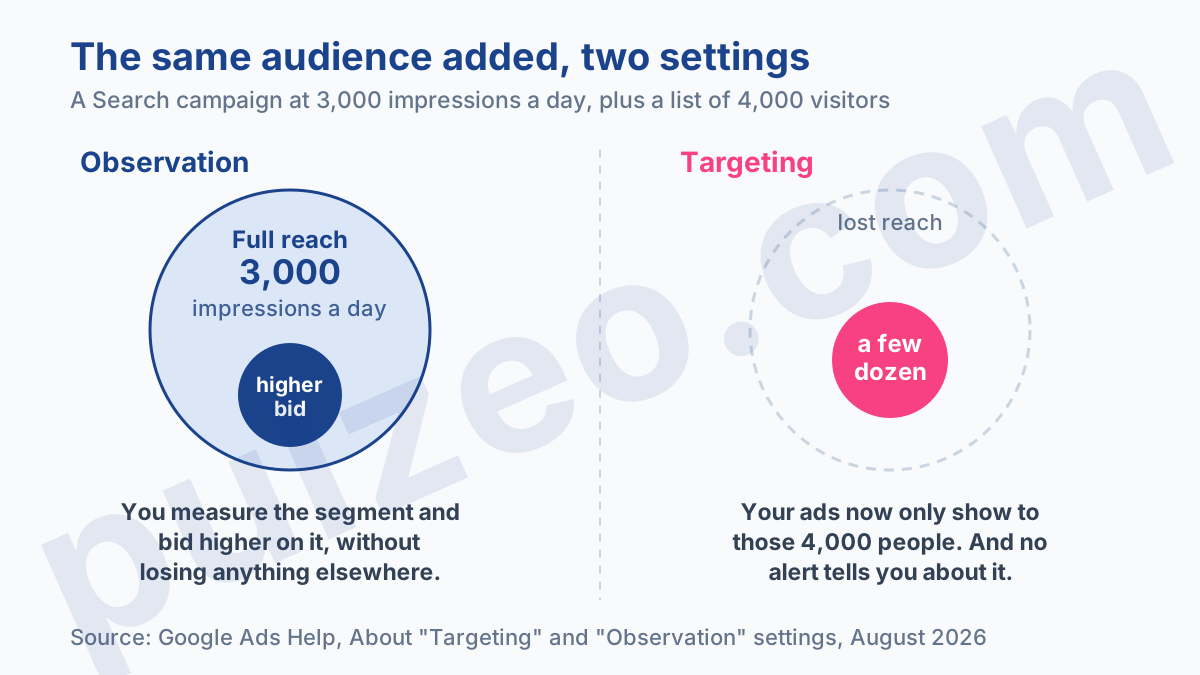
The Targeting setting tells Google which people to show your ads to. It's restrictive: outside the audience you chose, nothing shows anymore.
The Observation setting, on the other hand, doesn't affect the reach of your campaign. It doesn't change who sees your ads or where they can show. It lets you monitor how that group performs and set a custom bid for it, without restricting anything.
Targeting shrinks your reach. Observation leaves it intact and gives you one more bidding lever.
What it looks like on an actual Search campaign
Take a campaign running on twenty keywords and generating 3,000 impressions a day. You add the list of your visitors from the last thirty days, say 4,000 people.
With Observation, your 3,000 impressions stay. You simply also get to see how searches from people who have already been to your site behave, and you can bid 30% higher on them, because they convert better.
With Targeting, your ads only show to those 4,000 people. Your impressions drop to a few dozen a day. Nothing is broken, no alert appears, and you spend the week trying to work out where your volume went.
When Targeting is the right choice
Whenever restricting is the goal. A win-back campaign that should only reach abandoned carts, an offer reserved for existing customers, a Display campaign on a specific segment whose reach you want to keep under control.
The rule I apply: on Search Network campaigns, Observation by default, always. On Display and Video campaigns, Targeting when the audience IS the campaign.
How do Performance Max audience signals work?
They don't work like either of those two settings, and that's a constant source of misunderstanding. In Performance Max, what you provide isn't targeting: it's a signal.
Google is explicit about this. Audience signals for Performance Max campaigns aren't strict targeting criteria, and your ads can absolutely be shown to people outside the signal you provided, if the system judges that it serves the campaign's goal.
So you're telling it where to start looking, not where to stop. The practical consequence is that a poorly chosen signal doesn't hold the campaign back, it makes it start more slowly, while the system corrects course on its own. It's more forgiving than targeting, and much harder to steer.
What does stay under your control is your exclusions and the quality of the data you feed in: a clean, up-to-date customer list is worth more than three stacked affinity segments. The full topic is covered in the article on optimizing Performance Max.
Which audience for which goal
The right segment depends on what you're trying to achieve, not on what looks most sophisticated.
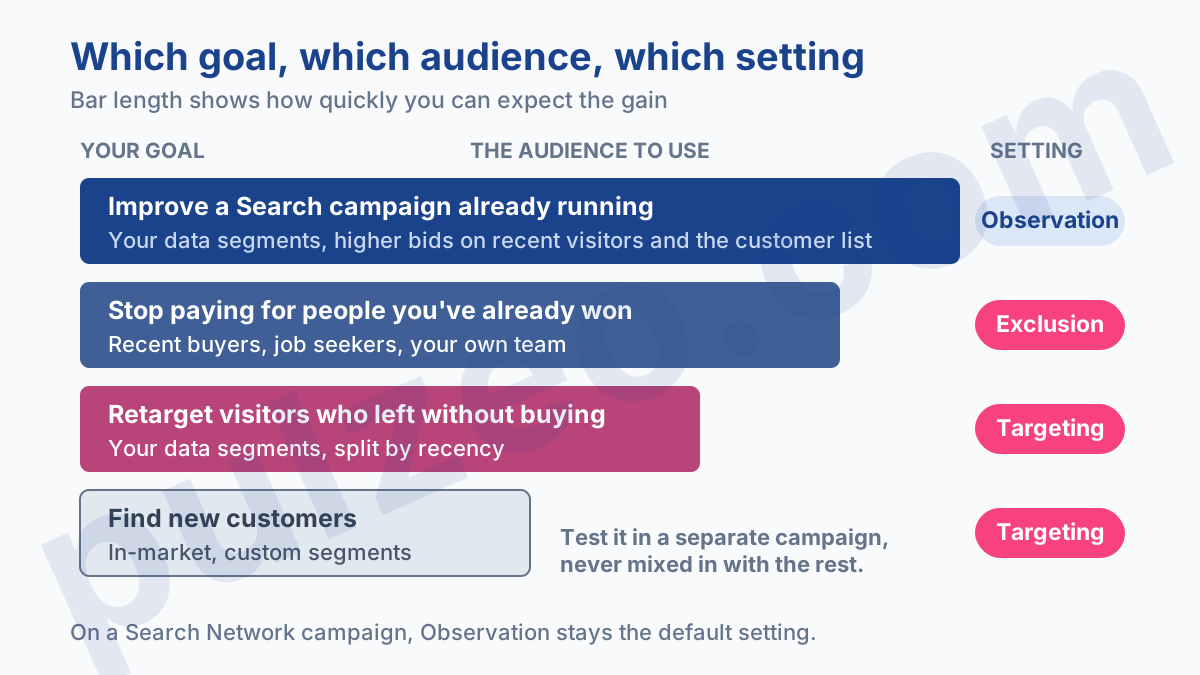
For pure retargeting, your data segments, on Targeting, split by recency. Someone who visited yesterday shouldn't be treated like someone who came twenty-five days ago, and a single catch-all list makes you pay the same price for both.
To improve a Search campaign that's already running, your data segments on Observation, with an upward bid adjustment on recent visitors and on your customer list. It's the fastest and least risky win on this whole list, and it's still rare in the accounts I open.
To go after new customers, in-market and custom segments built on your competitors' URLs and your market's keywords. Test them in a separate campaign, with its own budget: mix them into an existing campaign and you'll never know what produced what.
Finally, exclusions, which are often the most profitable setting of all. Removing recent converters from an acquisition campaign saves you from paying for people who bought from you just last week.
Three exclusions are worth setting up as soon as you open an account. Buyers from the last thirty days, on every acquisition campaign. Job seekers and the merely curious, if your "careers" or "about" pages pull in traffic that will never buy. And your own team, whose repeat visits artificially inflate your remarketing lists.
Pulzeo flags this kind of missing setting when it analyzes an account, with the estimated gain attached.
Membership duration, the setting nobody ever touches
When you create a list from your website, you set a membership duration: how long a visitor stays on it before dropping off. It's a field you fill in once, at creation, and that nobody ever looks at again.
That's a shame, because it decides what the list is worth. A long duration gives you a big volume, half of it cold; a short one gives you few people, but people still in buying mode.
Split rather than choose. On an account that sells online, three lists beat a single one:
- visitors from the last seven days, your warmest audience, worth bidding on aggressively;
- those from day eight to day thirty, still interesting but worth a more measured bid;
- those beyond thirty days, to handle as awareness or to exclude, depending on your sales cycle.
The right duration depends on your real cycle. On a $40 impulse buy, nobody needs thirty days to make up their mind, and a thirty-day list spreads your budget over people who have gone elsewhere. On an $8,000 service where the buyer compares three quotes, on the other hand, thirty days is a minimum.
The benchmark I use: look in your data at the lag between the first click and the conversion, then set your main list's duration to match. It's measurable, unlike the gut feeling behind the original setting.
The mistakes that make your delivery drop
Three traps keep coming back, and none of them triggers an alert in the interface.
The first is Targeting switched on by accident on a Search campaign, as described above. Check it on every ad group, not just at the campaign level: the setting can live at either level, and each ad group can then have its own.
The check takes a minute. Open the campaign's Audiences page, look at the setting shown at the top of the table, and compare it with what you think you set. On an account you've taken over, do it everywhere before touching bids: that's often where last month's unexplained drop is hiding.
The second is a list too small to activate. The threshold is 100 active users over the last 30 days, on every network, and a list below it just sits inactive with no error message. You think you're targeting, but you're targeting nothing, and the campaign serves or doesn't depending on what the rest of the setup allows.
The third is more recent, and it's growing. When people decline consent to personalized advertising, your lists fill up far more slowly than they used to on European traffic: a segment that reached its threshold in a week can now take a month, or never get there.
The mechanism is explained in the article on Google Ads consent mode, and it's worth understanding before you build a whole audience strategy on top of it.
One last word on method. Add one audience at a time, and give it time to produce data before you judge it: stacking five segments on the same day makes the results impossible to read, and the account goes back into learning for nothing. How long that lasts is covered in the article on the learning period, and day-to-day management on the optimizations page.
Common questions
What's the difference between Targeting and Observation in Google Ads?
The Targeting setting restricts delivery to the people in the selected audience only: outside that list, your ads stop showing. The Observation setting has no effect on who sees your ads: it's there to measure how that group performs and to set a different bid for it, without reducing reach. It's the most commonly misunderstood setting, and the most expensive one when it is.
How many people does a remarketing list need?
At least 100 active users over the last 30 days, and the threshold is the same on the Display Network, the Search Network and YouTube. Google applies it automatically: a list that's too small simply stays inactive instead of producing an error. Check the size of your segments in Audience manager before building a campaign on them, or you'll be building on a list that will never kick in.
Can you use audiences on a Search campaign?
Yes, and it's actually one of the most profitable uses, as long as you choose Observation rather than Targeting. You keep all your reach on your keywords, and you can bid higher on people who have already visited your site or on the segments that convert best. Switching to Targeting on a Search campaign cuts volume instantly, often dramatically.
Do audiences still work when consent is denied?
No, not for those visitors. Lists built from your website only fill up with people whose consent signal for personalized advertising is granted. On European traffic with a high refusal rate, your segments therefore grow much more slowly than before, and some lists can fall below the activation threshold.
