
How to manage Google Ads campaigns

You don't need whole days to manage Google Ads campaigns, you need consistency. Plan on thirty to forty-five minutes a week for an account with two campaigns, and two to three hours for one running ten or so. The rest of the time, you leave everything alone, and that's the hardest part.
What's missing from every guide is the detail: what to open, in what order, and above all how big a gap has to be before stepping in is justified. They give you the cadence (daily, weekly, monthly) and stop right before the numbers. Here's the routine as I run it on the accounts I look after, thresholds included.
How long does it take to manage a Google Ads account?
Budget isn't the right yardstick, and that's the first estimating mistake. An $800-a-month account running a single campaign can be monitored in half an hour a week. An $800 account split across eight campaigns needs three times as much, because each campaign brings its own search terms report, its own ads, and its own charts.
What eats up time is the number of things to read. So structure drives the maintenance workload far more than spend does, which is one more reason not to split your account up too much.
In my experience, the split is stable: two thirds of the weekly time goes into reading search terms, and the remaining third is shared between checking the budget and a quick look at the ads. Bids aren't part of this count: they belong to the monthly check-in.
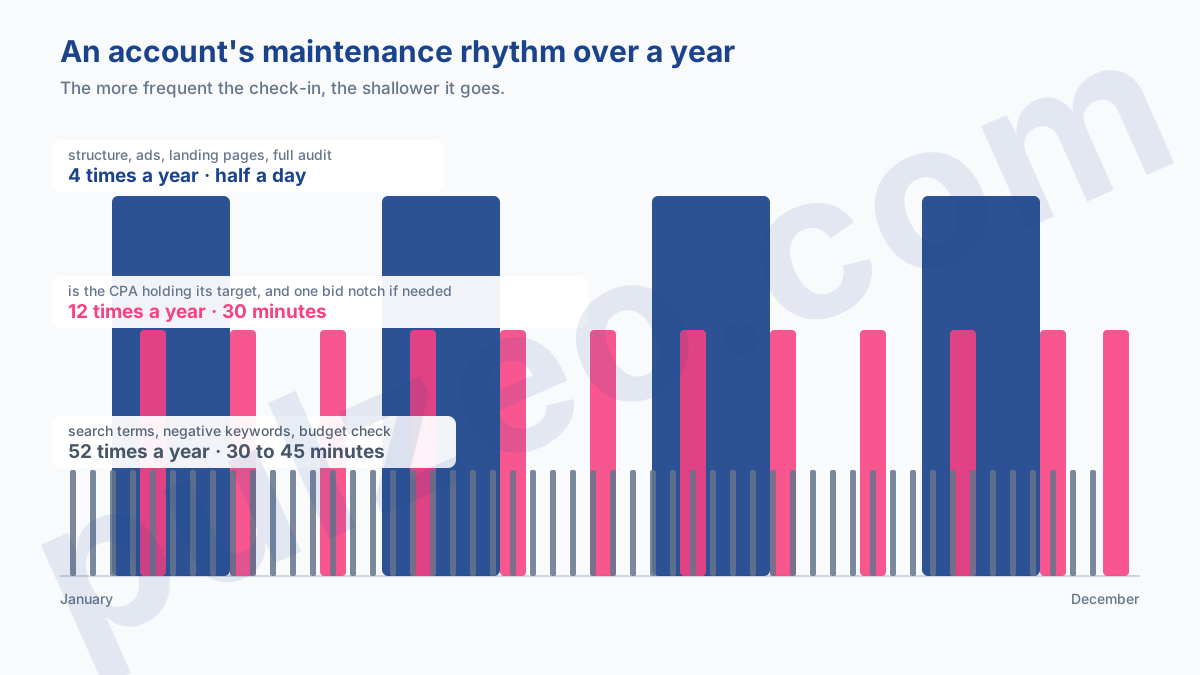
The weekly routine, step by step
The weekly check-in is where most of the useful decisions get made, and it comes down to two tasks. The rest is just checking.
Always do it on the same day. Not for discipline's sake, but because a search terms report read every seven days covers one full week, whereas a report read at random mixes periods of different lengths and makes comparisons shaky.
Read the search terms and exclude
It's the most profitable task in all of account management, and the most neglected. The report shows what people actually typed, as opposed to what you targeted, and the gap between the two always comes as a surprise at first.
Open it for the last seven days, sort by cost from highest to lowest, and go through the first twenty rows. You're looking for one thing only: a query that used up budget without producing a single conversion, and that clearly has no business being there. Think "jobs," "free," "reviews," or a competitor's brand name.
Exclude without hesitating as soon as an off-topic query has spent the equivalent of your target CPA without bringing anything in. Below that, let it run: a $3 query that hasn't converted yet hasn't proved anything. One caveat, though: Google hides some of the terms for privacy reasons, so what you see isn't the whole picture, and the queries hidden from the report explains what's missing.
This weekly read is exactly the kind of task Pulzeo runs continuously, surfacing the terms that cost money without converting and offering to exclude them in one click.
Check that the budget goes where it should
Second task, five minutes. You look at the last seven days of spend, campaign by campaign, and ask yourself one simple question: did the money go where you wanted it to go?
A campaign that maxes out its budget every day signals demand you're not fully capturing. A campaign that never spends its budget signals the opposite: targeting that's too narrow, or bids too low to get into the auction.
Don't panic over a one-off overspend: Google can spend up to twice your daily budget on a given day, as long as it stays within the monthly average. What counts is the month's total, never the day.
Should you check your Google Ads account every day?
No, and yet it's the advice you read most often. Day to day, an account's numbers are dominated by chance: two fewer conversions on a Tuesday make the cost per acquisition jump even though nothing has changed. So checking daily gives you no usable information, just the urge to step in.
Three situations still justify opening the interface outside the weekly check-in.
- a campaign launch, where the first forty-eight hours reveal a targeting mistake or a broken landing page;
- a time-limited promotion, a sale or a product launch, where a lost day can't be made up;
- an alert you receive, a budget used up or a disapproved ad, which calls for an immediate check.
The rest of the time, the weekly check-in is enough. Five minutes of daily checking adds up to as much time as the routine itself over a month, for information nobody can do anything with.
What to review once a month
The monthly check-in is for judging, not maintaining. It's where you see whether the cost per acquisition is on target, and it's the only time you touch bids.
Always compare against your own history, month over month in a comparable season, never against a figure found online. And look at the trend over three to four weeks rather than the last one: a cost per acquisition moves on its own from one week to the next, especially at low volume, and telling noise from a real deterioration takes method.
If an adjustment is called for, go one notch, ten to twenty percent, no more. Google states that a changed target doesn't restart learning but applies right away: a big jump therefore shifts delivery overnight, and the following month is no longer comparable to the one before.
Which thresholds trigger action
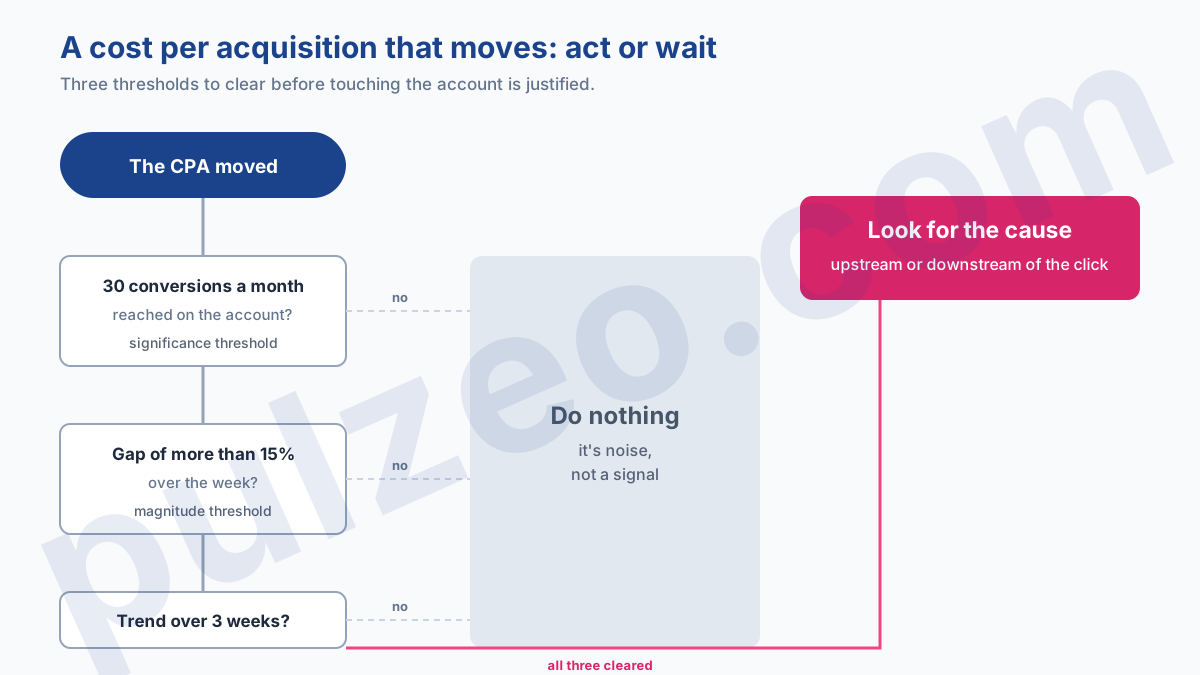
Here's the part the guides never give you, even though it's what keeps you from acting blind. Three rules of thumb are enough.
- below thirty conversions a month, no change in cost per acquisition is significant: chance produces streaks, and you'd be interpreting noise;
- a gap of less than fifteen percent over a single week doesn't justify stepping in, whatever the volume;
- a steady trend over three weeks justifies digging, even if each week taken on its own looked acceptable.
These three thresholds are read in order, and the first one governs the other two. On an account under thirty conversions a month, the next two simply don't apply: there's nothing significant to measure from one week to the next, and the quarter settles it.
Those thirty conversions don't come out of nowhere: on Display, it's also the volume Google recommends per ad group per month for a Smart Bidding strategy to hit its target. Below that, you and the algorithm are in the same boat: neither of you has enough data to decide.
An account doing ten conversions a month isn't steered by its weekly numbers. It's steered by the quarter, and you accept not knowing in between.
These thresholds are also what lets you NOT open an account: as long as none of them is crossed, there's nothing to decide. That's the principle behind Pulzeo's alerts, which watch these thresholds continuously and only notify you once one is crossed.
What not to touch every week
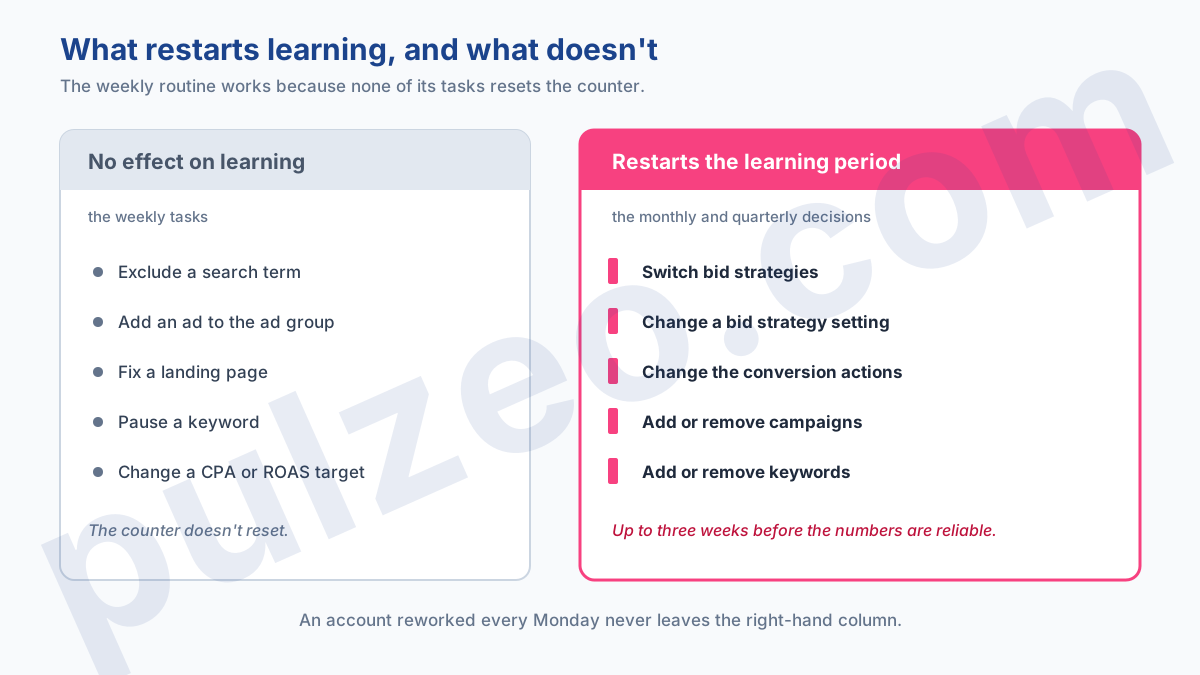
Google lists four triggers for the learning period: creating or reactivating a bid strategy, changing one of its settings, adding or removing campaigns, ad groups, or keywords, and sometimes, on Shopping campaigns, changing the target at the ad group level. During this phase, delivery readjusts and the numbers can't be interpreted.
Maintenance tasks, on the other hand, restart nothing. Excluding a search term, adding an ad, fixing a landing page: the counter doesn't reset. That's precisely what makes the weekly routine sustainable, and it's the distinction most beginner account managers miss.
The practical consequence is brutal. An account that gets reworked every Monday spends its life in learning and never produces stable data, so never a reliable conclusion. I've seen accounts run like that for a year, with a conscientious manager at the controls.
The exact length of this phase depends on the conversion cycle, from a few days in ecommerce to several weeks in B2B sales: how long the learning period lasts gives ballpark figures.
The quarter, the only window for big changes
Once a quarter, you open the hood. It's the moment for the changes you've kept off-limits the rest of the time: reviewing the campaign structure, rewriting the ads that are running out of steam, reworking the landing pages, questioning how the account is split up.
This window exists for a mechanical reason. Three months give you enough perspective to tell a trend from seasonality, and enough stability between two overhauls for the algorithm to have time to learn and then produce clean data.
It's also the right time for a full audit, with a Google Ads audit checklist that goes through the points in order.
How many accounts before the routine breaks down
The routine works very well for up to three or four active accounts. At five or six, the weekly read already takes up a whole day, and that's where things slip, always in the same way: you keep up the routine on the two big accounts and let it slide on the small ones.
The problem isn't the time it takes to fix things, it's the time it takes to find them. Opening an account to see that everything's fine produces nothing, and yet you have to open it to know. Across eight accounts, half the weekly time goes into checking accounts that didn't need anything.
Three ways out, and the choice comes down to each account's monthly budget rather than how many there are. Under $2,000, an agency costs more than it brings in, and you're better off running the routine yourself. Above $5,000, managing the account becomes a part-time job and handing it to an agency makes sense.
In between sits the majority of advertisers, and that's where a monitoring tool replaces the rounds of manual checks. It doesn't do the work for you, it tells you which account to open today.
The real gain isn't in the tasks, which take a few minutes. It's in the hours you no longer spend checking accounts that were doing fine.
Common questions
How many hours a week does it take to manage a Google Ads account?
Allow thirty to forty-five minutes a week for an account with one or two campaigns, and two to three hours for one running ten or so. The factor that really moves this figure isn't the budget but the number of campaigns: each one adds its own search terms report to read and its own ads to keep an eye on.
How often should you change your bids in Google Ads?
Once a month at most, and in small steps. Switching bid strategies restarts the learning period, which Google puts at up to 50 conversion events or three conversion cycles. Changing a target CPA, on the other hand, doesn't restart it, as Google states plainly: it applies right away, which shifts delivery in one go and makes the month impossible to compare with the one before. An account whose bids get reworked every week never leaves that state and never produces stable data to interpret.
Can you manage Google Ads campaigns without being an expert?
Yes, as long as you commit to a regular routine. That matters more than expertise. The part that really takes experience is interpreting the numbers, not the tasks themselves. Reading search terms and excluding off-topic queries takes no particular knowledge, and yet it's the task that pays off the most.
How many Google Ads accounts can one person keep up with?
The routine works well for up to three or four active accounts. At five or six, it already takes a whole day every week. Beyond that, you either have to give up the weekly read on some accounts, or use a tool so that spotting problems no longer depends on reading each account by hand.
