
Why is my Google Ads not working?

Your campaign is running, the budget is going out, and nothing is coming in. "Why is my Google Ads not working?" actually covers two very different problems, and the whole diagnosis depends on which one you have: the campaign isn't serving at all, or it's serving and bringing in nothing.
Their causes have nothing in common. Half the articles on the subject only deal with the first, when most of the advertisers I work with actually have the second. Here's the full diagnosis, in the order you should run it.
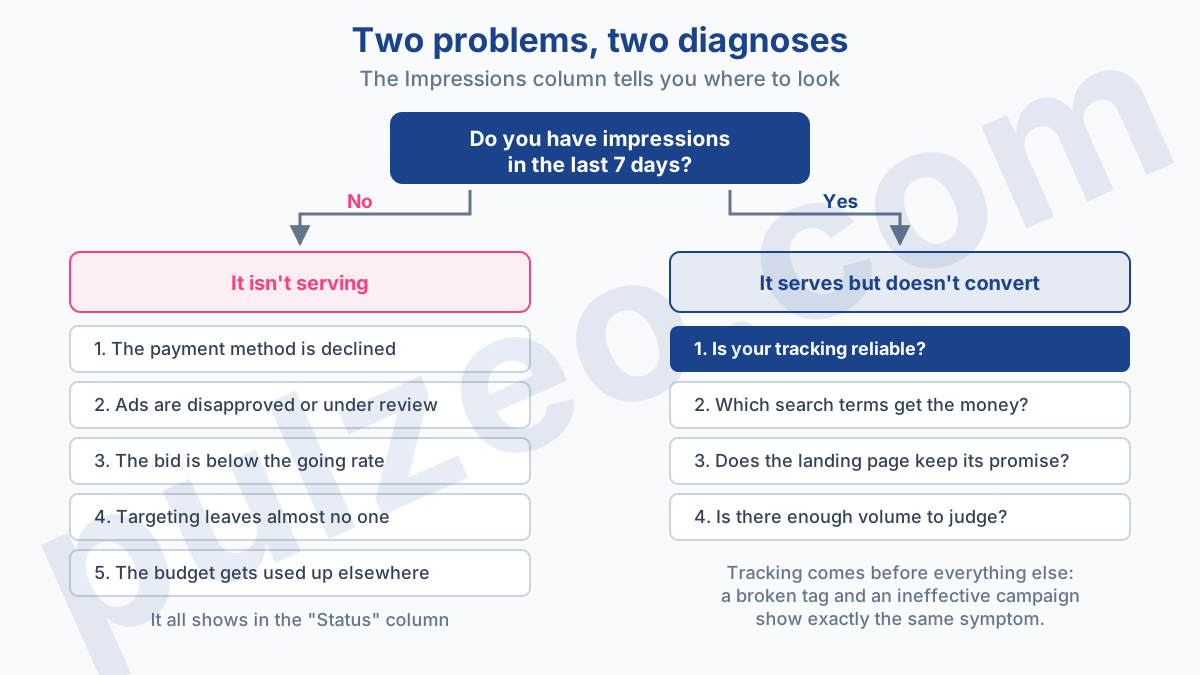
First question: is your Google Ads campaign getting impressions?
Open the campaign and look at the Impressions column over the last seven days. That single number steers the whole rest of the diagnosis.
Fewer than a few hundred impressions over the week: your campaign is barely serving, if at all, and the answer lies in the five causes in the next section.
More than that, with no conversions to show for it: your campaign is serving. The problem is elsewhere, and you can skip straight to the second half of this article.
In between, in that gray zone of a few hundred impressions you often run into with local targeting, both diagnoses apply. Start with delivery: it takes five minutes to check.
Don't skip this step thinking you already know the answer. I've seen accounts where people spent weeks optimizing ads while half the ad groups weren't getting a single impression, all because of a disapproved keyword nobody had noticed.
A campaign that isn't serving: the five causes
Check them in this order, from most to least common. Each one shows up in the interface, no guesswork required.
Payment is blocking everything
It's the number one cause, and the dumbest. An expired card, a charge declined when you hit your payment threshold, or a prepaid balance that ran out if you're on manual payments, and delivery can stop overnight, without anything flashing on the main dashboard.
Careful not to mix these up: reaching your payment threshold doesn't block anything, it simply triggers a charge. It's the declined charge that cuts off delivery.
Go to Billing and check the status of your payment method. Sort this out before touching the campaign: as long as it's stuck, everything else waits.
Your ads are disapproved or under review
A disapproved ad doesn't serve, and an ad group where every ad is disapproved is a dead ad group. The reason is spelled out in black and white in the Status column at the ad level.
The most common disapprovals come down to four things:
- a superlative nothing backs up ("the best," "#1");
- a health claim or a promise of guaranteed results;
- excessive punctuation or symbols in headlines;
- a landing page judged non-compliant, often for missing content or missing legal information.
As for timing, Google says most ads are reviewed within one business day, but those that need a more complex review can take longer. After two full business days, go check the status; after more than a week, contact Google Ads support.
Your bid is below the going rate
If your max CPC bid is $0.80 on a keyword whose first page bid estimate is around $3, your impressions collapse. The keyword's Status column flags it explicitly.
One distinction matters here: the keyword stays active and can still trigger an ad. Google talks about a lower chance of appearing on the first page, not about the keyword switching off. So a bid that's too low explains a trickle of volume, rarely an absolute zero.
Before raising the bid, make sure the keyword is within your reach. Keyword Planner's Top of page bid (high range) tells you what other advertisers bid for the top of the page, and your margin tells you what you can pay. When the two don't overlap, it's the keyword itself that's out of your league.
Your targeting leaves almost no one
A location narrowed down to a single city, combined with a narrow audience, a limited ad schedule and a device exclusion, can shrink your targeting until it stops working altogether.
Each criterion looks reasonable on its own. Stacked together, they kill delivery, and nobody sees it because restrictions get added one at a time, weeks apart.
Your budget is being eaten elsewhere
On an account where several campaigns share one budget, or where one of them burns through it all early in the day, the others stop serving. The symptom is misleading: the campaign looks active and spends nothing.
Look at how spend is really split across campaigns over the week. One campaign soaking up 90% of the budget is enough, on its own, to explain why the others have gone quiet.
A campaign that serves but doesn't convert
This is the most common case, and the most poorly handled. The campaign runs, spend goes up, and the Conversions column stays at zero or close to it.
Here too, one question comes before all the others, and asking them out of order costs you weeks.
Are your conversions even being tracked?
Always start here. Four incidents produce exactly the same symptom as an ineffective campaign:
- a tag that no longer fires;
- a conversion action switched to secondary by mistake;
- a consent banner blocking tracking;
- a redesigned site where nobody put the tags back.
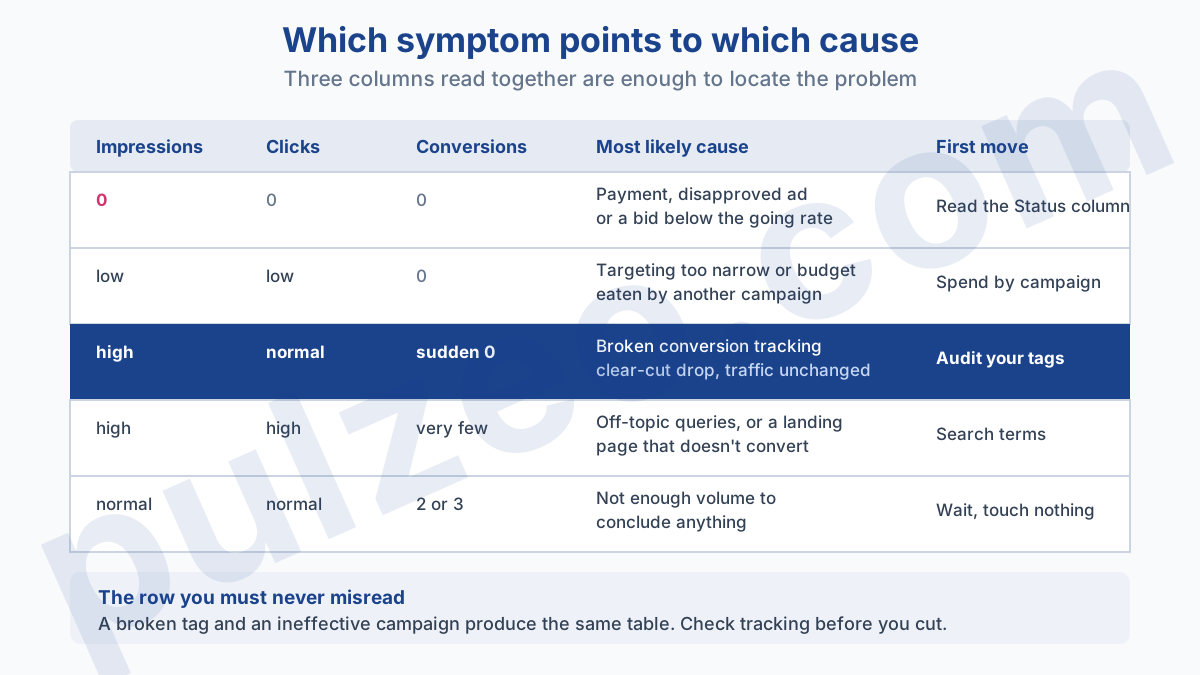
The difference is huge: in one case you're losing money, in the other you're making it without seeing it, and you risk shutting off a profitable campaign.
The telltale sign: a sharp drop in conversions that you can pin to a date, with no matching drop in traffic. A healthy account doesn't lose all its conversions overnight for a business reason. I've detailed the six settings that skew measurement in the guide to misconfigured conversions, and that's the first place to go.
It's also a check Pulzeo runs on its own: the conversions audit reviews your conversion actions and flags the ones that have stopped reporting, without you having to open Google Tag Manager.
Which search terms is your money going to?
Once your measurement is reliable, open the search terms report. You won't see your keywords there; you'll see what people actually typed, and the gap is often brutal.
On broad match that nobody keeps an eye on, you regularly find off-topic queries swallowing a serious share of the budget. Someone looking for a job in your industry, a competitor comparing offers, a student doing homework: all of them paid clicks that will never convert.
Two caveats. Google hides some of these terms, so what you see is a sample. And the match type decides what triggers your ads: it's often the thing to tighten, before you even add a single negative keyword.
Does your landing page deliver on the ad's promise?
The click comes in, tracking works, and yet nobody buys. The problem has left Google Ads and moved to your site.
The cases I run into most:
- the ad promises a price the page doesn't show anywhere;
- the form asks for eight fields when three would do;
- the page takes four seconds to load on mobile;
- the featured product is out of stock, and nothing says so before the cart.
The test that never lies: tap your own ad from a phone, in a private window, and go all the way to the end of the journey. Three minutes is usually enough to find what you'd been hunting for six weeks on the bidding side.
Do you have enough volume to judge?
It's the cause nobody ever suspects, because nothing looks broken.
On a campaign producing three conversions a week, the CPA for any given week means nothing. Two fewer conversions and it triples, two more and it plunges. You think you're watching things get worse; you're watching noise.
Until the campaign has reached around thirty conversions, there's nothing to conclude and, above all, nothing to fix. That's the whole point of the minimum budget threshold, and it's what separates an account that doesn't work from one that simply hasn't run long enough yet.
The special case of Performance Max
If the campaign worrying you is a Performance Max campaign, half of the diagnosis above doesn't apply the same way, and you need to know that before you start going around in circles.
You don't choose keywords there, and you don't control any match type. That said, two common beliefs have stopped being true and deserve correcting.
The placement report does exist: it lists the webpages, apps and YouTube videos where your ads served, with impressions. The catch is elsewhere, and Google says so in writing: you shouldn't use it to evaluate performance, because it doesn't cover every channel. It's a brand safety tool, not a performance tool.
Negative keywords exist too, at both the campaign and the account level. Their reach is limited to Search and Shopping inventory, which leaves the rest untouched, but excluding an unwanted query is entirely possible.
Three things do stay under your control, though, and they're what you should look at. The audience signals you provide steer the learning, even if they don't constrain it. Brand exclusions keep you from paying for your own name or your competitors'. And above all, the quality of your feed and assets decides almost everything, since it's all the algorithm has to work with.
One mistake keeps coming back with these campaigns: launching Performance Max on an account whose conversion tracking is shaky. It then optimizes very efficiently toward the wrong goal, and the results look disastrous without anyone understanding why. The levers you actually have are covered in detail in the article on running Performance Max.
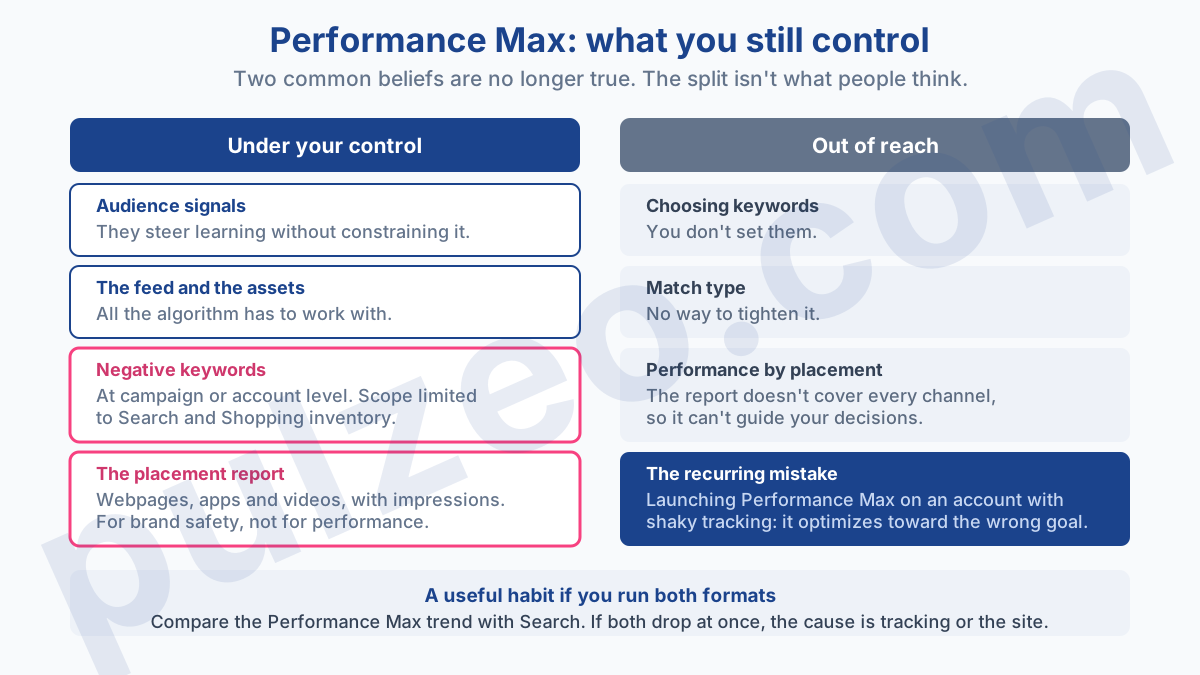
A useful habit, if you run both: compare your Performance Max trend with your Search campaigns' trend over the same period. If both drop off at the same time, the cause is shared, and it lies in your measurement or on your site.
The three false alarms
Before concluding that something is broken, rule out these three situations. All three are easy to mistake for a real problem, when they're just part of normal operation.
- The learning period. After a change of bid strategy or conversion setup, the algorithm feels its way. Results are volatile and often poor for as long as that learning lasts. Making significant changes during this phase (to bids, creatives, targeting or audiences) sends it back to learning, and that's how you lock yourself into a loop that lasts months. Google does point out, though, that small, infrequent changes to the target aren't likely to cause a noticeable problem.
- Seasonality. Plenty of industries sag in August and pick back up after Labor Day. Always compare with the same period last year before concluding that things have gotten worse.
- Conversion lag. If your buying cycle lasts three weeks, today's conversions come from last month's clicks. Judging a campaign launched ten days ago on today's conversions makes no sense.
What order to fix things in
Once you've found the cause, the order of your moves matters as much as the moves themselves, because each step makes the next one measurable.
- Fix the measurement, always first. Bids optimized on bad data will leave you with no way of knowing whether your fixes helped.
- Stop the bleeding: off-topic queries, locations that spend without converting, devices that cost three times as much. It's the fastest win, and it frees up budget for what comes next.
- Fix the landing page if the journey has a breaking point. It won't happen in a day, but no ad setting will make up for a broken funnel.
- Adjust bids and structure only at that point, once you're measuring accurately and no longer paying for off-topic traffic.
- Wait for volume before judging your fix. Same threshold as before: around thirty conversions, or you're looking at noise and starting all over again.
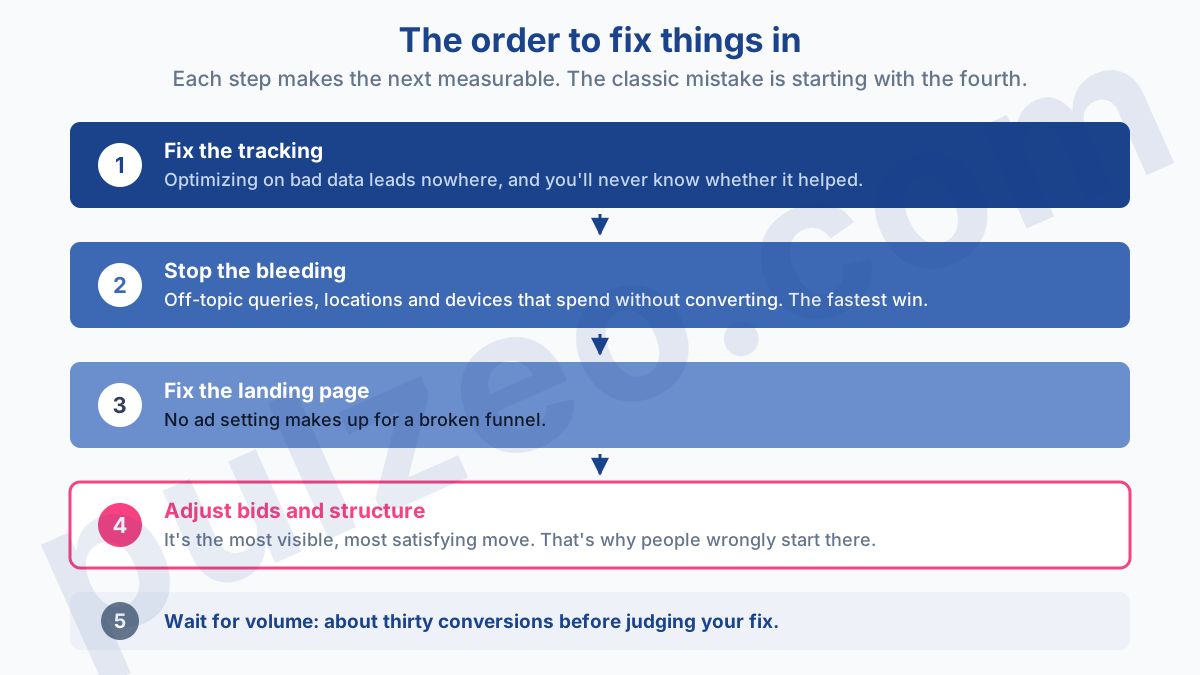
The classic mistake is starting with step 4, because it's the most visible and the most satisfying thing to do. You raise a bid, lower a target CPA, rewrite three ads, and the account doesn't budge, because the leak is somewhere else.
Why these problems get found too late
All these causes have one thing in common: they take a few minutes to spot when you know where to look, and they fly under the radar for weeks when nobody's looking.
The payment declined on a Friday night, the tag broken by a site redesign, the keyword that slips below the going rate when competition heats up in the fall: none of this sends an alert on its own, and the main dashboard shows numbers that look normal right up until the month is lost.
The bare-minimum safeguard, one you can set up yourself today: create an automated rule in Google Ads that emails you when a campaign's impressions drop to zero, and a second one for a drop in conversions. Add a check of your billing status every Monday morning. Those three minutes of setup catch most of the problems in this article.
It's also what Pulzeo watches for you, with no rules to write. The account health score surfaces the campaigns that spend without converting and the ones that have stopped serving, along with the likely cause, and an email alert goes out when your cost per acquisition starts spiraling.
A campaign that isn't working almost always has a cause you can pin down in under an hour. What costs you is the time spent fixing the wrong one.
Common questions
My campaign is active but gets no impressions. Why?
Five causes, from most to least common: the payment is declined, the ads are under review or disapproved, the bid is too low for the first page, the targeting is so narrow that almost no one is left, or another campaign is eating the budget. Open the Status column at the keyword and ad level: Google writes the exact reason there, and it's the first thing to read before you touch anything.
How long should you wait before judging a Google Ads campaign?
Think in conversions first, not days. Until the campaign has produced around thirty conversions, the swing you're seeing may just be chance. On an account doing ten a week, that takes three weeks. And if you've just changed bid strategy, add the learning period on top.
My campaign is spending but not converting. What should I do first?
Check your conversion tracking before anything else. A broken tag produces exactly the same symptom as an ineffective campaign, and half the accounts I take over have a measurement problem. Only then should you open the search terms report to see which queries the money is really going to.
Should you shut off a campaign that isn't working?
Rarely right away, and never before you've worked out which of the two problems you have. Shutting off a campaign whose tracking is broken is like switching off the warning light instead of fixing the leak. Pausing an ad group or excluding specific queries, on the other hand, can be done without waiting.
