
Google Ads campaign example with real numbers

A Google Ads campaign example is easy to find, and it's almost always made up. A fictional shoe store, thirty percent more sales, not a single figure you can check.
Here's the opposite: a locksmith campaign built in front of you, with the volumes and bids I actually pulled from Keyword Planner in August 2026, for France. You'll be able to copy it, and above all see why it's structured the way it is.
What the skeleton of a campaign looks like
One campaign, two or three ad groups, a handful of keywords per group, one ad per group, one negative keyword list. That's all, and it's already more than a lot of accounts manage to keep clean.
"A handful" means exactly that: the campaign built below comes to nine keywords in total, two to four per group. The two-hundred-entry lists you see going around are variants of the same demand, and further down I prove it with the actual numbers.
The rule that governs everything else fits in one sentence: an ad group exists so you can write it an ad of its own. If two keywords deserve the same ad text, they go in the same group. If they deserve two different ones, they split up.
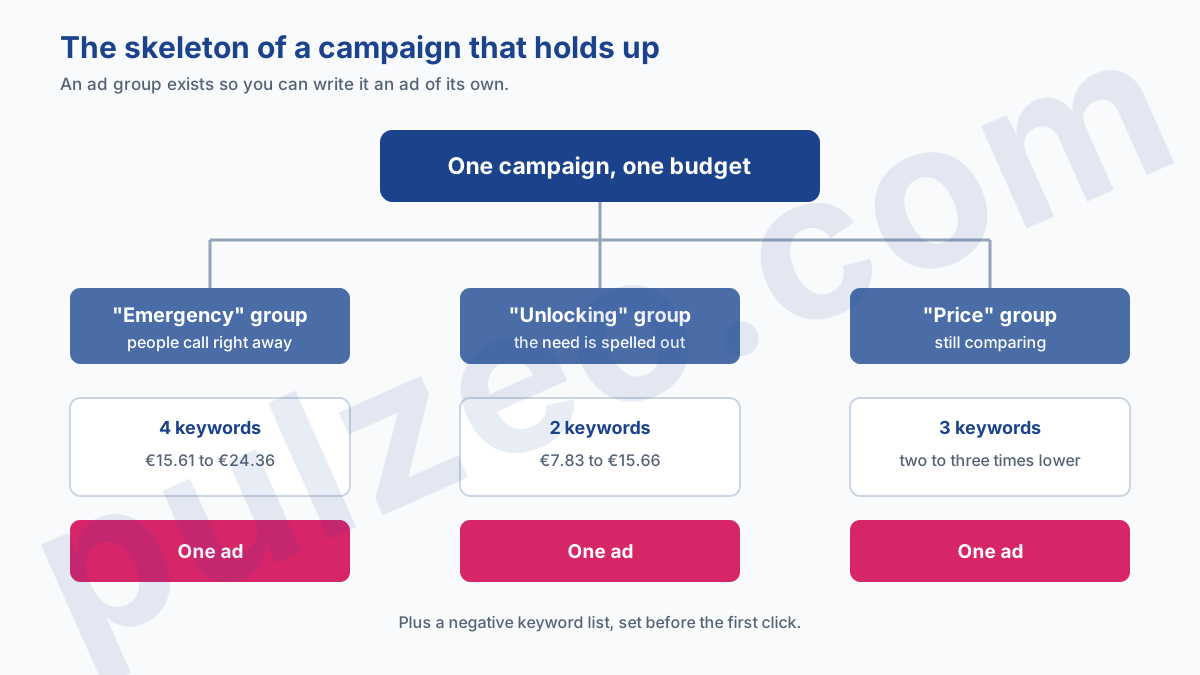
Everything else (assets, audiences, bid adjustments) gets layered on afterward. Starting there is like decorating a house before the walls are up.
The campaign, ad group by ad group
The trade I picked is locksmithing, because its numbers are clear-cut and the intent is easy to read. The volumes and bids that follow are the ones pulled in August 2026 for France, my home market, so the searches are French ones, translated here. Your own market will give different figures; what carries over is the structure. The bid shown is the one you'd need to offer to aim for the top of the page.
Ad group 1: emergencies
This is the heart of the trade, and on its own it accounts for most of the demand.
| Keyword (translated) | Searches / month | Estimated bid |
|---|---|---|
| emergency locksmith | 5,400 | €22.88 |
| locksmith call-out | 3,600 | €15.61 |
| 24/7 locksmith | 2,400 | €16.31 |
| SOS lock | 390 | €24.36 |
This group's ad has to say one thing only: you'll be there right away. The phone number comes before everything else, and the response time you promise is worth more than any claim about quality.
Ad group 2: door unlocking
Same urgency, but a precisely named need, and bids that are more spread out: €7.83 on the generic query, double that on the one with "call-out" in it.
| Keyword (translated) | Searches / month | Estimated bid |
|---|---|---|
| locksmith door unlocking | 1,300 | €7.83 |
| locksmith call-out door unlocking | 480 | €15.66 |
These queries deserve their own group precisely because the ad changes: it can repeat the words "door unlocking", which makes it more relevant and brings the cost per click down. It's the central mechanism of Google Ads, and the one people neglect the most.
Ad group 3: price
| Keyword (translated) | Searches / month | Estimated bid |
|---|---|---|
| how much does a locksmith cost | 390 | €8.18 |
| emergency locksmith rates | 320 | €7.84 |
| lock repair price | 170 | €7.71 |
This group has an interesting trait: its bids are two to three times lower than for pure emergencies. Someone comparing rates isn't locked out yet, and the market knows it.
It's up to you whether you want this traffic. If you show your prices, it converts decently. If you hide them, you're paying for people who'll leave to find them elsewhere.
Should you keep every keyword from Keyword Planner?
Here's what the tool actually returns when you ask it for "emergency locksmith" (in French, so each line is my translation), and it's instructive.
| Keyword (translated) | Searches / month | Estimated bid |
|---|---|---|
| emergency locksmith | 5,400 | €22.88 |
| locksmith for emergencies | 5,400 | €22.88 |
| locksmith emergency | 5,400 | €22.88 |
| locksmith in an emergency | 5,400 | €22.88 |
| emergency locksmithing | 5,400 | €22.88 |
| locksmithing for emergencies | 5,400 | €22.88 |
Six entries, one and the same volume, one and the same bid: Keyword Planner is selling you the same demand six times.
They're permutations of a single query, which Google rolls up into a single figure. Adding them all to your ad group won't get your ad shown a single extra time.
It's the most common list mistake beginners make: you export two hundred keywords, you think you've got an arsenal, and what you really have is twenty or so distinct demands buried in their variants. Keyword matching already takes care of those, and how match types really work explains which of your keywords actually gets triggered.
The emergency group's ad, word for word
An ad group without its ad is just a list. Here's what I'd put in the emergency group's ad, in the real format: headlines of 30 characters max, descriptions of 90.
Six headlines are enough to start, even though there's room for fifteen:
- 24/7 Emergency Locksmith
- At Your Door in 30 Minutes
- Locked Out? We're On Our Way
- Price Quoted Before We Start
- Local Shop, Not a Call Center
- Call Us, We Pick Up
Two things set them apart from the ads you usually see. Each one makes a promise you can check: a response time, a price stated upfront, an identity. And none of them says "quality" or "professional", words everyone writes and nobody reads.
For descriptions, watch the minimum: Google requires at least two, and accepts up to four. Enter just one and the screen won't let you save, which plenty of people only find out when they try to publish.
- Local locksmith, at your door within 30 minutes, price quoted before we start work.
- Independent locksmith, no middleman. Price given over the phone, no surprises.
The same rule governs both: the first sentence answers the fear of the moment, not your urge to introduce yourself. These two come to 83 and 78 characters, and each of the six headlines stays under 30: you can check everything before you paste anything into the interface.
Google will then build its own combinations, and not all your headlines will show. Writing six good ones beats filling in fifteen just to fill the boxes.
The settings, which count as much as the keywords
Three settings carry a lot of weight and take two minutes to set.
Location first: a tight radius around your shop, not a whole county. A locksmith who's willing to drive forty minutes to a job will lose it to the one who's ten minutes away.
Then the ad schedule, and it's the most profitable setting in this trade. People get locked out at night, on Sundays and on holidays, and the auctions are often less crowded at those hours. An emergency campaign that only runs during business hours cuts itself off from its best demand.
Finally, the bid strategy: start on Maximize clicks while you build up conversions, before moving to a target. The full reasoning is in which bidding strategy to choose.
Negative keywords, before the first click
A campaign goes live with its negative keyword list, not after you've seen the damage. Four categories to rule out from day one in this trade:
- jobs and training: "become a locksmith", "locksmith salary", "locksmith school";
- DIY: "open a door without a key", "how to pick a lock", which draws massive curiosity and zero customers;
- hardware: "lock price", "buy lock cylinder", which is aimed at hardware stores;
- towns you don't serve, since the default location setting also reaches people who are merely interested in an area.
The trap of broad match negatives is worth knowing before you launch, because it cuts more than you'd expect: the mechanism is explained here.
How much budget does this campaign need?
The math starts from the bids in the tables, not from your ambitions.
One word of caution before you multiply: the amounts in the tables are bids to offer, not prices paid. The click you're actually charged for almost always costs less, so the calculation below gives you a ceiling, not an invoice.
At a €15.61 median bid for this trade and one click in ten turning into a job, each customer comes to €156 at most. Ten jobs a month therefore means planning for around €1,560, knowing the real spend will be lower.
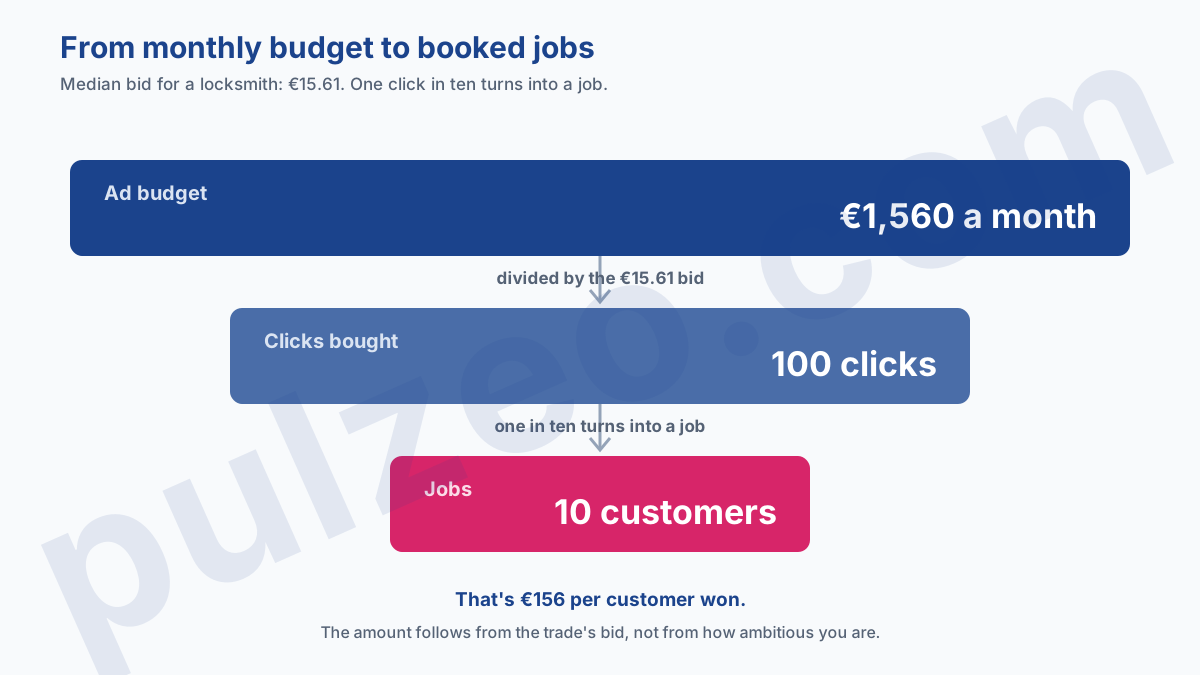
That amount surprises people, and that's exactly why you should set it down before you start rather than discover it six weeks in. The trade-by-trade breakdown is in what a customer costs a tradesperson.
Tracking these figures week after week is exactly the kind of task that gets dropped when you're out on jobs all day, and Pulzeo flags the campaigns that spend without making the phone ring.
The same skeleton on a restaurant, and why it breaks
Take this structure and lay it over a restaurant: it doesn't hold up anymore, and the numbers show why.
In the restaurant keyword cluster pulled in August, still for France, the median high-range bid drops to €0.96, versus €15.61 for locksmiths. Clicks cost next to nothing, so the instinct is to buy lots of them. Except that out of 3,240,420 monthly searches in that pull, only 14,910 show an intent to book, less than half a percent.
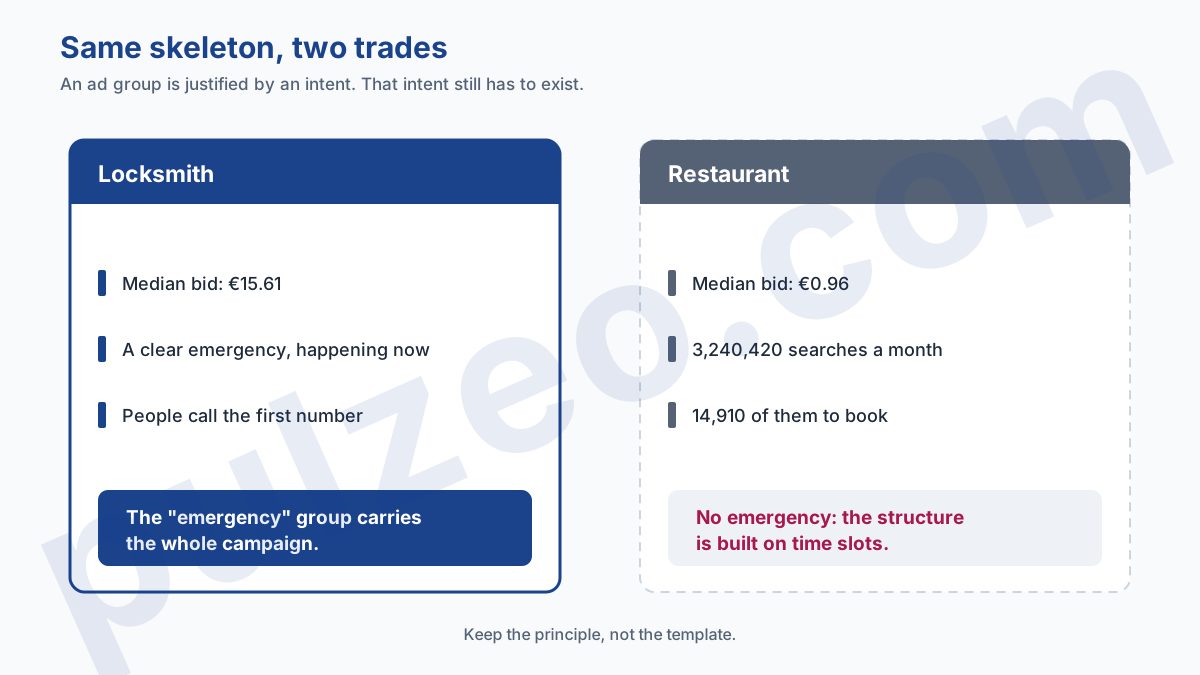
The locksmith's emergency group has no equivalent for a restaurant owner. There's no moment when someone has to have dinner within the hour and will call the first number they see. So the structure has to be built on time slots and location, not on need, and the full math is here.
Hold on to the principle rather than the template. An ad group is justified by a distinct intent, and distinct intents aren't the same from one trade to the next.
Where to start
Open Keyword Planner, type in your trade, and export. Then do the opposite of what everyone does: instead of keeping two hundred keywords, strike out every permutation and see how many genuinely different demands you have left. It'll often be fewer than fifteen.
Group them by the ad you'd write for each, and you've got your ad groups. That list is your campaign, and it fits on a single sheet of paper.
Common questions
What does a good Google Ads campaign look like?
A lot simpler than people think. One campaign, two or three ad groups matching genuinely different intents, two to four truly distinct keywords per group, one responsive search ad per group, and a negative keyword list set before the first click. Anything beyond that skeleton at launch makes the campaign harder to manage without adding anything.
How many keywords should an ad group have?
Far fewer than you'd think: two to four are enough, as long as they're genuinely different. Keyword Planner returns plenty of variants that are only permutations of the same query: for locksmiths in France, six entries at 5,400 searches a month actually describe one and the same demand. Adding them all won't get your ad shown any more often.
Should you run one campaign per service or a single campaign?
A single one at launch, unless two services need separate budgets. Budget is set at the campaign level: two campaigns means two budgets to watch and two algorithms each learning on its own from half the data. You split when one service has to be protected from the other's budget, not to make things look tidy.
How much does a locksmith campaign cost per month?
On the figures I pulled for France, expect €156 at most per job won, starting from the trade's median bid of €15.61 and one click in ten that turns into a job. Ten jobs a month therefore call for a budget of around €1,560. The amount looks high, but it follows from the bid level in this trade, not from how ambitious you are.
