

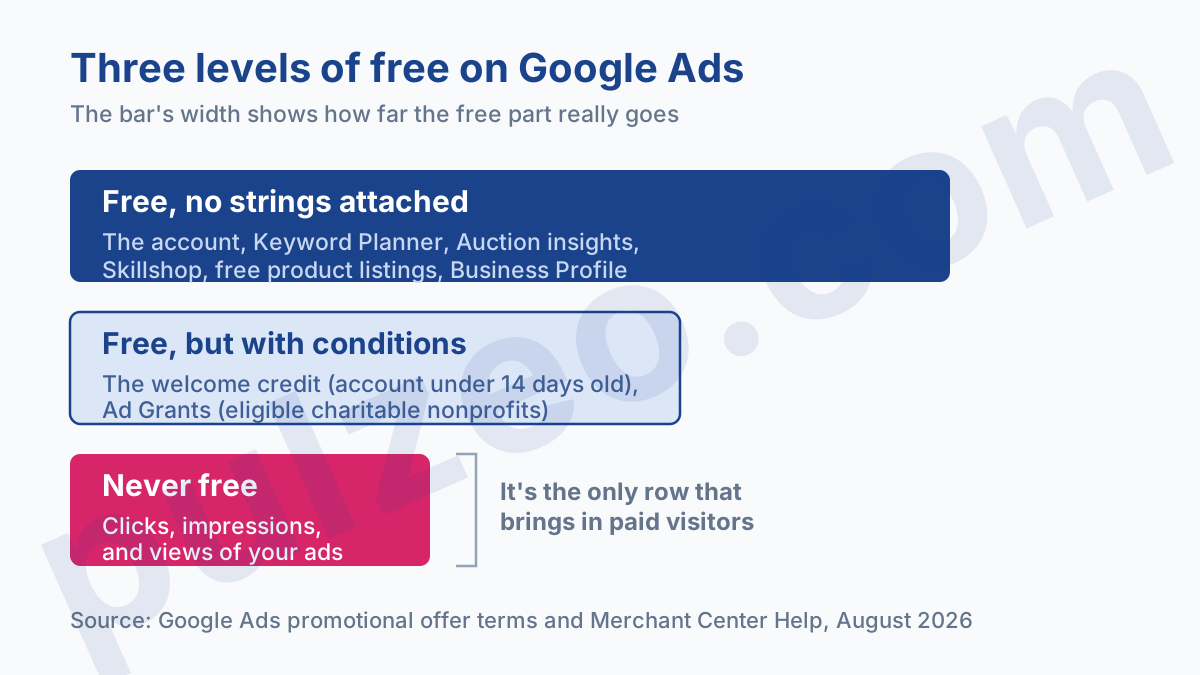
No, clicks are never free. That's the short answer, and it beats the promises you run into when you look for a way to use Google Ads free of charge. But the short answer hides three things most people don't know: the account itself costs nothing, one program really does run your ads without billing you, and part of Google's storefront has been free since 2020, with a reach that widened in 2026.
It's a question I see coming from both directions. There are the people hoping for a trick, and the people who've heard about the €400 credit Google offers in France and want to know where the catch is. Both deserve a real answer, because either way there's money that shouldn't go to waste.
How much does it cost to open a Google Ads account?
Nothing. There's no subscription, no setup fee, no license to buy, and no minimum amount to commit to create the account. You open it, you configure it, you can even build out your campaigns completely and leave them paused: at that point, you haven't paid a thing.
Billing starts when your ads run. Depending on the format, you pay per click, per impression or per view, and that's where the budget goes. A $5 daily budget is perfectly allowed, and nobody will stop you.
What will stop you is the math. At ten clicks a day in an industry where it takes fifty to make one sale, you learn nothing, and neither does the algorithm. The real starting threshold isn't written anywhere in Google's terms: it's calculated from your cost per click and your conversion rate, and I've broken down that calculation in the article on the real budget of a Google Ads campaign.
The free Google Ads credit for new accounts
This is the offer everyone talks about, and the one almost everyone misunderstands. Here's how it works: Google adds ad credit to your account after you've spent a certain amount. The tiers change over time and from country to country, and the figures floating around on French blogs range from €400 to €1,700, without it always being clear which offer they refer to.
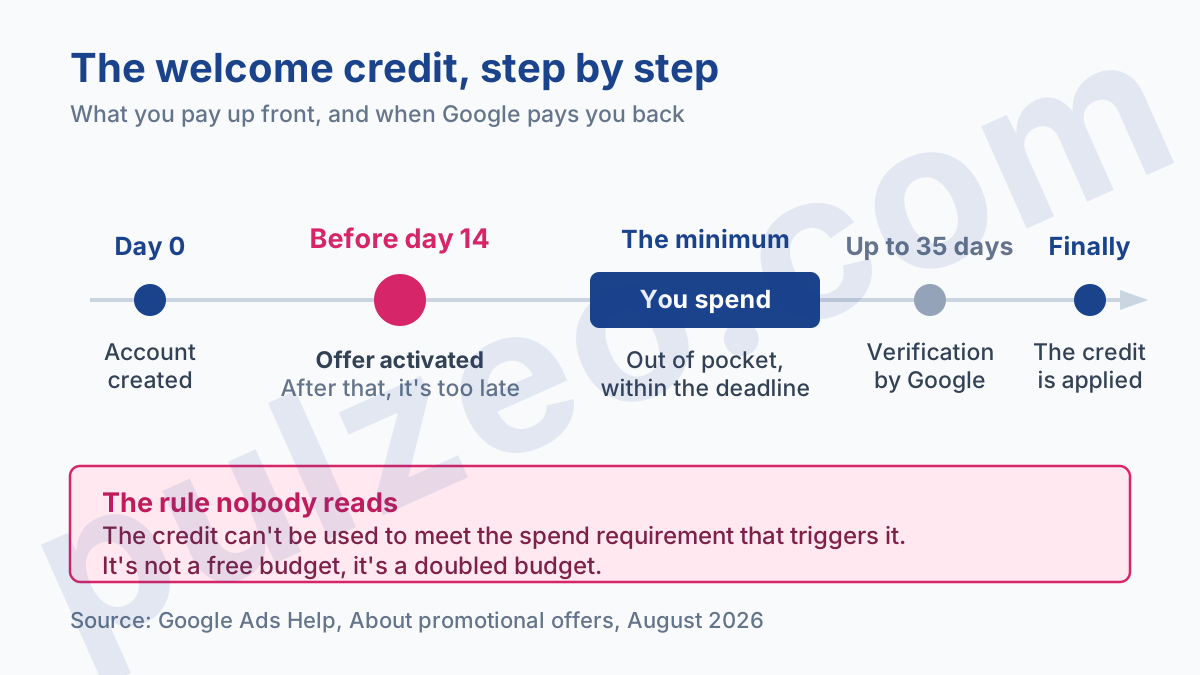
The detail that changes everything is spelled out in black and white in the terms of Google Ads promotional offers: the credit can't be used to reach the spend threshold that triggers it.
In France, you don't get €400 of free advertising. You spend €400 out of your own pocket, and Google credits you another €400 afterward.
The offer is still worth having: your launch budget gets doubled, which is no small thing when you're starting out. But an advertiser who was counting on getting started without spending a dime runs into a wall they never saw coming.
The eligibility conditions are strict and worth checking before you start. The account must be less than 14 days old when the offer is activated, a valid payment method must be on file, and you can't have already run ads for the same business. That last point rules out a lot of people: opening a new account to grab the offer again doesn't work.
Once you've reached the threshold, allow up to 35 days of verification before the Google Ads credit shows up. The credit then applies automatically to your future ad spend, until it runs out or expires.
Google Ad Grants: $10,000 a month for nonprofits
This is the only program where advertising is truly free, with nothing to front and nothing to pay in return. Google Ad Grants gives eligible nonprofits up to $10,000 a month in Search Network ads, shown on Google.com.
The amount is impressive, so let's be upfront about what you have to accept in exchange. The budget only covers text ads on Search: no Display, no YouTube, no Shopping. It doesn't roll over: whatever isn't spent by the 31st is lost on the 1st. And your ads have to point to the domain approved when you signed up, with any additional domain requiring a separate request.
The program's eligibility criteria also hold a few surprises on the management side:
- logging in to the account every month, and making at least one change every 90 days after reviewing performance;
- a website that complies with the program's rules, with no AdSense ads or affiliate links for as long as you take part;
- a nonprofit organized and operated exclusively for charitable purposes, which rules out most groups on the fringes of the nonprofit world;
- a ban on ads for financial products, or ads soliciting donations of vehicles or real estate.
In my experience, the real problem with Ad Grants isn't getting in, it's staying useful once you're in. I've seen nonprofit accounts spend $300 of the $10,000 available, month after month, because nobody had time to work on the keywords. Google grants the budget, but not the hours of management that come with it, and that's exactly what Pulzeo takes on for this kind of account left to fend for itself.
Free product listings on Google Shopping
If you sell online, this is probably the most valuable part of this article. Since 2020, Google has been showing products without charging for them, and that reach has grown significantly.
Where your products show up for free
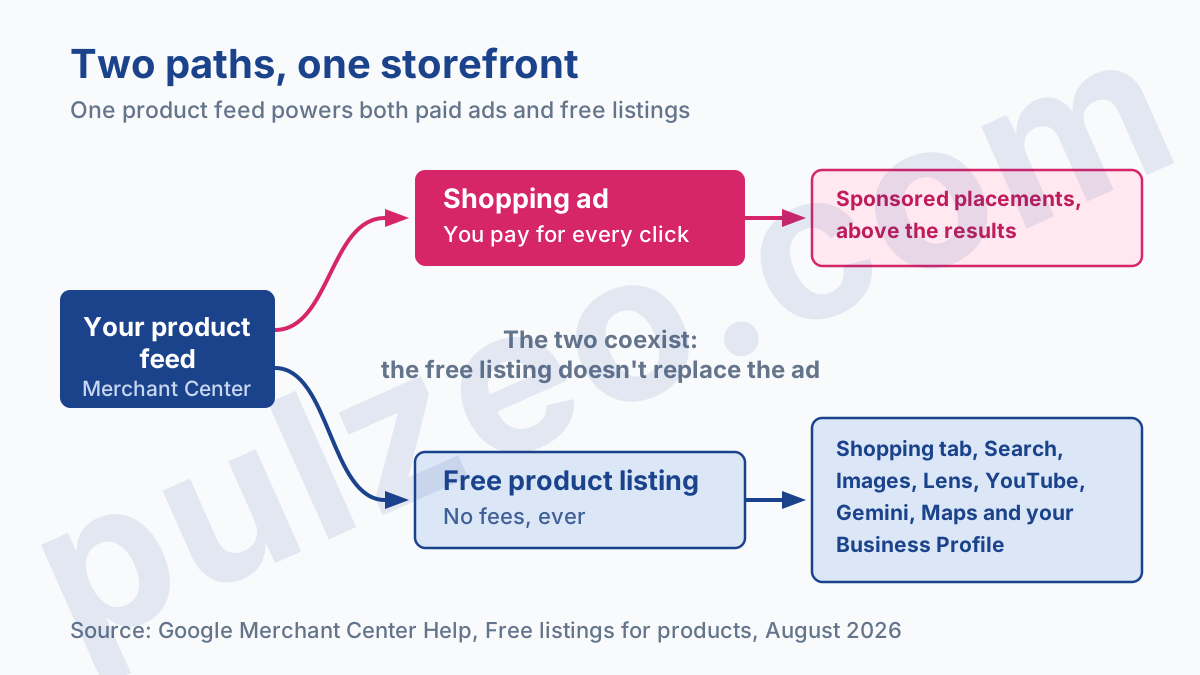
According to the Merchant Center documentation on free listings, a properly submitted product can show up in six places:
- the Shopping tab and rich results in Search;
- Google Images and Google Lens;
- YouTube and Gemini.
Two more spots are added if you run a brick-and-mortar store: Google Maps and the products module on your Business Profile. They fall under free local listings, which require turning on the feature and submitting your in-store inventory. An online-only merchant can't access them.
Showing up in Gemini is the new development that matters for 2026. Your products can be cited by a conversational assistant without you spending a cent, which wasn't the case two years ago.
What to set up first
Free doesn't get you off the hook on the technical side. You need a feed that complies with Google's policies for free listings, a return policy published on your website, and correctly filled-in shipping settings, or failing that, shipping costs included in your product data. A sloppy feed doesn't cost you money, it costs you visibility, and the full mechanism is laid out in the guide on how Merchant Center works.
Which Google tools are free for advertisers?
A lot of what you'd pay for elsewhere already exists in the interface, at no extra cost.
Keyword Planner is one of them, with a big caveat: as long as the account isn't spending, it shows very wide ranges instead of precise volumes, which makes its numbers almost useless for making decisions. It's a classic trap when you're starting out, and I've explained how to read those ranges in the article on reading Keyword Planner volumes.
Auction insights are free too, and widely underused: they tell you who's competing with you on your queries and how their impression share is trending. Your Google Business Profile remains the best starting point for a business that doesn't have a single dollar of ad budget yet, and it keeps paying off once your ads are running.
Then there's Skillshop, Google's catalog of training courses and certifications, which doesn't cost anything either. That puts a lot of paid training programs into perspective, a topic I covered in the article on what a Google Ads course is really worth.
None of these tools requires an active ad budget, except Keyword Planner, which stays usable but gets much more precise once the account is spending.
Is a free Google Ads audit really free?
A good share of what's presented as free around Google Ads is really a foot in the door for sales. The free audit is the most common example: in my experience, it's the number one prospecting tool for agencies and consultants who cold-pitch advertisers.
There's nothing dishonest about it, as long as you know what you're looking at. A free audit is still a quote in disguise, written to show you how big the problem is rather than to help you fix it on your own.
The test I apply comes down to one question: is the document I'm handed actionable if I don't sign anything? If the recommendations stop at "your account structure needs to be reworked" without saying what or how, what you've received is a sales brochure.
The second thing to watch out for is access. A serious audit needs to see the account, which is normal. Grant Read only access, never Admin access, and remove it once you've received the document. Access you've granted can be revoked in three clicks under Access and security, in the account's Admin settings, and nobody ever thinks to do it.
As for the free ad generators springing up everywhere, they write copy without knowing anything about your account: not your search terms, not your conversions, not what your competitors are running against you. The result reads well and is worth nothing.
How much to budget when nothing is free
Once you set aside what's truly free, you're left with the question that matters: how much to put on the table. My answer comes down to one simple rule. Take the cost per click in your industry, multiply it by the number of clicks you need to get one sale, and you have the price of a customer. Multiply that by the number of customers you need per month, and you have your starting budget.
If that number seems out of reach, don't try to get around it with a trick. Start smaller, with a narrower scope, and with high-intent keywords rather than broad coverage.
What really costs the most is almost never the media budget. It's the budget nobody watches: the irrelevant search terms you discover three months too late, the campaign that swallows everything, the conversion tracking that's been broken for six weeks. That's exactly what Pulzeo monitors continuously so it can alert you before the bill arrives, and you can compare the plans on the pricing page.
Free does exist on Google, but it's never where people look for it. It's in product listings, in the data nobody opens, and in the time you don't waste.
Common questions
Is there a minimum budget to get started on Google Ads?
Google doesn't impose any minimum: you can open an account and set a $5 daily budget. What holds you back is the math, not the rules. Below thirty or so conversions a month, you don't have enough data to tell a real trend from chance, and automated bid strategies have nothing to learn from. The real floor is set by your industry: the cost per click multiplied by the number of clicks you need to make one sale.
How do you get the Google Ads credit offered to new accounts?
You have to activate the offer on an account less than 14 days old, add a payment method, then spend the required threshold out of your own pocket within the time allowed. The credit comes afterward, following a verification that can take up to 35 days. Beware of the most common misunderstanding: the credit can't be used to pay for the threshold itself. You front the money, and Google doubles it after the fact.
Can a nonprofit really get $10,000 in advertising a month?
Yes, that's the Google Ad Grants program, and the amount really is $10,000 a month. But it's limited to Search Network ads on Google.com, it doesn't roll over from one month to the next, and it requires active account management. The nonprofit's website can't show AdSense ads or contain affiliate links for as long as it's in the program.
Can you show up on Google Shopping without paying for clicks?
Yes. Since 2020, a merchant who properly maintains their feed in Merchant Center sees their products show up for free in the Shopping tab, Search, Google Images, Lens, YouTube and now Gemini, and even Maps if you run a physical store. These free listings don't take the same spots as paid Shopping ads, and they don't replace them: the two coexist.
