
How to link Google Business Profile to Google Ads

Your Google Business Profile doesn't sit off to the side of your campaigns: it feeds them. The address, phone number and hours that show under your ads come from there, not from your ad account. So a correction accepted on Google Maps on a Friday night ends up in your ads by Sunday.
That's good news, and it's a trap. Here's exactly what linking unlocks, how to do it, and above all why it stays stuck in half the cases I see.
Google Ads location assets: where the data comes from
A quick word on vocabulary first, because the same thing goes by two names: Google Business Profile is the current one, and plenty of articles still use the old one, Google My Business. Both refer to the same thing.
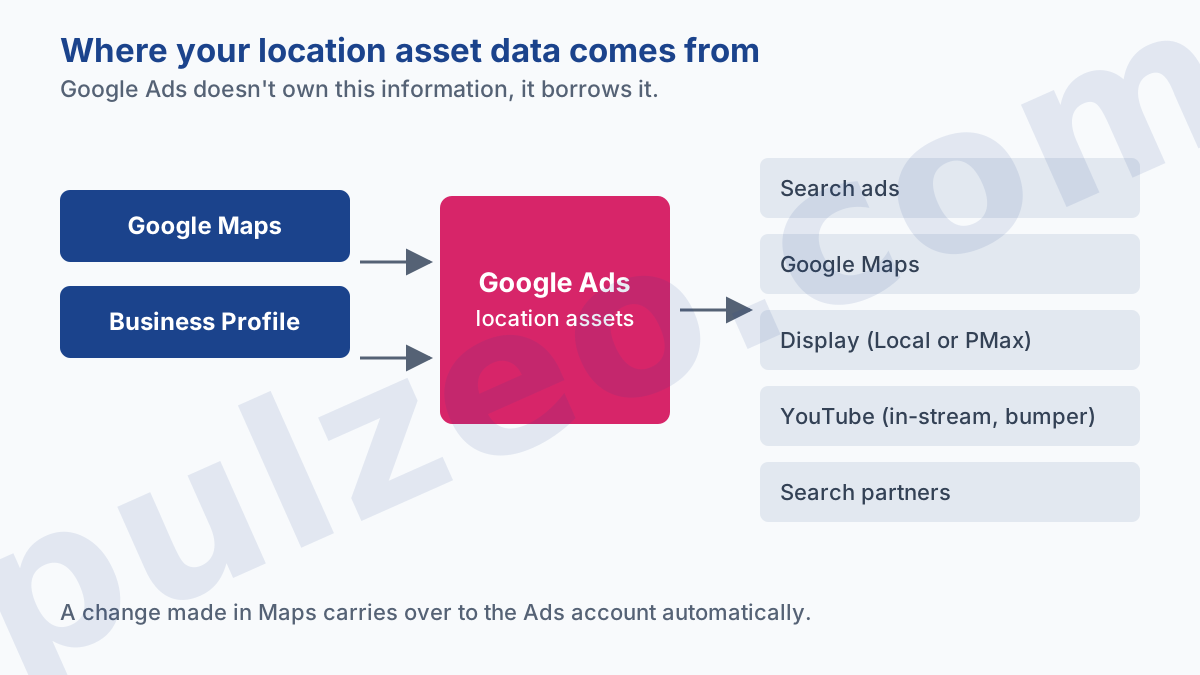
Location assets are the business details that get added to your ads: the address, the phone number, sometimes the hours and the review rating. You don't type them in by hand.
Location asset data is "sourced directly from Google Maps and Google Business Profile."
That line comes from Google's help page on location assets, and it's worth reading twice. Your ad account borrows this information from a source it doesn't control.
Once the link is in place, these assets aren't limited to the Search Network. They show up on five surfaces:
- Search text ads, with the address and phone number;
- Google Maps, beside, above or below the results;
- the Display Network, but with a condition I'll get to in a moment;
- YouTube, on TrueView in-stream and bumper ads;
- search partners.
The Display line deserves a closer look, because the help page is out of date on this point. It reserves location assets on Display inventory for Local campaigns or Performance Max campaigns with store goals. Remember the second half: an ordinary Performance Max campaign doesn't qualify; it needs store goals.
As for Local campaigns, they no longer exist. Google upgraded them to Performance Max between August and September 2022, and its own documentation warned that once the upgrade started, you could no longer create new Local campaigns. The ones that were left switched to the "Removed" status. The page on location assets still mentions them.
Also note what Google doesn't say: this page gives no performance figures. No "+10% clicks", no promised gain. You're told how it works, never what it's worth. An article that promises you a percentage gain from location assets got it somewhere else, and nothing from Google backs it up.
How to link your Google Business Profile to Google Ads
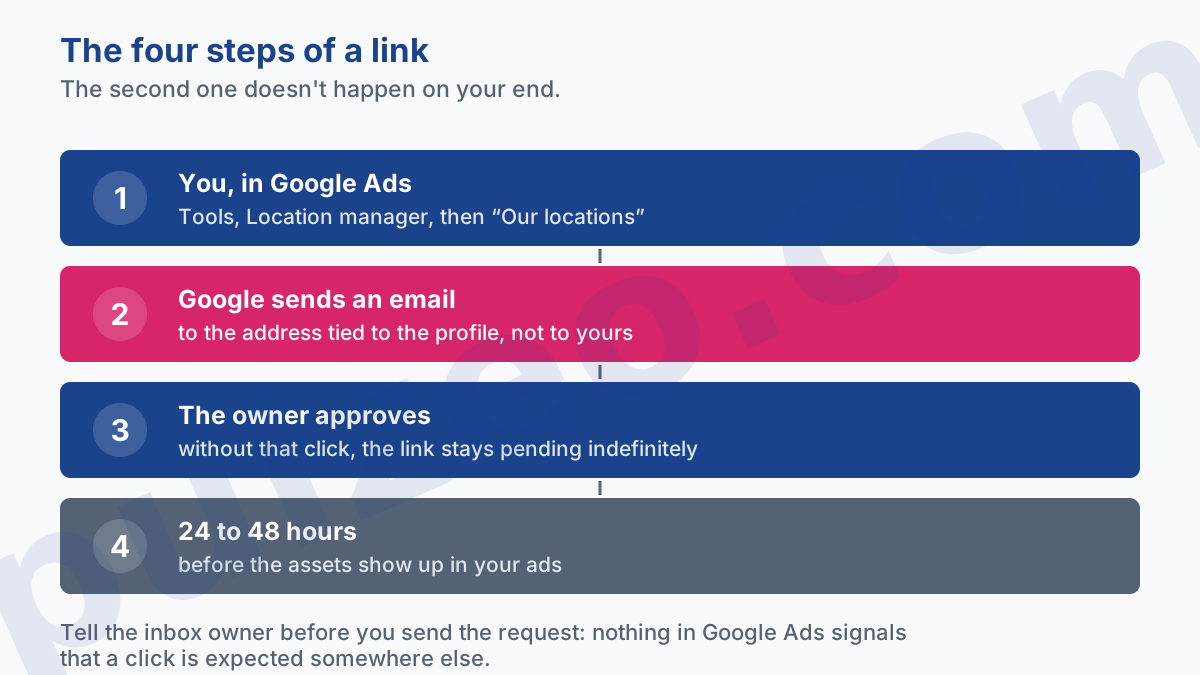
The link is started from Google Ads, and it needs approval at the other end. That second step is the one that catches everyone off guard.
What you do in Google Ads
In the Tools menu, under Shared library, open Location manager, then click the plus button and choose "Our locations".
Click Continue, select Google Business Profile, then "Enter a domain to ask for access". Your domain should show up on its own. Next, pick the countries with the pencil icon, find the profile that matches your business, check the preview, and confirm.
About ten clicks, two minutes. The easy part ends there.
What happens next, out of your sight
Google then sends a request, and it doesn't show up in your interface. The request goes to the email address of the Business Profile you selected, and only once it's approved can that account's locations show as location assets with your ads.
That email goes to the address tied to the profile. If you're an agency, that's the client's, often set up six years ago by an intern and checked once a quarter. The link then sits pending indefinitely, and nothing in Google Ads tells you that someone needs to click something somewhere.
The habit that saves you a week: give the profile's owner a heads-up before you send the request, and tell them which subject line to look for in their inbox. It spares you three rounds of follow-ups where everyone assumes someone else took care of it.
Why your Business Profile link isn't working
Google publishes a whole page on common linking issues, which says a lot about how often this comes up. Three causes keep coming back, and the third is the nastiest.
The first is a permissions problem: you don't manage the profile you're trying to link. You then have to ask whoever manages it to give you owner or manager access, or go through them.
The second isn't a real problem: plenty of people give up, convinced that a profile can only serve one account. That's wrong, and Google says so explicitly. The same profile can be linked to multiple Google Ads accounts, even if they sit under different manager accounts. A brand that keeps an account of its own and hands the rest to an agency doesn't have to choose.
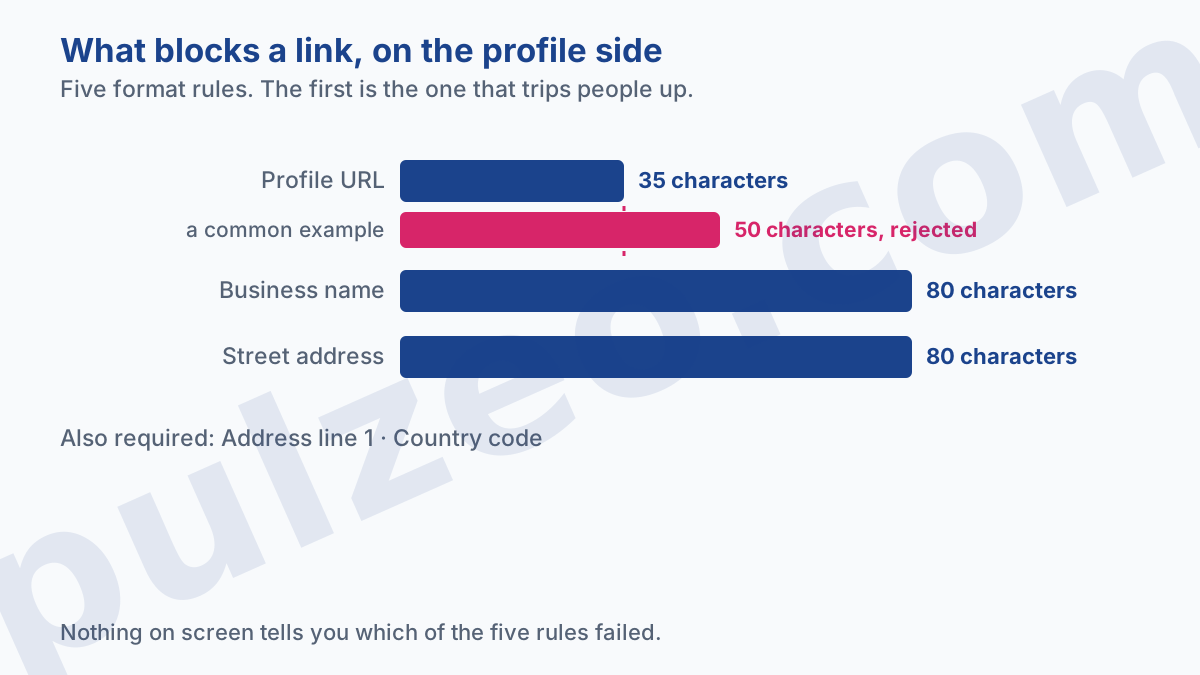
The third doesn't look like a linking problem, and that's why people spend an hour searching elsewhere. It's the format rules of the Google Business Profile itself:
- the business name can't exceed 80 characters;
- address line 1 is required;
- the street address can't exceed 80 characters;
- the country code is required;
- the URL can't exceed 35 characters.
The last one is the one that trips people up. Thirty-five characters is short: https://www.bobs-garage-la.com already takes up 30, which leaves nothing for an inner page. A profile that points to https://www.johnson-custom-cabinets.com/contact-us is out of bounds.
And nothing will tell you. The help page describes no error message, only an absence: if you can't find your locations on the Assets page of your Google Ads account, it tells you to check that the locations in your profile follow these guidelines. You look for your locations, they aren't there, and that's all you'll ever know.
Then there's the case where everything is in order and nothing shows up. Google gives a timeframe: it can take 24 to 48 hours after you link or update. Past that, the steps are to verify your locations, check your labels, or unlink and then relink the profile.
On that last point, Google spells out the exact trade-off, and it comes in two sentences you should read together. Relinking removes all the filters you've applied. But all your data, such as statistics and the associations between locations and campaigns, is preserved.
In plain terms: your history and your campaign associations survive, but your filters by name or label have to be redone. If you spent an hour sorting thirty locations, write your filters down before you unlink.
Why a location asset gets disapproved
There's a second kind of failure, and people often confuse it with the first: the link went through, but the asset never shows because it's been disapproved. Different rules, and a different place to look.
Google's advertising policies include the location asset requirements. Three grounds for disapproval come out of them, and the last one is the one that catches resellers.
First, permission. Google doesn't allow you to advertise a business location without its owner's explicit approval. Nothing surprising here: it's what stops an advertiser from hooking their ads onto someone else's address.
Next, existence. A location Google doesn't recognize, or one you've marked as closed yourself in your profile, can't be used as an asset. The classic case is premises taken over after a business closed: Maps remembers the old shop for a long time, and that memory is what Google Ads checks.
The third ground is the most useful to know, because it covers an everyday situation. Google disapproves when the location doesn't match the business running the ad, and when the product or service in the ad isn't sold or available at that location.
In practice, that means a reseller advertising a brand that the store it lists doesn't carry is out of bounds, even if the store exists and belongs to them. A chain pushing a national promotion onto stores that don't honor it is in the same boat.
For those who sell through stores they don't own, Google provides a separate type of asset, affiliate location assets, built for exactly that setup.
And to find out which of your locations is causing trouble, there's a dedicated screen few people ever go back to: Location manager, in the Tools menu, under Shared library. It gathers your stores in the Google Ads interface and shows the eligibility status of each one.
It's also where you create location groups, which let you attach only a subset of your locations to a campaign. That's essential as soon as a brand has more than a handful of stores and not every campaign applies to every store.
A change on Google Maps ends up in your ads
Here's the point almost nobody fully grasps. The help page on location assets states that any change accepted on Google Maps carries over to your linked Google Ads accounts.
Read that as a risk, not a convenience. Your summer hours entered in June and never removed are still running in September. Change your phone number without updating the profile, and your ads send prospects to a dead line. Botch the address after a move, and Maps guides people to your old premises.
None of these three situations shows up anywhere in Google Ads. You won't see an alert, a drop in Quality Score or a red flag. You'll see your cost per conversion climbing, and you'll go looking for the cause in your bids.
That's the flip side of automation: the profile becomes a data source for your campaigns, with the same freshness requirements as a product feed. The habit to adopt is simple. Whenever someone touches the profile, they tell whoever runs the campaigns, and the other way around.
Do you need a Business Profile to run location assets?
No, and it's the counterpoint to everything above. Google's help center lists three possible sources for a location asset: Google Business Profile, chain stores, and Google Maps.
That distinction covers two real-world cases. A shop owner who has never claimed their profile, but whose business still appears on Maps, can run location assets. And a reseller with no store of their own uses affiliate location assets, mentioned above.
That said, going without a profile deprives you of everything else: the reviews, the photos, the hours, the directions button, the answers to questions. For a local business, the profile does a good share of the work that advertising bills you for, at no cost. I covered this from a restaurant's point of view in the article on what a customer costs a restaurant.
Measuring store visits in Google Ads
It's the promised reward of linking, and two clarifications are in order before you go after it.
First, these conversions aren't a head count. Google explains that store visits rely on anonymous, aggregated statistics that are then extrapolated, and that Google Ads builds modeled numbers of the customers who click or view your ads and later visit your store.
Next, the conditions published in Google's help page on store visits rule out small businesses from the start:
- stores located in an eligible country, and the United States is one of them;
- locations that aren't considered sensitive;
- active location or affiliate location assets, not turned off at the campaign or ad group level;
- campaigns opted in to show them;
- enough clicks or impressions on your ads;
- enough visitors in your physical stores.
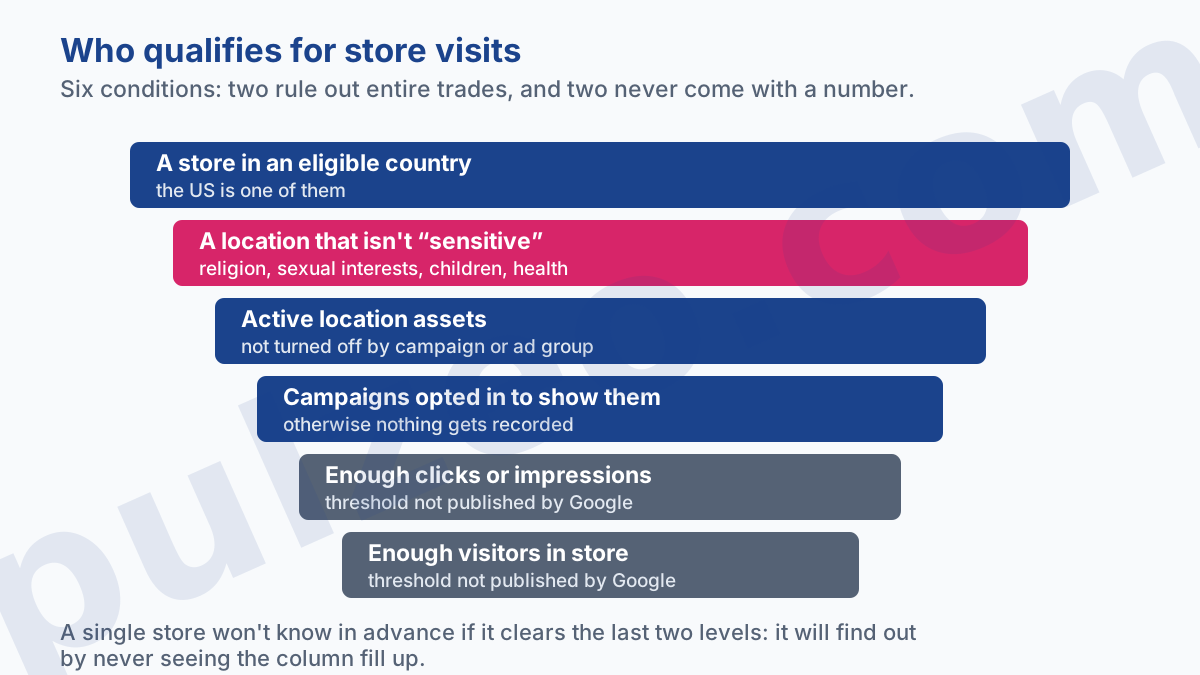
The second condition deserves a closer look, because it quietly rules out entire industries. Google classifies locations related to religion, sexual interests, children and certain health issues as sensitive. A medical practice, a daycare or a place of worship will therefore never get this measurement, whatever their foot traffic.
For the last two, Google says "enough" and leaves it there: no threshold comes with a number. It adds that the more locations you have, the more likely your account is to have enough data. So a single store won't know in advance whether it qualifies, and will find out by never seeing the column fill up.
At least there's a Diagnostics page that shows the reporting status, whether locations are linked to the account, and how many campaigns use location assets. That's where to look before concluding that the measurement doesn't work.
For everyone these thresholds leave out, the only reliable measurement is the one you set up yourself: a tracked call, a form, a booking. That's the tracking Pulzeo sets up without a developer, with its Google Tag Manager assistant.
Where to start
If you run a storefront business and advertise on Search, linking is worth the half hour it takes. Do it in this order, without skipping the first step.
Open the profile before Google Ads, and check what it really contains: the address, the current hours, the phone number that still rings, and the URL (count its characters). That's the content that will go out in your ads, and it's out of date more often than you'd think.
Then give a heads-up to whoever owns the inbox tied to the profile, and send the request from Location manager. Allow 24 to 48 hours before drawing any conclusion.
And to check where the request stands, don't start over: Google documents the exact screen. In the Campaigns menu, open Assets, go to the Associations tab, then click Location. The status shows up there, and nowhere else.
One last thing, which goes well beyond this topic: this kind of setting gets done once and never checked again. Wrong business hours, a link that dropped, an asset turned off on a campaign: nobody notices until the month's numbers come in bad. That's exactly the kind of blind spot Pulzeo monitors on your accounts, to warn you before the bill does.
Common questions
Is Google Business Profile free?
Yes. Creating it and keeping it up to date costs nothing, and it's independent of Google Ads. Linking it to your campaigns is free too: what you pay for is the clicks on your ads, exactly as before. The profile adds information to those ads; it doesn't change how you're billed.
How long before a change shows up in my ads?
Google says it can take 24 to 48 hours for changes to sync after you link your accounts or edit your business information. If nothing has changed after 48 hours, the things to try are verifying your locations, checking your labels, or relinking the profile. So hours you fix on a Friday night can still show up wrong on Saturday.
Can you link the same profile to several Google Ads accounts?
Yes. Google states that the same Business Profile can be linked to multiple accounts, even if they sit under different Google Ads manager accounts. It's the usual setup for a brand that works with an agency while keeping an account of its own: both can run location assets from the same profile.
What happens to my history if I unlink my profile?
Most of it is kept, but not all. According to Google, relinking removes all the filters you've applied, while all your data, such as statistics and the associations between locations and campaigns, is preserved. So your numbers and your campaign associations survive, but your filters by name or label have to be redone. Write them down before you unlink.
