How to use Google Ads for ecommerce

An online store getting started with Google Ads for ecommerce should almost always launch a Standard Shopping campaign first, limited to its best sellers. A small Search campaign protects the brand if people already search for it. Performance Max comes next, once the account has enough purchases to feed it, and Display or YouTube come last.
That's not the order most of the stores I take over have followed: they often launched everything in the same week, on the same budget. Here's the order I recommend, why, and the case where it flips.
Which Google Ads campaign should an online store launch first?
An online store's first campaign is a Standard Shopping campaign on around twenty products that already sell. It's the one that turns a budget into measurable sales fastest, and into lessons about the catalog.
The reason comes down to what a Shopping ad shows: the product photo, its price, the store's name. Someone who clicks has already seen what they're going to buy and how much they'll pay. That's a more qualified click than a click on a text ad, and it lands straight on the product page.
The rest follows a staircase. Each step assumes the one before it, and you only climb when the step below holds.
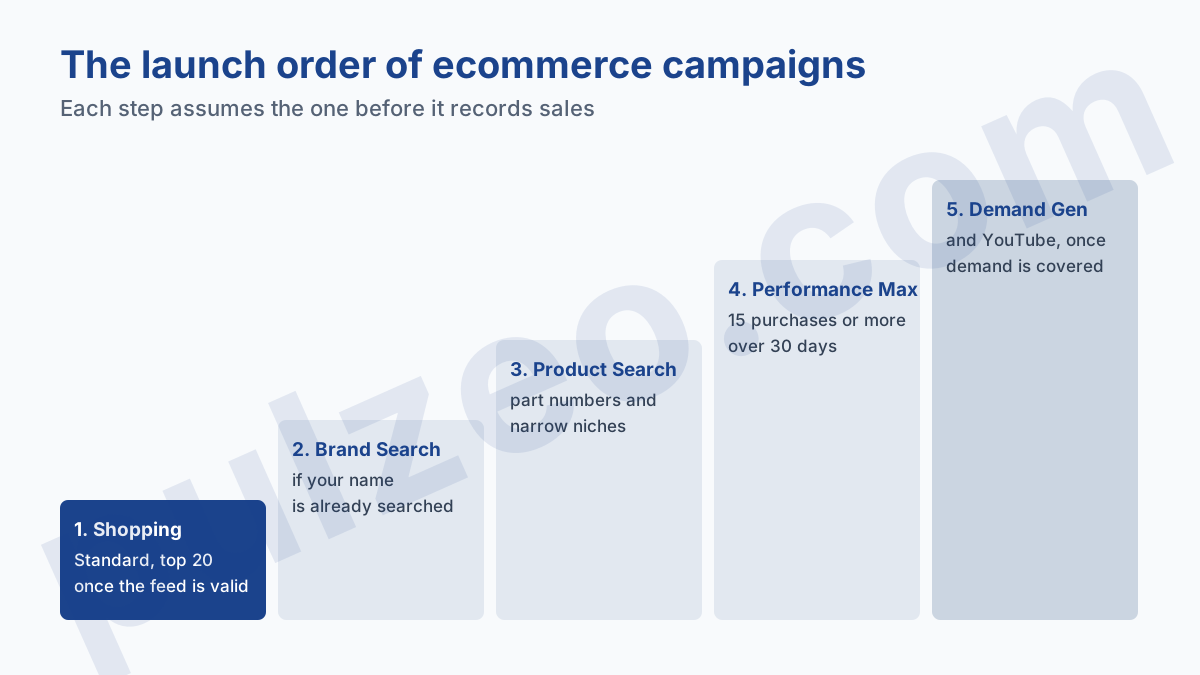
A campaign is only ready to climb a step when the one below records sales you can explain.
The classic mistake is the reverse: four campaigns opened on the same day, each with a quarter of an already tight budget. None reaches the volume you need to judge it, and a month later you still don't know what works.
What you need before the first campaign
Before creating anything in Google Ads, four things need to be in place. Skipping them costs time at the end of the month:
- a validated Merchant Center feed, with no disapproved products among your best sellers;
- purchase tracking in place, with the real value of each order sent back to Google Ads;
- the gross margin of your main products, so you know at what ROAS a sale pays off;
- a monthly budget decided in advance, that you'll hold for at least three months.
The feed first. Without it, no Shopping, and no Performance Max with your products. If you're starting from zero, the full workings are covered in how Google Merchant Center works, including the product disapprovals that block the first weeks.
Tracking next, and it's the point I always check first on an ecommerce account. Tracking that counts add-to-carts as purchases, or that sends a fixed value instead of the order amount, skews everything that follows. The full check is in the guide to misconfigured conversions.
On Shopify, setup is shorter than elsewhere. The Google & YouTube app connects Merchant Center and Google Ads, and automatically syncs every available product in the store during the first setup. Running Google Ads for Shopify stays simple, with one catch: nothing is sorted for you, so it's up to you to unpublish what shouldn't be advertised.
Why start with Shopping rather than Search?
Because on a catalog of several dozen products, Shopping does in one campaign what Search would need dozens of ad groups to do. But that's only true for a catalog, and that's where the rule has its exception.
A large catalog: Shopping first
A Search campaign needs keywords and ads written by hand. For three hundred products, that's the same work three hundred times, or a handful of ad groups that are too broad and send everyone to a category page. Shopping relies on the feed: each product's title and description act as its keywords.
That's also why feed quality decides everything else. A vague product title ("Summer dress") triggers on nothing specific. A complete title ("Women's linen maxi dress, navy, size M") catches the searches of someone who knows what they want.
A single product or a niche: Search can go first
If you sell a single product, or five very specialized ones, the order often flips. A spare part for a specific lawn mower brand, a technical accessory people search for by its part number: the search is narrow, explicit, and a well-built Search campaign catches it with a precision Shopping doesn't have.
The test is simple. Open Keyword Planner and check whether people search for your product by its name or part number. If they do, Search deserves to be the first campaign, or to start at the same time as Shopping. To read the volumes without getting caught out by the rounding, see how to read Keyword Planner volumes.
Standard Shopping or Performance Max to start
Standard Shopping, in the vast majority of cases. Performance Max optimizes from your conversions, and a new store has none: the algorithm starts blind, on a catalog nobody has sorted yet.
The full comparison between the two, with what each one lets you control, is in the article on setting up a Shopping campaign. Here I only keep what changes the launch order: the bid strategies available at the start.
In a Standard Shopping campaign, Maximize clicks doesn't require any conversions. Target ROAS and Maximize conversion value do. For Target ROAS, Google states the threshold in black and white: at least fifteen conversions in the last thirty days, counted per Merchant Center account.
So a standard campaign starts on Maximize clicks or manual CPC, with a maximum bid that caps the cost of each click. It learns which products people buy, and that's exactly what Performance Max will need to know when you launch it.
To follow those first weeks, the product-by-product detail matters more than the campaign total. Pulzeo shows that detail on Shopping campaigns as well as on Performance Max, and names the products that spend without ever selling.
Do you need a brand campaign when you're starting out?
Only if people already search for your brand. A store launched last month has nobody typing its name: a brand campaign would have nothing to catch, and that's setup time for zero clicks.
A store that's been around for two years, with returning customers, is different. Check in Search Console or Keyword Planner how many searches include your name each month. Beyond a few dozen, a small Search campaign, in exact match on the store name, costs very little and catches buyers who had already made up their minds.
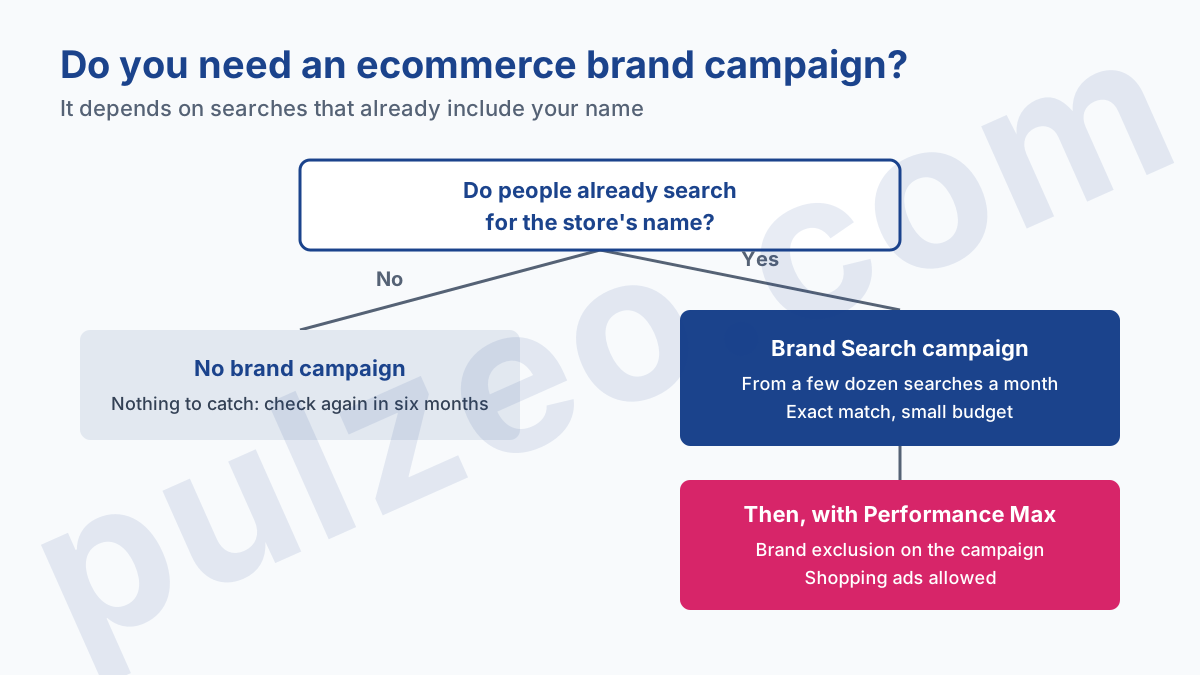
The point of this campaign isn't to sell more. It separates brand sales from the rest, and that becomes essential the day Performance Max enters the account. A Performance Max left on its own readily captures searches for your name, the easiest sales in the account, and then shows a flattering ROAS that owes it almost nothing.
Two settings prevent that mix. Google writes it in its Performance Max help: Search campaigns containing an exact match keyword are prioritized when the query matches that keyword. And Performance Max accepts brand exclusions, which apply to Search, Shopping and YouTube inventory.
The same page contains a box worth knowing, "Allow Shopping ads on searches that mention excluded brands". Checked, it keeps your product listings visible on searches for your name, while taking those queries out of the rest of the campaign.
When to move to Performance Max?
When the Standard Shopping campaign records at least fifteen purchases a month, regularly, for two or three months. That's the threshold Google sets for Target ROAS. In my experience, it's also the point where Performance Max has enough examples not to guess at random.
That threshold translates into budget, and that's where many stores get it wrong. Take two fictional stores, same catalog, same $60 average order, same 1.5% conversion rate, and clicks at $0.50 on average.
The first spends $300 a month. That's 600 clicks, so 9 orders. It's below the threshold, and will stay there as long as the budget doesn't move: Performance Max has nothing to do there, and the standard campaign on Maximize clicks is the right answer.
The second spends $1,500 a month. That's 3,000 clicks, so 45 orders and $2,700 in revenue. It clears the threshold in the first month. But its 180% ROAS doesn't yet say whether it makes money: with a 40% gross margin, each ad dollar brings back 72 cents of margin, and the campaign loses money.
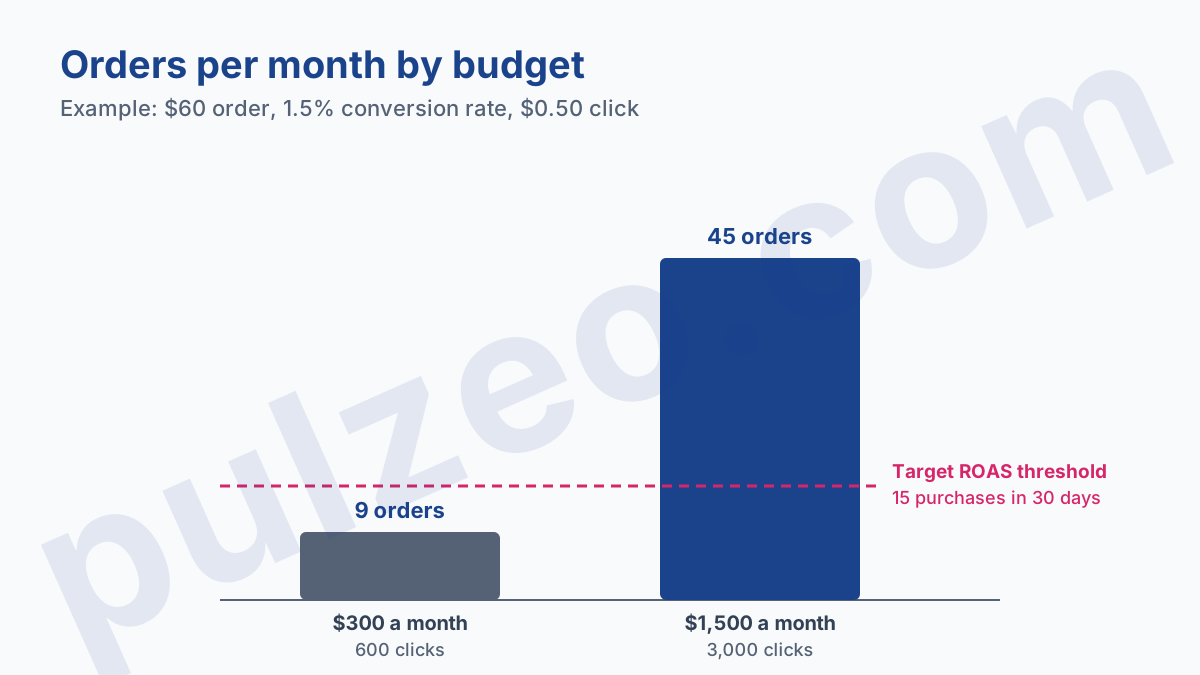
That's why margin is on the list of prerequisites.
Moving to Performance Max on a campaign that loses money means asking the algorithm to lose money more efficiently.
Fix what's wrong first: the feed, the unprofitable products, the irrelevant queries. How to calculate the minimum budget from your cost per sale is covered in the Google Ads budget threshold.
When you launch Performance Max, keep the standard campaign on your best sellers at first, rather than switching everything over at once. You keep a point of comparison, and a safety net if the new campaign gets off to a bad start.
Campaigns to keep for later
Some campaigns have no place in a store's first three months. They serve another moment:
- Demand Gen, which serves on YouTube, Discover and Gmail among others, to people who aren't searching for anything;
- YouTube video campaigns, which need creative few stores have at the start;
- classic Display, whose clicks are cheap but rarely convert into a direct purchase.
All three create demand instead of capturing it. A store that's starting has better things to do: serve the people already searching for what it sells first. They make sense later, once searches are covered and growth depends on new audiences. For that moment, see what a Demand Gen campaign is used for.
Remarketing deserves a separate note. It often gets launched first because it shows nice numbers, but it only reaches visitors who've already been to the site. Without a campaign to bring in new ones, the list stays tiny. And a Performance Max, when the time comes, will also reach those returning visitors.
The first month of an ecommerce Google Ads campaign
The first month is for learning, not for winning. A Standard Shopping campaign on twenty products, on Maximize clicks with a maximum bid, and two checks a week: search terms, and products.
Search terms first. That's where the budget that sells nothing goes: a candle store finding out it's paying for clicks on "number birthday candles" when it doesn't sell any. Each irrelevant query gets cut as a negative keyword, and the search terms report tells you which ones, even if it hides some of them.
Products next. After three or four weeks, three groups take shape: the ones that sell, the ones that spend without selling, and the ones that have barely served. The first keep the budget, the second leave the campaign, the third wait.
These are two repetitive checks, easy to put off when stock and orders come first. Pulzeo sorts the search terms and adds the negative keywords you've approved in Google Ads.
When those two checks stop finding much, and purchases pass fifteen a month, you're ready for the next step. Not before.
Common questions
Should an online store start with Performance Max?
Rarely. Performance Max optimizes from your conversions, and a store that's just starting doesn't have any yet. Start with a Standard Shopping campaign on your best sellers, then move to Performance Max once the account regularly records at least fifteen purchases over thirty days.
How many products should go into the first Shopping campaign?
Not the whole catalog. Around twenty products that already sell on the site is enough to start: the budget concentrates on them instead of spreading across three hundred items, and you read the results product by product. The rest of the catalog comes in once the first numbers are readable.
Can you run Google Ads for ecommerce without Merchant Center?
You can run a Search campaign without Merchant Center, but neither Shopping nor Performance Max with your products. For a store, a validated Merchant Center feed is the real starting point, before any campaign.
Does Google Ads work for a Shopify store?
Yes, and setup is simpler there than elsewhere: Shopify's Google & YouTube app syncs your products with Merchant Center and connects the Google Ads account. It sends all available products by default, so it's up to you to remove what shouldn't be advertised.