Which Google Ads campaign types should you use?

For most businesses, the right Google Ads campaign type to start with is a Search campaign: it serves people who are already looking for what you sell, and you keep control over every keyword. An online store with a large catalog goes with Shopping instead. Performance Max, Demand Gen and video come later, once the account has reliable conversions and existing demand is covered.
That's the short answer. The long one comes down to two questions I ask before I open the creation screen: are your customers already searching for your offer on Google, and what do you have in hand today (tracked conversions, a product feed, videos)?
It's the mistake I see most often on the accounts I take over: the type was picked because the screen offered it first, and nobody checked that it served the goal.
What are the Google Ads campaign types?
Google currently offers seven Google Ads campaign types, each with its own placements and its own way of targeting. Its help page on choosing a type covers six of them in detail. Demand Gen and Smart campaigns have their own documentation.
- Search: text ads in Google results, triggered by the keywords you choose.
- Performance Max: a single campaign that runs across all of Google's placements, from search to YouTube, driven by your conversion goals.
- Shopping: product listings with a photo and price, powered by a Merchant Center feed.
- Demand Gen: image and video ads on YouTube, Discover, Gmail and the Google Display Network, shown to people who aren't searching for anything.
- Display: banners on Google's partner sites and apps, currently being migrated to Demand Gen.
- Video: YouTube ads for reach, views or an ad sequence.
- App: campaigns to drive installs, engagement or pre-registrations for a mobile app.
Add to that the Smart campaign, which Google mainly offers in its stripped-down Smart Mode. It asks for few settings and so leaves you few: it runs on keyword themes, from which Google generates the keywords itself. For a business that wants to understand where its budget goes, I'd steer clear of it from day one.
One detail that saves you a false start: the list you see depends on the objective chosen at the previous step. Performance Max, for example, only shows up if you picked a sales, leads or store visits objective. If a type is missing from the screen, go back one step.
Capture demand or create it
The question that settles things fastest is this one: are your future customers already typing a search that matches your offer? If so, you're capturing demand that exists. If not, you have to create it, which costs more and is harder to measure.
A plumber is the perfect example. Someone whose water heater is leaking types "plumber" followed by their city, with a credit card within reach. Search catches them at the exact moment they need you. Showing a video of the same plumber to someone with no leak does almost nothing.
A brand launching a product nobody knows is in the opposite position. Nobody types its name, and the generic searches for the category are few or very expensive. That's where Demand Gen and video have a role: putting the offer in front of an audience that looks like its buyers.
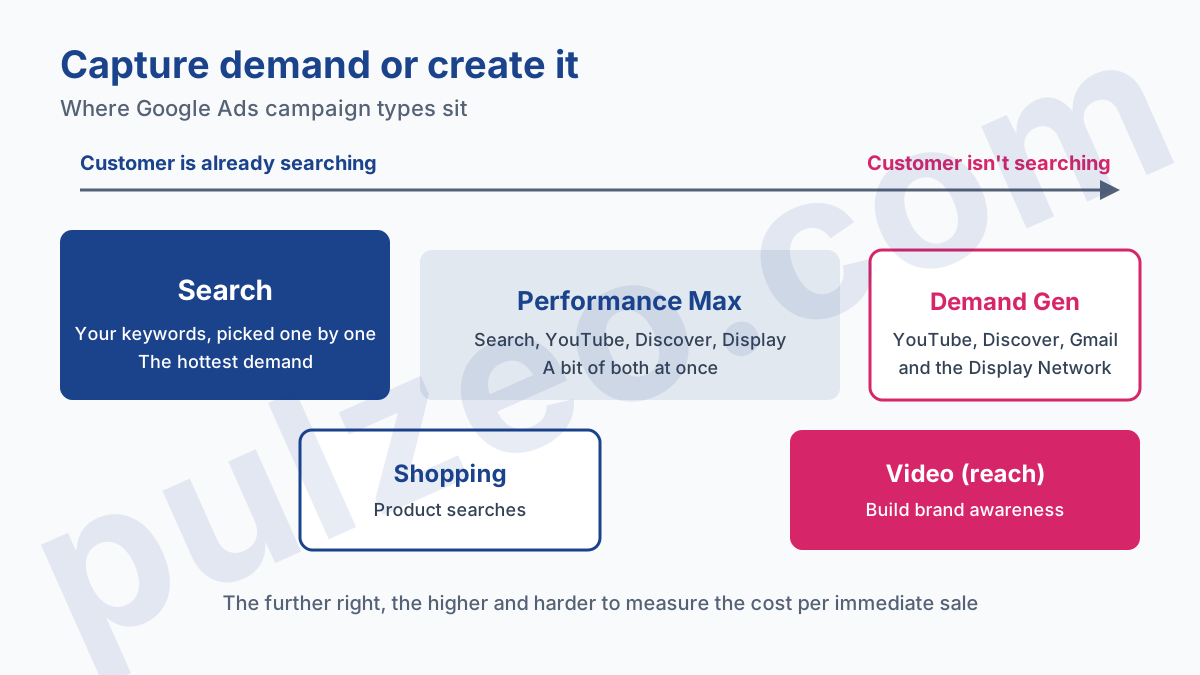
Between the two, Shopping and Performance Max do a bit of both. Shopping captures product searches, and Performance Max mixes search with YouTube, Discover and Display, which is why its numbers are hard to read if you judge it like a Search campaign.
As long as existing demand isn't covered, every dollar put into a campaign that creates demand is a dollar taken away from people ready to buy.
Which campaign type to choose for your goal
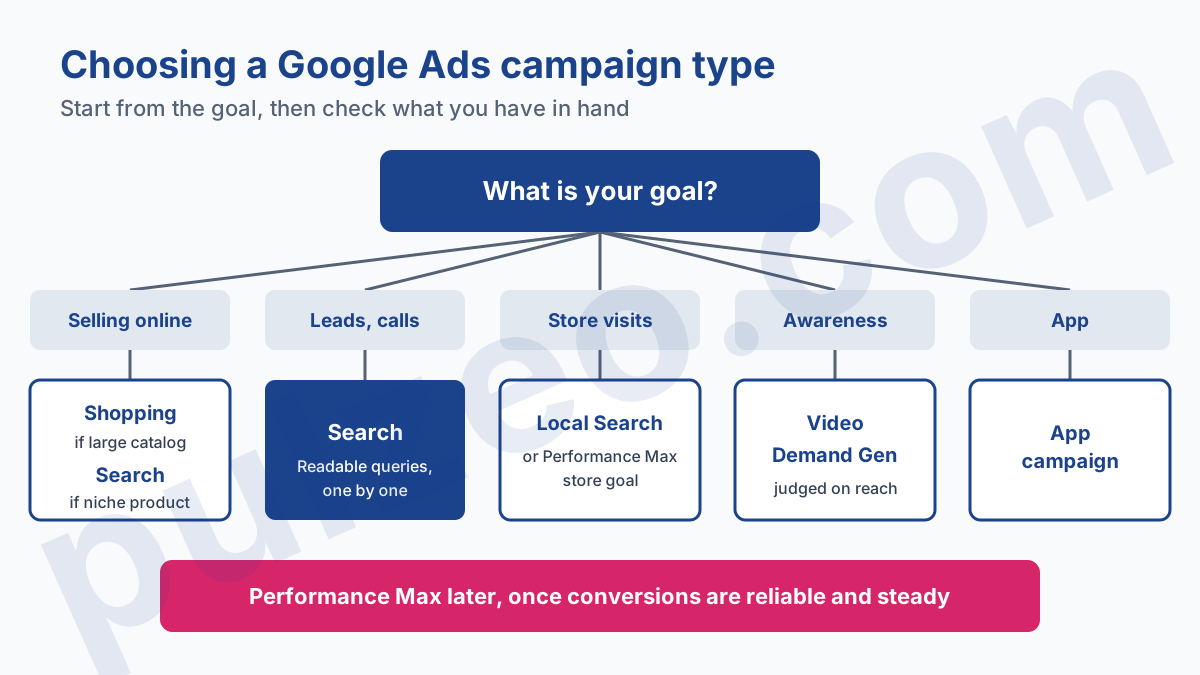
The goal decides the type far more than the size of the budget does. Here's the mapping I use, with its exceptions.
Selling online
With a catalog of several dozen products, Shopping comes first: the ad shows the photo and the price before the click, which filters out the merely curious. With a single product or a niche that people describe in words rather than by a product name, Search can come first. I covered this launch order in the article on the first ecommerce campaign, so I won't repeat it here.
Getting leads or calls
This is the natural ground for a Search campaign. A contractor, a professional firm, a service company: their customers spell out what they need, and every query can be read in the search terms report. For a local business, the campaign comes with tight location targeting plus call and location extensions. The local Google Ads guide goes into those settings.
A trap specific to leads: a completed form isn't a customer. If you later aim for Performance Max, it will optimize whatever you count, including forms filled out by people who never pick up the phone. Better to measure lead quality properly before handing it the bidding.
Driving store visits
Performance Max is available with a store visits objective. For a single store with a small budget, a local Search campaign stays easier to read: you know which searches brought in the clicks.
Building brand or product awareness
Video reach campaigns and Demand Gen are built for this. They're judged on reach, recall and the rise in searches for your name, rarely on cost per immediate sale. If the brand is already known, add a Search campaign on your name so competitors can't take that spot.
Promoting an app
App campaigns are the only type designed for this, with three variants: installs, engagement from existing users and pre-registration before launch. They only make sense if the app is published and its installs are tracked.
What each type needs before launch
A campaign type doesn't run on empty. Each one assumes a prerequisite, and launching without it costs weeks of budget for unusable data.
- Search: a well-thought-out keyword list, a landing page that answers the search, a tracked conversion.
- Shopping: an approved Merchant Center account and a product feed without mass disapprovals.
- Performance Max: reliable conversion tracking, a steady volume of conversions, text, images and ideally a video.
- Demand Gen and video: image and video creatives in the right formats, plus audiences or customer lists to steer delivery.
- App: the app published in the stores and tracking for installs or in-app actions.
The prerequisite most often forgotten is conversion tracking. Every type that relies on automated bidding depends on it, and a miscounted conversion sends the algorithm in the wrong direction.
For Performance Max, my rule of thumb is not to launch it before the account has about fifteen conversions over thirty days, otherwise it gropes around for weeks.
Performance Max or a Search campaign to start?
Start with a Search campaign, barring a special case. It's the opinion I argue most often with accounts that start with a Performance Max campaign because the creation screen puts it front and center.
The reason is control. On Search, you choose your keywords and their match types, you read every query and you exclude the ones that waste money. Performance Max decides placements and queries from your signals. It can work very well, but it learns from your conversions, and a new account gives it nothing to learn from.
The other reason is reading the results. A Performance Max showing a good cost per conversion may actually be capturing mostly searches for your brand, people who would have found you anyway. Without a Search campaign alongside to compare, there's no way to see it. I wrote a whole article on how to run a Performance Max campaign and read its channel reports.
There are exceptions. An ecommerce site that already has a sales history, a good feed and visuals can start Performance Max earlier. And an advertiser with neither the time nor the desire to manage keywords will find it useful, accepting that they'll know less about what's going on.
Display and Video action campaigns: the types on their way out
Two formats are changing right now, and it's better to know before you build on them.
Video action campaigns, the ones that went after conversions on YouTube, no longer exist. Google removed the option to create them in April 2025 and converted the last ones to Demand Gen in spring 2026, according to its page on the end of Video action campaigns. What's left under the "video" label targets reach and views, not sales.
Display is going the same way. Since June 2026, Google has been rolling out a tool to migrate Display campaigns to Demand Gen, and says that new Display campaigns will eventually only be created within Demand Gen, then that the remaining ones will be migrated without any action on your part. Google's page doesn't give a date for either step yet.
If you're torn between Display and Demand Gen for a new campaign, the choice is quick: a Demand Gen campaign saves you a migration a few months down the line. How it works and where it trips people up is covered in the article on Demand Gen.
How many campaign types in one account?
Two or three, rarely more, for an account spending less than a few thousand dollars a month. Each type you add shares the same budget, and each campaign needs enough clicks and conversions for its numbers to mean something.
The order you add them in matters as much as the number. I build an account like a house, from the foundations up: first the campaign that captures the hottest demand, then the one that widens reach, and only at the end the one that creates demand.
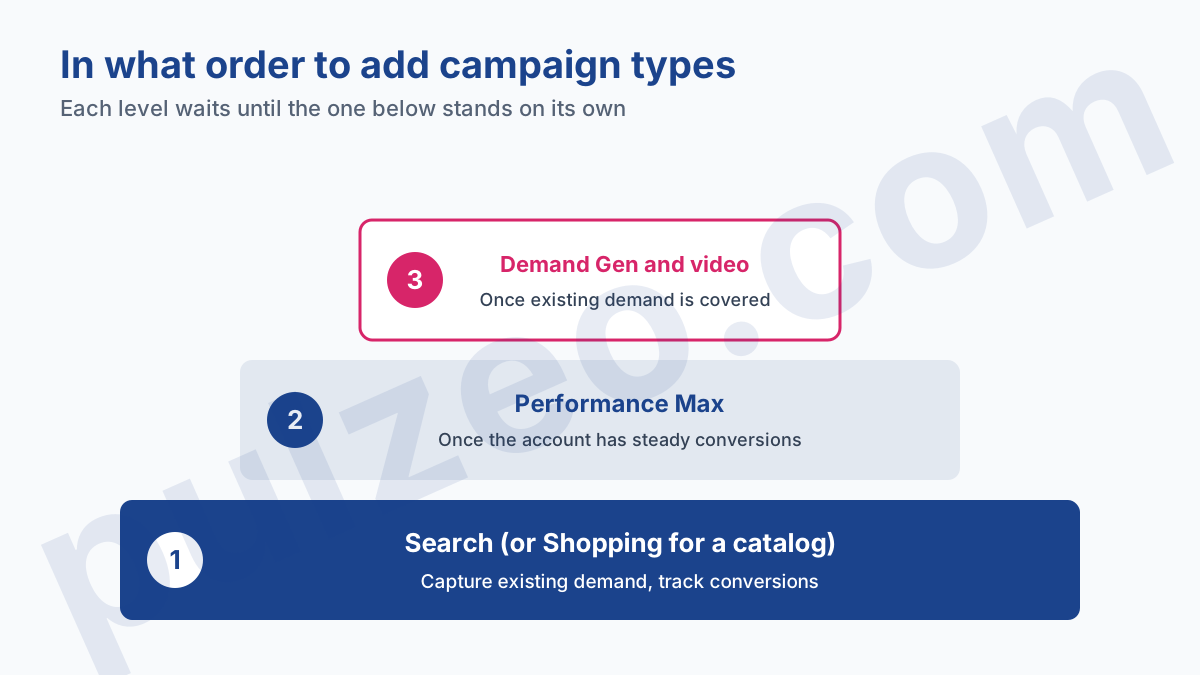
Take a worked example for a service company at $1,500 a month. It starts with a single Search campaign at $1,500. Three months later, with about forty conversions a month and well-cleaned queries, it moves $400 to a Performance Max. Search keeps $1,100, and comparing the two shows whether Performance Max brings new customers or recycles the same ones.
What to avoid is the reverse: five types launched in the same month with $300 each. No campaign has enough data to get out of learning, and you end up judging formats on three weeks of noise. In Pulzeo, reports break down spend and conversions by campaign type, which shows at a glance which type spends without paying back.
The type is chosen once
One last point, and it changes how you decide: a campaign type can't be changed after it's created. Google's documentation says so plainly.
You cannot change your campaign to a new campaign type once it's been created.
So a wrong type means starting over, with a new campaign that has no history. Hence the value of taking ten minutes to answer the two opening questions before you click. The guide to creating a first campaign then walks through the steps one by one.
Once campaigns are live, each type is tuned in its own way: you don't optimize a Performance Max with the levers of a Search campaign. That's why Pulzeo's action plan gives, for every recommendation, the steps to follow in Google Ads, adapted to the type of the campaign analyzed.
Common questions
What's the best Google Ads campaign type for beginners?
For most businesses, a Search campaign. It reaches people who are already looking for what you sell, you pick your keywords one by one and you can read every query. An online store with a large catalog is the exception: it often starts with Shopping.
Can you change a Google Ads campaign type after it's created?
No. Google's documentation is clear: the type is locked at creation. To go from a Search campaign to Shopping, you have to create a new campaign of the right type. The objective of a Performance Max or Demand Gen campaign is locked too.
Should you launch a Performance Max campaign from day one?
Rarely. Performance Max optimizes from your conversions, and a new account doesn't have any yet. It also shows less of your search queries than a Search campaign does. Launch it once conversion tracking is reliable and the account records conversions on a regular basis.
Do Display campaigns still exist?
Yes, but Google is moving them to Demand Gen. A migration tool has been rolling out since June 2026, and Google says new Display campaigns will eventually only be created within Demand Gen, with no exact date so far.