Why was my Google Ads account suspended and how do I fix it

A Google Ads account suspended by Google almost always gets unblocked the same way: read the reason first, fix what it points to, and only then appeal. The reason appears in the notification at the top of the account and in the email Google sends, which lists the policies involved.
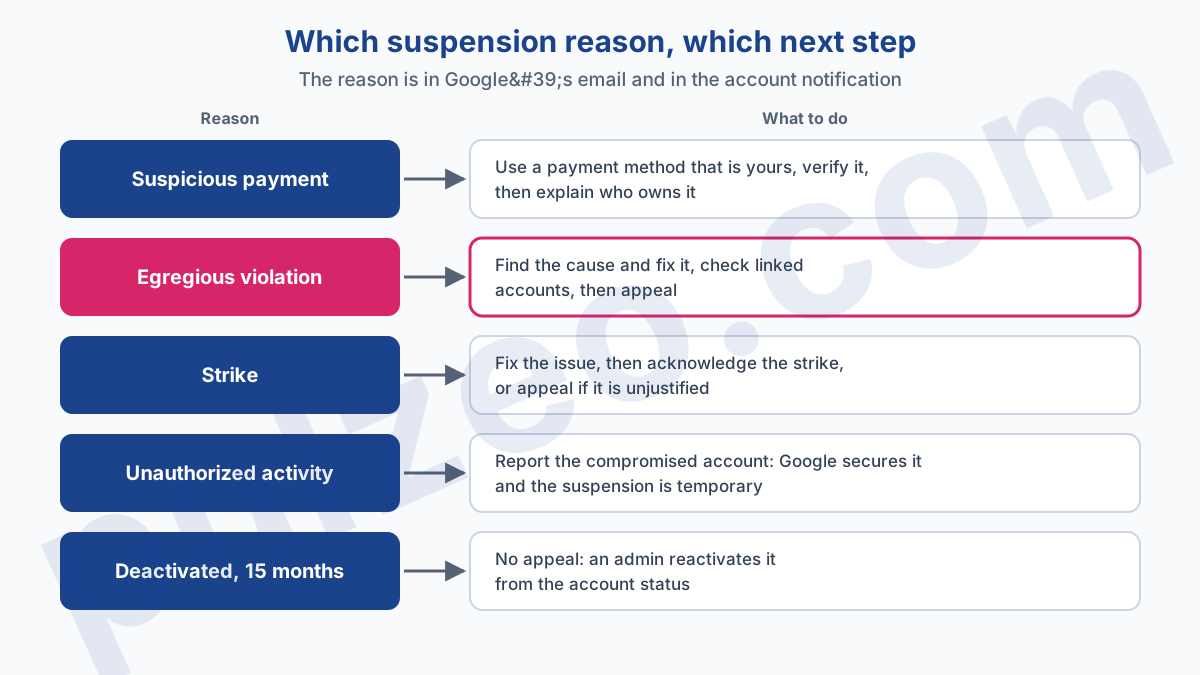
Suspicious payment, egregious policy violation, third strike, unauthorized activity: each one has its own way out, and they look nothing alike.
The usual reflex is the opposite. You find the red banner one morning, write to Google right away, try again the next day, and sometimes open a second account "in the meantime". Three moves that make the case worse. Here is how to tell what is really happening to you and what to do, case by case.
Google Ads account on hold, suspended or deactivated: what's the difference?
These three words describe different situations, and an account you believe is "suspended" is not always suspended. Before doing anything, identify the exact state of the account, because the next step follows from it.
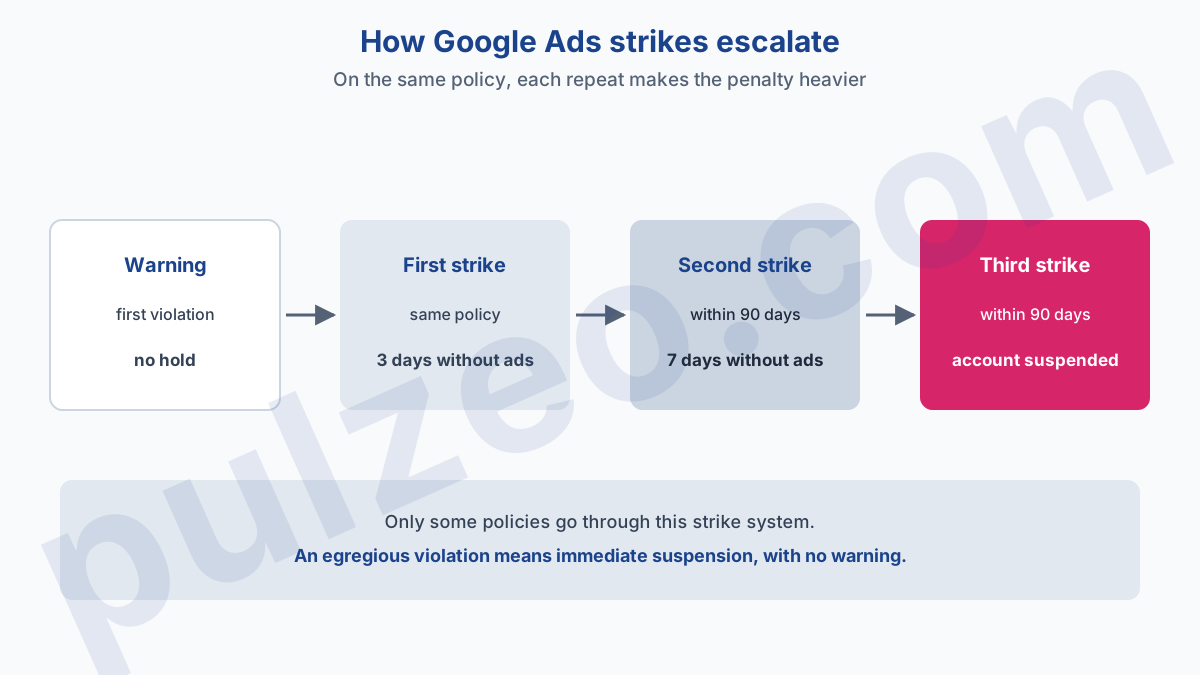
A temporary hold is not a suspension. It enforces a strike under the repeat violations system: three days for the first, seven days for the second. Ads stop serving, but the account and its reports remain accessible, and ads serve again once the strike is acknowledged and the issue fixed.
A suspension stops serving for good. Google's Help Center describes it as permanent unless the advertiser appeals. The account becomes read-only, and it is the only one of the three states where an appeal is the normal way out.
A deactivated account, finally, comes down to inactivity. Google automatically deactivates any account with no spend for more than 15 months. An admin can reactivate it, and Google may then ask for payment or document verification.
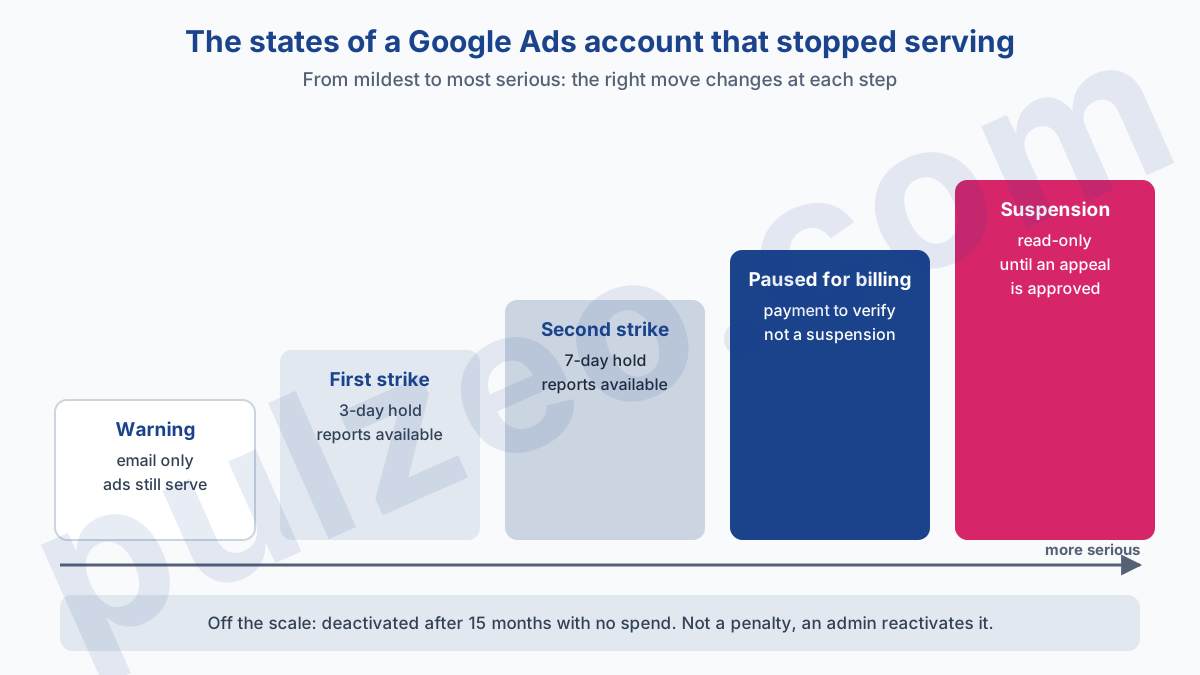
Two other states blur the picture further. A billing problem can first pause the account while the payment method is verified, with no suspension.
Unauthorized activity, for its part, triggers a temporary suspension, put in place by Google to prevent any fraudulent charge. In that case, the way out is the compromised account form referenced in the Help Center: Google secures the account and gets back to you with preventive measures. For the Google account itself, the steps are in the article on how to get back into a Google Ads account.
The billing pause is the quieter of the two: nothing flags it at campaign level, and the payment notice at the top of the account is where to look for it. Pulzeo catches it by its symptom, alerting when an account with active campaigns shows no impressions at all for five days.
Why was my Google Ads account suspended?
The answer is in writing, you just have to read it. The suspension email lists every policy violated and contains the link to appeal. If you can no longer find it, the notification at the top of the account repeats the reason.
Google's Help Center page on suspensions separates several cases, three of which concern nearly every advertiser. Egregious violations lead to immediate suspension, with no warning. Repeat violations go through the strike system, with at least seven days' notice before suspension.
Billing and payment problems follow their own procedure. That leaves unauthorized activity, covered above, and two separate cases: the minimum age for a Google account and the Ad Grants policy for nonprofits.
Egregious violations are the ones that surprise people most, because they land without warning. Google lists ten, and here are the ones I come across on ordinary business accounts:
- Circumventing systems;
- Unacceptable business practices;
- Coordinated deceptive practices;
- Counterfeit goods;
- Malicious software.
The other items on the list (prescription opioid painkillers, unauthorized pharmacies, trade sanctions violations, sexually explicit content, child sexual abuse and exploitation) concern activities an ordinary advertiser never comes near.
Google Ads account suspended for suspicious payment activity
It is the easiest reason to clear when nothing is actually fraudulent. Google suspends an account or limits its spend when it detects suspicious payment activity: a card that does not seem to belong to the advertiser, several new cards used at once, declined payments, a chargeback requested from the bank.
The way out comes down to two words: prove and explain. Use a payment method that belongs to you or that you are authorized to use, and complete advertiser verification and payment information verification if Google asks for it. In the appeal, Google expects you to state who owns the payment method on the account, and to explain every declined payment or chargeback.
A common case: a business owner who pays with a partner's personal card, or an agency that puts its own card on a client's account. Nothing fraudulent, but from Google's point of view, the cardholder and the advertiser do not match.
Google may ask you to verify the payment method within 30 days, through a small temporary charge or by sending documents. Only an admin on the account can do this. I detailed the list of documents requested and the path to the form in the article on how to contact Google Ads support.
Circumventing systems: what to fix before you appeal
Circumventing systems is the most feared suspension, and it deserves its reputation. Google defines it as any practice or attempt to circumvent or interfere with its advertising processes and systems. The policy on abusing the ad network leaves no room:
The suspension happens as soon as the issue is detected, with no prior warning.
An appeal remains possible, but it is useless while the cause is still in place. Google only reinstates an account if it is convinced the appeal is valid, and an appeal saying "I did nothing" on an unchanged account has no chance of convincing anyone. The work happens before you write, on two fronts.
What Google sees on your site and your ads
Start from what a visitor gets after the click. Is the page they land on really the one the ad promises? I first check that the visitor actually reaches the final URL declared in the ad, that no redirect added later sends them elsewhere, and that no page displays differently depending on the visitor. Those are the situations where Google can believe something is being hidden from it.
The information you give Google matters too. The page on advertiser verification counts submitting false information among the cases of circumventing systems. An approximate business name or a document that does not match the account can therefore be enough.
Linked accounts, the agency trap
The second front is less visible. The Help Center warns that accounts linked to the suspended account may be suspended too. Same payment method, same email address, same manager account: one suspended account can drag others down, and an old, forgotten, suspended account can block a perfectly clean new one.
For an agency, the consequence is concrete. A suspended client in your manager account may have linked accounts among the ones you manage, and Google strongly recommends restoring all suspended accounts before creating new ones. Take stock of everything connected to the account in question before you send the appeal.
Unacceptable business practices: the reason that targets the business
This reason is not about an ad, it is about what you sell and how you present yourself. The policy on unacceptable business practices prohibits concealing or misrepresenting information about the business, its products or its services in order to deceive users. It too is treated as egregious.
The examples Google gives are telling: claiming to be endorsed by a brand or a government body without being so, offering a service you cannot provide for lack of a license or qualification, impersonating another business. On a service provider's site, I always start by checking partner logos, accreditation claims and the About page: they are what makes or breaks trust.
How long does a Google Ads account suspension last?
A suspension has no set length: it lasts until an appeal is approved. Google publishes no response time, but it gives at least six months from the suspension to appeal. Nothing is so urgent that you should send a rushed appeal the same day.
The strike system, on the other hand, runs on a precise schedule. A first violation only brings a warning by email, with no hold. Breaking the same policy again earns a first strike, then a second if the repeat falls within 90 days, and a third within the following 90 days leads to suspension.
Meanwhile, the suspended account remains viewable in read-only mode, and Google's Help Center lists what is still possible:
- view the account and download reports;
- make a payment and download tax documents;
- cancel the account and request a refund;
- appeal and complete advertiser verification;
- update security settings.
Download your reports without waiting. The Help Center warns that a suspended account may become inaccessible after a long period, without saying how long.
Should you create a new Google Ads account after a suspension?
No, and it is probably the most important advice in this article. The strike acknowledgment form says so plainly:
Creating additional accounts and/or trying to circumvent enforcement actions is strictly prohibited, at the risk of account suspension.
The Help Center page on suspensions adds that any other account the advertiser tries to create may also be suspended. A new account opened with the same payment method, the same business or the same website inherits the case, and adds along the way a behavior that looks like what Google calls circumventing.
The only sensible route is therefore the appeal, from the Contact us link in the notification, one at a time. The Help Center states that if appeals are deemed abusive, Google pauses processing of certain appeals for seven days. One well-argued appeal beats five identical ones.
Spotting a suspension before your clients do
A suspension often costs more through the time it takes to be noticed than through the difficulty of lifting it. The worst scenario is a suspension discovered a week later, by a client who no longer sees their ads. On an account you open once a week, a week without ads goes unnoticed.
The basic safeguard needs no tool. The suspension email is only useful if someone reads it: make sure Google Ads emails reach an inbox that someone actually checks, not a former employee's or a departed contractor's. And open each account at least once a week to read the banner at the top of the screen, which is where Google displays its notification.
If you manage an account that was suspended in the past, or several client accounts, Pulzeo reads the status of each Google Ads account at every sync and sends a critical alert, by email and on the dashboard, as soon as Google reports it as suspended. The page on Pulzeo alerts describes the other signals they watch.
The appeal remains your job: no tool writes it for you, and that is just as well. But an appeal prepared on day one, with the reason read, the cause fixed and linked accounts checked, stands a much better chance than one written in a hurry.
Common questions
How long does Google take to answer a suspension appeal?
Google publishes no response time for reviewing a suspension appeal. While the review is ongoing, the account shows that your appeal is under review. What the Help Center does specify is the window to appeal: at least six months from the date of suspension, and one appeal at a time.
Can you recover a Google Ads account suspended for circumventing systems?
Yes, through an appeal, but it is the hardest case. Circumventing systems is one of the violations Google treats as egregious: the suspension lands as soon as it is detected, with no warning. Google only reinstates the account if it is convinced the appeal is valid, so an appeal only stands a chance once the cause has been found and fixed.
My Google Ads account is on hold for three days, is that a suspension?
No. A three-day hold matches the first strike of the repeat violations system, and a seven-day hold the second. The account stays accessible with its reports, and ads serve again once the strike is acknowledged and the issue fixed. It is the third strike, on the same policy and within 90 days, that leads to suspension.
What happens to the money in a suspended Google Ads account?
A suspended account becomes read-only, but a few actions remain possible. According to Google's Help Center, you can in particular cancel the account and request refunds, make a payment, and download your tax documents and your reports.