How to contact Google Ads support by phone

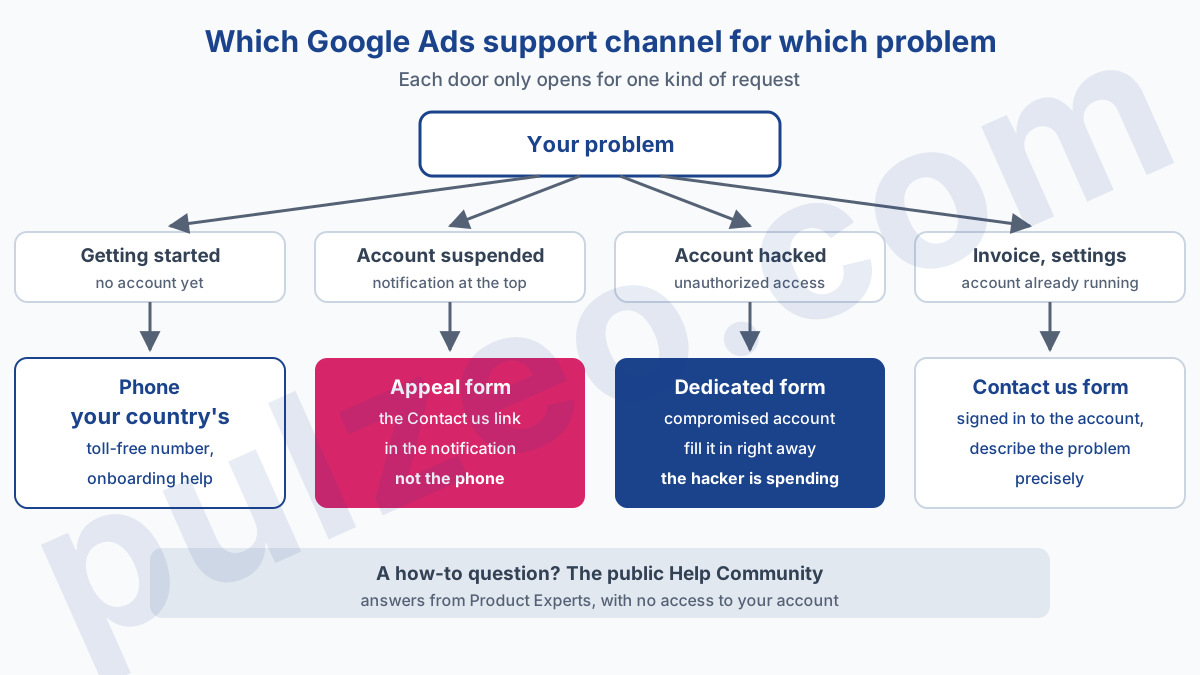
To contact Google Ads support, there are five doors, and each one only opens for one kind of problem. A toll-free number in your country for advertisers who are starting out, a Contact us form that requires you to sign in, an appeal form reserved for suspended accounts, a dedicated form for hacked accounts, and a public Help Community. Knock on the wrong one and you'll be told, politely, to try elsewhere.
I often get the same question from advertisers who spent a morning on the phone: "Why can't anyone at Google help me?" Almost always, someone could have. They had simply picked the channel built for a different problem. Here is how to find the right one on the first try, and what to have at hand before you call.
Contact Google Ads by phone: which number to call?
The numbers are published on Google's help page "Get free, personalized help from a Google Ads Expert", one per country: 1877 509 4295 in the United States, 0800 026 1703 in the United Kingdom, 1800 929 8932 in Canada, 1800 574 174 in Australia. Google presents them as toll-free, with support in your language. These are the Help Center's numbers to contact Google Ads by phone.
This line has a specific audience, and that's where most calls go nowhere. The page addresses it to people who "don't have an account yet" or are brand new, and lists what the Expert can do: evaluate your site, choose your ad types and conversion goals, set up your first campaigns with their budget and bids. It is an onboarding line.
It isn't presented as a troubleshooting line for an account that has been running for three years. If your problem is a disputed invoice or a disapproved ad, expect, in my experience, to be sent back to the online form. The page publishes neither opening hours nor spending conditions, which leaves little room to insist.
Google publishes a second kind of number, on another of its sites: the Google Ads sales team, 1-844-245-2553 in the United States, shown by the appointment page when no slot is free, "Monday–Friday, 9AM–9PM ET". It's a sales line, for launching or growing campaigns, not a troubleshooting service.
A word about the other numbers floating around online. Directories and third-party sites show different numbers for Google Ads customer service. None of them appears on Google's pages as I write this. If a number is on neither support.google.com nor business.google.com, nothing proves Google will pick up, or what the call will cost you.
Contact Google Ads support by email or chat
The Help Center gives no email address. The written entry point for support is the Contact us form, where Google asks you to describe your problem so it can route you. It requires you to sign in with the Google account that manages the ad account.
After that, everything depends on what you write. Google publishes no grid saying which problem gets access to which channel, or at what time: the rest of the path only shows up once you're signed in. In my experience, a vague description leads back to a generic article, and a precise one saves you a step.
For unauthorized access to your account, don't wait on the general form: Google keeps a dedicated one, the compromised account form. This is the case where every hour counts, because a hacker can spend with your payment method.
That leaves the question support doesn't handle well, and it's often the real one: "why did my cost per lead jump this week?" If your account is in English, Google's built-in assistant, Ask Advisor, can take that kind of question inside the interface. Zeo, the assistant in Pulzeo, answers it too, after reading your campaigns, your search terms and the account's change history.
Google Ads account suspended: how to appeal
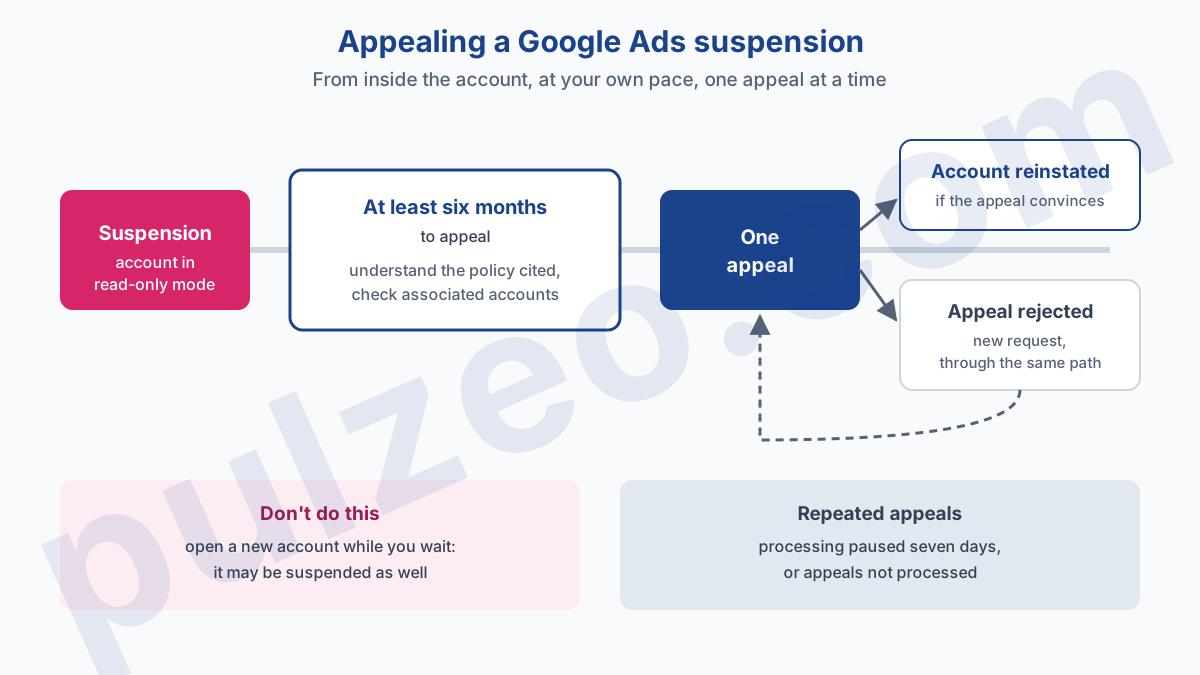
Google's Help Center describes a single path to contest a suspension, and it starts from inside the account. The help page on suspensions describes the path: the Contact us link in the notification at the top of the screen opens the appeal form, on the right. Meanwhile the account stays viewable in read-only mode.
Before you write that appeal, make sure you know what is actually happening: a three-day hold, a billing pause and a suspension are not handled the same way. I explain how to read the reason and what to fix in the article why was my Google Ads account suspended and how do I fix it.
Suspension for policy violations
Google gives at least six months from the suspension date to appeal. Nothing is so urgent that you should rush it, and that's the first piece of advice I give: take a day to understand the policy cited before writing a single line. The help page warns that accounts are only reinstated when Google is convinced the appeal is justified.
One appeal at a time. Google may stop processing repeated appeals for the same suspension.
Firing off appeal after appeal is the classic mistake of a panicked advertiser, and it backfires: the help page mentions pausing the processing of some appeals for seven days in case of abuse. Second mistake, opening a new account while you wait. Google writes that any other account the advertiser tries to create may also be suspended. Before sending the appeal, check that associated accounts, even old ones, comply with the policies.
Some advertisers must first complete identity verification, and the rule is blunt: after three failed verification attempts, no more appeals. If the appeal is rejected, a new request can be sent, through the same path.
Billing or payment suspension
A billing suspension follows its own logic. The dedicated help page lists the reasons: unpaid balance, payment activity deemed suspicious, a chargeback requested from your bank, misuse of promotional codes. Google may then ask you to verify your payment method within 30 days.
Verification goes through a six-digit code read on a small temporary charge, refunded afterwards, or through documents. The list requested can go far:
- your legal name and the name on the payments profile;
- your address and a proof of address;
- your date of birth and an ID document;
- an image of the payment method used.
Only the account's admins can carry this out, from the account's Admin section. If you manage a client's account with standard access, an account admin will have to handle it. For invoices and payments outside a suspension, I've detailed how it works in the article on Google Ads billing.
Google Ads customer ID: what to have before you call
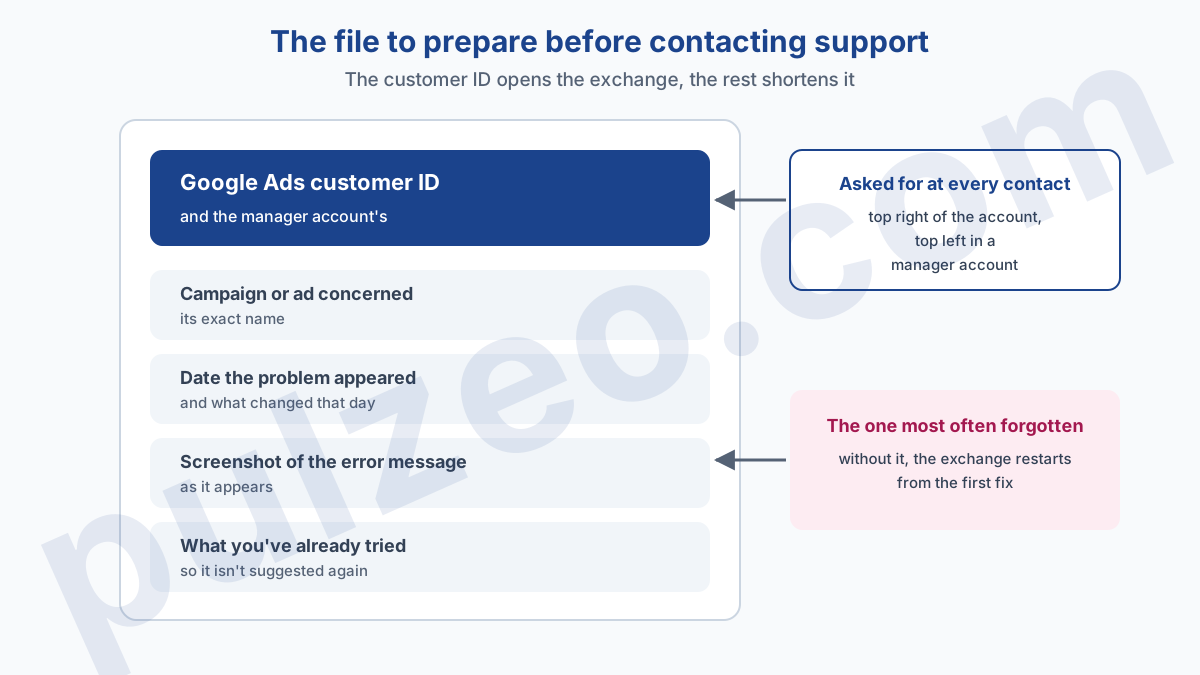
The customer ID is the unique identifier of your ad account, and Google asks for it at every contact. The Help Center says it in one sentence: keep it handy, you'll need it every time you contact customer service. It appears at the top right of the account, at the top left in a manager account, and on your emails and statements.
The customer ID opens the conversation. What really shortens an exchange with Google Ads support is arriving with the file already put together. Here is what I prepare before any contact:
- the customer ID, and the manager account's if you go through one;
- the exact name of the campaign or ad concerned;
- the date the problem appeared, and what changed that day;
- a screenshot of the error message, as it appears;
- what you've already tried, so it isn't suggested to you again.
The last point matters more than it seems. Someone who doesn't know you've already restarted the verification will suggest it, and you'll have lost ten minutes. A complete file spares you that step, and it's often what separates a five-minute exchange from half an hour.
The Google Ads Help Community: who answers you?
The Google Ads Help Community is a public forum where you put your question to other advertisers. Who answers? Mostly Product Experts, whom Google describes as frequent, passionate users of its products, ranked from Bronze to Diamond.
They aren't presented as Google employees. The overview of the communities distinguishes them from employees, guides and Community Managers, who work for Google. Google also states that content posted by members isn't proactively reviewed.
It's an excellent channel for a settings question or odd interface behavior, because someone has almost always seen the same thing. It's a poor channel for anything that requires opening your account: a Product Expert sees neither your billing nor the details of a suspension. And never post your full customer ID or a screenshot of an invoice on a public forum.
Contact an independent Google Ads expert
Google Ads support answers one question: how to make Google's tool work. In my experience, it won't decide for you whether your budget is well spent or whether a campaign deserves to be cut. Yet that's what many of the people who pick up the phone are after: an opinion on their strategy, not a procedure.
For that opinion, you need someone who isn't paid by the platform. An agency or a consultant, when the budget justifies it: I've detailed when a Google Ads agency becomes worth it. Below that, it's Pulzeo's role: Zeo analyzes the account, ranks the fixes by their estimated gain, and explains step by step where to click in Google Ads to apply them.
Keep Google's support for what it does well: unblocking an account, an invoice, a verification. And to know where your money goes, ask someone who has nothing more to sell you.
Common questions
Which number should I call to reach Google Ads?
Google's official help page lists a toll-free number per country: 1877 509 4295 in the United States, 0800 026 1703 in the United Kingdom, 1800 929 8932 in Canada. These numbers open free, personalized help from a Google Ads Expert, aimed at people who don't have an account yet or are just starting. Google also publishes 1-844-245-2553 in the United States for its sales team. Distrust any other number found in a directory: only those published by Google count.
Can I email Google Ads support?
Google's Help Center publishes no email address for Google Ads support. The written entry point is the Contact us form, which asks you to sign in with the account concerned, then routes you based on the problem you describe.
Can Google Ads support unblock a suspended account over the phone?
Not according to Google's Help Center: a suspension is contested through the appeal form, opened from the Contact us link in the notification at the top of the account. Google gives at least six months to appeal, asks for one appeal at a time, and may stop processing repeated appeals for the same suspension.
Do the Product Experts in the Google Ads Community work for Google?
They are not presented as employees. Google describes them as frequent, passionate users of its products, recognized for their help in the forums. Google employees also take part, as guides or Community Managers. An answer marked as recommended can come from the original poster, an expert or a Google representative.