
Google Ads billing in France: payments, invoices and VAT

You run a business in France. You open your bank statement, and Google Ads shows up three times in the same month, for round amounts, on dates that follow no pattern. Then you look for the invoice your accountant needs, download the document the platform offers you, and it has a note that should set off alarm bells. Google Ads billing doesn't follow the monthly calendar everything else has trained you to expect.
It follows a threshold, one that climbs on its own as you spend. Here's how those charges work, where the real invoice for your books is, and why it shows no VAT even though you're a French business.
How Google Ads billing works
Google Ads billing rests on three payment settings, and you don't necessarily have access to all three. The settings available to you depend on your country, the age of the account and how much it spends.
Postpay, which Google used to call automatic payments, is the default setting, and the one the vast majority of accounts run on. Your ads run first, and Google charges you afterward, on the card or bank account on file. It's the only setting that produces the multiple charges we'll get to further down.
Prepay, formerly manual payments, works the other way around: you fund the account in advance, and the credit is used up as your ads run. It's the setting people ask for when they want a hard cap on what Google can take, and I'll say it right away: France doesn't have it. It's on the list of countries where prepay isn't available, alongside almost all of Western Europe.
Monthly invoicing, finally, is a credit line. Google fronts the costs, sends you an invoice, and you pay it afterward like any other supplier. It's what most finance departments ask for, and it's the hardest setting to get: you have to apply for it and meet the requirements.
Why does Google Ads charge several times a month?
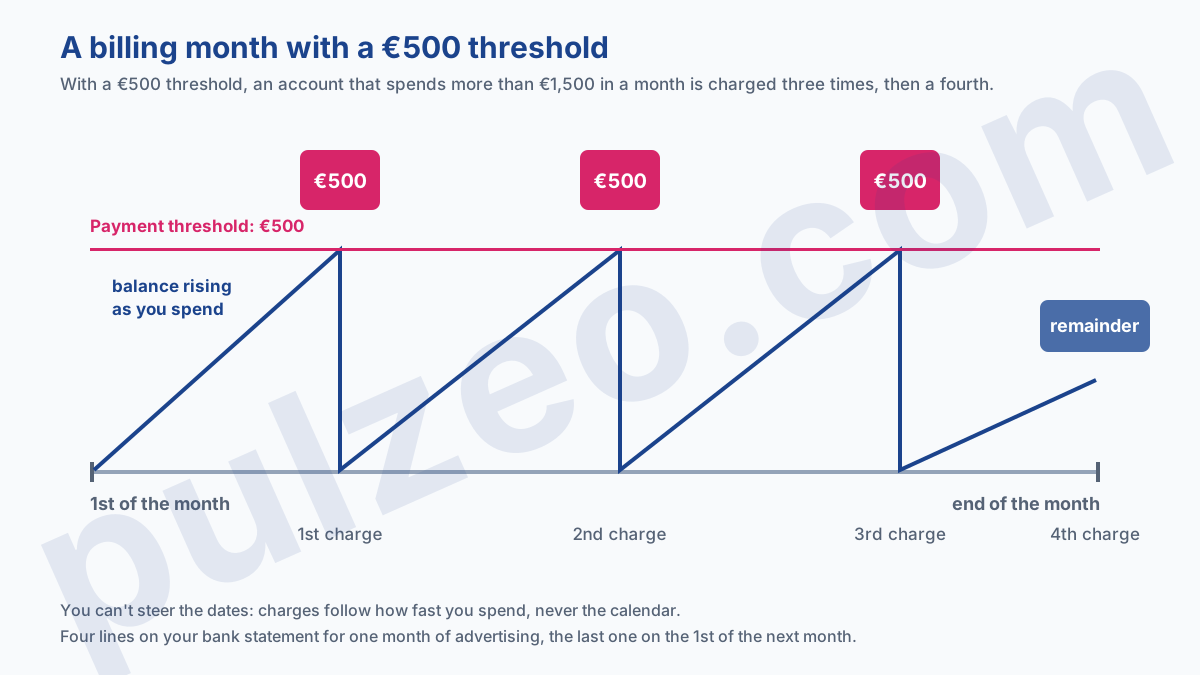
Here's the mechanism almost nobody knows about until it happens to them. On postpay, Google doesn't charge you on a fixed date. It charges you every time your balance reaches an amount called the payment threshold, plus once on the first day of the following month for whatever is still owed.
Google gives three examples in its help center, and they beat a long explanation. An account with a threshold of 50 that spends 49 in the month is charged once, on the 1st of the following month. An account with a threshold of 250 that spends 275 is charged 250 during the month, then 25 the following month. An account with a threshold of 500 that spends 1,500 is charged three times.
So that's three lines on your bank statement for a single month of advertising, and none of them is a mistake.
The threshold goes up on its own
This is the part that surprises people most, because it happens without you asking for anything. The starting threshold is around €50, and it climbs in steps as you reach it: €200, then €350, then €500.
Those amounts come from Google's French example, and Google's help center notes that thresholds vary by account, country and currency. Nothing says the climb stops at €500, either.
The trigger, on the other hand, is spelled out: "Your threshold can be automatically raised if your costs reach this amount before the end of the monthly billing cycle."
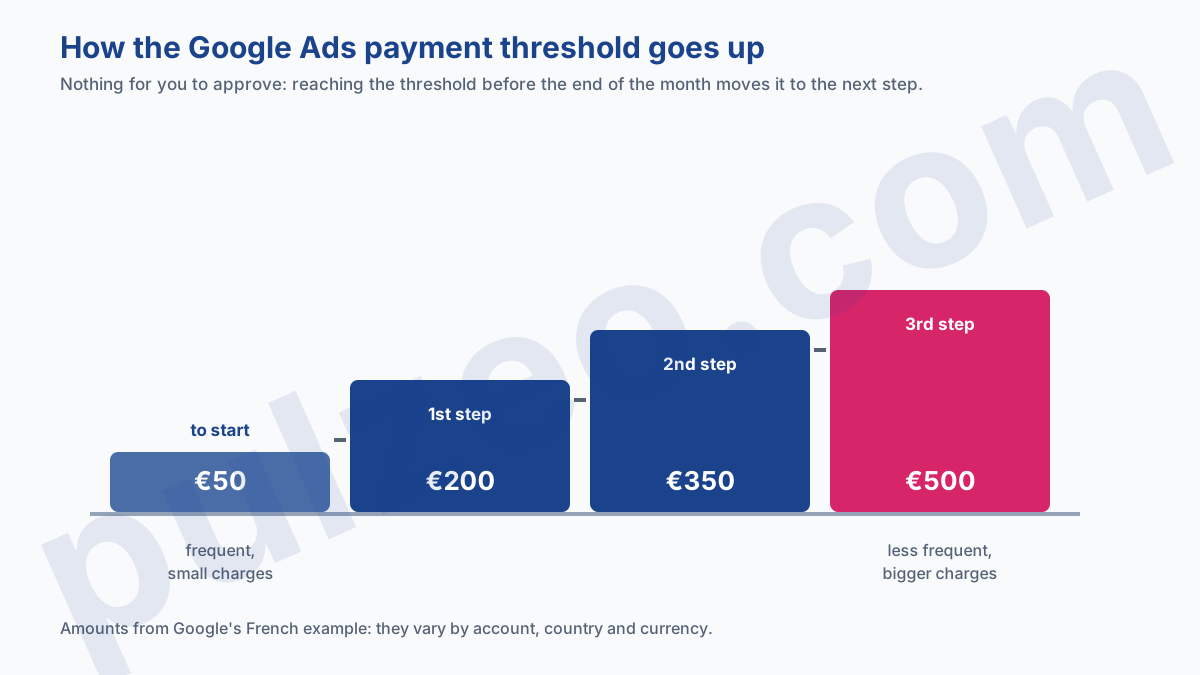
In other words, an account that ramps up sees its charges get bigger and less frequent, with no sign-off from you. Google confirms it without beating around the bush: if your threshold goes up, you get no email and no notification.
There's an "Opt out of automatic threshold increases" checkbox, but don't count on it: Google's help center ties it to the thresholds of "some advertisers in the United States" and warns that it may not be available in every account.
What it means for your cash flow
On a small budget, the effect is negligible. On an account spending several thousand euros a month, it gets very real: you go from regular, predictable charges to €500 debits that land whenever they land.
The takeaway for anyone tracking cash flow: the charge date depends on how fast you spend, and on nothing else. A lower daily budget will space out the charges, but it will never let you pin them to a date you choose.
Where to find your Google Ads invoice
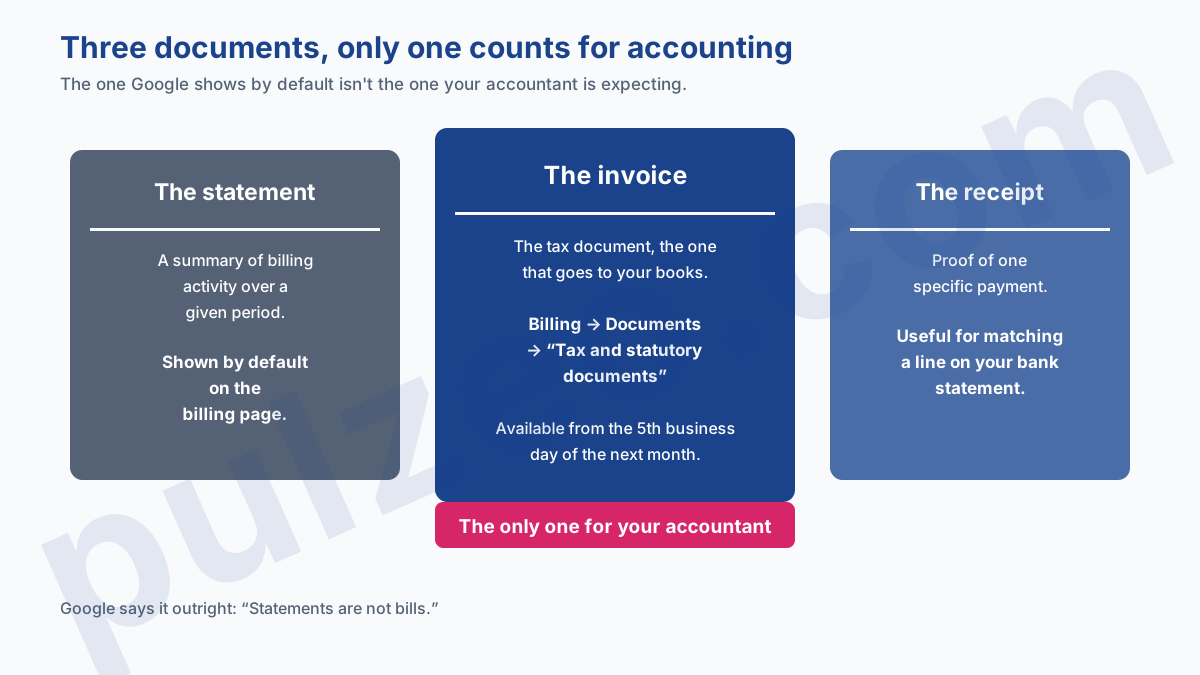
This is the most common mistake, and you pay for it at year-end. The document the platform offers by default, the one you download out of habit, isn't an accounting document. Google says so itself, in a sentence I'd advise you to remember.
Statements are not bills. This document is a summary of billing activity for the time period stated above.
The real invoice is somewhere else, and the path isn't obvious: the Billing menu, then the Documents section, then "Tax and statutory documents" in the top bar. You select the months you want and download them.
The second trap is about timing: these documents aren't available right away. A given month's documents are available from the fifth business day of the following month, with weekends and holidays not counted. A month-end close started on the 2nd won't find them.
Why there's no VAT on your Google Ads invoice
Because your account isn't billed by a French entity. Google says it explicitly: "Your account is served by Google Ireland Ltd." The consequence fits in one sentence of their documentation.
Google writes that it doesn't add VAT to your account unless you selected "Eligible non-business" as your purpose of use at sign-up. In return, you have to provide your EU VAT number in your billing settings.
And the corollary, which plenty of people only discover at year-end: Google says that if you weren't charged VAT, you might be required to self-assess it. It's a standard mechanism between businesses in the European Union, known as the reverse charge, but it takes an accounting entry that nobody will make for you.
Full disclosure: I run campaigns, I'm not an accountant, and Google itself writes that it can't give advice about VAT. Provide your number, keep your tax documents, and let your accountant decide how to handle it. What matters for you is knowing that this missing VAT is the normal setup for a French account, and that it calls for accounting treatment on your end.
One invoice for several client accounts
If you manage accounts for several clients, you've probably tried to get a single invoice instead of one per account. It exists, it's called consolidated billing, and two requirements shut the door on a lot of people.
The first one is expected: "You'll need to have a Manager Account to use consolidated billing." The second is much less so, and it's the one that blocks people in practice.
You must use the monthly invoicing payment setting to pay for advertising costs.
In other words, consolidation is reserved for the credit line setting. A portfolio of accounts on postpay, the starting point of almost every agency, can't be consolidated until monthly invoicing has been granted.
A third constraint is worth planning for well in advance: all the accounts on one invoice must share the same currency, or you'll receive one consolidated invoice per currency. Since the currency is locked when the account is created, a client account opened in dollars will stay on its own invoice forever.
And consolidation only takes care of invoicing. It says nothing about what each account brought in, which is what Pulzeo's portfolio view shows account by account, with spend, conversions and ROAS side by side.
Why the amount charged doesn't match your budget
Two gaps stack up, and they don't have the same cause.
The first comes from the budget itself. Your daily budget is an average, not a daily cap, and the monthly amount Google can spend is calculated over 30.4 days. It's a topic in its own right, which I covered in the guide to the Google Ads budget and its minimum threshold.
The second comes from the mismatch between the calendar month and the threshold. Whatever gets spent at the end of the month without reaching the threshold rolls over into the next charge. So comparing the spend shown in the interface with the total charged over the month almost always shows a gap, and that gap isn't an anomaly.
Finally, it's worth spelling out exactly what a charge contains, because it isn't just your ad spend for the period. Google adds or subtracts four items:
- costs for the current billing period;
- the taxes that apply in your country;
- earlier costs left unpaid, for example after a declined card;
- minus promotional credits, which is the only place a promo code you've used shows up.
What to check every month
Three checks are enough, and they take five minutes once you know where to look:
- the current payment threshold, on the billing page, to see whether you've moved up a step;
- downloading last month's tax documents, after the fifth business day;
- that your VAT number is in your billing settings, since it determines how your invoices are handled.
That leaves the question billing never answers: was that money well spent? Google tells you exactly how much it took, and absolutely nothing about what it earned you.
One last habit, for those managing several accounts. The billing country and the currency are locked when the account is created and can't be changed afterward, which makes the sign-up step more consequential than it looks: I went through those permanent fields in the article on creating a Google Ads account.
Google bills for usage, not a subscription. As long as you're expecting an end-of-month invoice, you'll keep misreading your bank statement.
Common questions
Where do you download your Google Ads invoice?
In the Billing menu, under Documents, then “Tax and statutory documents” in the top bar. The document shown by default on the billing page is a statement, and Google spells it out in black and white: statements are not bills. A given month's documents are available starting the fifth business day of the following month.
Why did Google Ads charge me twice this month?
Because you reached your payment threshold during the month. On the postpay setting, Google charges you every time your balance hits that threshold, and one last time on the first day of the following month for whatever's left. This is normal. Google itself gives the example of an account with a threshold of 500 that spends 1,500 in a month: it gets charged three times.
Do you have to enter your VAT number in Google Ads?
Yes, Google requires it: “We'll need your VAT ID.” You enter it in your billing settings and can change it later. The VAT is missing from your documents because of the entity that bills you, not because of that number: a French account is served by Google Ireland Ltd. Google says you may then have to self-assess the VAT, and adds that it can't give advice about VAT: that's a question for your accountant.
Can you pay for Google Ads at the end of the month instead of up front?
That's the “monthly invoicing” setting, where Google gives you a credit line and sends you an invoice that you pay afterward. It isn't open to everyone: availability depends on your country, the age of the account and how much it spends. In France, it's the only alternative to postpay: prepay, where you fund the account in advance, isn't offered there.
