How to get a Google Ads promo code

To get a Google Ads promo code today, you don't need to hunt for a code: in the US, Google offers new advertisers three welcome offers to choose from, and the one you select is applied automatically when you sign up. Spend $500 in 60 days and you get $500 in ad credit; spend $1,500 to get $1,000, or $3,000 to get $1,500.
A code to type in only matters in a few cases: an offer received by email, from a partner agency, or offered to an existing advertiser.
People often send me this question along with a link to a site promising "the code that works in 2026". Those pages waste your time, and sometimes the offer itself.
The real risk isn't missing a code. It's missing a date: the offer is lost on a missed deadline, a billing change or a miscalculated spend. Here's what Google actually offers, who qualifies, and the exact timeline so the credit doesn't slip away.
Google Ads promo code 2026: what Google actually offers
The official amounts are on Google's Google Ads page for the US, which I checked on November 19, 2026: "up to $1500 in ad credit", in three tiers. The principle is simple. You choose an offer before signing up, it shows when you enter your billing information, and it attaches itself to the new account. Other countries have their own amounts.
So nobody sends you a code in this flow. Sites that publish one are usually copying the old mechanism, back when the offer came as a voucher to enter.
What you receive is ad credit. Google's help page on promotional offers is clear on this: these are not cash back or refunds. The credit pays for future ads, nothing else. It doesn't cover the spend that unlocked it, or costs from before it was applied.
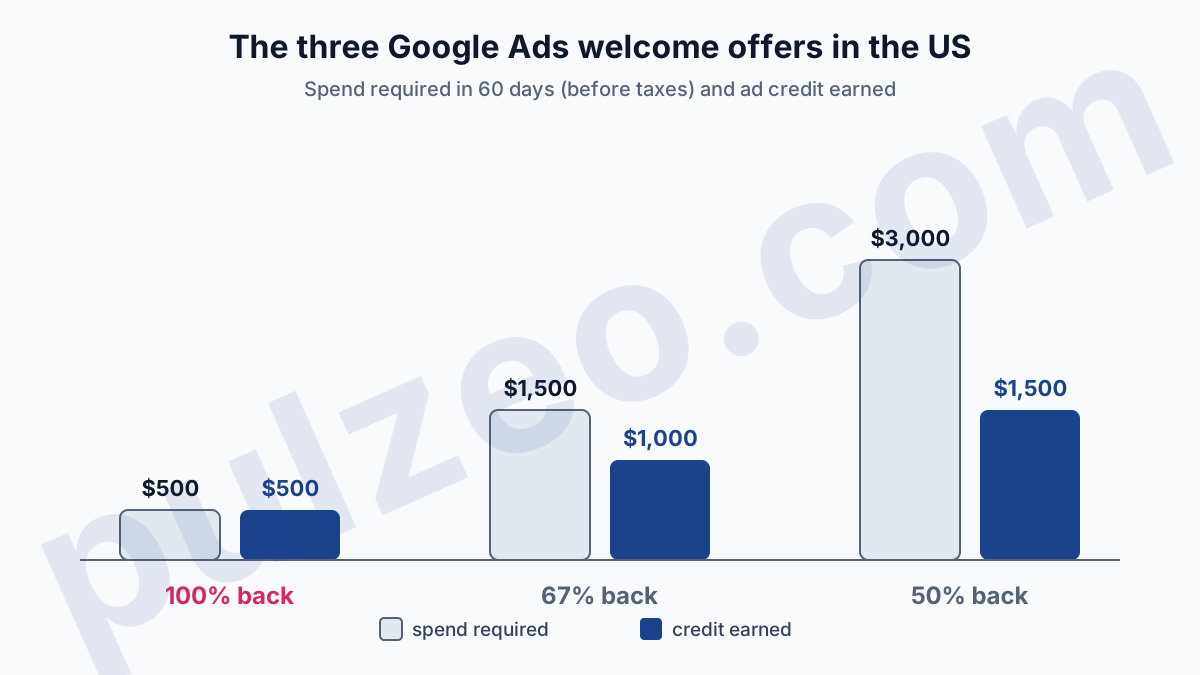
Look at the ratio between spend and credit. The first tier gives back 100% of what you spend, the second 67%, the third 50%. We'll come back to it at the end, because that number should drive the choice.
Google Ads promo code in the US: who qualifies
The welcome offer is for new advertisers, in the strict sense. The terms of the US offer and Google's help set four conditions:
- be new to Google Ads, with a billing address in the United States;
- never have advertised for the same business with another account;
- add a valid payment method to the account;
- use only one offer per advertiser.
The second condition trips up more people than you'd think. A business that "tried" Google Ads three years ago with a forgotten account is no longer a new advertiser, even with a fresh email address. Google does leave one opening: an existing business expanding into another country, with a new billing address, can become eligible again.
Existing advertisers aren't shut out of everything. Google considers anyone with active spend in the last 6 months an existing advertiser, and sometimes offers them targeted credits, by email or on the account's Promotions page: for adopting a new feature (Google cites Performance Max) or for reviving a dormant account. They come at Google's initiative.
"Google support can't provide promotional offers upon request."
That line comes from the page on the types of promotional offers, and it saves you a pointless chat with support. No point opening a second account to land back in the "new" box either: that's exactly the case the same-business condition rules out.
How long does it take to unlock Google Ads credit?
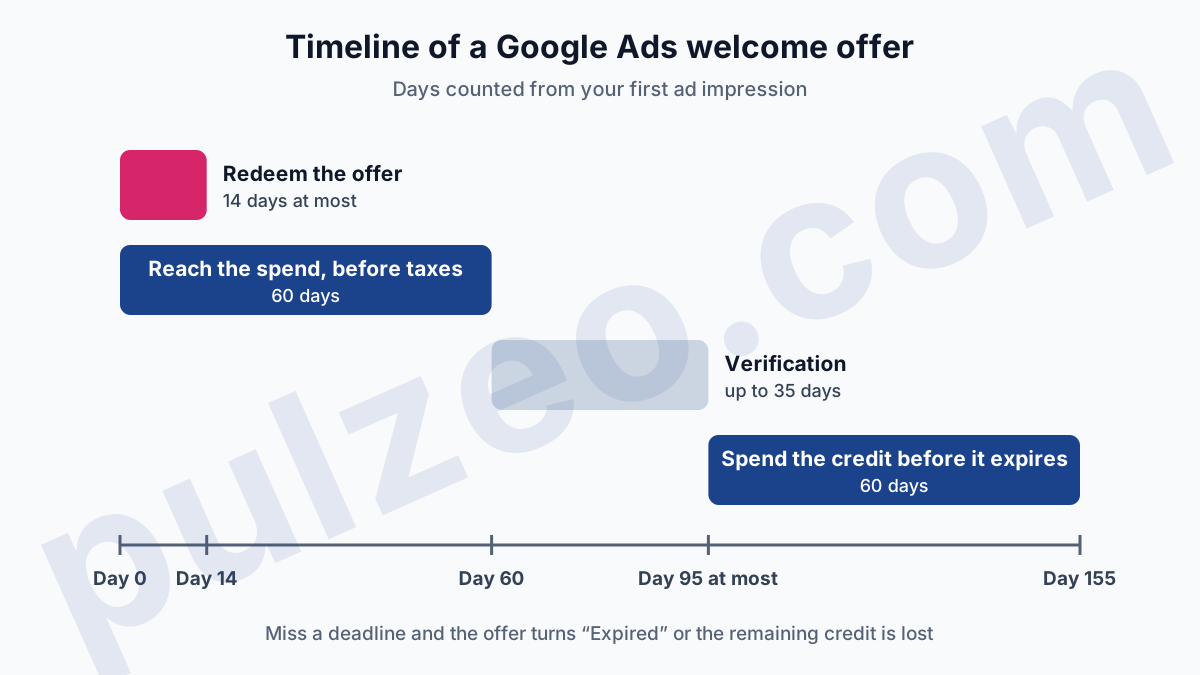
From sign-up to the end of the credit, the offer can stretch over about five months: 60 days of spend, up to 35 days of verification, then 60 days to use the credit. The timeline comes down to four deadlines, which I suggest putting in a calendar the day you sign up.
First deadline, 14 days. The US terms require you to redeem the offer on your first account within 14 days of your first ad impression. The help page says instead that the account "must be less than 14 days old" at redemption. The two wordings don't quite match, so take the safer one: the offer should be active before your first campaign serves.
Second deadline, 60 days to reach the required spend, before taxes. It has to be actual spend, on clicks and impressions, and the terms say so plainly:
"Making a payment of the required amount is not sufficient."
Third deadline, up to 35 days of verification once the threshold is reached. Fourth deadline, 60 days to spend the credit after it's applied. Past that, whatever is left expires.
For the $500 offer, reaching the threshold in 60 days takes about $250 of spend a month. On a $5 daily budget you won't get there: 60 days at $5 make $300. That's the calculation error I see most, a budget set "at the minimum to see" that ends up $200 short.
So set the budget from the threshold, then watch the other direction: Pulzeo tracks the account's spending pace against the monthly budget you give it, and warns you when you're about to overspend.
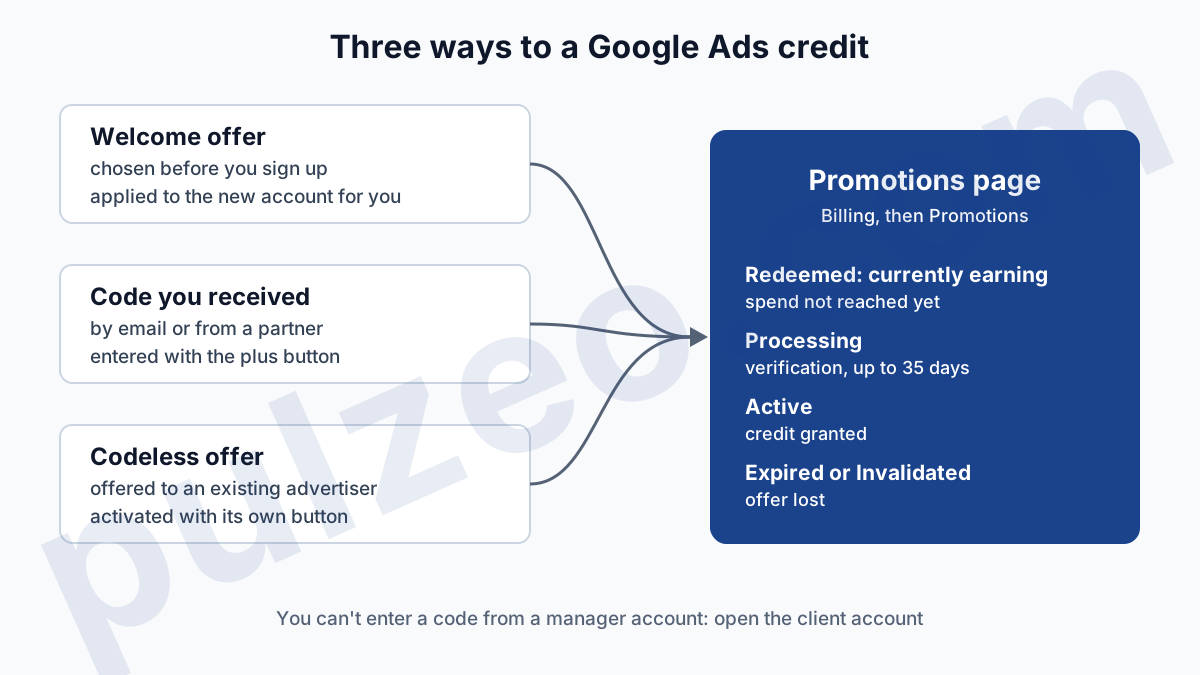
All along, the Promotions page shows the offer's status, updated every few hours according to the help page on tracking promotions. "Redeemed: currently earning" means the threshold isn't reached; "Processing", that Google is checking; "Active", that the credit has been granted. The "Spent from Promotion" column tells you where you stand.
Entering a Google Ads promotional code on the Promotions page
If you've received a real Google Ads promotional code, by email or from a partner, you enter it in the account, and the path described in the help page on using an offer takes four steps:
- click the Billing icon, then Promotions;
- click the plus button, the blue one;
- enter your promotional offer code;
- click Submit.
A codeless offer, an existing advertiser's for instance, is activated from the same Promotions page, with the button tied to the offer once you've read its terms. It then joins the table, with its redemption date, its expiration dates and its status.
Two details save some back and forth. You can't enter a code from a manager account: open the Promotions page of the client account instead. And the payment method has to be in place first.
Your final payment setting, automatic payments or monthly invoicing, should be in place before you redeem the offer (we'll see below what a later switch costs), and the article on Google Ads billing explains how each setting charges you.
Google Ads offer not applied: the common causes
When the credit doesn't arrive, the cause is almost always one of these three situations. Start with the status in Promotions: "Expired" and "Invalidated" already tell you which case you're in.
The account wasn't considered new
An old account for the same business, a first impression served more than 14 days before the offer was redeemed, a billing address outside the US: any one of them is enough to rule the account out. Google's pages describe no way to catch up in this case.
The spend wasn't reached within 60 days
This is the most common cause, and the most frustrating, because the gap is often small. The offer then turns "Expired": it was redeemed, but the threshold wasn't crossed in time. A campaign paused for two weeks in the middle of the period is enough to miss the mark.
The billing changed afterward
The least known trap. If you plan to switch to monthly invoicing, set it up before you redeem the offer. The help page is firm: otherwise, the offer is invalidated and the credit amount is lost when you switch.
If the credit still hasn't appeared after the 35 days of verification, and none of this applies, Google points you to support. The right desk is covered in the article on how to contact Google Ads support.
Credits handed out by Google Partners agencies
Agencies in the Google Partners program also hand out credits, on a scale published in the help page on Google Partners offers. The partner picks from seven values and applies them itself, from its own account, to a specific client. The scale is in US dollars, or the local equivalent: from $500 spent for $500 in credit, up to $12,000 for $6,000.
These offers have their own rules. The client account must have been created less than 20 days before, carry no other promotion, and the partner is bound by a monthly cap, set at 15% of its rolling 90-day spend. An agency promising you credit is doing it out of its own quota, and only at the start.
Be wary, on the other hand, of codes sold online. Google lists selling promotional offers among the violations that lead to suspension of promotions, alongside several accounts opened for the same website to stack codes. Buying a code means paying for a credit that can vanish, and putting the account at risk too.
Google Ads $500 or $1,500 offer: which one to choose
Choose the tier whose required spend matches what you would have spent anyway over two months, and not a dollar more. For a $250 monthly budget, that's the $500 offer. For $750 a month, the one that returns $1,000. The $1,500 credit only makes sense from a $1,500 monthly budget.
The opposite temptation is strong, because "$1,500 free" sounds better than "$500 free". But look at what you're buying. To earn $1,000 more credit than the first tier, you have to spend $2,500 more within 60 days, on a brand-new account that is barely out of its learning phase and doesn't yet know what converts. Inflating a budget to catch a credit means funding the most expensive learning possible.
And credit gets wasted just as easily as real money. The first weeks of a new account often go to queries unrelated to the business, which nobody is looking at yet. Pulzeo spots the search terms to exclude in your real queries, so you don't burn the credit on clicks that never stood a chance of converting. The 14-day free trial is enough to do that cleanup on the first month.
One last point, often forgotten: if you stop Google Ads before using up the credit, you won't get it back. Promotional credits are excluded from the refund when you cancel a Google Ads account. Google Ads credit is only worth something once it's spent, on campaigns that already run properly.
Common questions
Is the credit from a Google Ads promotional offer refundable?
No. Google states that its offers work as ad credit, not as cash back or refunds. The credit can only be spent on advertising, and any promotional balance left when you cancel the account is excluded from the amount Google refunds.
Do taxes count toward the spend required to unlock the credit?
No. The terms of the welcome offer count spend before taxes. For an offer that requires $500 of spend, you need $500 of actual advertising costs within 60 days, taxes excluded, and simply making a payment of that amount isn't enough.
Can you combine two Google Ads promotional offers?
No. The welcome offer terms limit it to one per advertiser, and Google lists using multiple offers on the same account among the reasons promotions get suspended. Opening several accounts for the same website to apply a code to each is also penalized.
How long does Google Ads credit stay valid?
Once applied to the account, the credit expires 60 days later. It is applied automatically to your next costs until it runs out or expires. Whatever isn't spent within that window is lost, which is why you should keep campaigns running after earning the credit.