How do I cancel my Google Ads account

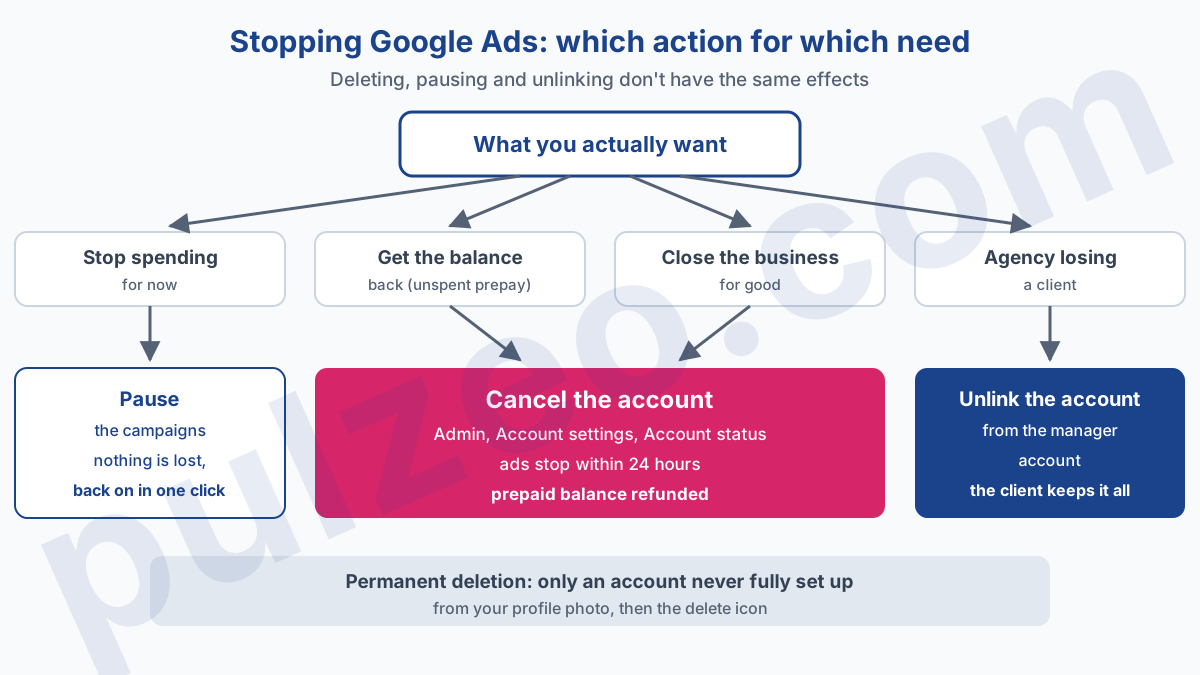
To cancel your Google Ads account, you need to know one thing: Google doesn't delete an ad account, it cancels it. The button is called "Cancel my account". It sits in Admin, then Account settings, under Account status, and only a user with Admin access can use it. Ads stop within 24 hours, your prepaid balance is refunded, and the account stays viewable.
I almost always get this question in the same situation: an advertiser who "tried Google Ads", doesn't want it anymore, and is afraid of being charged forever. The fear is legitimate, but it rarely points at the right place.
What costs money after canceling isn't the account itself, it's the last hours of serving and the bill that follows. Here is the exact path, what you still owe, and the cases where something other than canceling is the better move.
Can you actually delete a Google Ads account?
No, except in one specific case. Google's help page on canceling describes only one permanent deletion: an account that was never completely set up. That one is removed by selecting your profile photo in the upper right corner, then the delete icon next to the account. Any account that has run ads gets canceled.
The nuance is more than vocabulary. A canceled account keeps its campaigns, its history and its numbers. You can still sign in to view the data it contains, and reactivate it later if you change your mind. That's reassuring, and it's often what people who want to "delete" are really after: to stop paying, without losing track of what they spent.
Another common confusion: your Google Ads account isn't your Google Account. Your Gmail address, your calendar, your Drive live separately. Canceling the ad account touches none of that. The reverse does have a consequence: if you delete the Google Account, Google says you'll have to recover it first before you can reactivate the ad account.
How to cancel a Google Ads account, step by step
The path takes four clicks, as long as you have the right access level. The help page is unambiguous: only users with Admin access can cancel an account. If you have standard access because an agency set up the account for you, ask them to make you an admin first, or to do it themselves.
Once you're signed in to the right account, here is the order, with the exact interface labels:
- open the Admin menu;
- select Account settings;
- expand the Account status section;
- click Cancel my account.
Before that last click, two conditions sometimes get in the way. Billing setup must be finished: without it, Google asks you to complete it before you can cancel Google Ads and request a refund. And for a Google Ad Grants account, the free ads for nonprofits, Google requires you to remove all campaigns before canceling.
If the admin who opened the account has left the company and nobody has control anymore, the help page points to support, with the customer ID, the sign-in email address and the billing information. I've covered the channels that actually answer in the article on how to contact Google Ads support.
Stop paying for Google Ads: what you're still billed after canceling
This is the question that worries people most, and Google answers it in one sentence:
"If you cancel your account, you'll still need to pay for any accrued costs."
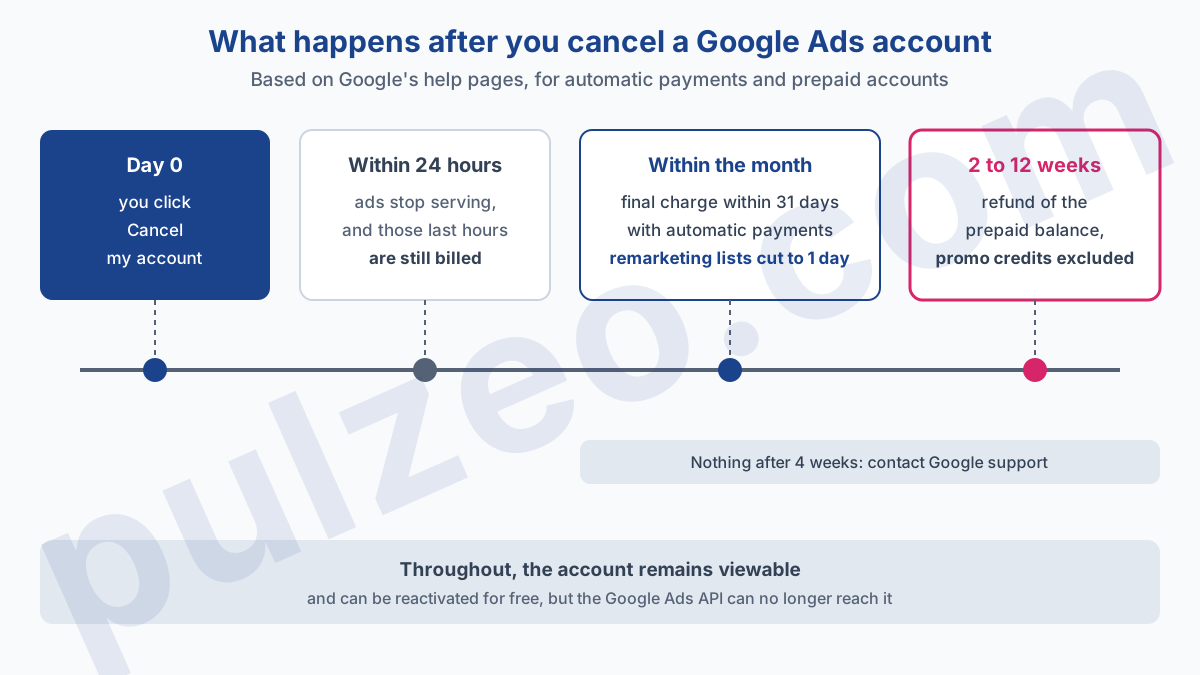
In practice, to stop paying for Google Ads, canceling stops future spend; whatever has already served is still owed. Ads stop serving within 24 hours, and those last hours get billed. What happens next depends on how you pay, and the page on billing after canceling separates the cases.
Automatic payments or monthly invoicing: the last bill
With automatic payments, where Google charges after your ads run, any remaining balance is charged automatically to your primary payment method within the next 31 days. That includes costs you hadn't been billed for yet. A charge that arrives three weeks after canceling is therefore just the account closing normally.
With monthly invoicing, where you pay against an invoice, what you still owe is the amount shown under "Amount due". Google also advises checking the Transactions page, where later charges can show up. Keep an eye on your statement the following month: if an amount looks wrong, the article on Google Ads billing explains how to read each line.
Manual payments: the prepaid balance refund
If you funded the account in advance, Google automatically refunds unused prepaid funds and other refundable credits, to the original card or bank account. A bank transfer may require entering your bank details in your billing settings, and the help page sometimes mentions an extra form.
Promotional credits, on the other hand, are gone: they're excluded from the refunded amount. An advertiser who got a welcome credit and cancels before spending it won't see that money again, which makes sense since they never paid it in.
If you're canceling because the welcome offer didn't pay off, check where it stands first: its timeline and the reasons it gets lost are covered in the article on how to get a Google Ads promo code.
Then there's the timing, and here Google's pages don't say the same thing. One says 4 to 12 weeks, the other says that, for a card or direct debit, refunds are typically processed within 2 weeks, plus up to 10 business days on the bank's side; a bank transfer takes longer. In my experience, plan for the longer end.
The help page recommends contacting support if nothing has arrived after four weeks, and the Billing Summary page lets you track the refund.
Pause the campaigns or cancel the account?
If you have no prepaid balance to recover, Google itself suggests pausing your campaigns instead of canceling the account. It's my advice too in the vast majority of cases, for a simple reason: pausing stops the spend just as surely, and destroys nothing.
Canceling has effects you don't see right away. About a month later, the membership duration of your remarketing lists drops to one day, which in practice empties audiences you built patiently. Dynamic remarketing settings are removed. And the account is no longer accessible through the Google Ads API, which cuts off every tool that was reading it in one go.
A paused account, on the other hand, switches back on in one click, with its history and audiences intact. And if you forget about it, Google tidies up on its own: an account that spends nothing for more than 15 months is canceled automatically.
Canceling is justified in three situations. You have a prepaid balance to get back. You want to be certain nobody restarts a campaign by mistake. Or you're closing the business for good.
There's one more case I see often, where I advise waiting instead: canceling because "Google Ads doesn't work". An account that spends without bringing anything back almost always has an identifiable fault, broken conversion tracking, off-topic search terms, a badly set bid.
Pulzeo's action plan ranks those fixes by estimated gain, which tells you in a single analysis whether the problem is the channel or the setup.
Cancel a Google Ads manager account or a client account
With a manager account, the one agencies use to run several clients, the question splits in two. Either you want to stop a client account, or you simply want to stop managing it. They're not the same action, and mixing them up gets expensive.
To cancel client accounts from the manager account, you need administrative access to the manager account. For several accounts at once, the dedicated page gives the path: Accounts, then Management, check the accounts, Edit, then Cancel. The client can also cancel their account themselves, from their own access.
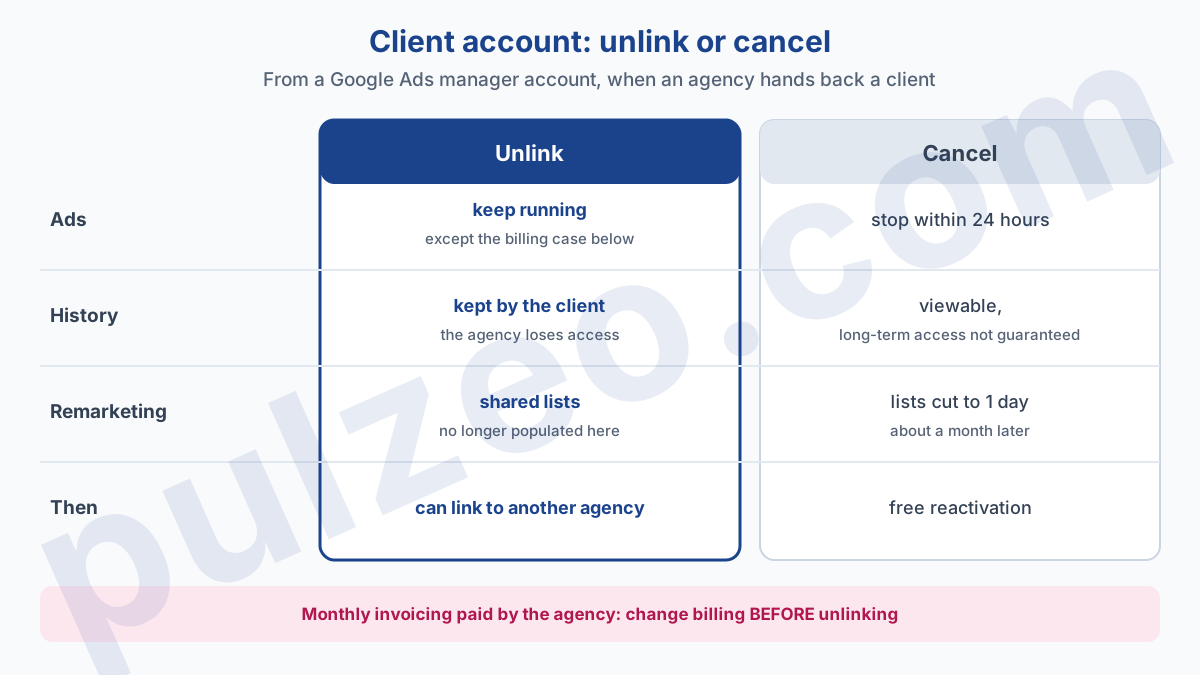
When an agency loses a client, the right move is almost always unlinking. From the manager account, the path goes through Accounts, then Sub-account settings, check the account, Edit, Unlink.
The help page on unlinking is clear about its effects: the manager account loses access, but the client account loses neither its campaign history nor access to Google Ads features. It can then be linked to another agency.
Three side effects are worth checking before you unlink:
- remarketing lists shared from the manager account stop being populated, and ad groups that target them stop serving;
- cross-account conversion tracking no longer records conversions from clicks made after the unlinking;
- with monthly invoicing, if the manager account is the payments manager, the client account stops serving ads: billing has to be changed first.
That last point is the classic end-of-contract trap. The agency unlinks on a Friday, and the client discovers on Monday that their ads aren't running. For everything about how the manager account itself works, I've covered roles and access in the article on the Google Ads MCC.
Reactivate a canceled Google Ads account
Changing your mind costs nothing: reactivation is free. The path goes through Preferences in the Admin menu, then Account status, and the Reactivate my account button. Here again, only a user with Admin access can do it.
Google may ask you to verify your payment information on payments.google.com, sometimes with documents, and says its team reviews them within 48 hours. Once the account is open again, campaigns you left active start running again, and paused ones wait until you re-enable them. So check the status of every campaign before reactivating, or an old forgotten campaign restarts with its old budget.
Two limits to know. A reactivated account that serves no ads for three months is canceled again automatically. And an account canceled for violating Google's policies may not be reactivated at all: that's a suspension, which is handled differently, as I explain in the article on a suspended Google Ads account.
What to save before you cancel
A canceled account remains viewable, but Google warns that you may not be able to access it after an extended period, without saying how long. So I wouldn't rely on the interface as an archive. Before you click, take twenty minutes to put aside whatever could be useful in a year, if you restart a business or a buyer asks for it:
- an export of performance by campaign over the whole life of the account;
- the list of keywords and search terms that converted, and the ones you had excluded;
- the ad copy that worked best;
- the invoices, downloaded from the billing section.
The list of search terms that converted is the most valuable of the four. It's what saves you from paying for the learning curve again if you come back one day, and it's the first thing I ask for when I take over an account.
If you track this account in Pulzeo, the logic is the same and the timing matters. Once the account is canceled, Pulzeo can no longer read it through the API, and disconnecting an account from Pulzeo deletes the data attached to it, with no restore on reconnection. So download the PDF reports for the periods that matter first: it's the most readable record you'll have left, for you and for a future provider.
Common questions
How long does it take for ads to stop after canceling?
Google's help page says all your ads stop serving within 24 hours. Those last hours of serving can still generate charges, and Google states that you'll still need to pay for any costs the account has accrued.
Does Google refund the prepaid balance of a canceled account?
Yes. Google automatically refunds unused prepaid funds and other refundable credits, usually to the original payment method. Promotional credits are excluded from the refund. You may have to provide bank details or fill out a form, and contact support if nothing has arrived after four weeks.
Can I still get the data from a canceled Google Ads account?
Yes, as long as the account remains accessible: you can still sign in to view its data. Google warns, however, that you may not be able to access a canceled account after an extended period, without giving a duration. Tools connected through the API lose access as soon as the account is canceled.
Does canceling Google Ads delete my Google Account?
No. Your Google Account (your Gmail address, your other services) and your Google Ads account are two separate things. Canceling the ad account doesn't erase the Google Account, and deleting the Google Account makes reactivating the ad account impossible until it has been recovered.