What is Google Ads Advisor used for?

Google Ads Advisor is the artificial intelligence agent Google built into the Google Ads interface: you ask it a plain-language question about your account, it reads your numbers, explains what's going on and can apply a change, always after your approval. It's now called Ask Advisor. And if you manage your accounts through a manager account, you've probably never used it, because it doesn't work there.
It's the question I hear most from people who follow the ad tech press: "everyone talks about this agent, where is it in my account?" Here's what it really does, what it doesn't, and why the icon is still missing for so many advertisers.
What is Ads Advisor in Google Ads?
Ads Advisor is a conversational assistant built on Gemini that lives in a panel on the right of the Google Ads interface. You type a question, it reads the data of the open account and answers with your own numbers.
Google announced it on November 12, 2025, alongside its twin Analytics Advisor for Google Analytics, with a rollout planned for early December to all English-language accounts. The post describes it as a partner that learns from your interactions and becomes more tailored over time.
The difference between this AI agent for Google Ads and a general-purpose chatbot comes down to one word: context. Ask a consumer assistant why your conversions dropped and it will recite the usual ten causes.
Ads Advisor, on the other hand, looks at your account, the date range, the campaigns involved, and can find the date someone touched the bids. It also keeps a memory of what you tell it about your business, stored under "saved info".
To open it, the Google Ads Help Center describes two paths: the icon with a Beta badge in the top-right navigation bar, or a question typed straight into the interface's search bar.
Ads Advisor vs Ask Advisor: what's the difference?
None for the advertiser: it's the same agent under a new name. On May 20, 2026, Google introduced Ask Advisor as a single experience that connects its agents in Google Ads, Google Analytics and, soon, Merchant Center.
The idea is to stop opening three tools for one question. Google's example is a request like "find new customers for my hair care products": the agent would pull the product details from Merchant Center to set up the campaign in Google Ads.
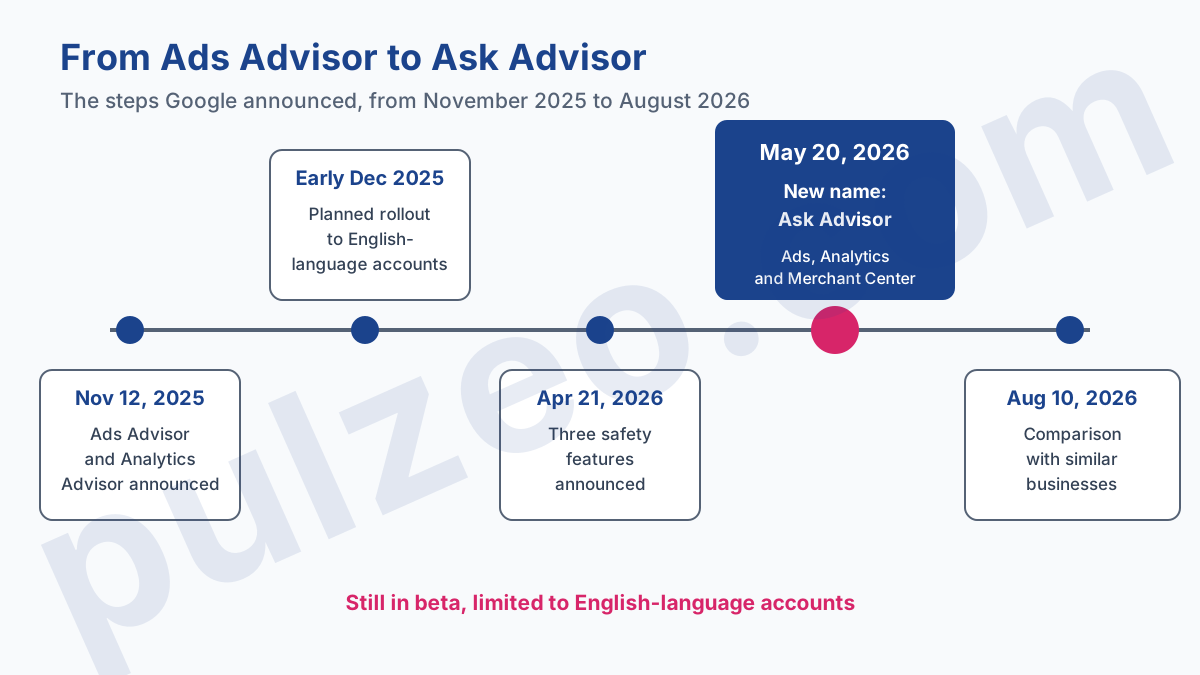
In your account, the help page has already switched: it's titled "Ask Advisor in Google Ads (beta)", at the same address as the old Ads Advisor page. Trade articles still use both names, which keeps the confusion going. A search on the old name still leads you to the right information, since the official documentation simply changed its title.
What Ads Advisor does in a Google Ads account
The agent does two very different jobs, and it's the most useful distinction to keep in mind: it reads, and it acts. Reading costs nothing and changes nothing. Acting changes your account, and that's where your attention belongs.
Questions about your numbers
This is the heart of the tool, and probably the use that will save you the most time. The help page gives example prompts that sound like what you actually wonder on a Monday morning: "Why did my branded campaign's clicks decrease?", "When were bids changed for this campaign?".
It can also produce a report on the campaign with the strongest week-over-week growth, chart impressions over thirty days, or explain why an ad was disapproved. Since the August 10, 2026 updates, it even compares your performance with anonymized averages from similar businesses.
Finding the change that made a CPA climb on your own means cross-checking the change history against the trend lines, campaign by campaign: that's exactly the legwork the agent shortens. In Pulzeo, Zeo does the same reading, campaigns, search terms, budgets and change history included, across every account you connect.
Changes, with your approval
The other half is agentic: the agent doesn't just advise, it prepares the change and asks you to approve it. The examples on the help page already cover a wide range:
- pause a campaign, rename it or change its daily budget;
- change location targeting or an ad's final URL;
- generate keywords for a Search campaign;
- suggest better headlines for a campaign, and images for Performance Max;
- appeal a disapproved ad.
The April 21, 2026 post added three projects announced for the following months: proactive troubleshooting of policy violations, round-the-clock account security monitoring (flagged domains, dormant users) and one-click industry certifications.
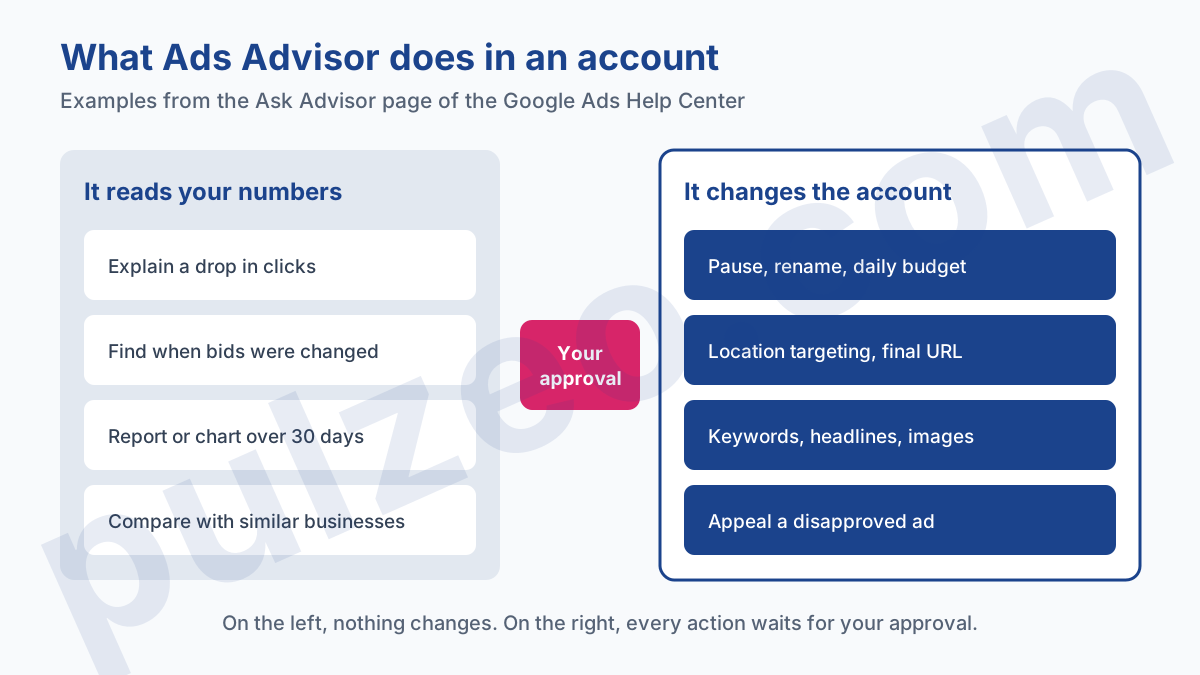
Keep one simple habit: anything coming from the right-hand column gets reviewed like a change made by a brilliant intern who's new to the company. It knows Google Ads by heart. It doesn't know your margin.
Which accounts can use Google Ads Advisor?
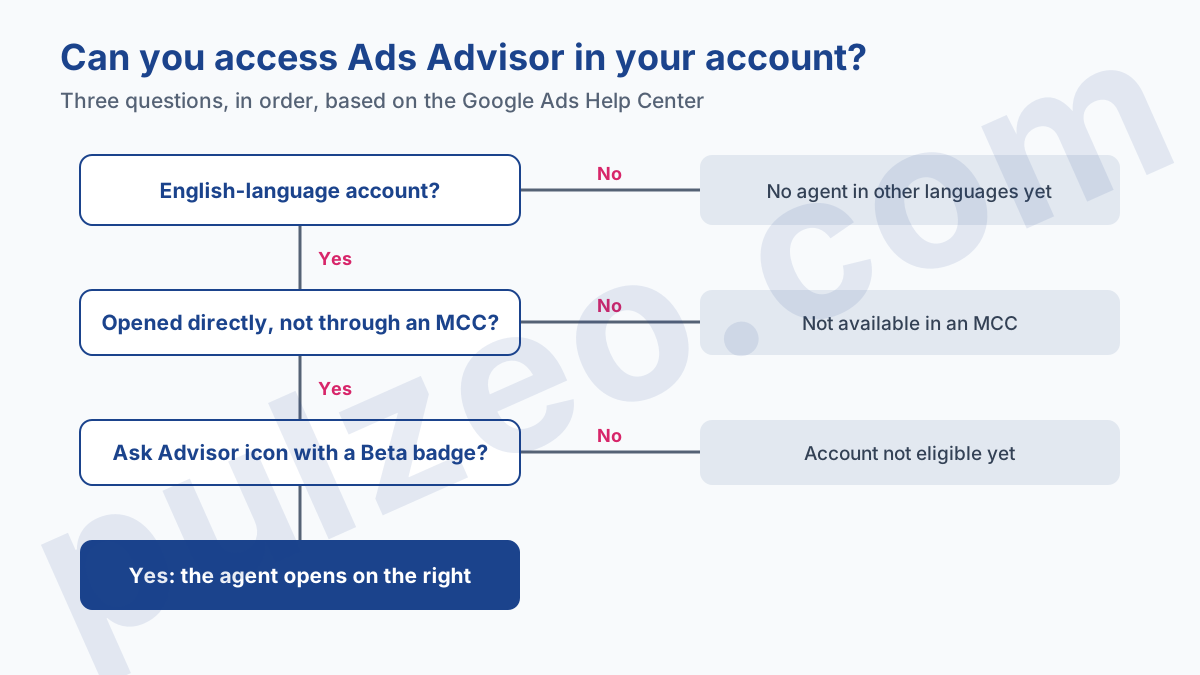
English-language accounts only, at the time of writing. Every official announcement repeats it at the bottom of the post, including the August 2026 one: the agent is in beta for English-language accounts. The April post promised that "more languages are rolling out soon", with no date.
The help page exists in other languages, which misleads many people. It's translated, and Google even notes at the bottom of the French version that it may contain AI-translated content. Google doesn't spell out on that page what makes an account an English-language account either: the only observable rule is that the icon only shows if the account is eligible.
Manager accounts (MCC)
The second lock concerns agencies and freelancers. The same page says it plainly:
"Note that Ask Advisor isn’t available in MCC accounts." (Google Ads Help)
In practice, from your manager account, you get no agent. You have to open each client account one by one, assuming it's eligible. For someone handling fifteen clients, that's the opposite of what you'd expect from an assistant: it works one account at a time.
Accounts without the Beta icon
That leaves the most ordinary case: an English account, opened directly, and still no icon. The Help Center only says the option appears if the account is eligible, without publishing the criteria. There's nothing to fix on your side in that case, except checking the top-right navigation bar of the interface from time to time.
Ads Advisor limitations to know about
The first one is written by Google itself, and it says a lot about the tool's status: the Help Center tells you to always verify billing status, identity verification documents and policy appeal outcomes directly in your account settings. In other words, on the topics where a mistake is expensive, your account settings are the reference.
The second comes with the beta. Google warns that "there may be limitations" and that processing a request can take a moment. A wrong answer delivered with confidence is still possible, as with any language model. A question about the cause of a drop therefore calls for a check in the reports before any decision.
The third is about incentives, and it's my opinion more than a documented fact. The agent is built by the company that sells the clicks.
I'm not saying it lies, and its ad disapproval diagnostics are exactly what an advertiser needs. But when it suggests adding sitelinks before a seasonal peak or generating new keywords, the recommendation usually points toward more reach, and therefore more spend. The same caution applies to the Recommendations tab and its optimization score.
An advisor built into the ad platform answers "how" very well, and "should I" much less so.
How to get your account ready for Ask Advisor
There's no need to wait for the icon to benefit from it. The agent will be all the more useful if your account is easy to read, and this work pays off today:
- name your campaigns explicitly, "Search, brand" rather than "Campaign 3", since that's how you'll refer to them when talking to the agent;
- check that your conversions measure the right actions, otherwise it will optimize toward a wrong number with the same confidence;
- write down your real goal for each account, CPA or ROAS, so you can give it upfront in its saved info.
If you already have it, use it for what it does best: understanding an ad disapproval, finding a past change, producing a one-off report. And keep spending decisions on your side.
For everyone else, account managers handling several clients first among them, the need is still there: asking a question about your campaigns and getting an answer with numbers, without opening ten tabs.
That's what Zeo does in Pulzeo, on every account you connect, with a multi-account view that brings the whole portfolio onto one screen. Ask Advisor will eventually reach more accounts. The question of who you trust with the judgment call won't change.
Common questions
Does Ask Advisor also work with Google Analytics?
That has been its whole point since May 2026. Google presents Ask Advisor as a single experience that connects its agents in Google Ads and Google Analytics, with a Merchant Center agent announced for later. It can explain a campaign result using data from both tools.
Can Ads Advisor change my campaigns without my approval?
No. The Google Ads Help Center states that the agent implements suggested changes with your approval, and the April 2026 post repeats that it asks for approval before taking action in the account. You also keep control of the text and images it generates, which you should review before accepting them.
Why don't I see the Ask Advisor icon in my account?
Three possible reasons: your account isn't an English-language account, you're signed in through an MCC (manager account), or your account isn't part of the beta rollout yet. The icon, marked with a Beta badge, only appears in the top right if the account is eligible.
What's the difference between Ask Advisor and the Recommendations tab?
The Recommendations tab pushes a fixed list of suggestions with an optimization score. Ask Advisor answers a question asked in plain language, pulls the numbers that answer it and can prepare the matching change. Both come from Google and deserve the same critical review.