How to run local Google Ads for a small business

Running local Google Ads for a small business almost always means launching a Search campaign, targeted to your trade area with the "Presence" option, on keywords that pair your trade with your city. Add your address and phone number to the ad, run it during the hours someone can answer, and track calls. The rest is fine-tuning.
If you searched before reading this, you probably landed on pages that only talk about Local Services Ads. They have their uses, but they don't cover every trade. Here's how I set up a local campaign for a shop, a salon or a restaurant, and the two settings I find wrong in almost every account I take over.
Local Services Ads or a regular Google Ads campaign?
Local Services Ads only cover some trades: for most businesses that serve customers on site, the right way in is still a Search campaign. Both products use the word "local", and that's where the confusion comes from.
Local Services Ads are a separate program. You don't pay for the click but for the lead, when someone calls or messages you from the ad.
Google verifies the business before ads run, and the trades it puts forward are home services: plumbing, electrical, roofing, moving, carpentry. Google also mentions other categories, such as beauty, health or retail, without saying which are open everywhere: check yours. A plumber has every reason to take a close look.
Everyone else is left with the regular Google Ads campaign, set up for a specific area. Note in passing that there's no longer a "Local" campaign type in the interface: Google folded it into Performance Max in 2022, with an automatic upgrade at the end of the summer. If a tutorial still shows you a "Local campaign" button, it's more than four years old.
Why Search rather than Performance Max to start? Because a neighborhood business has few conversions, and an automated campaign without data serves blind. On Search, you choose the queries, you can read what's happening, and a budget of a few dollars a day stays readable.
How to define your trade area in Google Ads
Your trade area is the distance your customers are willing to travel to reach you, and it depends on what you sell far more than on your ambitions. Nobody crosses town for a loaf of bread. For an $8,000 fitted kitchen, people drive forty minutes without a second thought.
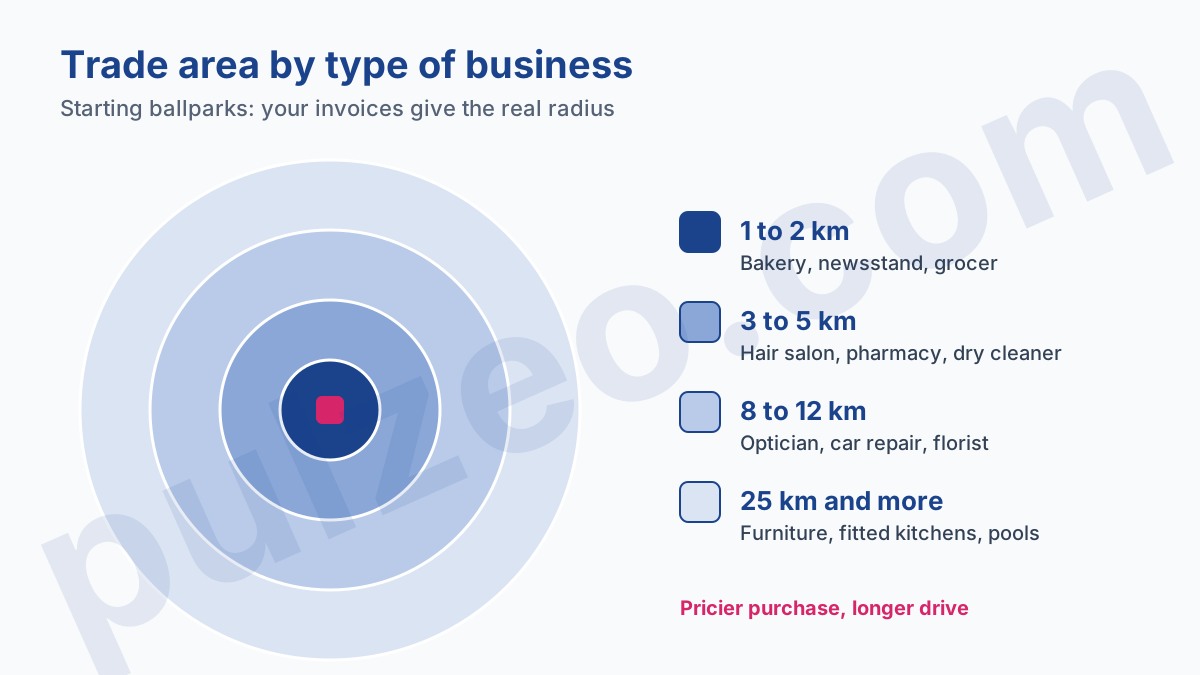
The radii in this diagram are ballpark figures, the ones I use as a starting point. The real number is in your data: ZIP codes on invoices, delivery addresses, loyalty cards. If 80% of your customers live within 5 km, your campaign has no business showing at 15.
Targeting a radius around the store
Radius targeting draws a circle around an address. It's the simplest option, and Google accepts a radius from 1 km. It works well in a city, where the trade area really does look like a circle.
Its limits show as soon as geography gets involved. A 10 km circle around a store on a riverbank covers the other bank, which your customers may never cross for lack of a bridge. The circle knows nothing about rivers, highways or habits.
Targeting cities or ZIP codes
The other method is to tick cities, ZIP codes or counties one by one. It takes ten more minutes, and it matches reality on the ground: you target the towns your customers come from, and you leave out the ones they don't come from, even nearby.
That's the method I prefer for a local Google Ads campaign outside big cities. It has another advantage: the geographic reports then read town by town, and you see right away which one costs money without bringing anything back.
"Presence" or "Presence or Interest": which location option to choose?
For a business where the customer has to come in, choose "Presence". This setting hides in the campaign settings, under "Location options", and the default is the other one.
Google says it plainly on its location options page, about "Presence or Interest":
"This default and recommended option lets you reach people who are likely to be in or regularly present in your targeted location, as well as people who have shown interest in your targeted locations."
Recommended for whom? For a hotel, certainly. For a bakery, much less. With "Presence or Interest", your ad can show to someone 500 km away whose search shows an interest in your city. With "Presence", it only shows to people who are in the area or regularly there.
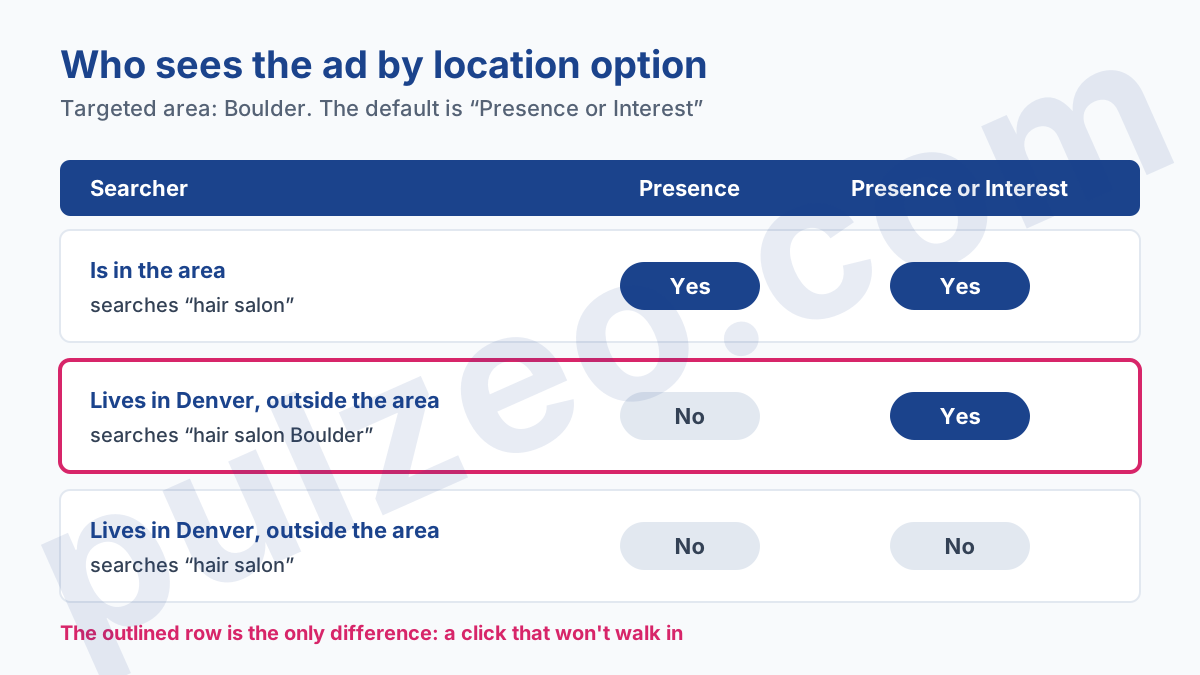
The default option has its uses. A hotel, a wedding caterer or a florist that delivers precisely want to reach the person in Denver planning a trip to Boulder or sending flowers to their mother in another city. But a hair salon, a bakery or a car repair shop has nothing to sell to someone who isn't nearby.
The cost of the mistake adds up fast. On a budget of $15 a day, if one click in five comes from outside the area, $3 a day goes to people who won't come, about $90 a month. For a small business, that's often the price of several customers.
To find out if that's your case, open the reports in the Locations section of the interface: one of them shows where the people who saw your ad actually were. Pulzeo, for its part, shows clicks and cost per conversion region by region, which makes a region that spends without ever converting stand out at a glance.
Which keywords for local Google advertising?
Local Google advertising lives on short, scarce, high-intent queries. People who type "shoe repair" on their phone at 11 a.m. are looking for a shoe repair shop open near them, right now. It's the best traffic there is, and there isn't much of it.
The keywords that work for a local business almost always fall into the same families:
- the trade alone, in exact or phrase match ("optician"), which the targeted area is enough to make local;
- the trade followed by the city or neighborhood ("optician Brooklyn", "optician Park Slope");
- the specific product or service ("iphone screen repair", "kids haircut");
- proximity phrasing ("optician near me", "optician open sunday").
Don't rely too much on Keyword Planner volumes for these queries. At the scale of a single town, they're tiny, rounded and averaged over twelve months, and the tool even replaces them with wide ranges if your account isn't spending. I covered this trap in the article on reading Keyword Planner volumes. A local keyword the tool rates as near zero can very well bring you customers every month.
The negative keyword list matters as much as the keyword list. From day one, exclude "jobs", "hiring", "training", "salary" and "free", which attract job seekers and the merely curious. Add the names of towns that share your town's name elsewhere in the country, and check the search terms report every week during the first month.
Address, calls and hours in a local campaign
A local ad that shows neither your address nor your phone number gives up what the customer looks for first. Three settings do that job.
Location assets show your address under the ad and let you appear in Google Maps, next to the results. They come from your Google Business Profile, which you need to link to the account: the steps, and the reasons the link sometimes gets stuck, are in the article on linking your Business Profile to Google Ads.
Just remember that Maps comes on top: Google doesn't let you run ads only in Maps.
The call asset adds your number, and it can be scheduled to show only during the hours when someone picks up. Do it.
A call ringing in a closed shop is a click paid for nothing, and a customer who won't call back.
Then there's the campaign's own ad schedule. It follows the account's time zone, and an automated bid strategy like Maximize conversions respects your ad schedule while ignoring any bid adjustments you set on it.
My usual setting: ads run during opening hours, plus one hour before opening, when people plan their day. Pulzeo shows hour by hour and day by day what your clicks cost and what they convert, enough to tighten those time slots after a few weeks.
Measuring what a local campaign brings in
This is the weak spot of any local campaign: a good part of what it produces happens offline. Someone sees the ad, notes the address and drops by the next day. Google Ads will never see that sale.
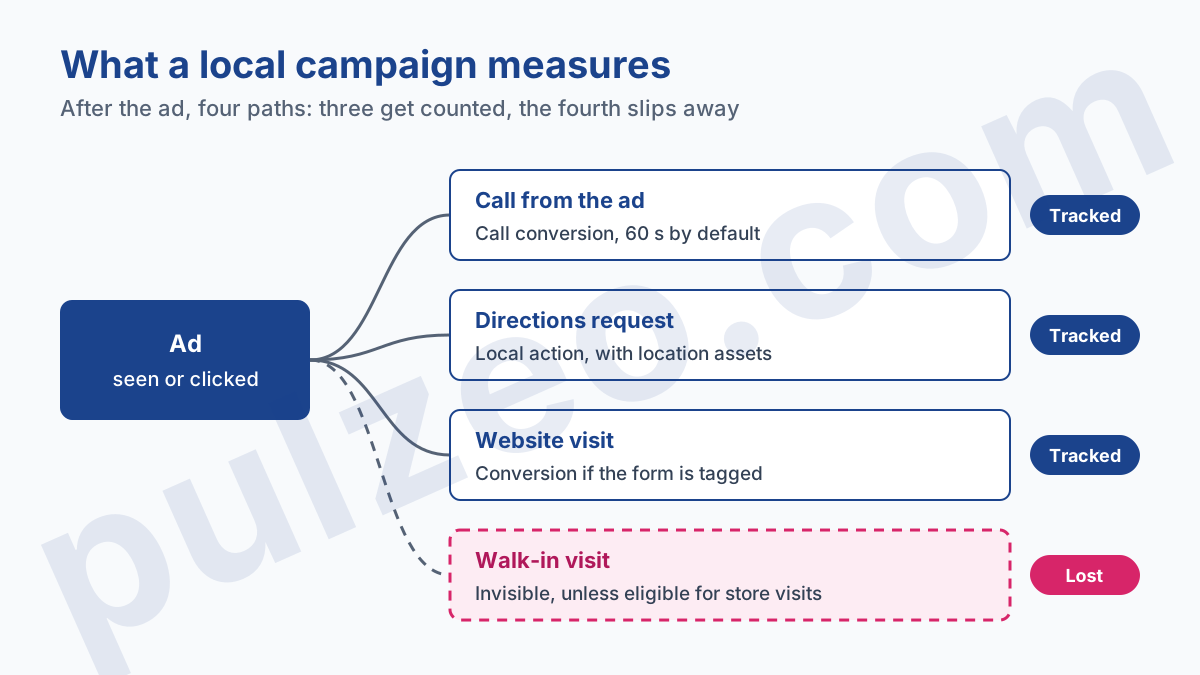
Whatever can be measured, measure it properly. Calls from the call asset can be tracked as conversions, with a default minimum length of 60 seconds to filter out wrong numbers and cold callers, which you can change to fit your trade.
Direction requests can be tracked as local actions, as long as location assets are active. And if your website has a booking or quote form, it should send its own conversion.
"Store visits" conversions make everyone dream. They exist, but their eligibility requirements include active location assets, verified locations and above all enough clicks and visitors, a volume Google doesn't put a number on. In my experience, a single shop spending a few dollars a day almost never gets them. Don't build your measurement on them.
My advice for a small business: back Google Ads up with one simple question, asked at the counter or the register. "How did you hear about us?" Keep a tally in a notebook for a month. It's low-tech, and it's often the only way to know whether the campaign brings people in.
Where to start this week
If you're starting from scratch, the order matters more than getting each setting perfect. Here's the one I follow:
- a Search campaign, with one ad group per main service;
- the trade area as cities or a radius, and the location option switched to "Presence";
- about twenty keywords drawn from the four families above, plus the starter negative list;
- the Business Profile linked, location and call assets active, the call asset scheduled to your hours;
- call and form conversions checked before the first dollar is spent.
As for budget, it depends on the cost per click in your trade, which varies by a factor of more than ten depending on whether your customers search in an emergency or not. The per-trade data in the series on what a customer costs a contractor gives real ballpark figures, measured in France.
To choose keywords, Pulzeo's keyword research shows volumes for a specific city or region rather than for the whole country, which keeps you from building a neighborhood campaign on national figures.
And if you run Google Ads yourself, between two customers, that's exactly the case Pulzeo for businesses exists for: Zeo, its assistant, analyzes the account, writes the diagnosis and suggests the fixes, without you having to become a specialist.
Common questions
Are Local Services Ads right for every local business?
No. They're open to certain categories only, first of all home services (plumbing, electrical, roofing, moving), and you pay per lead rather than per click. Google lists other categories, such as beauty or health: check yours on the program's page. If it isn't there, it's a regular Search campaign.
What radius around the store should you start with?
The distance your customers already travel to reach you, not the one you'd like to cover. Start from your current customers: ZIP codes on invoices, delivery addresses, what they tell you at the counter. Google accepts a radius from 1 km, and you can widen it once the first numbers come in.
Can you run ads only on Google Maps?
No, Google doesn't allow it. A Search campaign that uses location assets can show in Google Maps, next to the results, but it also serves in regular search. Maps comes on top, never instead.
Do you need a Google Business Profile to run local Google Ads?
Not to serve ads: a Search campaign targeted to your city works without one. It becomes essential to show your address in the ad, appear in Maps and measure store visits, which all rely on location assets pulled from the profile.