Do you need a Google Shopping agency?

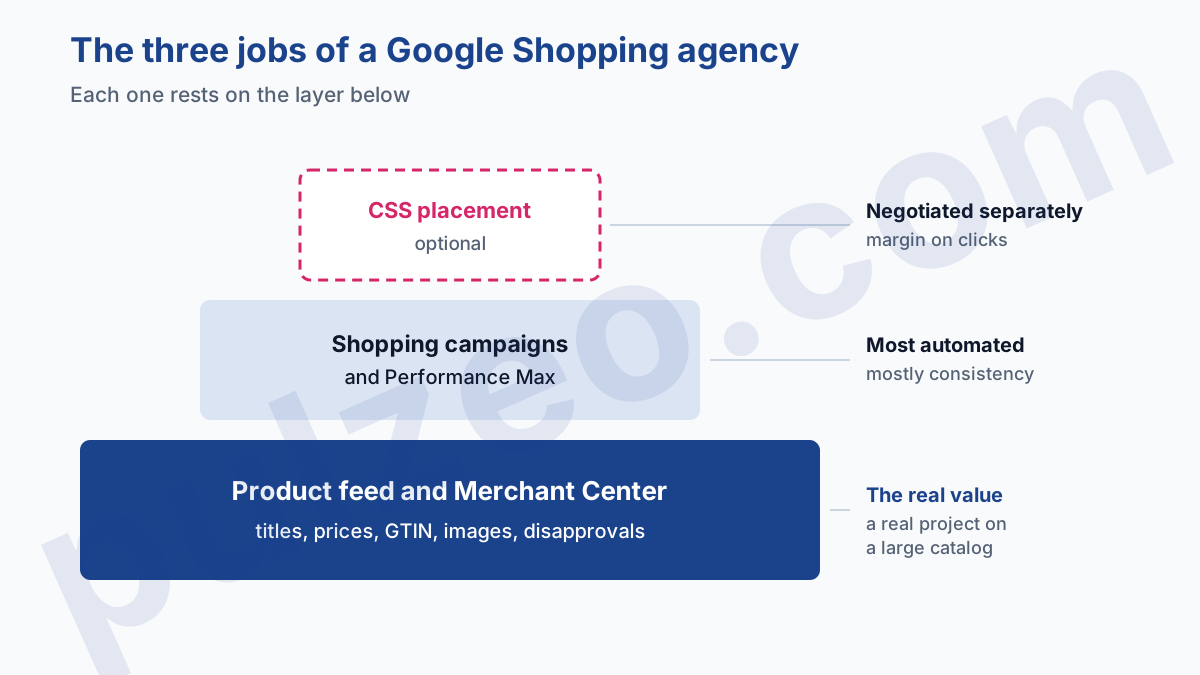
Do you need a Google Shopping agency to sell online? Not necessarily, and the question is badly framed until you know what you are buying. Under that name, agencies sell three different jobs: fixing your product feed, running the campaigns, and sometimes placing your ads as a CSS partner.
The first can justify an agency, the second can often stay in house, and the third is negotiated separately. Here is how to tell them apart, what each one costs, and at what point outsourcing starts to pay off for an online store.
Let me say where I'm coming from: the ecommerce accounts I take over almost all share the same story. The agency had been hired to "do Shopping", nobody had asked which of the three jobs was actually being bought, and the merchant found out on leaving that they owned neither the reworked feed nor the account history.
What does a Google Shopping agency actually do?
A Google Shopping agency takes on all or part of the chain that runs from your catalog to the ad shown on Google: the product data feed, the campaigns, and for some of them the placement of the ads. These are three layers, and they need neither the same skills nor the same time.
The product feed and Merchant Center
This is the foundation, and it is often where an agency's real value lies. The feed is the file that describes each product to Google: title, price, availability, image, GTIN, category. To build a Shopping ad, this file is what Google reads.
A feed exported raw from a store produces thin titles ("Alice dress blue" instead of "Navy blue long linen dress, size 8"), missing attributes and disapproved products. Reworking it across a catalog of several thousand products is a real project, which I covered in the guide on how to optimize a Google Shopping campaign.
Shopping and Performance Max campaigns
This is the part everyone associates with the word "agency": structuring the campaigns, setting bids, picking a target ROAS, excluding the queries that spend without selling. It is also the part that is most automated.
Since Performance Max absorbed the old Smart Shopping campaigns, a good share of the fine settings has disappeared from the interface. What remains is arbitrating budgets, reading results product by product and cutting what doesn't pay. This work mostly calls for consistency, and it is the best tooled part of the chain.
Ad placement through a CSS
The third layer only exists in Europe, and many merchants don't even know it is there. In France, the UK and the other countries on Google's list, Shopping ads can only be placed by a Comparison Shopping Service, called a CSS. Several Google Shopping agencies are also CSSs, and their offer mixes both roles.
Google Shopping agency or CSS partner: what's the difference?
An agency runs your campaigns for you, a CSS is the intermediary that places your Shopping ads in Google's auction. The same company can do both jobs, but they are not billed the same way and they don't leave you the same rights.
The framework is set by Google itself. Its help page on CSSs lists the countries where using a CSS is mandatory, France and the UK included, and states that Google Shopping is one CSS among others, which bids for the merchants it represents like any competitor.
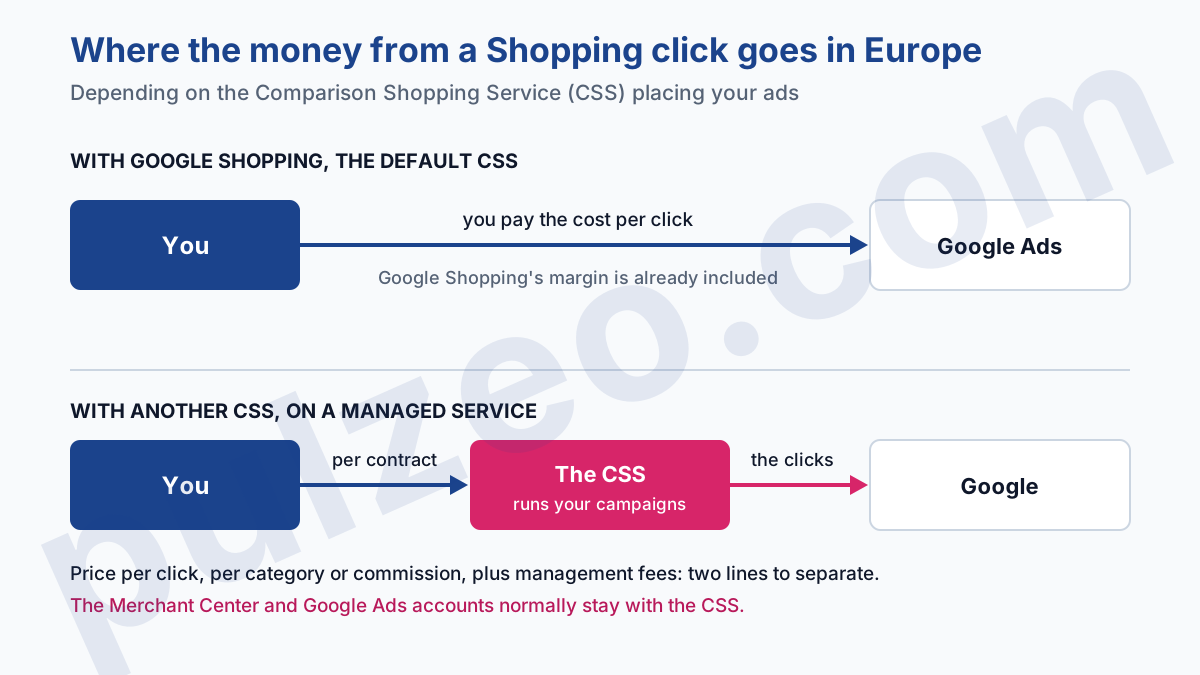
If you sell in Europe and never chose a CSS, you have one anyway: Google Shopping, whose margin is already included in the cost per click you pay.
What changes from one CSS to another is the billing. Google bills the CSS for clicks on the ads it places, and the CSS bills the merchant on its own terms: a price per click, a rate per category, a commission on sales. Google describes it on its page about working with a CSS, with three possible models.
On self-service, you manage the feed and the campaigns, and the CSS usually takes a fixed percentage on the cost per click. On a managed service, it optimizes your feed, uploads it to Google and runs your campaigns: that is exactly a Google Shopping agency. In between, hybrid setups split the work.
The point that should stop you comes down to one sentence on the same page: on a managed service, you normally don't have access to the CSS's Merchant Center and Google Ads accounts. Your campaigns live with them. The day you leave, the history stays.
Independent CSSs advertise a saving on cost per click compared with Google Shopping. Google does not publish the size of its own margin, and the savings figures in circulation come from the CSSs themselves.
How much does a Google Shopping agency cost?
The pay models are those of any Google Ads agency, which I broke down in the article on the budget at which a Google Ads agency pays for itself: 10 to 20% of the ad budget, a monthly flat fee that in France starts around €500 in practice, or a share of revenue.
According to the rate cards published by French agencies, the last one is often what gets offered in ecommerce, at 2 to 5% of the revenue attributed to the campaigns.
That model looks the fairest, since the agency only earns if you sell. It has a blind spot, and a big one: "attributed" revenue is what Google Ads counts, not what your store takes in.
Take a store that spends $4,000 a month. Google Ads reports a ROAS of 5, so $20,000 in attributed sales. At 3%, the agency bills $600 a month. If your back office only finds $12,000 in sales truly tied to the ads, your real ROAS is 3, and you are paying the agency on $8,000 of sales that only exist in the account.
The gap between the two figures is nothing unusual: attribution windows, conversions counted across several devices, purchases that would have happened anyway. Before signing on a percentage, measure it, with the method described in the article on calculating ROAS.
And if the agency is also your CSS on a managed service, two forms of pay stack up: its agency fees, and its margin on clicks. Both are legitimate, but they must show up on two separate lines of the quote.
When a Google Shopping agency is worth it
My position is simple: most stores that hire a Google Ads ecommerce agency buy campaign management when their real problem is the feed. Reverse the order. An agency is justified first by the work on the catalog, and it is clearly worth its price in these situations:
- your feed needs rebuilding, with a large share of products disapproved or limited in Merchant Center;
- your catalog runs to thousands of products, with size and color variants to describe one by one;
- you sell in several countries, which multiplies feeds, languages and currencies;
- nobody on your side has time to look at results every week, even for an hour.
Outside these cases, a store with a few hundred products and a clean feed doesn't have much to outsource. The feed gets fixed once, then maintained. The campaigns mostly need watching.
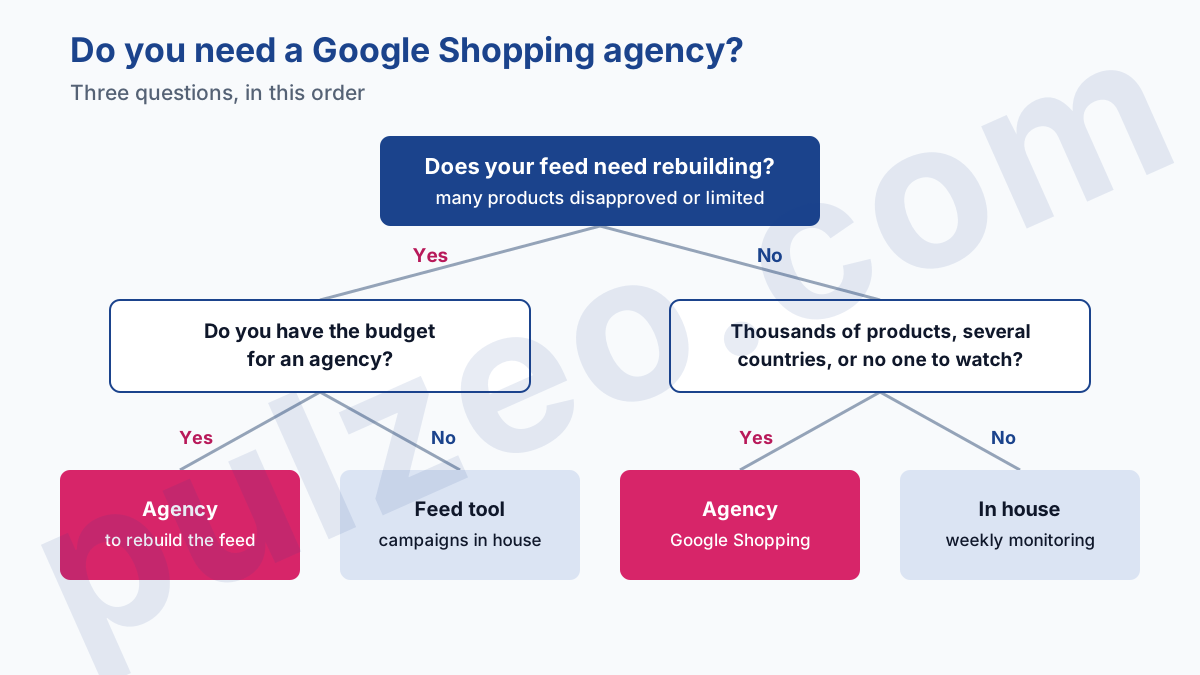
An in-between case is worth knowing: the feed is the problem, but you don't have an agency budget. Feed management tools answer that exact need, rewriting titles, rules by category, sending to several channels.
They don't run your campaigns, and that is enough if you keep that part. Pulzeo, for its part, touches neither the feed nor Merchant Center: for that project, what you need is an agency or a feed tool.
Questions to ask before signing with a Google Shopping agency
Four questions are enough to sort the offers, and they often make a salesperson uncomfortable if they haven't prepared the answer:
- whose name the Merchant Center and Google Ads accounts are created in, and who keeps the reworked feed if you leave;
- whether the agency is also a CSS, and whether its margin on clicks is billed on top of its fees;
- which revenue its percentage is based on, the Google Ads figure or your store's;
- what the monthly report contains, and whether it shows the product-level detail and the list of changes made.
The first is the one that costs the most when you forget it. A feed reworked over months is real capital: if it stays in the agency's tool, you start again from your raw export the day you leave.
The third changes the negotiation: ask whether the agency will be paid on your real sales, measured in your back office, rather than on those in the Google Ads account.
Managing Google Shopping yourself: what to keep in house
Day-to-day Google Shopping management comes down to a few actions, as long as you do them every week. Open the Merchant Center diagnostics and deal with the new disapprovals, often a price or availability that no longer matches the site. How the tool works and the order of these checks are covered in the guide to Google Merchant Center.
Next, look at your results at the level of each product. A Performance Max campaign that is profitable on average almost always hides a few products that spend without ever selling, and one or two that carry everything else. Pulzeo goes down to the product level in Performance Max and names the ones that spend without selling.
Finally, check that your purchases are still coming through. A theme update or a changed payment module is enough to cut the conversion tag, and a campaign that no longer sees its sales cuts its bids on your best products.
By hand, compare every week the purchases reported in Google Ads with the orders in your back office, and check the status of the purchase action in the conversions list. It is the most tedious check, and Pulzeo flags a drop in conversions the same day.
If your store is in the most common case, a reasonable catalog and a clean feed, you don't need an agency to run things. You need to see every week what each product brings in and to be warned when tracking breaks. That is what Pulzeo does for online stores, from $49 to $299 a month depending on the plan.
Zeo spots the products and campaigns that eat into the margin, suggests the fix, and applies it in Google Ads when you approve it. The day your feed needs a real overhaul, hire the agency for that, and for that only.
Common questions
How does a Google Shopping agency get paid?
According to the rate cards published by French agencies, the model often offered in ecommerce is a share of revenue, 2 to 5% of the sales attributed to the campaigns. The two other models of any Google Ads agency exist too: 10 to 20% of the ad budget, or a monthly flat fee that in France starts around €500 in practice. If the agency is also your CSS partner, its margin on clicks can come on top of its fees: ask for the two lines separately.
Do you need a CSS to run Google Shopping ads in Europe?
Yes. In France, the UK, Germany and about twenty European countries in total, Shopping ads and free listings must be placed by a Comparison Shopping Service, a CSS. Google Shopping is one of them, and it is the one representing you if you haven't chosen another. You can pick another one, or several, from Merchant Center. Outside these countries, the CSS layer does not exist.
Can you manage Google Shopping yourself without an agency?
Yes, on a catalog of a few hundred products with a clean feed, it is entirely manageable. The regular work comes down to three things: fixing feed errors in Merchant Center, tracking profitability product by product and checking that purchases are still coming through. An agency becomes useful when the feed itself needs rebuilding, or when the catalog runs to thousands of products across several countries.
Who should own the Merchant Center account when you hire an agency?
You, always. The Merchant Center account holds your feed and its approval history, the Google Ads account holds the bidding history. With a regular agency, require both to be created in your name, with the agency accessing them through its own login. With a CSS on a managed service, know that Google says you normally don't have access to the CSS's accounts.