How do Google free listings work?

Google free listings work like this: you need a Merchant Center account, an approved product catalog and the free listings feature turned on, which it is by default. You then pay nothing per click, and your products can show in the Shopping tab as well as in regular search results. The rest of the work is about the quality of your product data, because that's what decides whether Google shows you or leaves you in the drawer.
I often get the same question from small online stores that have never touched Google Ads: "someone told me Shopping is free now, is that true?". It is, with a big caveat. The shop window is free, a good spot in the window isn't. Here's how to get into the first, and how to tell when the second is worth paying for.
Where Google free listings show up
Free product listings are unpaid placements where Google shows your products from your Merchant Center catalog. According to Google's help page on free listings, an eligible product can show in these places:
- Google Search and Google Images;
- Google Lens, when someone takes a photo of an object;
- YouTube and Gemini;
- the Shopping tab;
- the products module of your Business Profile, if you run a physical store.
Google opened them worldwide in October 2020, and they have kept gaining surfaces since. Only your product pages show: the home page and category pages aren't included. The link goes straight to the item's page, which is good news for conversion: the visitor lands where they can buy.
Paid ads don't go away. Google says so plainly: Shopping ads keep showing in the ad slots of the Shopping tab. Free and paid share the same page, and that sharing is what you need to understand before expecting miracles.
One caveat if you sell in Europe. In the European Economic Area, the UK and Switzerland, a Merchant Center account has to work with a comparison shopping service (CSS) to show free listings on the general results page, as Google's CSS compliance documentation explains. Google Shopping is the default CSS: if you haven't picked one, it represents you, and there's nothing to do.
How to get your products on Google free listings
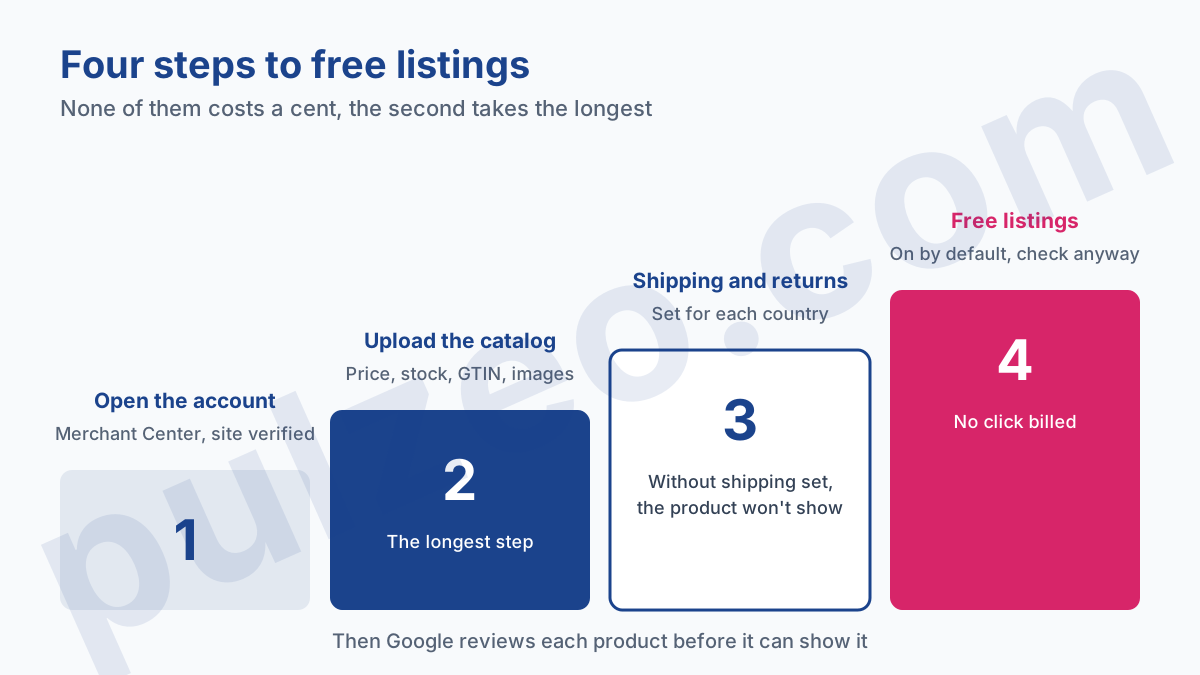
The process takes four steps, and none of them costs a cent. The one that takes time is the second.
Create the account and upload your catalog
It all starts with a Merchant Center account. Merchant Center is free, for real: opening the account, verifying the website and uploading products are never billed. You declare your store, you confirm that the website is yours, then you send your products.
To send them, you have several options. A file (a spreadsheet or an XML feed), a direct connection from your store platform, or the API for large catalogs. On Shopify, the "Google & YouTube" channel syncs the catalog with Merchant Center, and other platforms have their equivalent: it's almost always the right choice, because price and stock update on their own, which avoids the most common reason for disapproval.
Google can also add your products automatically from your online store: the source is called "Found by Google" and reads the structured data on your product pages. Handy to get started, but you control neither the titles nor the identifiers, so I never settle for it beyond the first few weeks.
For each product, the catalog needs the attributes that the product data specification marks as required: ID, title, description, link, image, availability and price.
On top of that, depending on the product, come the brand, the GTIN (the manufacturer's barcode) or else the manufacturer part number, and the condition for a used or refurbished item. Google warns that without a required attribute, neither an ad nor a free listing can be shown for the product.
The full mechanics of Merchant Center, from uploads to review times, are covered in the guide on how Google Merchant Center works. I won't repeat them here.
Turn on free listings and set up shipping and returns
Free listings are on by default in most cases, and always on a brand-new account. Check anyway: in Merchant Center, under Marketing, then Marketing methods, the "Free listings" card shows the status. You need admin access to change it, which often blocks accounts opened by a contractor who never handed back the keys.
Two settings then decide whether products show. Shipping first: shipping settings filled in for the countries you sell to, or else shipping costs declared product by product. Return policies next, which Google recommends adding in Merchant Center. Without shipping set up, the product doesn't show; without returns, it shows less well equipped than the one next to it.
Can you be on Google Shopping without Merchant Center?
For the Shopping tab, no. Google says so on its page about where ecommerce content can appear: to be there, you have to upload your products to Merchant Center. Same for Google Lens and for Maps, which also requires in-store inventory.
Regular search, however, has a second door: structured data. A product page with correct Product markup, including the price and currency, can appear in rich results without going through Merchant Center. The merchant listing structured data documentation lists the expected fields, and Search Console reports the errors.
My advice is simple: do both, but in this order. Merchant Center first, because it opens every surface at once and becomes the foundation the day you move to paid ads. Markup second, which most store platforms already add on their own, and which you only need to check.
How to measure free listings performance
Merchant Center has its own report, and almost nobody opens it. Under Analytics, on the Products page, set the "Traffic" filter to "Organic": you get the impressions, clicks, click-through rate and purchases of your free products, according to the help page on tracking product performance.
Read it product by product. An example: a store with 400 items that gets 900 free clicks a month can easily draw them from thirty products, while 250 others don't get a single impression. The total looks fine, and it hides a catalog that is three-quarters invisible.
Three readings are worth it. Products with lots of impressions and few clicks, where the price or the image puts people off. Products that never show, which the next section helps you diagnose. And your best free products, which are the natural candidates for a first paid campaign.
If a Shopping or Performance Max campaign is already running alongside, Pulzeo shows its products one by one, with spend, clicks, conversions and ROAS, so you can compare what the same item costs when you pay and what it brings in for free.
Why your products don't show on free listings
A product missing from free listings is almost always missing for one of three reasons, to check in this order.
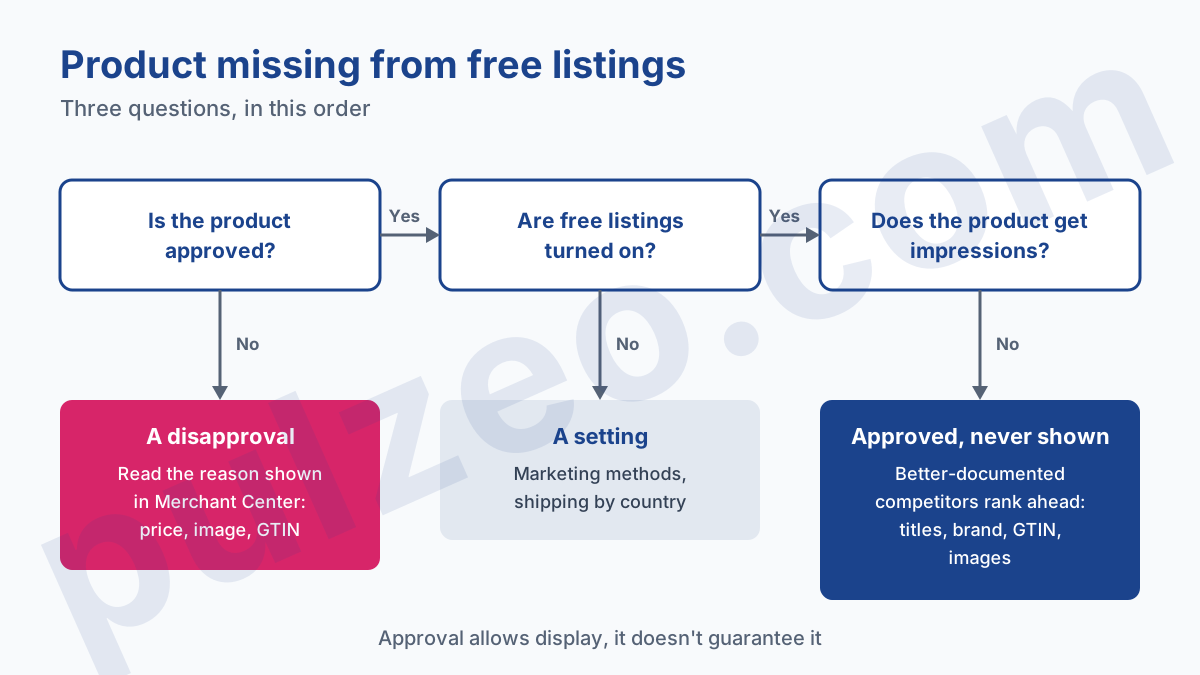
The first is a disapproval. The product failed Google's review: a price that differs between the feed and the page, an image with promotional text, a missing or wrong GTIN. Merchant Center shows the reason next to each product, and that's where to start. If the whole account is blocked, the procedure is different, and it's described in the guide to fix a Google Merchant Center suspension.
The second is a setting. Free listings were turned off, or shipping isn't set up for the country you sell to. Two minutes to check, and it's the cause I always check, because it leaves no trace in the product list.
The third is the most frustrating: the product is approved, everything is on, and it doesn't show. Google says it bluntly:
The status on the Free listings page controls permission to show products for free across Google, but doesn't guarantee that your products will be shown to customers.
In other words, being approved gets you into the line, not to the front of it. Google explains that, in the Shopping tab, non-sponsored results are ranked by their relevance to the search: what moves you up is product data that is more complete and better worded than your competitor's.
In my experience, the most profitable lever is the title: a title that uses the words shoppers type ("waterproof women's hiking shoes", not "Alpina 3 Model") gains impressions without changing anything else. Next come the identifiers (brand and GTIN), then the images, sharp and on a plain background.
Google free listings vs Shopping ads: when to start paying
The free listings vs Shopping ads question actually describes two floors. Free listings put your catalog to work with no budget, ads buy the top spots, the ones free listings never reach.
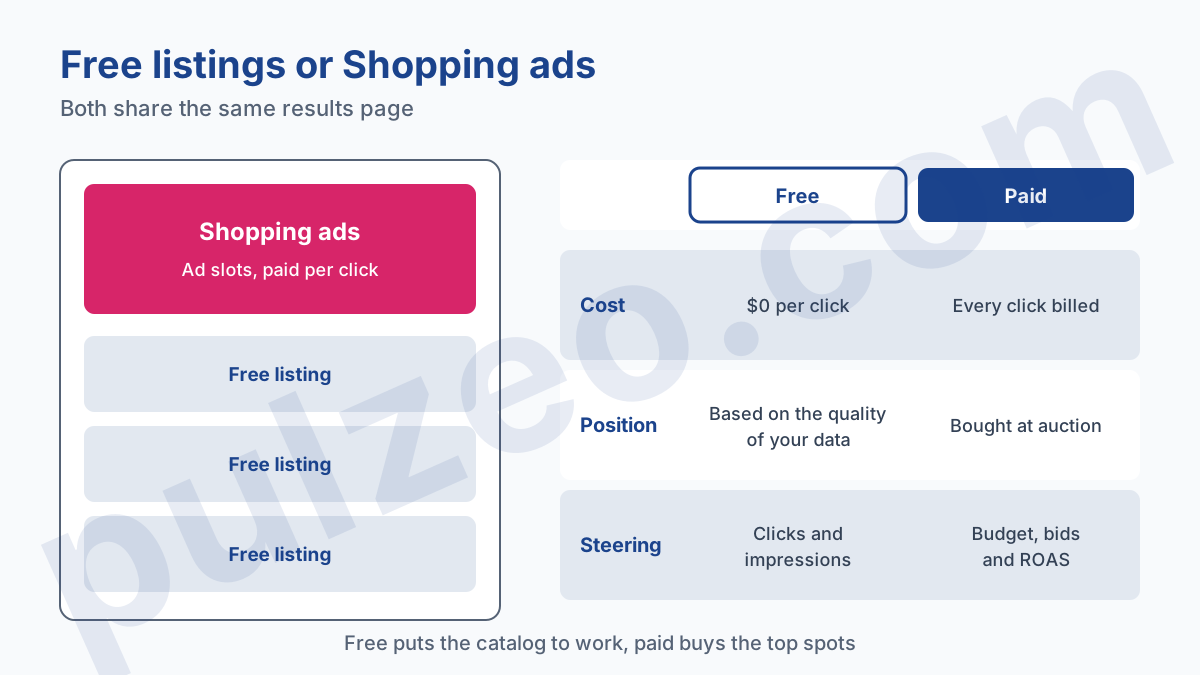
My view is firm: a small store that has never sold online shouldn't start by paying. Start free, polish the feed for two or three months, and watch what shows. If your free listings get no clicks, a paid campaign won't fix anything: it will show the same weak titles, and bill you for every click.
The right time to start paying is when three signals line up:
- the feed is clean, with no disapprovals on your main products;
- a few products already get regular free clicks;
- you know the margin a sale brings in, so what a click can cost.
At that point, the Shopping campaign builds on a catalog that has proven itself, and you already know which products to push. The setup, screen by screen, is explained in the guide to set up a Shopping campaign in Google Ads.
Paid ads then raise another question, the one about products that spend without selling. That's exactly what Pulzeo watches: for each Shopping or Performance Max campaign, it lists the products with their spend and conversions, surfaces the ones that cost money without selling, and lets you exclude them from that campaign without touching the rest of the catalog.
Common questions
Is Google Shopping really free?
Partly. Free listings don't charge you for clicks: an approved product in Merchant Center can show in the Shopping tab, Search, Images, Lens, YouTube or Gemini at no cost. Shopping ads are still paid and take the ad slots. Both share the same page.
Do you need a Google Ads account for free listings?
No. Free listings only depend on Merchant Center, which is free. Google Ads only comes in if you want to buy Shopping ads or run a Performance Max campaign from the same catalog.
How long before my products show up for free?
Google first has to review the products. Its help page says up to three to five business days for Shopping ads, but a few weeks for other features such as free listings. Once approved, nothing guarantees they'll be shown: Google says the free listings status grants permission without guaranteeing display. Give it one to two months before judging the volume.
Why do my approved products get no impressions?
Most of the time, because their title doesn't match any real search, or because better-documented competitors rank ahead. First check that free listings are turned on in Merchant Center, then rework the titles and product identifiers (GTIN, brand) of the items that never show.