
What changed with Google Ads target CPA on August 17?

Since August 17, 2026, your Google Ads target CPA is no longer a wish, it's an instruction. Google brings campaigns limited by their budget back to the target you set, and the change only works one way.
The consequence is surprising: a campaign that was doing better than its target slides until it reaches it. If you set a $10 cost per acquisition two years ago and the campaign runs at $5, it climbs back toward $10.
What exactly Google changed
The announcement sits on the Target CPA help page, and it gives a specific date. The dedicated help page, which details the mechanism and the options, now describes it in the past tense.
On 17 August 2026, Google updated its bidding systems…
The goal, per the same page: more consistent and predictable performance against the targets you set, even when you adjust your budget. The Target CPA page adds that campaigns on Target CPA or Target ROAS may see "temporary performance and traffic fluctuations."
And the timeline held: according to Google's FAQ, the rollout started on August 17 and was completed worldwide on August 27, 2026.
The principle fits in one sentence. Before, a campaign held back by its budget could drift away from its target for good without the system pulling it back. Now the system pulls it back.
Why good campaigns get worse
Here's the point most write-ups of this change gloss over, and it affects precisely the accounts that were doing well.
Take a campaign with a $1,000 monthly budget, set to a $10 target CPA, that actually achieves $5. It brings in two hundred conversions a month. Once its cost per acquisition climbs back toward $10, the same budget only buys a hundred.
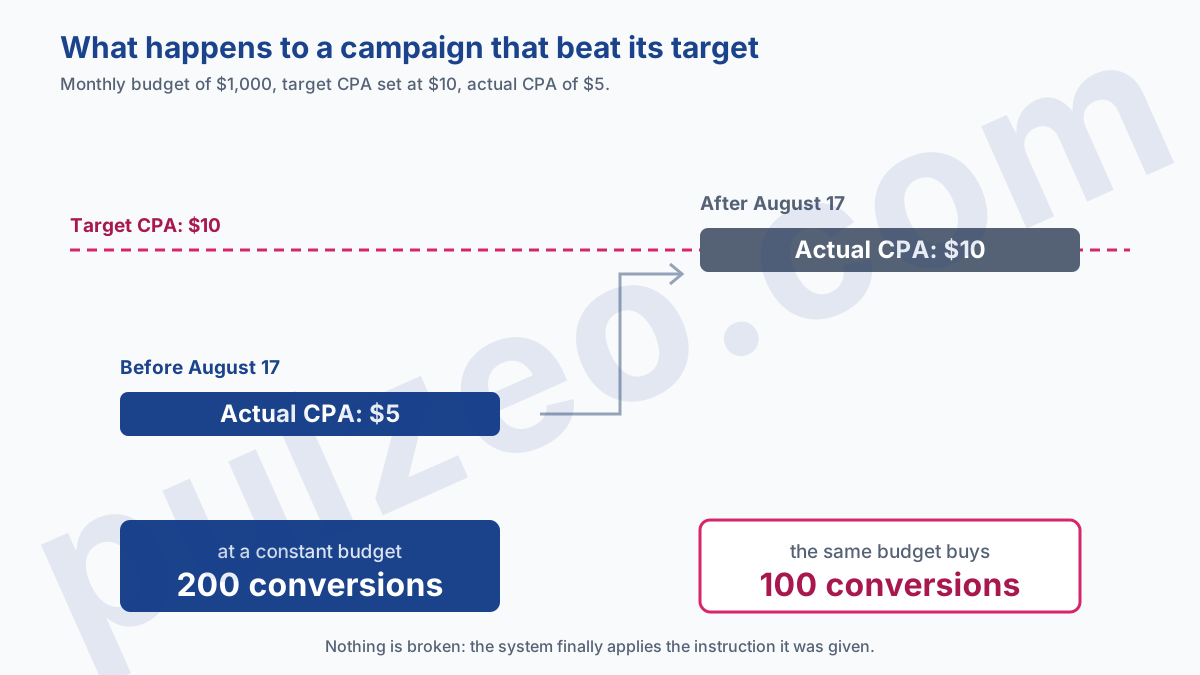
Nothing broke, though. The system is doing what it was asked, and above all it reveals that the instruction was too loose from the start. A target set by eye and then forgotten for two years ends up costing a lot the day it becomes binding.
You might hope for the reverse case: a capped campaign paying $14 where you aimed for $10 coming back down to your $10. It doesn't. Asked about exactly that case in a podcast interview published on August 12, Ginny Marvin, Google's Ads Product Liaison, said the change wouldn't help it.
Google's own wording says the same thing, and it deserves a careful read: some budget-limited campaigns "may be overperforming on bidding targets and see performance fluctuations when budgets are adjusted." Overperforming means beating the target, with a CPA below it or a ROAS above it. Those are the only campaigns that move.
This plays out campaign by campaign, not account by account: the same account can hold campaigns that beat their target and others that miss it, and only the first kind shifts.
Google also puts forward a trade-off, and even makes it a recommended action in its own right: increase your budget. Once performance is aligned with the target, it writes, you can "confidently increase your budget to capture more conversions," without the unpredictable swings of before.
That's the way out my whole calculation above ignored, since it assumed the budget stayed the same. You lose immediate efficiency, you gain the ability to scale volume without surprises, and that trade can be worth it if your target is well calculated.
Does target ROAS move in the same direction?
No, the number goes the other way, and it's the most predictable source of confusion in this change.
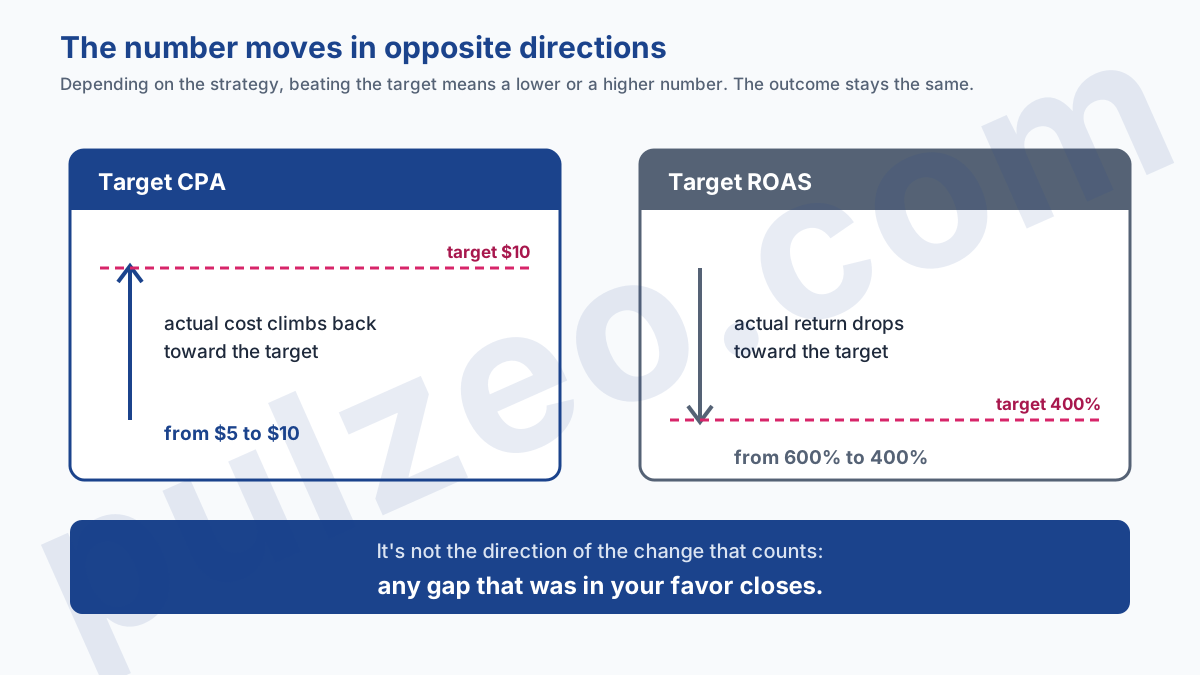
With Target CPA, beating your target means showing an amount below it. Convergence therefore pushes the number up. With Target ROAS, beating your target means showing a higher percentage, and convergence pulls it down.
A campaign set to a 400% return on ad spend that achieves 600% therefore slides toward 400%. This time the number falls instead of rising, but the outcome is identical: with the same budget, you bring in less.
Remember the rule this way; it keeps you from misreading the numbers. It's not the direction of the change that counts, it's the gap to the target: any gap that was in your favor closes, whatever the metric.
If return on ad spend isn't a figure you handle every day, what ROAS really measures goes back over the calculation and its margin caveat.
How do you know if a campaign is limited by budget?
The status appears in the Status column of your campaign list, as "Limited by budget." That's the filter to apply before anything else, since a campaign that isn't in that state isn't affected.
One caution, though: this status is a snapshot, not a permanent trait. A campaign can enter it on a high-demand Monday and leave it by Wednesday, and the interface only shows the current state.
So look instead at the Search lost IS (budget) column over the last thirty days. If it's significant and steady, the campaign is consistently capped, and that's the one that moves. If the loss is occasional, the effect is marginal.
Which campaigns are affected
The scope is broad, and it's better to check it than to assume it.
- affected: Search, Shopping, Performance Max, Demand Gen, Travel (Display and Hotel already worked this way);
- spared: App campaigns, Video reach campaigns, and Video view campaigns.
Two conditions must hold at the same time: the campaign uses Target CPA or Target ROAS (or, in Demand Gen, Target CPC), and it's limited by its budget. A target-based campaign that doesn't spend its whole budget isn't in scope, and neither is a capped campaign running on Maximize clicks.
While doing this, plenty of advertisers discover capped campaigns they thought had room to breathe, and that's often the real surprise of the exercise.
The four options, and how to choose
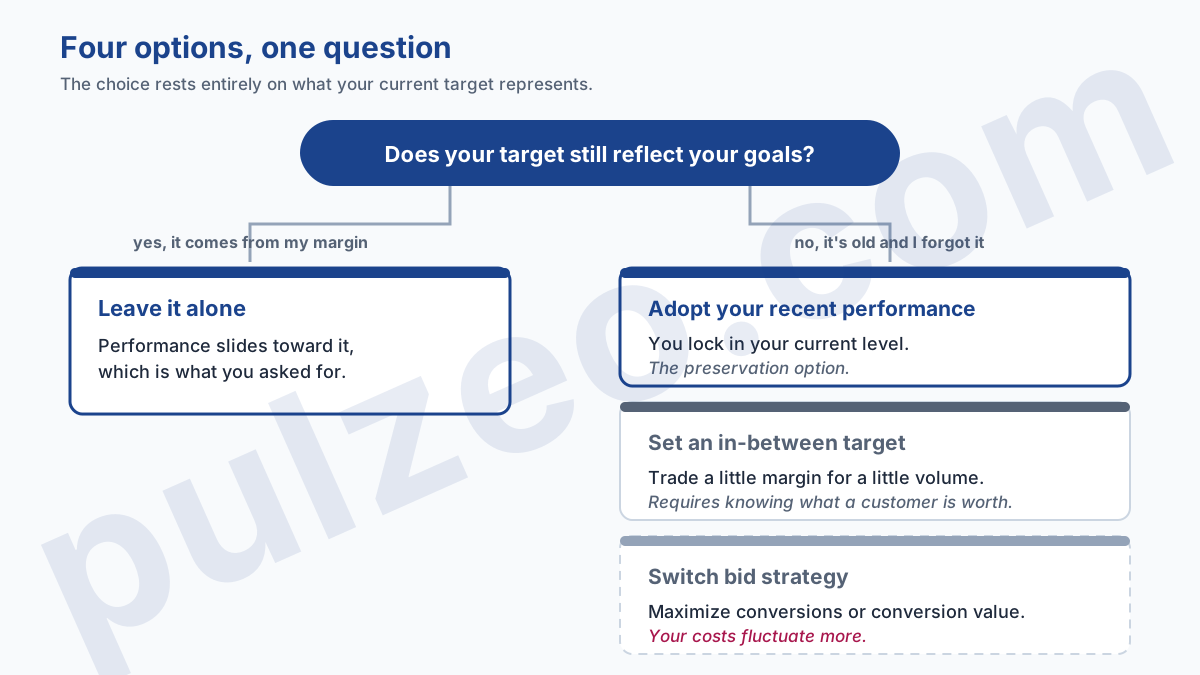
Google offers four. They aren't equally good in every situation, and the choice comes down to a single question: does your current target still represent what you're willing to pay?
Keep the target as it is
If the figure you set still matches your economics, leave it alone. Performance slides gradually toward it, which is exactly the behavior you asked for.
It's the right choice when the target was calculated from your margin, not borrowed from a template found online.
Adopt your recent performance
Google's tool lets you replace the target with a value close to what the campaign already achieves. You lock in your current level instead of letting it drift.
It's the preservation option, and the one that fits most accounts that were outperforming without knowing it. Note what Google implicitly admits by offering it: without it, your results would move.
Set an in-between target
Between the two, you can enter a value of your choice, for example going from $10 to $7 when the campaign achieves $5. You give up a little efficiency in exchange for a little extra volume.
It's the most precise option, and the only one that requires knowing what a customer is really worth to you. If you can't answer that, take the previous one instead.
Switch bid strategy
Last option: switch to Maximize conversions or Maximize conversion value. You leave target-based bidding behind, but your cost per acquisition and your return on ad spend fluctuate more, which isn't progress for everyone.
That switch deserves to be weighed on its own merits, and the full reasoning is in the article on which bid strategy to choose.
Where to find the adjustment tool
It has existed since July 6, 2026, and plenty of advertisers have never opened it. It shows up as a notification on your dashboard, under the headline "Review your campaign targets," and you can also reach it from the Campaigns page: the Settings icon next to a campaign, then Bidding, then Review campaigns.
It analyzes the history of your budget-limited campaigns and suggests targets aligned with your actual performance. You remain free to turn its suggestion down and enter your own.
What not to do while the numbers settle
Three knee-jerk reactions cost more than the change itself:
- correcting in the heat of the moment, when Google warned of temporary fluctuations and a swing seen right after the switch proves nothing about the new normal;
- adjusting the target over and over, when each change can only be judged after one to two conversion cycles: stack them and you no longer know which one did what;
- drawing conclusions on a low-volume account, where the numbers move on their own from one month to the next.
That last point deserves a number: below about thirty conversions a month, you can't tell the effect of the change from the usual noise. The ranges are worked out in the article on the metrics worth tracking.
This is exactly the kind of shift where daily monitoring keeps you from reacting to one bad day, and Pulzeo flags the gaps that stand out from the noise rather than the ones that blend into it.
Where to start
Open your campaigns, filter on the "Limited by budget" status, and keep the ones running on Target CPA or Target ROAS. That's your list, and it's often shorter than you feared.
For each one, compare the actual figure to the target figure. The gap tells you everything: if it's zero or small, you have nothing to do. If it's wide and in your favor, you're exactly the case that slides back, and that's where you have to decide which of the four options to take.
Common questions
What did Google Ads change on August 17, 2026?
Google changed its bidding systems so that campaigns limited by their budget optimize toward the target you set, instead of drifting away from it. The affected strategies are Target CPA and Target ROAS, plus Target CPC in Demand Gen. The rollout started on August 17 and was completed on August 27, and Google warned it could cause temporary performance and traffic fluctuations.
Does the August 17 change push my CPA up?
If your campaign is limited by its budget and was showing a CPA well below its target before the switch, yes, it climbs back toward that target. With the same budget, a cost per acquisition that doubles means half as many conversions. Campaigns that were missing their target gain nothing, though: the change only moves the ones that were beating it.
Which campaigns does the August 17 change affect?
Search, Shopping, Performance Max, Demand Gen and Travel campaigns, as long as they use Target CPA or Target ROAS (or Target CPC in Demand Gen) and are limited by their budget. Display and Hotel campaigns already worked this way. App campaigns, Video reach campaigns and Video view campaigns are not affected.
Should I change my target now?
Only if your target no longer reflects your goals. Google offers a Bid Target Adjustment Tool, available since July 6, 2026, which among other things lets you align the target with your recent performance to preserve your current results. If your target is right, leaving it as it is remains a perfectly valid choice.
