How to use location insertion in Google Ads

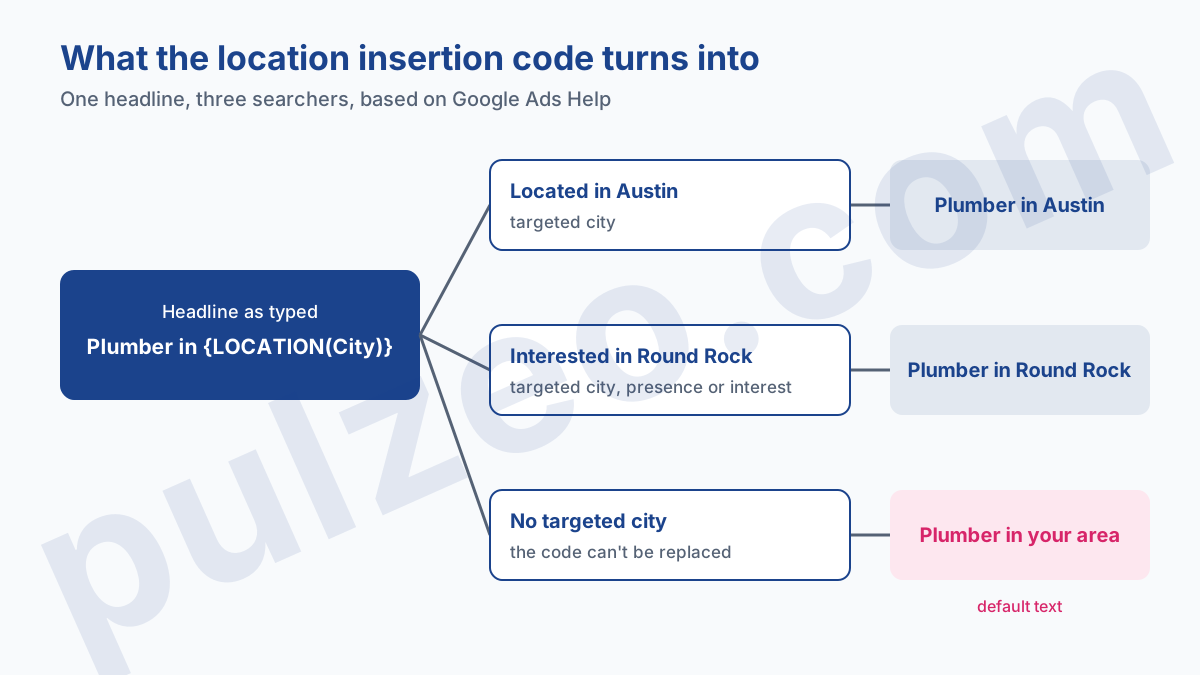
Location insertion in Google Ads writes into your ad the name of the city where the searcher is, or the one they're interested in. You type a brace in a responsive search ad headline, choose "Location insertion" and the City level, and "Plumber in {LOCATION(City)}" becomes "Plumber in Austin" for someone searching from Austin.
The city is taken from the locations your campaign targets. Two settings do all the work: targeting by named cities, and a default text for the cases where Google finds no city to write.
That's the principle. In practice, I mostly see three mistakes on the accounts I take over: a City code set on country-wide targeting without knowing what it will show, a headline that overflows as soon as the town has a long name, and a location option still on its default value. Here's how to set it up properly, what it really changes, and when you're better off without it.
How does location insertion work in Google Ads?
Location insertion replaces a code placed in the ad text with a location drawn from the campaign's location targeting. Google Help describes it for responsive search ads on the Search Network, and presents it as an alternative to an ad customizer file: instead of uploading one row per city, you write a single headline.
The mechanism fits in one sentence from Google's help page: it tailors your ad text "to your customers' locations, regular locations, or locations of interest". Remember the end of that sentence. The inserted location can also be the place the person is searching about.
That's where the campaign's location option comes in. By default, Google targets both people in your locations and people interested in them, as its advanced location options page points out.
For a hotel, that's perfect: someone in Chicago planning a trip to Boston should read "Boston Hotels". For a tradesperson who travels to customers, the "Presence" option fits better, since only people actually in the area matter to you. I covered that choice in the article on local Google Ads for a small business.
The rest follows the usual logic of responsive search ads. Google assembles your headlines and descriptions in the order it judges best, and the headline carrying the code is just one candidate among others. It won't show on every impression unless you pin it.
Setting up {LOCATION(City)} in a responsive search ad
Setup takes two minutes. In the ad editor, put your cursor in a headline, type a brace "{", then choose "Location insertion" from the menu that opens. Google then asks for a level and, if you want one, a default text. Confirm with "Apply", and the code appears in the field.
Don't type the code yourself. The help page writes it as {LOCATION(City)} and insists on proper capitalization. The menu writes the right syntax for you, one less typo to hunt for the day the ad doesn't show.
One code per headline. Descriptions accept up to two, which lets you repeat the city in a longer sentence ("Same-day service in Austin and nearby").
City, State or Country: which level to pick
The menu offers three levels. City, State and Country. Google spells out the limit of the middle one: the State level isn't compatible with other countries' equivalents, such as provinces, prefectures or regions. It is built around US states. For Canadian provinces, UK regions or French departments, it doesn't work.
That leaves country, which only makes sense for an account running the same ad in several countries ("Free shipping to Canada"). For everyone else, it's the city. And the city only makes sense if your targeting names cities.
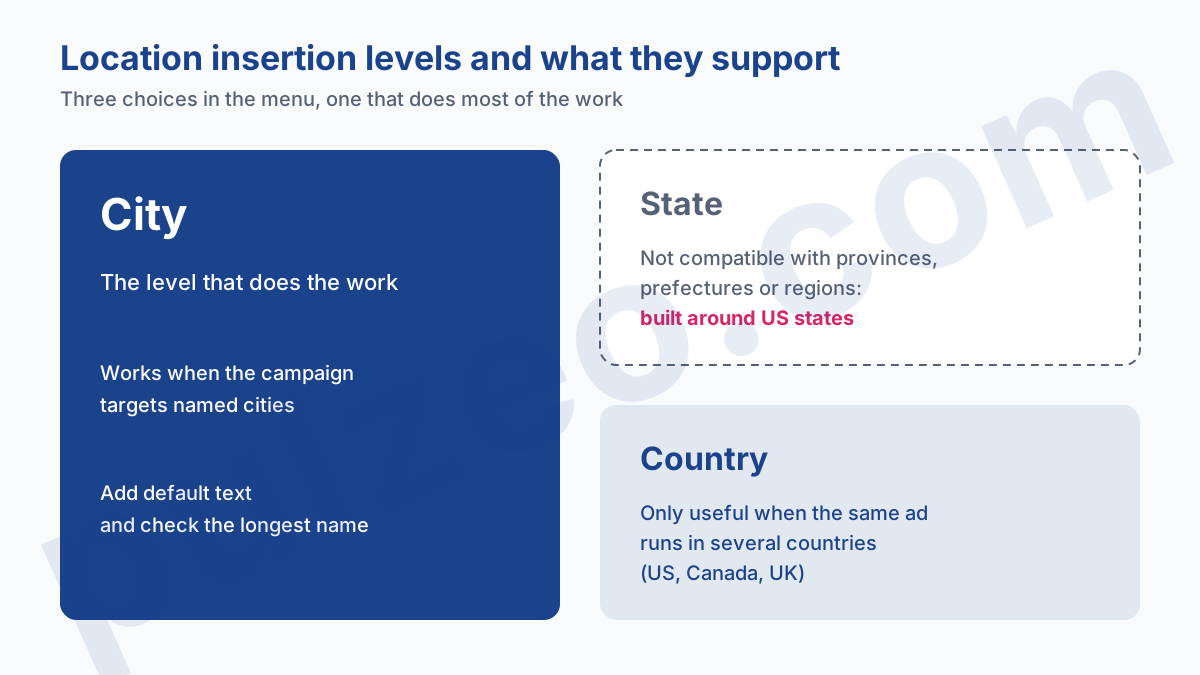
This is the point the documentation leaves vague. It says locations are selected from the campaign's location targeting, and asks that the insertion level be "appropriate given your campaign location targeting". It doesn't say what a City code produces on a campaign targeting the whole country, or a 20 km radius.
I wouldn't bet on it. If you want the city in the ad, target cities, one by one: it's ten more minutes at setup, and it's the safest configuration given what Google describes.
Default text: fill it in anyway
The default text is optional. Fill it in anyway. It's what the searcher will read every time Google can't replace the code with a location, and it's what exempts you from the rule of three headlines without insertion.
Choose a text that keeps the headline readable and true everywhere: "Plumber in {LOCATION(City)}" with "your area" as default text gives "Plumber in your area". Avoid your head office city as default text. A searcher in Oakland who reads "Plumber in San Jose" concludes you're not for them, even though they're in your area.
Location insertion Google Ads examples
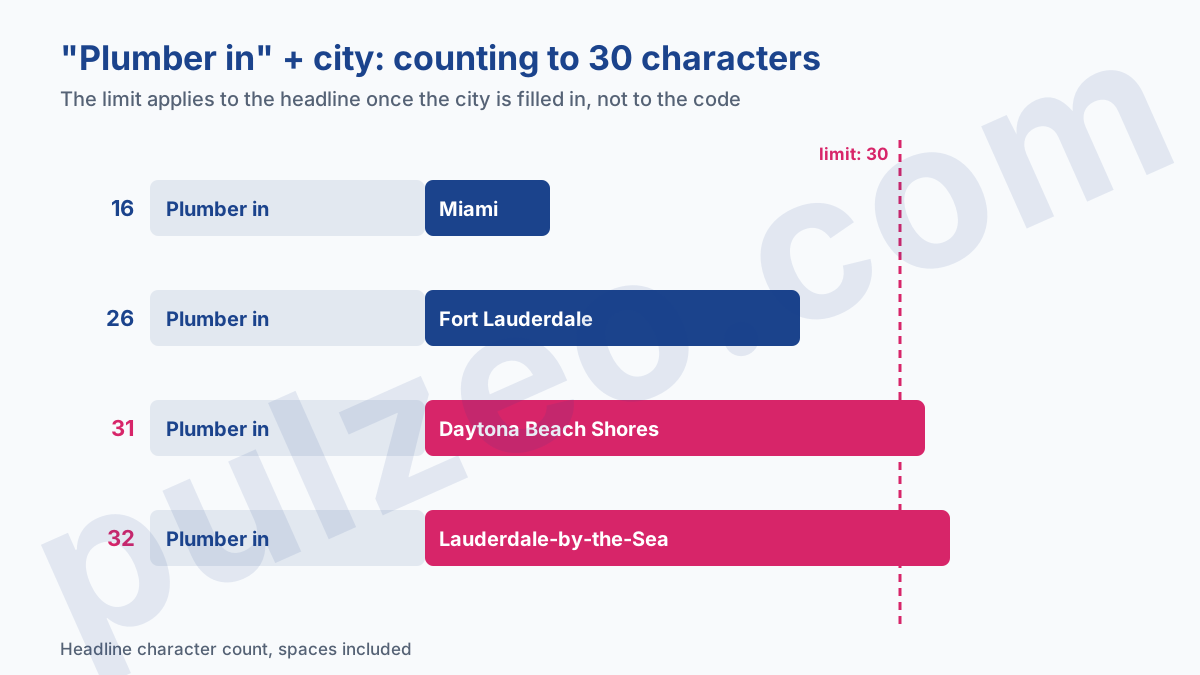
A good insertion headline is short, because the 30-character limit applies to the headline once the city is written in, not to the code. It's the constraint people discover too late, and it hits hardest in places with long, hyphenated names.
Count it out on an example. "Plumber in" takes 11 characters, space included. With Miami, the headline is 16, no problem. With Fort Lauderdale, 26, still fine. With Daytona Beach Shores, 31: one too many. Google only warns that overly long locations "may not have enough room", without saying what replaces them.
Size the headline for the longest city in your targeting, not the biggest one.
In practice, pull the list of targeted cities, find the longest name and write the headline for it. If Lauderdale-by-the-Sea (21 characters) is in your area, you have 9 characters left, space included, for the trade: "Plumber" just fits without a preposition, "Locksmith" no longer does.
In that case, keep the city headline for the short names and let the description carry the city for the others: it has 90 characters.
A few forms that work well, all at 30 characters or fewer with a 15-letter city: "Glazier [city] 24/7", "Optician in [city]", "Delivered to [city]", where [city] is the code inserted by the menu.
Trade first, city second, a short promise if there's room. To find headline variations around your keywords, Zeo, Pulzeo's assistant, suggests headlines and descriptions grounded in your business and your audience, from the keywords you've kept.
Why location insertion isn't showing
When the city headline never appears, the cause is almost always on the list Google itself gives in its troubleshooting help. I go through it in the order I check it:
- fewer than three headlines without location insertion, and no default text to make up for it;
- a headline that's too long once the city is inserted, for some of the targeted cities;
- location targeting that doesn't match the level chosen for insertion;
- pinning set up wrong: pinning the headline that carries the city requires at least three headlines in the ad.
The first is the most common on the accounts I take over. Someone put the city in almost every headline, out of enthusiasm, with no default text, and location insertion doesn't work.
"You need at least 3 headlines without location insertion, or you can use default text." Google Ads Help
A word on pinning, because it changes everything. If you don't pin it, the city headline competes with the others, and Google only shows it when it judges it does better.
If you pin it to position 1, it takes that spot every time the ad serves. I only pin it after two to three weeks of data, once the asset report shows it holds up. Pinning rules are covered in the article on how many headlines a responsive search ad needs.
Location insertion vs location extension in Google Ads: what's the difference?
The names are close, the tools have nothing in common. Location insertion changes the ad text. The old location extension, now the location asset, adds your business address, a map or the distance below the ad, from your Google Business Profile.
For a storefront business, the two work together: the city in the headline catches the eye, the address below reassures. For a tradesperson with no premises open to the public, insertion is the more useful of the two.
Three other tools are often confused with it, and the difference lies in what replaces the code:
- keyword insertion,
{KeyWord:Chocolate}, writes the keyword that triggered the ad (Google Help); - ad customizers write a value you supply, a price or a promotion for example, from data you upload and keep up to date;
- the location asset leaves the text as is and adds an address line below the ad.
Location insertion is the simplest of the three to maintain, since it needs no file. It's also the least flexible: it only writes a place name, and only the ones your targeting contains.
When location insertion is worth it (and when it isn't)
It's worth it when the city is part of the buying decision. The locksmith, the plumber, the tow truck, the driving school, the hotel, the caterer: their customers often type the trade followed by the city, and an ad that answers with the same city reads like a direct answer to their search.
It does little, or even harm, in two cases. An online store that ships everywhere has nothing to gain from writing "Delivery to Tulsa": the city isn't the point, and the headline takes the place of a more useful argument.
And a business that really covers only part of its targeted area promises a service it won't deliver. If you target thirty cities but only travel willingly to ten, the city in the headline will bring in calls you'll turn down.
My take, on most local accounts: it's one of the rare settings that takes five minutes and makes the ad more accurate. But it doesn't replace an ad group dedicated to your main city, with its own keywords and landing page. Main city on its own, secondary cities through insertion: that's the combination I set up most often.
What's left is checking that it pays off, area by area. The Google Ads locations report shows you, and it's work Pulzeo does for you: Zeo, its assistant, pulls your account's performance by region, cost, conversions and cost per conversion based on where people actually are.
You see at a glance whether a region spends without converting, and so whether the city in the headline brings in the right customers or just clicks. The other settings you can spot the same way are gathered on the Google Ads optimizations page.
Common questions
Does location insertion work in a Performance Max campaign?
Google Ads Help describes it only for responsive search ads on the Search Network. That is the format where you set it up, while typing a headline or description. For other campaign types, don't count on it until you have seen it in the interface yourself.
Can you insert a province or region into an ad?
No. Location insertion offers three levels, City, State and Country, and Google states that the State level isn't compatible with other countries' equivalents such as provinces, prefectures or regions. Outside US states, that leaves city and country, and the city is almost always the one that matters.
What does the searcher see when their city can't be inserted?
They see the default text, if you entered one. It's an optional field, meant for cases where Google can't replace the code with a location. If you leave it empty, Google requires at least three headlines without location insertion in the ad, which then act as the safety net.
Should you type the {LOCATION(City)} code by hand?
Better to use the menu. When you type a brace in a headline field, you pick "Location insertion", then the level and the default text, and Google writes the code for you. The help page stresses proper capitalization of the code: the menu avoids that typo entirely.