How to run YouTube ads

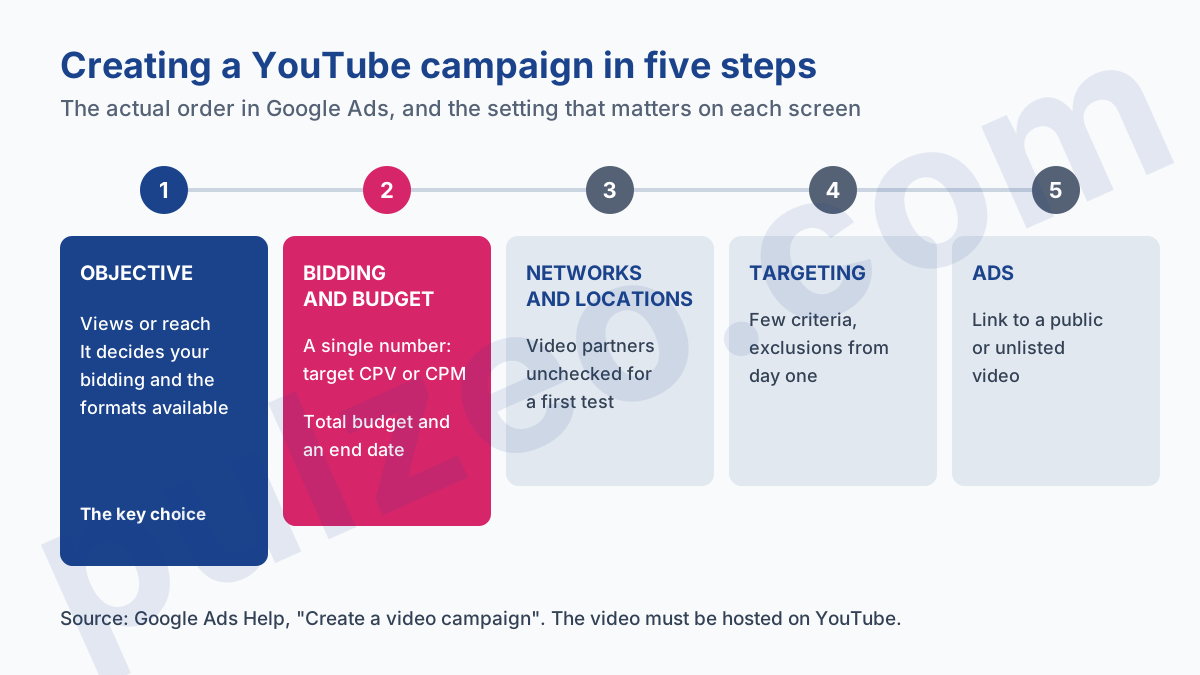
You have a video, a budget, and the urge to show it to people who don't know you yet. Here is how to run YouTube ads: everything happens in Google Ads, across five screens. The objective, the bidding and budget, the networks and locations, the ad group targeting, then the ads themselves. Allow an hour if the video is ready.
The path is short. What gets expensive are the three or four settings you accept without reading, even though they decide what you'll pay. I'll walk you through the actual creation order, with the choice that matters at each step and the one you can leave at its default.
How to make a YouTube ad: what to prepare
Two things have to exist before you open Google Ads, and the first isn't negotiable. If they're missing, you'll get stuck on the last screen, with everything else already set.
A video uploaded to YouTube
Google says it plainly on its page about video ad formats: video ad content must be hosted on YouTube. In Google Ads, you simply paste the link to a video that's already published.
It must be public or unlisted, never private. I recommend unlisted for a video made as an ad: it doesn't clutter your channel, and it stays usable as an ad. And think about the format before you shoot: a vertical video will serve on Shorts, a horizontal one on regular screens.
A channel linked to Google Ads
Linking the channel is done from Google Ads, with admin access to the account. Google asks for the channel, or the video, to be linked to the account to run its content as an ad, and a channel can restrict its videos to linked accounts only: without the link, the ad stops. Do it before launch.
It also gives you two things you'll be sorry to miss. First, the organic view count of your videos, next to the paid views. Second, audience segments built on people who have already watched your videos or visited your channel, what Google used to call remarketing lists. Without the link, those segments stay empty.
One last point, often forgotten: if your end goal is a lead or a sale, check that conversion tracking works on your site before you spend anything on video. Without it, you can only judge the campaign by its number of views.
Google Ads video campaign: which objective to choose
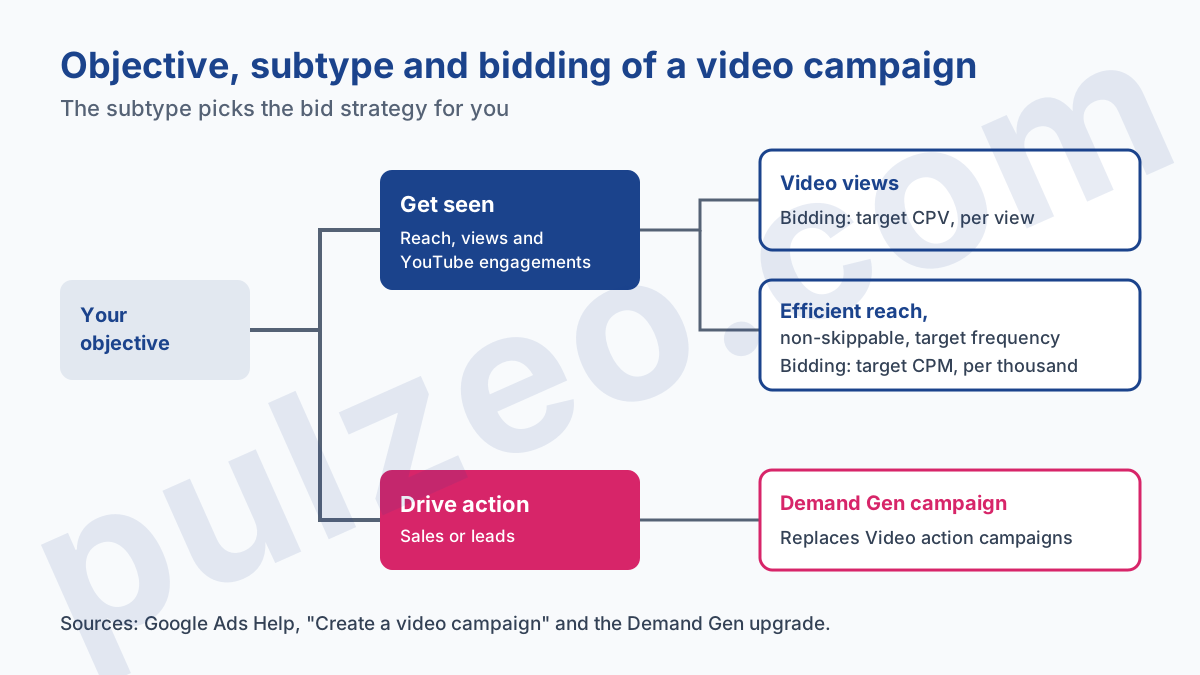
This is the first screen, and it decides almost everything else. The choice comes down to two families: getting your video seen, or getting the people who see it to act.
To get seen, the objective formerly known as "Awareness and consideration" has been renamed around reach, views and engagements on YouTube. The help page on creating a video campaign files several subtypes under it, and that's where your bill gets decided:
- Video views, to get a long message watched by people who chose not to skip it;
- Efficient reach, to reach as many people as possible at the best price, mixing formats;
- Non-skippable reach, for a short message everyone has to see in full;
- Target frequency, to show your ad to the same person several times over a period;
- Ad sequence, to tell a story across several videos in a set order.
To drive action, the answer has changed. The old Video action campaign has been upgraded to Demand Gen, and if you're after sales or leads with video, a Demand Gen campaign is where you'll go, with its own targeting logic and its own way of reading results.
My advice for a first campaign: pick Video views if you have a message longer than thirty seconds that explains something, Efficient reach if you simply want people in one area to remember your name. The other three serve specific needs: a short message to impose, a repetition to dose, a story in several episodes.
YouTube ad formats in a Google Ads campaign
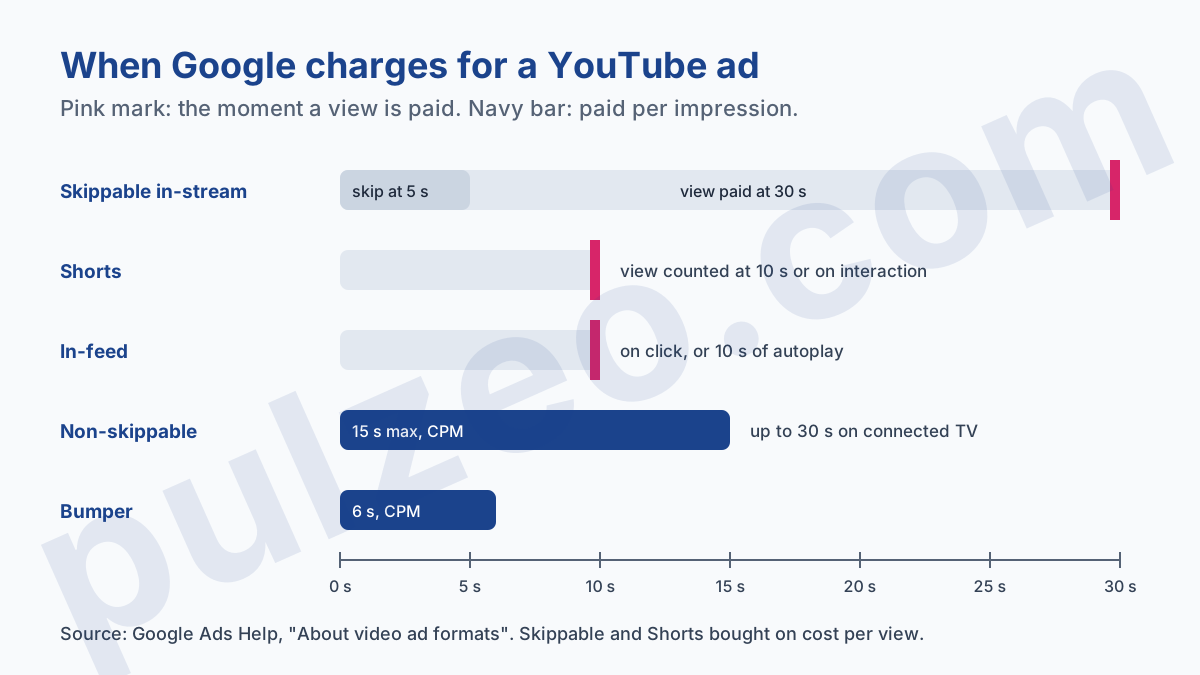
The format decides two things: what viewers can do when your ad appears, and the exact moment Google charges you. The two are linked, and most bad surprises come from there.
A skippable in-stream ad plays before, during or after a video, and can be skipped after five seconds. Bought on cost per view, it's only charged if the person watches thirty seconds, or the whole video if it's shorter, or interacts. Someone who skips at the sixth second has cost you nothing.
A non-skippable ad is watched in full, fifteen seconds at most in standard delivery, up to thirty seconds on connected TVs. A bumper doesn't go past six seconds. Both formats are paid per thousand impressions, whether the person liked them or not.
An in-feed ad appears in YouTube search results and suggestions, as a thumbnail. You pay when someone clicks to watch it, or, in a views campaign, when it autoplays for at least ten seconds. Shorts, for their part, count a view at ten seconds of watch time or at the first interaction.
A detail that will save you time: in a views campaign, the multi-format video ads option is checked by default, and it's what opens up Shorts, which are only available in that mode. Leave it checked. Google even says these campaigns will soon use that mode only.
Since October 2025, the column you knew as "Views" is called "TrueView views". If an old report can't find its metric, look for it under the new name.
How to run a YouTube ad campaign: bidding and budget
Second screen: the bid strategy, then the budget, then the dates. The bidding follows from the subtype chosen on the first screen.
A views campaign is bought on target CPV, the average cost you're willing to pay per view, and Google selects it automatically. The three reach subtypes are bought on target CPM, the target cost per thousand impressions. So you only have one number to set, and that's the one worth five minutes of thought rather than keeping the interface's suggestion.
For the level of that number, I won't redo here the work laid out in the article on what YouTube ads cost, which gives the price ranges and how to turn them into a cost per customer. Just remember that a target CPV set too low doesn't save you money: it makes you lose auctions, and the campaign barely runs.
The budget can be daily or a total over the campaign's length. A total forces you to set an end date, and that's what I recommend for a first test: three to four weeks, an amount you accept losing, and a date on which you'll decide.
A video campaign with no end date never stops on its own, because it always produces views, and views always make it look like something is happening.
YouTube ads targeting options
Targeting is set in two places, and that split trips up a lot of people. At the campaign level, you choose networks, languages, locations, content exclusions, then, under additional settings, devices, frequency and ad schedule. At the ad group level, you say who to show to and next to what.
For networks, outside the United States there are two boxes: YouTube and Google Display Network video partners, the third one, Google TV, being only available in the United States for now. Video partners are sites and apps outside YouTube. From experience, I uncheck them on a first test: you want to know what YouTube delivers before mixing inventories, and it's the part whose quality is hardest to control.
In the ad group, video campaign targeting offers two logics that have little in common:
- people, by age, gender, parental status, household income, interests, purchase intent, custom segments and your own lists;
- content, by keywords, topics and placements, meaning specific channels or videos.
The first aims at someone, wherever they watch. The second aims at a subject, whoever is in front of the screen.
The temptation is to stack everything to "target well". Resist it. Every criterion shrinks the audience, and on a reach campaign, Google itself advises against narrowing audience and content. One age range, one area and one or two interest segments are plenty for a first test.
Exclusions, on the other hand, deserve your attention from the start. Exclude sensitive content that doesn't fit your brand, and keep in mind that video ads now also run in YouTube search results.
Running YouTube ads: what to check in the first week
The campaign is live. In the first few days, the temptation is to look at everything every day. Better to know in advance what you're looking for, otherwise the reassuring number wins every time.
The view rate (the share of impressions that turn into a view) tells you whether the first five seconds hook people. If it's low, it's not the bid you need to change, it's the opening of the video. The actual cost per view, compared to your target CPV, tells you whether you're in normal competition or overpaying.
Click-through rate has its own benchmarks in video. From experience, a rate of 0.3% is perfectly fine for video, when it would be worrying on a keyword campaign. Pulzeo applies that video-specific threshold: it only flags a low click-through rate below 0.1%, and only after five thousand impressions, because below that the calculation means nothing.
Finally, open the campaign's placements report. It shows the channels and videos where your ads ran, and that's where you discover a kids' channel or content unrelated to your market. Add those channels as placement exclusions, at the account level if you want them to apply to all your campaigns.
Are YouTube ads worth it for a small business?
Not always, and I'd rather say so before you spend. YouTube rewards those who have a video that holds up, a message the image explains better than text, and the patience to wait for awareness to turn into demand. If your Search campaign hasn't hit its volume ceiling yet, it deserves the next dollar.
On the other hand, if your product is easier to understand when shown, or if a click on your keywords already costs $15, well-run YouTube ads open up an audience Search doesn't reach: the people who aren't looking for you yet.
The trap, once it's live, is to stop reviewing it. Pulzeo reads your video campaigns alongside the rest of the account, in the same dashboard as your Search campaigns, so you judge YouTube ads on what matters to you rather than on the number of views.
Common questions
Do you need a YouTube channel to advertise on YouTube?
At the very least, the video has to be hosted on YouTube, which means a channel to upload it to. Google then asks for the channel, or the video, to be linked to your Google Ads account to run its content as an ad, and a channel can even restrict its videos to linked accounts only. Linking also gives you the organic views of your videos and audience segments built on people who have already interacted with the channel.
How long should a YouTube ad be?
It depends on the format. A bumper ad runs six seconds at most, a non-skippable ad fifteen seconds in standard delivery, and a Shorts ad at least five seconds. The skippable format leaves more room, since viewers can skip after five seconds and on cost per view you only pay at thirty seconds of watch time, at the end of a shorter video, or on an interaction.
Can you run an ad on a specific YouTube channel?
Yes. In the ad group, placement targeting lets you aim at specific YouTube channels and videos, on top of topics and keywords. Keep it for an audience you have clearly identified: on a reach campaign, Google itself advises against narrowing content too much, because delivery gets choked fast.
Can a YouTube campaign drive sales?
Yes, but no longer through the old Video action campaign, which Google upgraded to Demand Gen between 2025 and 2026. For sales or leads with video, a Demand Gen campaign now does that job. The classic video campaign mainly serves reach, views and engagement.