How to detect and stop Google Ads click fraud

To detect Google Ads click fraud, start with the "Invalid clicks" column of your campaigns, which shows what Google has already filtered out. Then look for the signs its filters missed: clicks going up while conversions stay flat, bursts from the same IP addresses, visits that last zero seconds.
Then rule out the false leads before you cry fraud, because most spikes come from targeting that is too loose. To stop click fraud, you exclude the IP addresses your logs point to and ask Google for an investigation with proof in hand.
That last point is the one click fraud software vendors forget to tell you. On the accounts I take over, when a client talks about fraud, the culprit is most often a partner network switched on by default, a location setting that's too generous or an off-topic query. Here's how to sort it out, and how to build a solid case when it really is fraud.
Invalid clicks and invalid traffic: what Google calls click fraud
Google files everything under a category broader than fraud, invalid traffic, which its help center defines like this:
"Invalid traffic refers to traffic that doesn't represent genuine interest in your business."
The definition mixes two families that have nothing in common. On one side, click fraud in the strict sense: manual clicks to inflate your costs, bots, software that hijacks clicks. On the other, harmless noise, like the second click of a double-click. Depending on the page, Google calls them invalid clicks or invalid traffic, and forums talk about fake clicks: it's all the same thing.
The billing rule is simple. Google writes it in its page About invalid traffic: "You aren't charged for invalid traffic detected before billing." What you are charged for are the clicks its filters didn't recognize, and it's up to you to spot them within 60 days.
Where to see invalid clicks in Google Ads
In your campaigns table, add the "Invalid clicks" column: Columns icon, search, type "invalid clicks", then Apply. That number costs you nothing, it shows the clicks Google's systems detected and filtered in real time.
A full column first proves the filter is working. What should worry you is a break: a campaign that ran at a few invalid clicks a week and suddenly shows ten times as many, a sign it has become a target.
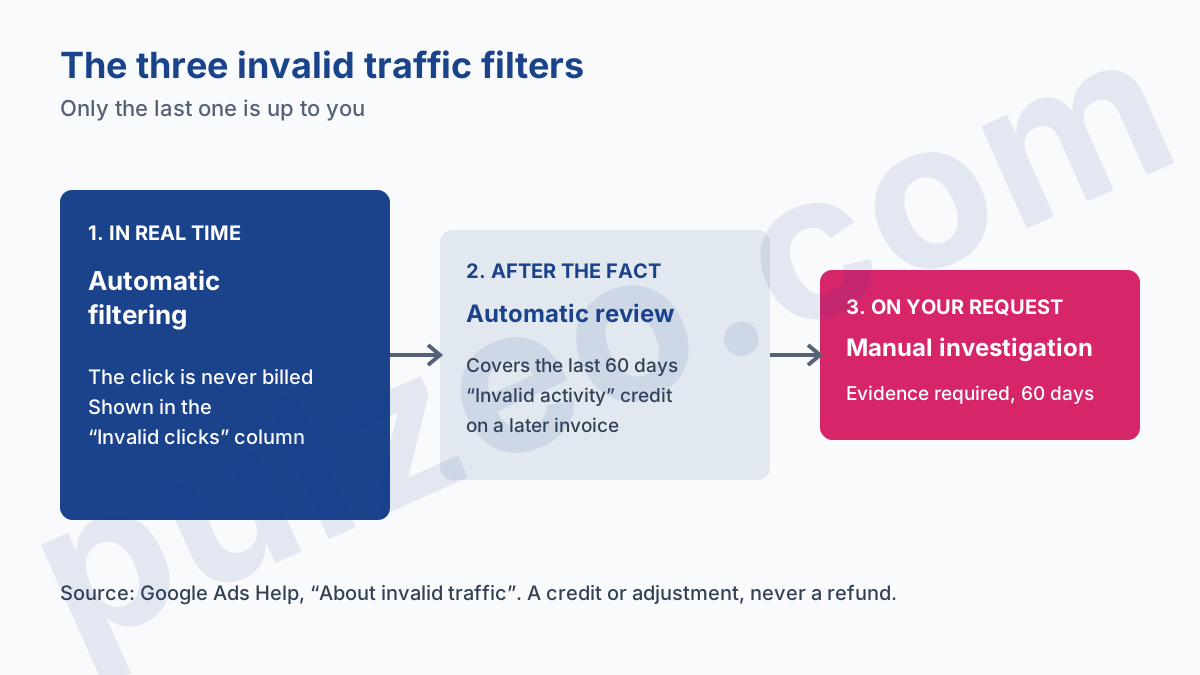
The real-time filter is only the first of three. Google then reviews the traffic of the last 60 days and, when it finds invalid clicks you were already billed for, it issues a credit, which shows up as a negative amount on a later invoice.
To see it, open Billing, then Summary, and expand "Adjustments" on the month in question: the line is labeled "Invalid activity". The third filter, the manual investigation, is the only one you trigger yourself.
Signs of fake clicks on Google Ads
The first sign is almost always the same: clicks and spend go up, conversions don't move. The rest of the diagnosis is about whether those clicks come from real people badly targeted or from no one at all. Two sources complement each other, and neither is enough on its own.
What the Google Ads interface shows you
Compare a suspicious week with a normal one, campaign by campaign. A real problem shows up in several places at once: a CTR that climbs for no commercial reason, a conversion rate that collapses, spend concentrated in a few hours of the night. Segment by hour and by device, fraud often leaves very regular time slots.
Take a locksmith account running at 140 clicks a week for 18 calls. One week it jumps to 390 clicks for 17 calls, and most of the gap falls between 2 and 5 a.m., on mobile. At that pace, the month's budget is gone in ten days, while real customers haven't changed their habits.
That's the kind of gap Pulzeo flags on its own: a campaign that spends without recording a conversion triggers a critical alert, with the amount already spent, and a cost per conversion that doubles compared with the previous period is flagged too.
What your server logs and Google Analytics add
Google Ads doesn't give you the IP addresses of the people who click. Your server logs do. Each click lands on your site with a GCLID in the URL, which lets you tie a visit to an ad click. Look in those logs for repetitions no interested human produces:
- the same IP address coming back several times a day, always through an ad;
- bursts of clicks a few seconds apart;
- identical user agents, often old or incomplete, on different visits;
- visits that stop on the landing page, with no scrolling and no second page.
Google Analytics is the cross-check. Compare the clicks Google Ads bills with the sessions from your campaigns over the same period: a gap that suddenly widens, or an engagement time that drops close to zero on paid traffic, points to clicks nobody really followed through to the site.
Click fraud or loose targeting: how to tell the difference
That's the question to ask before any other, because it changes the answer completely. A click from a real person outside your target isn't invalid traffic in Google's eyes: you pay for it, and no investigation will give it back. The only fix is to correct the setting.
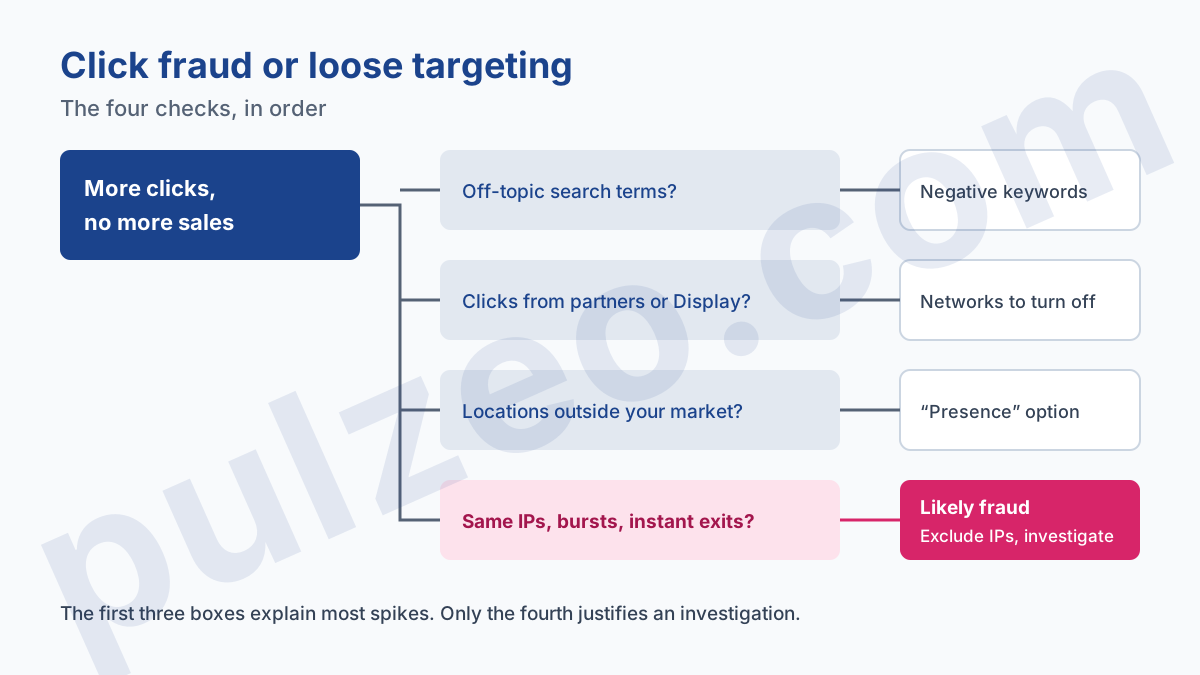
Start with the search terms. If the extra clicks come from off-topic queries, you have your explanation, and negative keywords will fix it. Google hides part of the queries, which makes this harder to read: I explained how to work around it in the article on why the search terms report hides queries.
Then look at where the clicks come from. A Search campaign is often created with Search Network partners and the Display Network checked. Segment by network: if the gap sits with the partners or on Display, the fraud lead narrows down to those placements, and turning them off solves the problem. For Display, the list of placements to exclude does most of the work.
Third check, location. The default location option, "Presence or interest", also shows your ads to people interested in your area without being there. A location report showing clicks from countries where you don't sell calls for the "Presence" option, not a complaint.
Fraud is left only if those three leads are clean and the logs show mechanical repetitions. This is where I part ways with the software vendors: on a small local account, organized fraud is rare, and loose targeting is almost always there. The first three checks take fifteen minutes in the interface.
How to exclude IP addresses in Google Ads
When the logs point to a few specific addresses, exclude them. At campaign level, the setting is under Settings, then Additional settings, then IP exclusions. Google accepts up to 500 per campaign, and an asterisk in place of the last block of digits excludes a whole range.
Two limits to know. That campaign setting doesn't exist for video, hotel, App, Performance Max or Smart Display campaigns. For those, use the account-level exclusion, which applies to every campaign, Performance Max included. If you have lists at both levels, Google merges them.
Keep your expectations reasonable. A serious bot changes address with every click, and an IP list won't stop it. Exclusion targets the stubborn competitor or the contractor testing your ads from the office, two cases where the address stays the same from one day to the next.
How to get a refund from Google for invalid clicks
You don't ask for a refund, you ask for an investigation. Google is explicit that no refunds are necessary: you either aren't charged, or you receive credits as a billing adjustment. If its investigation agrees with you, the credit lands on your following invoices, just like with its automatic review.
The request goes through the click quality form, from the Google Ads help center. What separates a request that gets filed away from one that succeeds is the case you build. Google asks for:
- your 10-digit customer ID and the exact date range;
- the campaigns, ad groups and keywords involved;
- your server logs, with IP addresses, user agents and GCLIDs;
- proof of the pattern, for instance a 300% spike in clicks without more conversions, the example Google gives.
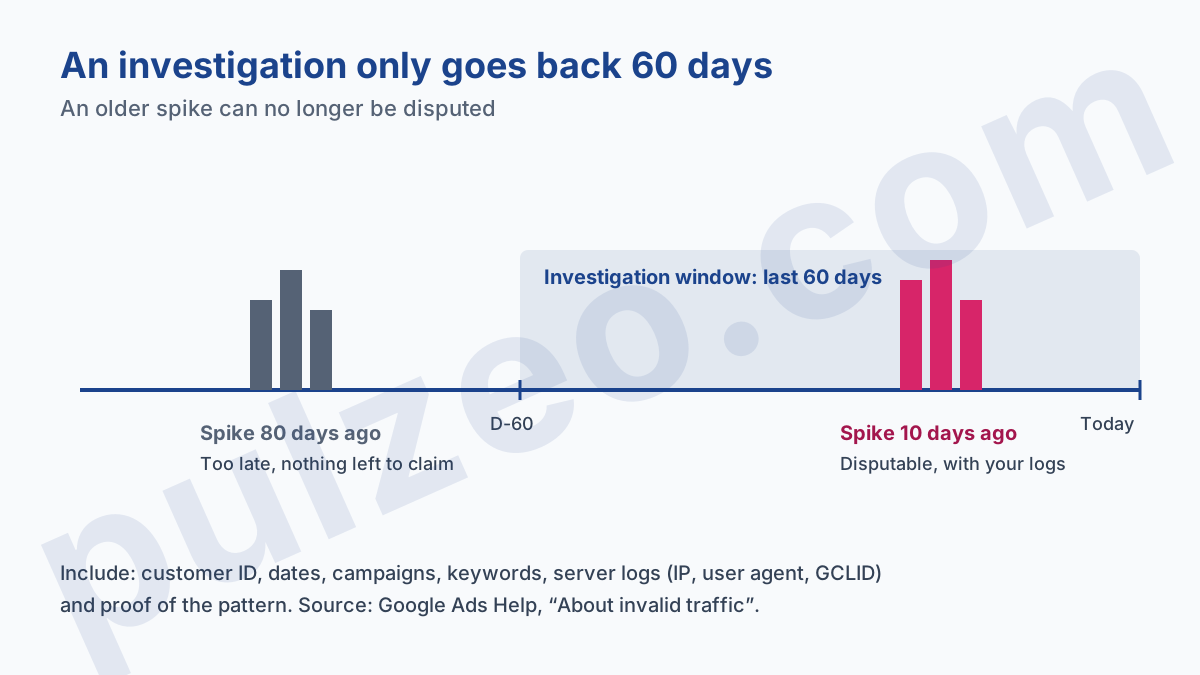
The trap is timing. Investigations are limited to the last 60 days, and Google answers within several business days. A spike you discover at the quarterly review is already half out of time, and your server logs may have been deleted in the meantime. Check how long your host keeps them, it's often shorter than you'd think.
Do you need click fraud protection software?
For most accounts, not right away. The figures used to sell these tools, one click in ten or one in five supposedly fraudulent, come almost entirely from the companies that sell them, and Google publishes no benchmark rate to confirm or contradict them. Measure your own situation first with the "Invalid clicks" column and your logs.
A tool makes sense when three conditions add up: a sector where clicks are expensive (locksmiths, legal, insurance), repeated signs of fake clicks despite clean targeting, and no time to read server logs every week. It then automates what this article describes by hand, spotting repeated addresses and excluding them.
Either way, the real danger is the delay between the start of the problem and the moment you see it. A campaign that spends without converting for three weeks costs you more than any bot. That's exactly what Pulzeo's alerts watch across all your accounts, so a spike of clicks without conversions is flagged well before the 60-day window closes.
Common questions
Does Google refund fraudulent clicks?
Not as a refund. Google doesn't bill the clicks it filters in real time, and for the ones it detects after you were billed, it issues a credit that shows up as a negative amount on a later invoice, labeled "Invalid activity". Its own help page puts it plainly: no refunds are necessary, because you either aren't charged or you get a billing adjustment.
Can a competitor click my ads to drain my budget?
Yes, manual clicks meant to increase your costs are one of the examples Google gives of invalid clicks. In practice, a competitor clicking by hand leaves easy traces: the same IP address, the same hours, no page viewed after landing. Repeated clicks like these are also the ones Google's filters catch most easily.
How many invalid clicks are normal on a Google Ads account?
Google publishes no benchmark rate, and the percentages you see quoted come almost entirely from click fraud software vendors, who sell the cure. The useful reference is your own history: watch the "Invalid clicks" column of your campaigns over several months, and worry when the number changes sharply from one week to the next.
How long do I have to report suspicious clicks to Google?
Sixty days. Google's automatic reviews cover the last 60 days of traffic, and manual investigations requested by an advertiser are limited to the same period. Past that, a spike of suspicious clicks can no longer be disputed, which is why you should keep your server logs and check the account every week.