How to set up offline conversion tracking in Google Ads

A prospect clicks your ad, fills in the form, and signs three weeks later over the phone. Google Ads saw a form, not a sale, and teaching it the difference is exactly what offline conversion tracking is for.
To let it know, you send the sale back, matched to the original click by the click identifier (the GCLID) or by the prospect's email address, then upload a file or a scheduled feed through the Google Ads Data Manager.
The technical part takes an afternoon. What makes most of the imports I see fail happens earlier, when the prospect first arrives: if your sales tracking tool kept nothing from the click, there is nothing to match, and no file will make up for it. So we start there, then move on to the file, the deadlines and the traps that make you think an import failed.
What is an offline conversion in Google Ads?
An offline conversion is a valuable action that happens outside your website and that you report to Google Ads yourself: a signed quote, a kept appointment, a contract, an in-store sale. Google's help also calls them "offline conversion imports", both terms describe the same thing.
It fixes what the tag cannot see. On a lead generation site, the tag counts requests, all at the same price. Yet a kitchen remodeler knows that one request in five turns into a $12,000 kitchen, and that the other four go nowhere. As long as Google Ads only receives the forms, it looks for people who fill in forms. Once it receives the sales, it learns to find people who buy.
GCLID or email: what your CRM needs to keep
To match a sale to a click, Google needs a key shared by your sales tool and its own system. There are two, and the question to ask before any setup is simple: which one does your CRM keep when the contact comes in?
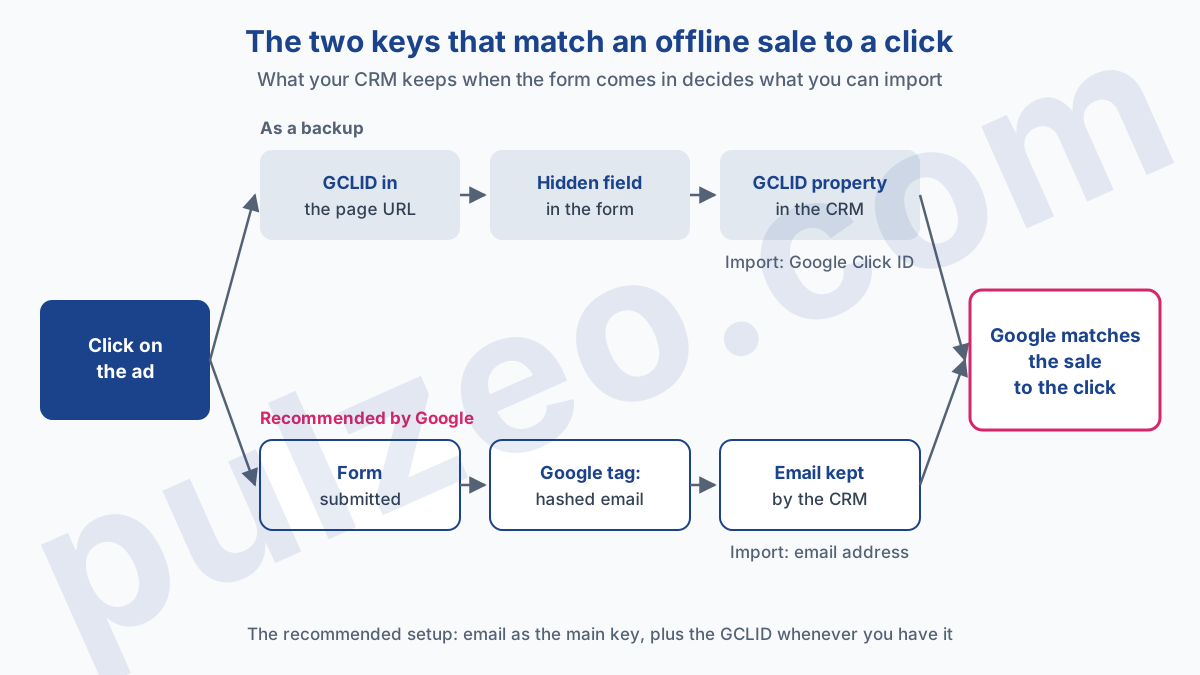
The GCLID in a hidden form field
The GCLID is, according to Google's definition, a URL parameter passed with ad clicks. It only exists if auto-tagging is turned on in the account, which is the first prerequisite listed in the GCLID import setup.
You still have to capture it. The classic move: a hidden field in the form, filled by a small script that reads the gclid from the page URL (or from the cookie set by the tag), and a dedicated property in the CRM to receive it. Test it by arriving from a real ad: a hidden field that goes out empty is the most common failure, and it only shows at the first import.
The prospect's hashed email address
The other key is the person. Enhanced conversions for leads use user-provided data, such as the email address, which the Google tag sends in hashed form when the form is submitted. At the sale, you import the same address, and Google does the matching.
The advantage is huge for a small business: no hidden field to maintain, and your CRM already keeps the email address anyway. I covered the full circuit, on the sales side, in the article on Google Ads lead generation.
Should you still import by GCLID in 2026?
For a new project, Google points you elsewhere. Its page on offline conversion imports leaves no room for doubt:
"If you have not already adopted offline conversion import, we recommend starting with enhanced conversions for leads instead."
The timeline has settled the technical side too. The Google Ads developer blog announced that starting June 15, 2026, the Google Ads API would no longer accept new adopters of offline conversion imports, with the Data Manager API becoming the primary route. If a vendor offers you a custom connector built on the old API today, ask them about it.
My take: don't throw the GCLID away. Google itself, in its migration guide, recommends including the GCLID with your imported events whenever possible, and makes it mandatory if your tag doesn't collect user-provided data. The right setup in 2026 is the email address as the main key and the GCLID as a backup.
How to upload offline conversions, step by step
Imports now go through the Google Ads Data Manager, which offers several sources: a file uploaded by hand, a Google Sheets spreadsheet, or a scheduled drop over HTTPS or SFTP, according to the help page on file imports. The GCLID setup page also lists integrations for HubSpot and Salesforce.
Start by creating the conversion action that will receive the sales, then wait. Google asks for four to six hours before the first import into a new action, and a file sent too early can take up to two days to show. That is the first-day trap: you create the action, import right away, see nothing, and start over three times thinking the file is wrong.
For a GCLID import, Google's template expects these columns:
Google Click ID, the click identifier, which must never be deleted or the import fails;Conversion Name, the exact name of the conversion action, character for character;Conversion Time, the date and time of the sale, with its time zone;Conversion ValueandConversion Currency, optional but valuable for value-based bidding;Ad User DataandAd Personalization, the two consent columns.
The time zone deserves a second of attention. The file can declare it once at the top, with a line such as Parameters:TimeZone=America/New_York, or carry it in each date (2026-11-03 14:30:00-0500). Always declare it: an hour or two off, and a sale logged shortly after the click can look like it came before the click itself.
Two settings prevent most duplicates and gaps. First, import one extra day with each upload, as Google advises: a sale entered late in the CRM is not lost. Second, know that Google spots a duplicate by the action name, the conversion time and the associated identifier. Sending the same row twice therefore counts only one sale, as long as the time does not change between uploads.
A scheduled import has one flaw: it is silent. The day the CRM export breaks, nothing arrives anymore, and nobody notices until the monthly review. Note the date of the latest imported conversion every week: if it stops moving, the import has stopped. Pulzeo flags an active conversion action that has recorded nothing for 30 days, which also catches an import that stopped along the way, on the conversions page.
How long do you have to import an offline conversion?
You have 90 days. Google's import guidelines state that a conversion imported more than 90 days after the last associated click is rejected, and that the limit drops to 63 days for enhanced conversions for leads.
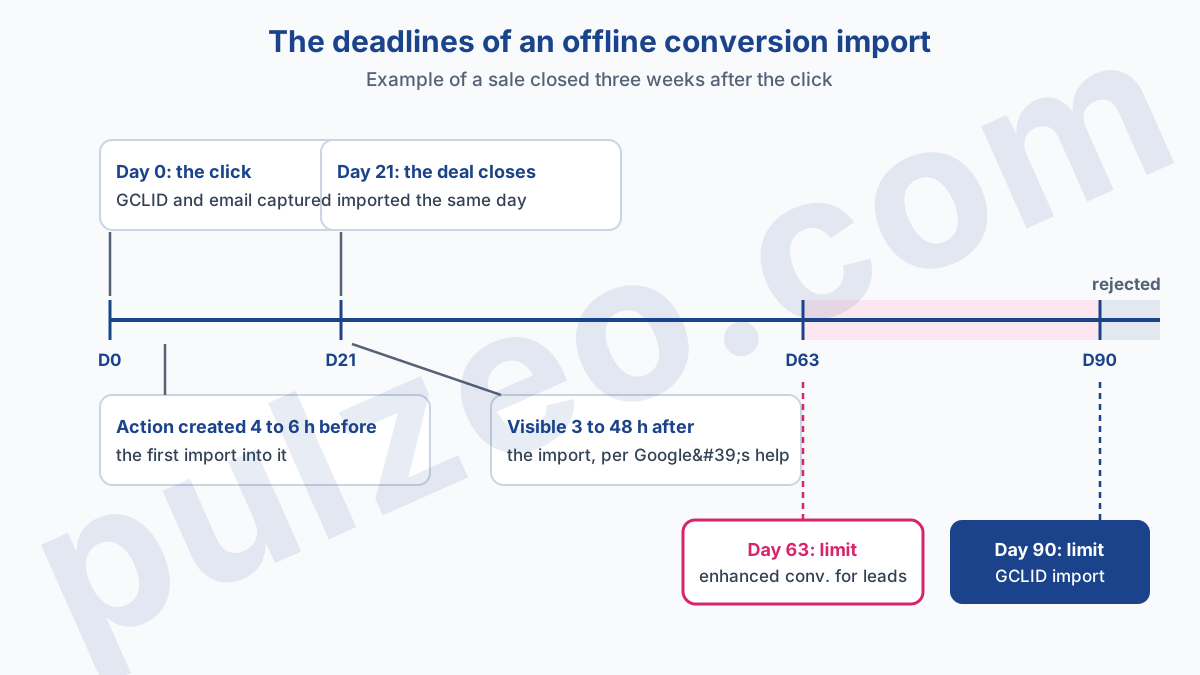
For most small business sales, that leaves room. On a four-month B2B cycle, however, the signature arrives too late and will never come through. The way out is to import an earlier stage, the lead qualified by your team or the quote sent, which arrives within days and gives the algorithm enough signal to learn.
On the reporting side, allow three hours to two days, since the help pages don't all give the same figure: about three hours in the import guidelines, 24 to 48 hours in the help on file imports.
Why aren't my offline conversions showing up?
Before suspecting the file, check where you are looking. The Google Ads "Conversions" column is calculated by the time of the click, not the time of the conversion. A sale closed on November 20 from a click on November 2 is filed under November 2. Filter on the week of the sale, and it isn't there.
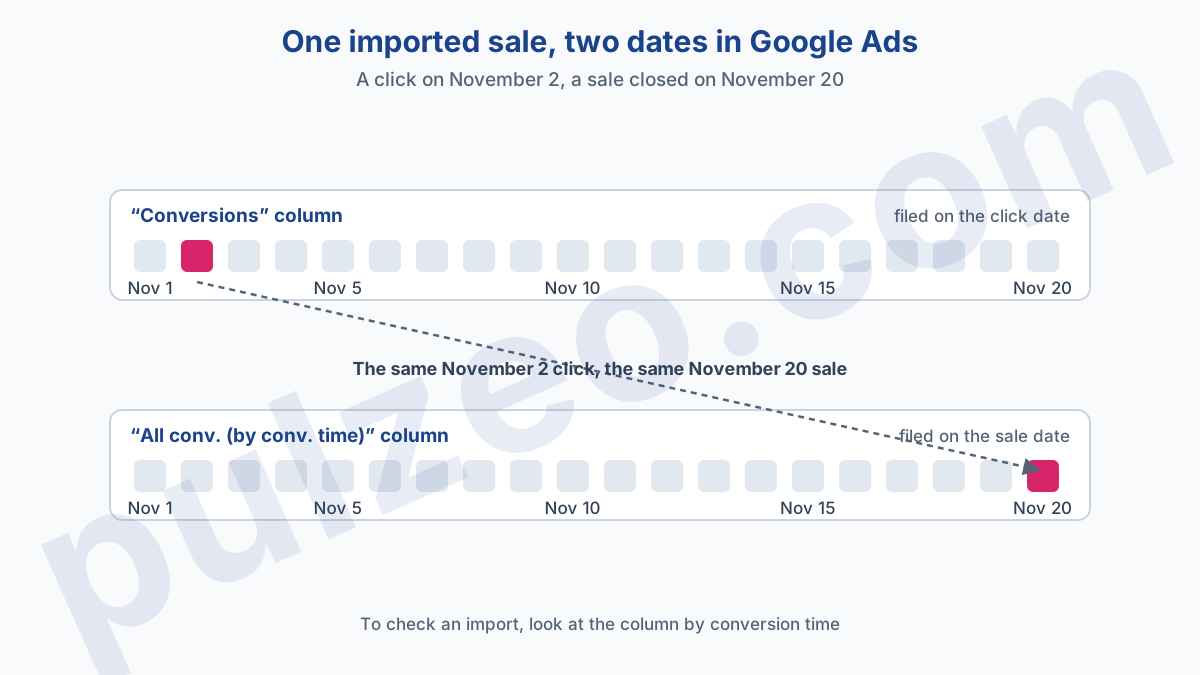
Google recommends checking an import with the "All conv. (by conv. time)" column, which files each sale on the day it happened. If it shows there, the import worked. If it doesn't, the cause is almost always on this short list:
- the conversion action was less than four to six hours old at import time;
- the original click is more than 90 days old, or more than 63 days with enhanced conversions;
- the
Conversion Namein the file doesn't exactly match the action name; - the GCLID is empty or truncated, a sign that the hidden field isn't filling in.
What importing changes for your bidding
Once sales are coming in, the temptation is to switch bidding over to them right away. Hold off. For a migration, Google advises waiting one to two conversion cycles or four weeks, whichever is longer, before setting the new action to "Primary" and the old one to "Secondary". That is the time needed to check that volumes hold up, and that the algorithm won't learn from a gap.
The lag between click and sale has an effect few advertisers anticipate. Since every sale is filed on the click date, the last days of your reports always look empty, then fill up as sales arrive.
Comparing the past week to the previous ones, on an account that imports its sales, shows a drop that doesn't exist. And that is often when someone pauses a campaign that was working. Judge a week that closed long enough ago for its sales to arrive instead, at least your usual time between click and signature.
On an account that imports its sales, the week that just ended is never finished.
That is exactly what Pulzeo watches for you. It measures, for each account, the share of conversions that arrive several days after the click, and its alerts leave out the last days while their conversions are still coming in: you are warned about a real rise in cost per lead, not about an import in progress.
For the rest of your conversion action settings, counting, attribution and duplicates, the guide to misconfigured conversions walks through the six mistakes that skew everything.
Common questions
What is the point of importing offline conversions?
It tells Google Ads which clicks end in a sale, not just in a form. An offline conversion is a sale closed over the phone, in a meeting or in your sales tracking tool, which you send back to Google Ads. Google matches it to the original ad click using a click identifier (the GCLID) or hashed contact details, such as an email address.
What if my deals close more than 90 days after the click?
Import an earlier stage, such as a lead qualified by your team or a quote sent. According to Google Ads help, a conversion imported more than 90 days after the last associated click is rejected, and the limit drops to 63 days for enhanced conversions for leads. The intermediate stage arrives in time and gives bidding enough signal.
Should you still use the GCLID in 2026?
Yes, as a complement. Google now recommends enhanced conversions for leads, which rely on hashed contact details, but also advises including the GCLID in your imports whenever you have it, for maximum accuracy. If your tag doesn't collect user-provided data, the GCLID is even mandatory.
Why doesn't an imported offline conversion show up in reports?
Three causes come up: the import happened less than four to six hours after the action was created, the original click is more than 90 days old, or you are looking for it on the sale date while the Conversions column files it on the click date. Check with the "All conv. (by conv. time)" column and allow up to 48 hours.